Overview
Summary
The useful answer before the supporting detail.
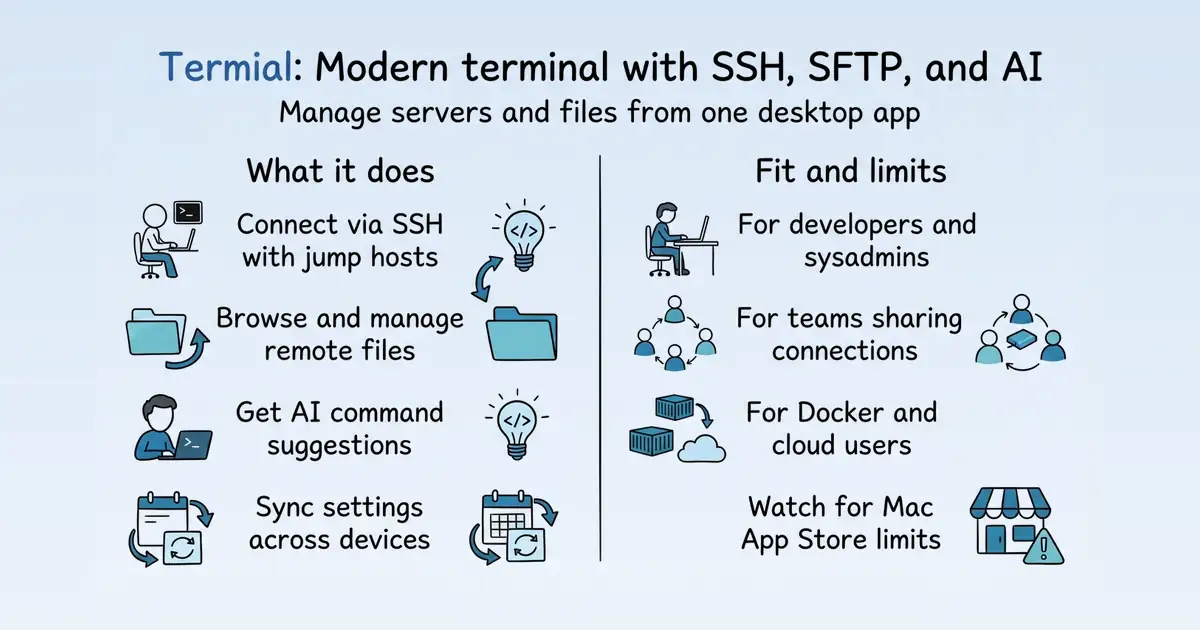
Termial is a modern, cross-platform terminal application for macOS, Windows, and Linux S2. It solves the problem of managing remote servers by combining a local terminal with SSH connection management, a built-in SFTP browser, and AI-powered assistance S2 S25. Its practical value is a unified workflow for developers and system administrators to connect, manage, and automate server tasks without leaving the app S25 S33.
Product identity and positioning
Name, category, positioning, audience, and first-party claims.
- Identity: Termial is a modern, cross-platform terminal application for macOS, Windows, and Linux S2.
- Core purpose: It solves the problem of managing remote servers by integrating SSH, SFTP, and AI assistance into one tool S2 S25.
- Intended users: Developers and system administrators who need to manage servers and remote files S25 S33.
- Product scope: It is a desktop application, not a platform, with a local terminal, SSH client, SFTP browser, and AI assistant S2 S25 S33.
- Positioning: Termial positions itself as more than just a terminal emulator, offering a comprehensive remote server management experience S2.
- Claimed distinction: It claims to combine terminal, SSH, SFTP, and AI in one app, with encrypted storage and cloud sync S2.
Use cases and audiences
Who the product serves and the jobs it is designed to handle.
| Audience | Practical use case |
|---|---|
| Developers | Manage multiple servers and run commands in split views while monitoring logs S15. |
| System administrators | Connect to servers through bastion hosts in enterprise environments S19. |
| DevOps engineers | Manage Docker containers directly from the sidebar S61. |
| Teams | Share SSH connections and credentials securely for collaborative server management S60. |
| Cloud engineers | Connect to AWS, Google Cloud, and Azure instances S1. |
Traffic and search
SEO analysis
Collected Oct 23, 2026termial.app: an estimated 1,911 total monthly visits and about 67 monthly organic visits across 99 ranking keywords. Scout crawled 15 pages and measured a technical health score of 98/100.
Search summary
The useful answer before the supporting detail.
Termial is a modern SSH client, SFTP client, and AI-powered terminal for macOS, Windows, and Linux. Manage servers, keys, files, port forwarding, and terminal tasks with built-in AI assistance. termial.app: an estimated 1,911 total monthly visits and about 67 monthly organic visits across 99 ranking keywords. Scout crawled 15 pages and measured a technical health score of 98/100.
- Total traffic (modeled): 1,911 monthly visits across all channels.
- Organic search traffic (estimated): 67 monthly visits from search.
- Strongest sampled ranking: macbook ssh client at position 17.
- Leading page in the collected evidence: https://termial.app/ssh-client-mac/.
- Closest measured organic competitor: apps.apple.com, appearing 7 times in the sampled first-page SERPs.
- Technical crawl: 15 pages, health score 98/100.
Website intelligence — Collected evidence
Company identity and positioning
| Page type | Evidence | Source |
|---|---|---|
| integrations | Termial is a modern SSH client, SFTP client, and AI-powered terminal for macOS, Windows, and Linux. Manage servers, keys, files, port forwarding, and terminal tasks with built-in AI assistance. | https://termial.app/ |
Domain performance
Modeled total traffic, six-month trend, engagement, countries, and domain identity.
Total website traffic
| Month | Modeled visits |
|---|---|
| 2026-04 | 580 |
| 2026-05 | 1,100 |
| 2026-06 | 2,096 |
| 2026-07 | 2,697 |
| 2026-08 | 654 |
| 2026-09 | 1,911 |
Top visitor countries
| Country | Name | Traffic share |
|---|---|---|
| CL | Chile | 29.2% |
| ID | Indonesia | 22.4% |
| IN | India | 21.8% |
| MX | Mexico | 15.1% |
| RU | Russia | 11.4% |
Domain identity
| Signal | Value |
|---|---|
| Registered | Dec 1, 2025 |
| Last changed | Dec 6, 2025 |
| Expires | Dec 1, 2026 |
| WHOIS server | — |
| DNSSEC | Not signed |
| Nameservers | jo.ns.cloudflare.com, john.ns.cloudflare.com |
Website capture
Organic keywords
Top keywords and an independent Google result page.
Top organic keywords
| Keyword | Volume | CPC | Estimated value |
|---|---|---|---|
| remote ssh terminal with ai | 60 | $0.00 | $60 |
| ssh client | 4,970 | $2.68 | $0 |
| ssh client mac | 800 | $0.45 | $0 |
| ssh terminal windows | 650 | $4.90 | $0 |
| a ssh client? | 360 | $0.00 | $0 |
Independent Google result page
Query: macbook ssh client
| Position | Title | URL | Description |
|---|---|---|---|
| 1 | Free SSH Client for macOS | https://termius.com/free-ssh-client-for-mac-os | Best SSH client for Mac! Super performant, safe and easy to use. Also, good feature set. I've been using Termius for a long time and I'm super satisfied! |
| 2 | Termius: SSH Client & Terminal - App Store - Apple | https://apps.apple.com/us/app/termius-ssh-client-terminal/id1176074088 | This app is great as a replacement for the Mac internal ssh client (which isn't bad either) and having support for saved connections and being able to log in ... |
| 3 | What terminal/SSH client are you using ? : r/macapps | https://www.reddit.com/r/macapps/comments/102b41p/what_terminalssh_client_are_you_using/ | I use Royal TSX for my remote connection stuff including SSH, RDP and VNC. Great app. Otherwise just use standard Terminal for quick local work. |
| 4 | The best SSH clients for MacOS | https://www.zdnet.com/article/best-ssh-clients-for-macos/ | The best SSH clients for MacOS · 1. Terminal · 2. Termius · 3. Server Cat · 4. WebSSH. WebSSH is similar to Termius and Server Cat — it's a ... |
| 5 | 6 Best SSH Clients for Mac (2026): Free & Paid Compared | https://ctrlops.io/blog/best-ssh-client-mac-2026 | iTerm2 is the best free SSH client for Mac beginners. It is already designed for macOS, installs in minutes, and adds split panes, search, and ... |
| 6 | macOS SSH Client - macoS Terminal Emulation Client | https://www.vandyke.com/products/securecrt/ssh_client_mac.html | SecureCRT is an SSH client that gives Mac users robust terminal emulation capabilities and loads of time-saving features. Multi-platform support makes SecureCRT ... |
| 7 | Best SSH Client for Mac | https://www.geeksforgeeks.org/techtips/best-ssh-client-for-mac/ | 10 Best Secure Shell Clients For Mac · 1. Terminal · 2. Termius · 3. iTerm2 · 4. Hyper · 5. Royal TSX · 6. Shuttle · 7. Kitty · 8. Core Shell ( ... |
| 8 | How to SSH on a Mac with Terminal | https://www.servermania.com/kb/articles/ssh-mac | Step 1: Open Terminal. In Finder, open the Applications folder and double click on the Utilities folder. · Step 2: Enter the standard SSH command. |
| 9 | Best Modern Terminal/SSH Client with a Clean UI | https://www.reddit.com/r/macapps/comments/1j344zu/best_modern_terminalssh_client_with_a_clean_ui/ | — |
| 10 | Using the built-in SSH client in Mac | https://discussions.apple.com/thread/251270270 | — |
Important pages
Pages earning the most estimated search traffic in the sample.
| URL | Ranking keywords | Estimated traffic | Best position |
|---|---|---|---|
| https://termial.app/ssh-client-mac/ | 18 | 19 | 17 |
| https://termial.app/ | 2 | 0.8 | 9 |
Website intelligence — Collected evidence
Prioritized website intelligence pages
| Type | Page | Words | Change | URL |
|---|---|---|---|---|
| integrations | Termial - AI SSH Client, SFTP Client and Terminal | 1,270 | new | https://termial.app/ |
| integrations | Termial Documentation (English) | 286 | new | https://termial.app/en/docs/ |
| integrations | Getting Started - Termial Docs (English) | 548 | new | https://termial.app/en/docs/01-getting-started/ |
| integrations | Installation - Termial Docs (English) | 422 | new | https://termial.app/en/docs/02-installation/ |
| integrations | Terminal Management - Termial Docs (English) | 412 | new | https://termial.app/en/docs/03-terminal-management/ |
| integrations | SSH Connections - Termial Docs (English) | 635 | new | https://termial.app/en/docs/04-ssh-connections/ |
| integrations | AI Assistant - Termial Docs (English) | 618 | new | https://termial.app/en/docs/05-ai-assistant/ |
| integrations | SFTP Browser - Termial Docs (English) | 344 | new | https://termial.app/en/docs/06-sftp-browser/ |
| integrations | Encryption & Security - Termial Docs (English) | 448 | new | https://termial.app/en/docs/07-vault-security/ |
| integrations | Cloud Sync - Termial Docs (English) | 449 | new | https://termial.app/en/docs/08-cloud-sync/ |
| integrations | Teams - Termial Docs (English) | 463 | new | https://termial.app/en/docs/09-teams/ |
| integrations | Docker Integration - Termial Docs (English) | 443 | new | https://termial.app/en/docs/10-docker/ |
Features
No supporting public-page evidence was collected for this category.
Pricing and plans
No supporting public-page evidence was collected for this category.
Integrations and supported platforms
| Page type | Evidence | Source |
|---|---|---|
| integrations | Termial](/en/) | https://termial.app/ |
| integrations | AI-powered SSH client and terminal | https://termial.app/ |
| integrations | The AI-powered SSH client for modern server work | https://termial.app/ |
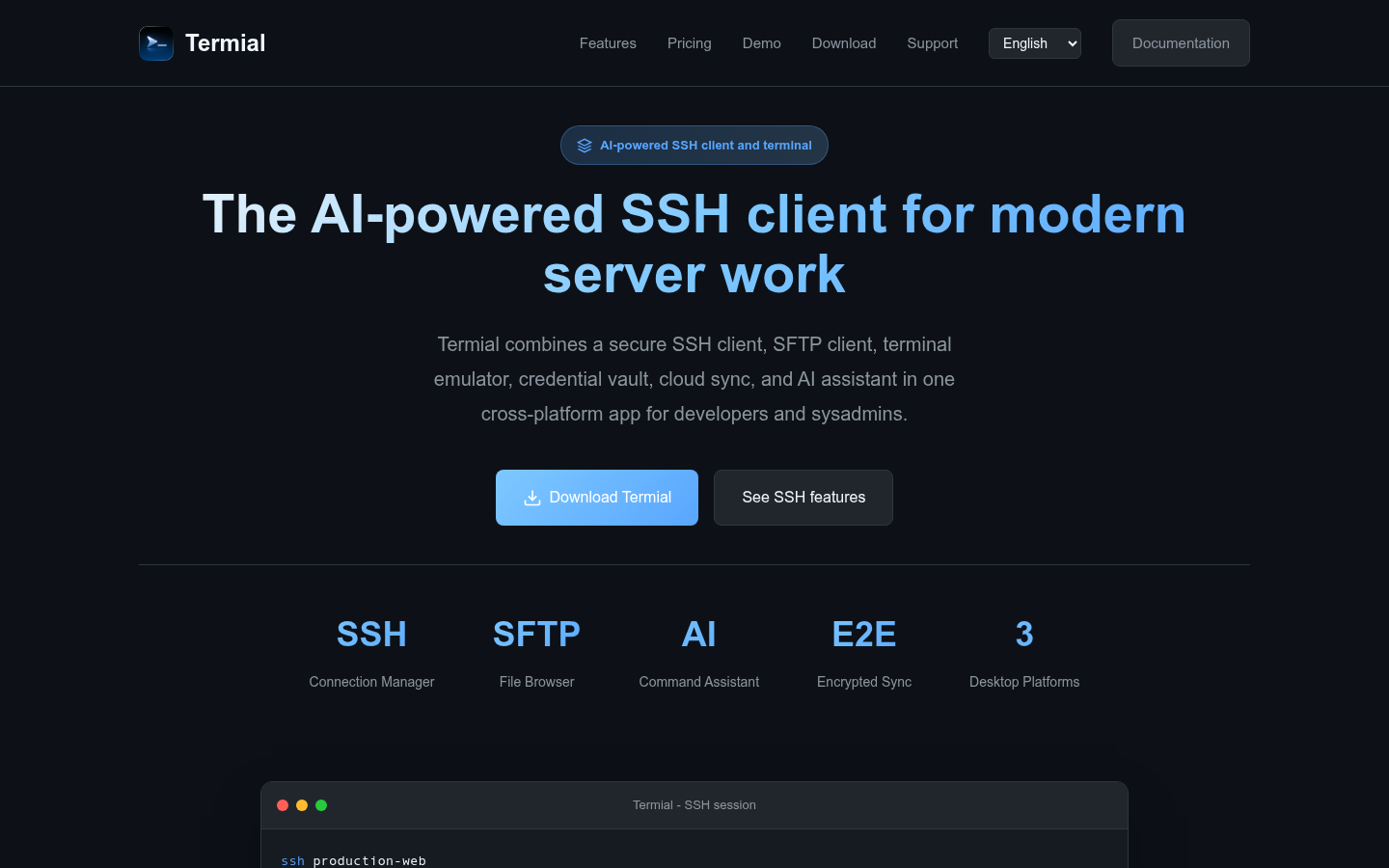
| integrations | Termial combines a secure SSH client, SFTP client, terminal emulator, credential vault, cloud sync, and AI assistant in one cross-platform app for developers and sysadmins. | https://termial.app/ |
| integrations | Download TermialSee SSH features | https://termial.app/ |
| integrations | Connection Manager | https://termial.app/ |
| integrations | File Browser | https://termial.app/ |
| integrations | Command Assistant | https://termial.app/ |
| integrations | Encrypted Sync | https://termial.app/ |
| integrations | Desktop Platforms | https://termial.app/ |
| integrations | Termial - SSH session | https://termial.app/ |
| integrations | sshproduction-web | https://termial.app/ |
| integrations | Connected with SSH key authentication | https://termial.app/ |
| integrations | $systemctl status nginx | https://termial.app/ |
| integrations | nginx.service - active (running) | https://termial.app/ |
| integrations | sftp/var/www/app | https://termial.app/ |
| integrations | Remote file browser ready for upload and download | https://termial.app/ |
| integrations | sudo journalctl -u nginx -n 100 --no-pager | https://termial.app/ |
| integrations | Show the latest nginx service logs on the connected SSH server | https://termial.app/ |
| integrations | One workspace for serious server work | https://termial.app/ |
Product and company updates
No supporting public-page evidence was collected for this category.
Rank tracking
Persistent keyword baselines and position movement.
This analysis created the first position baseline at 2026-10-23T13:48:14.606Z. Movement appears after the next fresh analysis using the same location and language.
| Keyword | Current | Previous | Movement | Volume | Ranking URL |
|---|---|---|---|---|---|
| macbook ssh client | 17 | Baseline | Baseline | 880 | https://termial.app/ssh-client-mac/ |
| mac ssh software | 19 | Baseline | Baseline | 880 | https://termial.app/ssh-client-mac/ |
| macos ssh client | 22 | Baseline | Baseline | 880 | https://termial.app/ssh-client-mac/ |
| ssh for macbook | 22 | Baseline | Baseline | 880 | https://termial.app/ssh-client-mac/ |
| mac ssh client | 24 | Baseline | Baseline | 880 | https://termial.app/ssh-client-mac/ |
| secure shell client for mac | 25 | Baseline | Baseline | 880 | https://termial.app/ssh-client-mac/ |
| ssh client for mac | 26 | Baseline | Baseline | 880 | https://termial.app/ssh-client-mac/ |
| ssh client mac os | 26 | Baseline | Baseline | 880 | https://termial.app/ssh-client-mac/ |
| termark | 9 | Baseline | Baseline | 50 | https://termial.app/ |
| best mac ssh client | 25 | Baseline | Baseline | 140 | https://termial.app/ssh-client-mac/ |
| best macos ssh client | 26 | Baseline | Baseline | 140 | https://termial.app/ssh-client-mac/ |
| ssh app mac | 17 | Baseline | Baseline | 50 | https://termial.app/ssh-client-mac/ |
| ssh tool for mac | 18 | Baseline | Baseline | 50 | https://termial.app/ssh-client-mac/ |
| ssh client mac free | 18 | Baseline | Baseline | 40 | https://termial.app/ssh-client-mac/ |
| ssh app for mac | 22 | Baseline | Baseline | 50 | https://termial.app/ssh-client-mac/ |
| ssh tools for mac | 23 | Baseline | Baseline | 50 | https://termial.app/ssh-client-mac/ |
| ssh client for mac free | 25 | Baseline | Baseline | 40 | https://termial.app/ssh-client-mac/ |
| mac ssh gui client | 24 | Baseline | Baseline | 30 | https://termial.app/ssh-client-mac/ |
| ssh gui for mac | 26 | Baseline | Baseline | 30 | https://termial.app/ssh-client-mac/ |
| termdock | 26 | Baseline | Baseline | 30 | https://termial.app/ |
Features
Features and capabilities
Core functions and evidence-backed product capabilities.
| Capability | What it does |
|---|---|
| Terminal Management | Manage multiple terminal sessions with tabs and split views S15. |
| SSH Connections | Create and manage SSH connections with multiple authentication methods and jump host support S19 S2. |
| SFTP Browser | Browse and manage files on remote servers directly within the app S33. |
| AI Assistant | Generate commands, analyze terminal output, and automate multi-step tasks S25. |
| Cloud Sync | Sync connections, settings, and credentials across devices with end-to-end encryption S46 S38. |
| Docker Integration | Manage Docker containers directly from the sidebar S61. |
| Port Forwarding | Create SSH tunnels and port forwards S1. |
| Team Collaboration | Share connections and credentials securely with role-based access control S2 S60. |
Integrations and ecosystem
Connected products, exports, APIs, and workflow compatibility.
| Integration or interface | Type | What it enables |
|---|---|---|
| Docker | Integration | Manage Docker containers directly from the sidebar S61. |
| AWS, Google Cloud, Azure | Integration | Connect to cloud instances S1. |
| SFTP | Built-in protocol | Browse and manage remote files S33. |
| SSH | Built-in protocol | Connect to remote servers with multiple authentication methods S19. |
| Cloud sync | Data portability | Sync connections and settings across devices S46. |
| Import/export | Data portability | Manually export and import data as a file S46. |
Pricing
Pricing and plans
Published plans, free access, trials, credits, and pricing limitations.
| Plan or offer | Verified price and billing | Included | Limits |
|---|---|---|---|
| Free | $0 S1 | Unlimited SSH connections, basic SFTP, AI with usage limits S1 | No cloud sync S1 |
| Pro | $10 per month, or $99.99 per year via App Store S1 | Full SFTP, port forwarding, jump hosts, cloud sync, Agent Mode, Docker management S1 | AI credit packs sold separately from $4.99 for 50 S1 |
| Team | $20 per user per month, or $199.99 per year via App Store S1 | Shared connections and credentials, role-based access S1 | Not established |
| Enterprise | Contact sales S1 | SSO, bring your own key, dedicated support and SLA S1 | Custom S1 |
Competition
Competitive landscape
Domains competing for the same organic search demand.
Sampled competitors
| Competitor | First-page appearances | Sampled queries | Average position | Queries observed |
|---|---|---|---|---|
| apps.apple.com | 7 | 2 | 5.6 | macbook ssh client, mac ssh software |
| reddit.com | 2 | 2 | 3.5 | macbook ssh client, mac ssh software |
| talk.macpowerusers.com | 2 | 2 | 4 | macbook ssh client, mac ssh software |
| forums.appleinsider.com | 2 | 2 | 7 | macbook ssh client, mac ssh software |
| emtec.com | 1 | 1 | 1 | macbook ssh client |
| youtube.com | 1 | 1 | 1 | mac ssh software |
| bitvise.com | 1 | 1 | 3 | mac ssh software |
Website intelligence — Collected evidence
Customers, testimonials, and first-party review claims
No supporting public-page evidence was collected for this category.
Independent review sources discovered
No links to supported independent review platforms were discovered on the collected pages.
AI visibility
Measured ChatGPT and Google AI mentions with cited sources.
AI-assistant referral traffic
- Estimated current generative-AI referral share: 1.8%
Scout traffic model did not return a separate AI-referral trend series for this domain.
Website intelligence — Collected evidence
Site-stated AI capabilities
| Page type | Evidence | Source |
|---|---|---|
| integrations | Termial is a modern SSH client, SFTP client, and AI-powered terminal for macOS, Windows, and Linux. Manage servers, keys, files, port forwarding, and terminal tasks with built-in AI assistance. | https://termial.app/ |
| integrations | AI-powered SSH client and terminal | https://termial.app/ |
| integrations | The AI-powered SSH client for modern server work | https://termial.app/ |
| integrations | Termial combines a secure SSH client, SFTP client, terminal emulator, credential vault, cloud sync, and AI assistant in one cross-platform app for developers and sysadmins. | https://termial.app/ |
| integrations | Termial brings SSH connections, SFTP file transfer, secure credentials, port forwarding, cloud sync, and AI assistance into one focused terminal experience. | https://termial.app/ |
| integrations | Use the same polished SSH, SFTP, vault, port forwarding, and AI terminal workflow on macOS, Windows, and Linux. | https://termial.app/ |
| integrations | AI Assistant | https://termial.app/en/docs/ |
| integrations | AI AssistantUse AI to generate commands, analyze output, and automate tasks in Termial | https://termial.app/en/docs/ |
| integrations | AI-Powered Assistance – Get command suggestions, explanations, and automated multi-step workflows | https://termial.app/en/docs/01-getting-started/ |
| integrations | Explore the AI assistant by clicking the AI panel | https://termial.app/en/docs/01-getting-started/ |
These are first-party product claims, not independent measurements of AI-search visibility.
Marketing opportunities
Actions calculated directly from the collected evidence.
| Opportunity | Recommended action | Evidence |
|---|---|---|
| Striking-distance keyword | Move “macbook ssh client” from position 17 toward the top three. | Volume 880 · https://termial.app/ssh-client-mac/ |
| Important page | Strengthen the page already earning search visibility before creating an unrelated page. | https://termial.app/ssh-client-mac/ · 18 sampled keywords · best position 17 |
| Competitor gap | Review the sampled queries where apps.apple.com appears. | 7 first-page appearances across macbook ssh client, mac ssh software |
Website intelligence — Collected evidence
Website evidence gaps
- pricing: no usable public page was collected; verify whether the site publishes this evidence.
- features: no usable public page was collected; verify whether the site publishes this evidence.
- customers: no usable public page was collected; verify whether the site publishes this evidence.
- reviews: no usable public page was collected; verify whether the site publishes this evidence.
- changes: no usable public page was collected; verify whether the site publishes this evidence.
- identity: no usable public page was collected; verify whether the site publishes this evidence.
- technical: no usable public page was collected; verify whether the site publishes this evidence.
Trust and proof
Customers, proof, and reviews
Published proof, customer signals, and review evidence.
Independent reviews
No citation-grounded independent review links were found.
Customer proof
No named customers, testimonials, or customer case studies were found.
Independent mentions
- Termial - AI SSH Client, SFTP Client and Terminal — # The AI-powered SSH client for modern server work ... Termial combines a secure SSH client, SFTP client, terminal emulator, credential vault, cloud sync, and AI assistant in one cross-platform app for developers and sysadmins. ... ## Three Powerful AI Modes ... Use AI to generate commands, explain terminal output, and automate multi-step SSH workflows. ... ### Agent Mode ... Fully autonomous execution. Describe a complex task and the Agent plans and executes it step by step with approval contro
- Termial - AI SSH Client, SFTP Client and Terminal — # The AI-powered SSH client for modern server work ... Termial combines a secure SSH client, SFTP client, terminal emulator, credential vault, cloud sync, and AI assistant in one cross-platform app for developers and sysadmins. ... ### Agent Mode ... Fully autonomous execution. Describe a complex task and the Agent plans and executes it step by step with approval controls.
- Termial Documentation (English) — - AI Assistant Use AI to generate commands, analyze output, and automate tasks in Termial - SFTP Browser Browse and manage remote files with Termial's built-in SFTP browser - Encryption & Security How Termial protects your data with encryption - Cloud
- SSH Client for Mac - Termial for macOS — Termial is an SSH client for Mac users who want saved server connections, secure SSH key workflows, SFTP file transfer, terminal sessions, and AI help without stitching together several tools. ... SFTP file browser for remote servers Browse remote files,
- SSH Client for Mac - Termial for macOS — Termial is an SSH client for Mac users who want saved server connections, secure SSH key workflows, SFTP file transfer, terminal sessions, and AI help without stitching together several tools. ... SFTP file browser for remote servers Browse remote files,
- Terms of Service - Termial — provides tools for SSH connections and server management. You are solely responsible for: - Maintaining the security of your SSH keys and credentials - Ensuring you have authorization to access connected systems - Complying with your
- SSH Client - Modern Secure Server Access with Termial — Termial gives you a secure SSH client, saved server connections, SFTP file transfer, terminal sessions, port forwarding, encrypted credentials, and AI command assistance in one cross-platform desktop app.
- SSH Client for Linux - Termial for Linux Desktops — Termial gives Linux users a polished SSH client for saved server connections, secure SSH credentials, SFTP file transfer, port forwarding, cloud sync, and AI-assisted terminal work. ... and work through multi-step server tasks with an AI assistant that
External links were grounded in one live web search. Search snippets are leads, not independently scraped page content; rejected links remain available in Review evidence.
Company, security, and trust
Ownership, policies, security signals, and public trust evidence.
| Signal | Finding | Source |
|---|---|---|
| Company and ownership | Not published on the collected pages. | — |
| Contact and support | Need Enterprise? Custom deployment, SSO, BYOK (Bring Your Own Key) for AI functions, dedicated support, and SLA. Contact us for a custom quote. | source |
| Legal and privacy | Cancel: Stop the entire task | source |
| Security and compliance | Your credentials are protected with AES-256-GCM encryption. Passphrase-derived keys with PBKDF2 and OS keychain integration for maximum security. | source |
| Uptime and status page | Need Enterprise? Custom deployment, SSO, BYOK (Bring Your Own Key) for AI functions, dedicated support, and SLA. Contact us for a custom quote. | source |
| Domain registered | 2025-12-01 | — |
| Domain expires | 2026-12-01 | — |
Not found on the collected pages: company and ownership. This only means Scout did not find it on the pages it read; it says nothing about the company itself.
Documentation and product updates
Help resources, product guidance, and visible changes over time.
| Resource or update | Type | What is available | Date or freshness |
|---|---|---|---|
| Termial Documentation (English) | Documentation | Termial documentation in English. (source) | Not dated |
| Getting Started - Termial Docs (English) | Documentation | Get up and running with Termial, the modern cross-platform terminal (source) | Not dated |
| Installation - Termial Docs (English) | Documentation | Install Termial on macOS, Windows, or Linux (source) | Not dated |
| Terminal Management - Termial Docs (English) | Documentation | Master tabs, splits, and terminal sessions in Termial (source) | Not dated |
| SSH Connections - Termial Docs (English) | Documentation | Manage SSH connections, authentication, and jump hosts in Termial (source) | Not dated |
| AI Assistant - Termial Docs (English) | Documentation | Use AI to generate commands, analyze output, and automate tasks in Termial (source) | Not dated |
| SFTP Browser - Termial Docs (English) | Documentation | Browse and manage remote files with Termial's built-in SFTP browser (source) | Not dated |
| Encryption & Security - Termial Docs (English) | Documentation | How Termial protects your data with encryption (source) | Not dated |
Not found in the collected public sources: public roadmap, changelog or release notes, status page, separate help center or knowledge base.
Technical
Technical and delivery signals
Delivery model, platforms, API, data ownership, reliability claims and release activity.
| Signal | Finding | Source |
|---|---|---|
| Delivery model (cloud, self-hosted, desktop, browser extension) | Desktop application for macOS, Windows, and Linux S2. | S2 |
| Platforms and apps | Available for macOS, Windows, and Linux S10. | S10 |
| API and extensibility (API, SDK, webhooks, MCP, plugins) | AI Assistant supports custom API endpoints S25. | S25 |
| Data ownership and export | Data can be exported and imported manually S46. | S46 |
| Performance and reliability claims | Not published on the collected pages. | — |
| Release activity | Updates are handled automatically by the App Store S10. | S10 |
Measured infrastructure
Domain, certificate, and hosting signals, measured directly.
| Signal | Finding |
|---|---|
| Domain registered | 2025-12-01 — Squarespace Domains II LLC. |
| Domain expires | 2026-12-01 |
| First archived | 2026-06-07 — web archive |
| TLS certificate | Google Trust Services, valid, expires 2026-12-22 |
| Security headers | none served |
| Headers not served | HSTS, CSP, X-Content-Type-Options, X-Frame-Options, Referrer-Policy |
| Server header | cloudflare |
| Mail handled by | mail.termial.app |
| Nameservers | john.ns.cloudflare.com, jo.ns.cloudflare.com |
Technical site audit
A bounded multi-page crawl with page-level issues and URLs.
Scout — Bounded technical crawl
- Pages crawled: 15 of 15 maximum
- Technical health: 98/100
- Critical issues: 0
- Warnings: 5
- Notices: 5
Issues
| Severity | Issue | Value | Affected URL |
|---|---|---|---|
| notice | Meta description length should be reviewed | 193 | https://termial.app/ |
| notice | Meta description length should be reviewed | 193 | https://termial.app/en/ |
| warning | Title length should be reviewed | 70 | https://termial.app/en/download/ |
| notice | Low visible word count | 65 | https://termial.app/en/download/ |
| notice | Meta description length should be reviewed | 33 | https://termial.app/en/docs/ |
| notice | Meta description length should be reviewed | 43 | https://termial.app/en/docs/02-installation/ |
| warning | Duplicate title in audit sample | 2 | https://termial.app/ |
| warning | Duplicate title in audit sample | 2 | https://termial.app/en/ |
| warning | Duplicate meta description in audit sample | 2 | https://termial.app/ |
| warning | Duplicate meta description in audit sample | 2 | https://termial.app/en/ |
Crawled pages
| Status | Title | H1s | Words | Response | URL |
|---|---|---|---|---|---|
| 200 | Termial - AI SSH Client, SFTP Client and Terminal | 1 | 1524 | 250 ms | https://termial.app/ |
| 200 | Termial - AI SSH Client, SFTP Client and Terminal | 1 | 1524 | 261 ms | https://termial.app/en/ |
| 200 | AI Agent Demo - See Termial Autonomous Mode in Action | 1 | 202 | 253 ms | https://termial.app/en/demo/ |
| 200 | Download Termial - Free AI-Powered Terminal for macOS, Windows & Linux | 1 | 65 | 279 ms | https://termial.app/en/download/ |
| 200 | Support - Termial Help Center | 1 | 396 | 262 ms | https://termial.app/en/support/ |
| 200 | Termial Documentation (English) | 1 | 247 | 235 ms | https://termial.app/en/docs/ |
| 200 | SSH Client - Modern Secure Server Access with Termial | 1 | 485 | 232 ms | https://termial.app/en/ssh-client/ |
| 200 | SFTP Client - Secure File Transfer Built Into Termial | 1 | 401 | 309 ms | https://termial.app/en/sftp-client/ |
| 200 | SSH Client for Mac - Termial for macOS | 1 | 396 | 243 ms | https://termial.app/en/ssh-client-mac/ |
| 200 | SSH Client for Windows - Termial for Windows 10 and 11 | 1 | 378 | 252 ms | https://termial.app/en/ssh-client-windows/ |
| 200 | SSH Client for Linux - Termial for Linux Desktops | 1 | 374 | 387 ms | https://termial.app/en/ssh-client-linux/ |
| 200 | Privacy Policy - Termial | 1 | 627 | 282 ms | https://termial.app/en/privacy/ |
| 200 | Terms of Service - Termial | 1 | 1706 | 263 ms | https://termial.app/en/terms/ |
| 200 | Getting Started - Termial Docs (English) | 1 | 588 | 216 ms | https://termial.app/en/docs/01-getting-started/ |
| 200 | Installation - Termial Docs (English) | 1 | 477 | 265 ms | https://termial.app/en/docs/02-installation/ |
This is a bounded Scout crawl. Core Web Vitals and Lighthouse scores are not claimed unless a dedicated performance audit is connected.
Search Console and Analytics
First-party search and behavioral data connection state.
Modeled acquisition channels
| Channel | Estimated share |
|---|---|
| direct | 40.0% |
| search | 36.0% |
| search organic | 34.8% |
| search paid | 1.2% |
| social | 6.3% |
| social organic | 5.8% |
| social paid | 0.5% |
| referrals | 9.7% |
| paid referrals | 2.2% |
| 2.7% | |
| gen ai | 1.8% |
| affiliate | 1.3% |
| other | 0.0% |
First-party connections
| Integration | Status | Data available after connection |
|---|---|---|
| Google Search Console | Not connected | Clicks, impressions, CTR, average position, queries, pages, countries, and devices |
| Google Analytics | Not connected | Organic sessions, engagement, landing pages, conversions, geography, and devices |
No first-party Search Console or Analytics numbers are shown until the site owner authorizes the corresponding Google account. Scout traffic model values above are modeled estimates, not private analytics totals.
Limits and method
Limitations and open questions
Known constraints and missing evidence from the collected pages.
The collected sources do not mention any competitors. Evidence gaps include lack of customer reviews, company ownership details, and specific performance or uptime claims. Open questions remain about the exact AI usage limits and the availability of the local terminal in the Mac App Store version S15.
Sources, method, and limitations
Evidence inventory, collection method, provider use, and constraints.
This report is based on 14 of 15 collected pages from termial.app, including documentation and pricing pages. The evidence catalog includes 180 items from the official documentation and pricing page. External proof search was performed but no external reviews or customer evidence were collected. Limitations include the absence of third-party reviews and the fact that some pages were not fully rendered.
- Documentationhttps://termial.app/Verified
- Documentationhttps://termial.app/en/docs/Verified
- Documentationhttps://termial.app/en/docs/01-getting-started/Verified
- Documentationhttps://termial.app/en/docs/02-installation/Verified
- Documentationhttps://termial.app/en/docs/03-terminal-management/Verified
- Documentationhttps://termial.app/en/docs/04-ssh-connections/Verified
- Documentationhttps://termial.app/en/docs/05-ai-assistant/Verified
- Documentationhttps://termial.app/en/docs/06-sftp-browser/Verified
- Documentationhttps://termial.app/en/docs/07-vault-security/Verified
- Documentationhttps://termial.app/en/docs/08-cloud-sync/Verified
- Documentationhttps://termial.app/en/docs/09-teams/Verified
- Documentationhttps://termial.app/en/docs/10-docker/Verified
- Documentationhttps://termial.app/en/docs/11-cloud-providers/Verified
- Documentationhttps://termial.app/en/docs/12-port-forwarding/Verified
- Articlehttps://termial.app/en/Verified
- Articlehttps://termial.app/en/ssh-client-mac/Verified
- Articlehttps://termial.app/ssh-client-mac/Verified
- Articlehttps://termial.app/terms/Verified
- Articlehttps://termial.app/it/ssh-client/Verified
- Articlehttps://termial.app/de/ssh-client-linux/Verified
- Articlehttps://termial.app/de/ssh-client-windows/Verified
- Articlehttps://termial.app/fr/sftp-client/Verified