4.1k stars · Apache-2.0 · v1.50.1 (2026-09-01) · Track this in Rising ↗
Fast source-code spell checker with low false positives — designed to run on every commit.
Radar check
What we found when we opened it. Every bar is one fact, with its date.
Last code pushed 6 Oct 2026, 21 days before this check.
Latest release v1.51.1 on 6 Oct 2026.
Public since April 2019, a little over 7 years.
4,197 stars and 187 forks.
102 commits and 13 new issues in the last 90 days.
97 contributors. 24 pull requests merged in 90 days.
No security policy file says how to report a problem. No published security advisories.
How the bars are scored
- Alive. Days since the last code push: a week or less 100, a month 90, three months 70, six months 50, a year 30, eighteen months 15, older 0.
- Releases. Age of the latest GitHub release, on a similar scale; no bar when the project publishes no releases.
- Maturity. Age of the project: eight years 100, five 90, three 70, two 55, one 40, six months 25, younger 10.
- Adoption. Stars on a log scale: 100,000 stars is 100, 10,000 is 80, 1,000 is 60, 100 is 40.
- Activity. Commits in the last 90 days: 300 or more 100, 100 85, 30 65, 10 45, any 25.
- Community. People who have contributed: 100 or more 100, 30 80, 10 60, 5 40, 2 25, one 10.
- Security. A published security policy 80, none 40; published advisories are listed, not scored.
Checked by Repo Radar on 25 Oct 2026 from the repository on GitHub. Covered in Edition 17.
▶Repo detailsthe review · specs · pros & cons · install
What it does
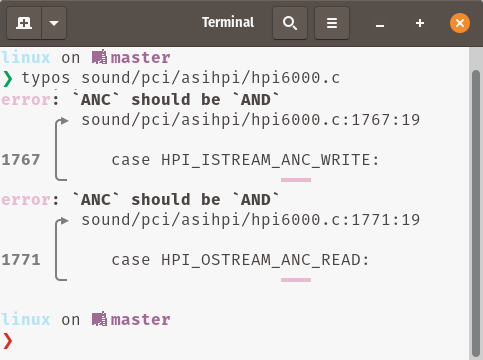
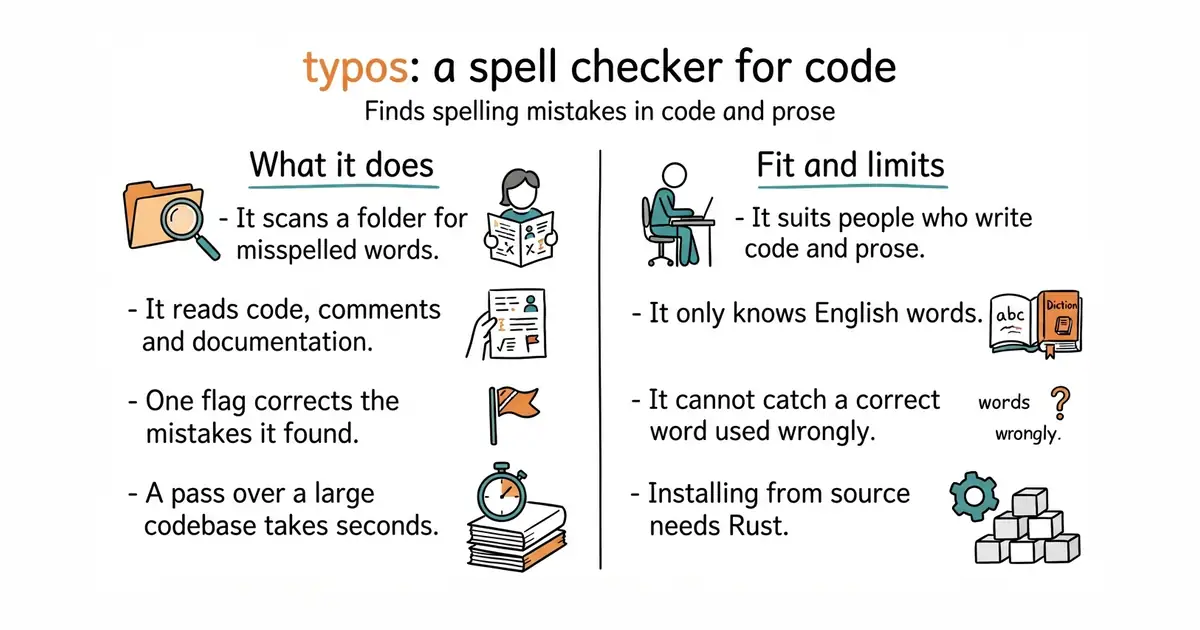
It scans a folder and reports misspelled words. It reads program code, comments, commit messages, documentation and plain text. It was built for large projects, so one pass over a big codebase takes seconds rather than minutes. The word list was tuned to keep false alarms very low, which is the reason people keep it switched on. With the --write-changes flag it corrects what it found instead of only listing it. It runs as a command, and the same binary runs in an automated check. Version 1.51.1 arrived on 6 October 2026, and code landed on the same day. It only knows English words, and it cannot tell you that a correctly spelled word is the wrong word.
Why it matters
Who it suits. Anybody who writes both code and prose. Spelling mistakes hide inside variable names, comments and documentation, and nobody reads those closely enough to catch them. It earns the most where English is not the writer's first language, because a second pair of eyes costs nothing here. Skip it if the text is mostly in another language, because every non-English word will be reported as wrong.
Verdict. Worth five minutes today, and then you never think about it again. The risk is close to zero: it changes nothing until you pass a flag, and the list it prints is short enough to read. Use codespell-project/codespell instead if you want the same job done by a Python tool, and streetsidesoftware/cspell if you need a spell checker with dictionaries for many languages.
Summary (Key Points)from the README
Key features
- Source code focus: Finds and corrects spelling mistakes among source code.
- Monorepo speed: The README describes it as fast enough to run on monorepos.
- Low false positives: It keeps false positives low so it can run on pull requests.
- Known-correction approach: It maintains a list of known typo corrections rather than checking words against a dictionary of valid words.
- Ambiguity handling: When a word has multiple possible corrections, it reports the ambiguity and moves on.
- Config-based exceptions: You can mark words or identifiers as valid in `_typos.toml`, and extend the dictionary.
- Per-file control: You can turn off content checking for a file type while still checking file names, or exclude files entirely.
- Broad integrations: It works with GitHub Actions, pre-commit, Visual Studio Code, typos-lsp, GitLab Code Quality and a Putout processor.
- Scriptable interface: It reads stdin, offers `--diff`, and outputs JSON lines with `--format json`.
- Debugging tools: `--dump-config`, `--files`, `--identifiers`, `--words`, `--type-list` and `-v` debug logging help trace why something was or wasn't flagged.
Ways to install
| Platform or method | What it needs | Effort |
|---|---|---|
| Pre-built binary | Not stated in README | Not stated in README |
| Rust (cargo) | Rust toolchain, implied by the README | Not stated in README |
| Homebrew | Homebrew | Not stated in README |
| Conda | Conda | Not stated in README |
| Pacman | Pacman | Not stated in README |
The README also mentions installing via gh-install for the pre-built binary.
Important
- Known corrections only: Because it relies on a list of known typo corrections, misspellings outside that list may not be caught.
- Guessing on unknown words: For unknown words it guesses the closest-looking word, and only proposes a correction when the match is close enough. You should verify corrections.
- Ambiguous fixes are not applied: When several corrections are possible, the tool reports them instead of choosing one.
- Git-tracked files may still be skipped: If `files.ignore-vcs = true` is set, a file in `.gitignore` that git still tracks will be skipped. The README recommends allowing such files explicitly.
- Known issues: The FAQ links to open issues (#593, #909) about file exclusion behaviour that can cause files to be unexpectedly skipped.
- Exit codes for scripts: With `--format json`, exit code 2 signals typos, and any other non-zero code is an error, so scripts need to handle both.
- Localized content: Text in non-English or localized content may be flagged, so you may need to disable content checking for those files.
Written by an AI model from the project’s README; not part of the review, and it can be wrong.
- One command, with no configuration needed to start.
- Very few false alarms, which is why people leave it switched on.
- It can correct the mistakes it found with a single flag.
- Installing from source needs Rust, the programming language it is written in, which you install once with a script from rust-lang.org. On a Mac, Homebrew is easier.
- It only knows English words, so files in another language will be full of reported mistakes.
- It cannot catch a correct word used wrongly. "Form" and "from" are both real words.
# macOS, easiest:
brew install typos-cli
# Anywhere, with Rust installed:
cargo install typos-cli
# Then, inside a project folder:
typos                     # list what it found
typos --write-changes     # correct them