8,800 stars · BSD-2-Clause · v0.16.1 (2026-02-20), confirmed by crates.io · Track this in Scout
Shows a Markdown file as a slide show inside a terminal, so a talk is a text file that can be reviewed and diffed rather than a binary deck.
▶Repo detailsthe review · specs · pros & cons · install
What it is
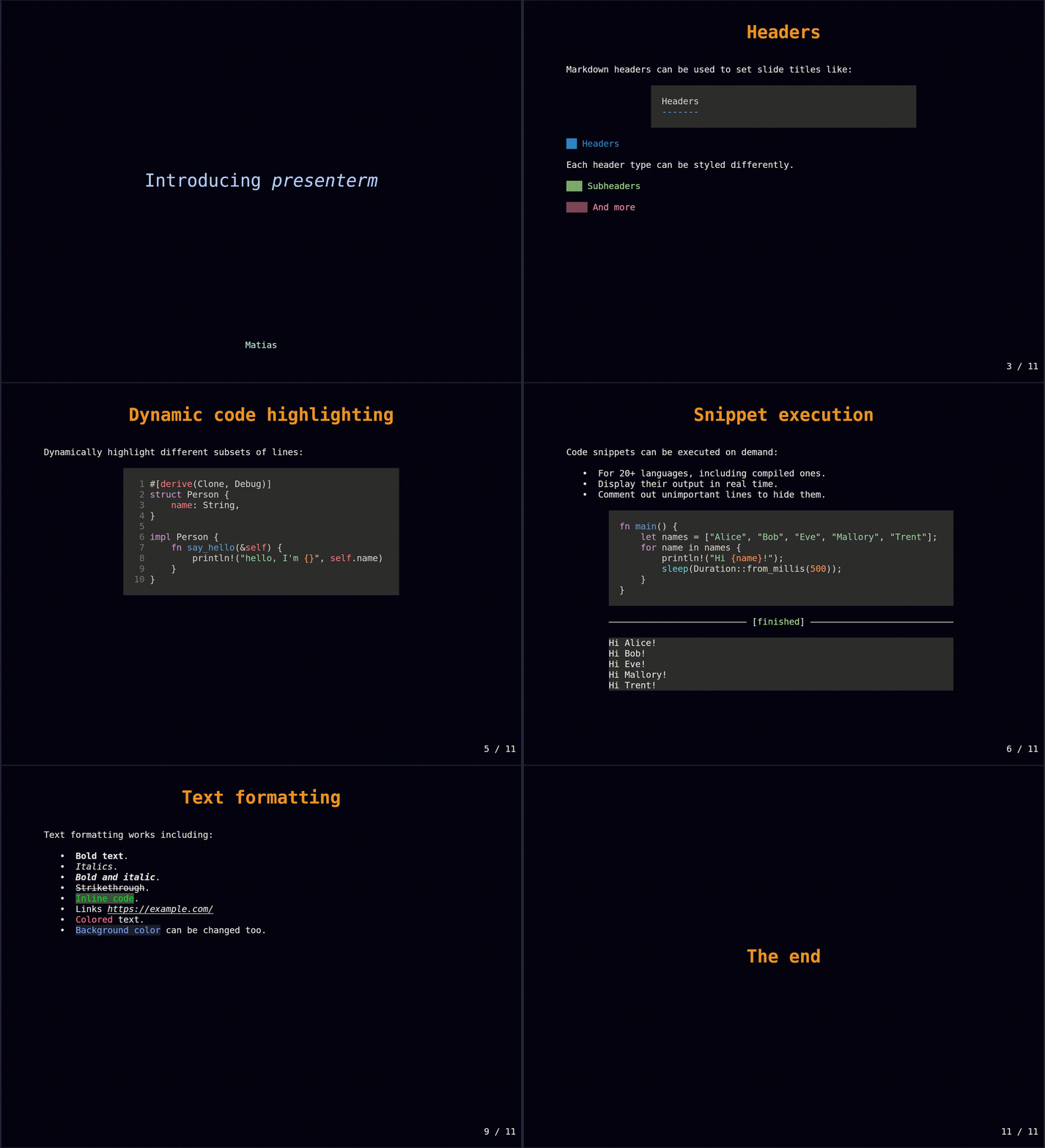
presenterm is a Rust program that renders a Markdown file — Markdown being the plain-text way of writing headings and lists with symbols like # and - — as a presentation, with code highlighting, themes, speaker notes and the ability to run a code block live during the talk.
What it is good for. Anyone giving a technical talk who resents the hour spent fighting a slide editor. The real argument is not speed: it is that the talk becomes a text file you can keep beside the code, review as a change, and diff against last year's version. Running a code block live from inside the slide is the other reason — it removes the switch between the deck and a terminal, which is where most demonstrations go wrong.
- A plain BSD-2-Clause licence read from
/blob/master/LICENSE, unmodified, "Copyright (c) 2023, Matias Fontanini". Permissive with no conditions beyond keeping the notice. - It is properly packaged for a project of its size: Homebrew, Nix, Arch Linux's pacman, Scoop, WinGet and
cargo binstallall work, and pre-built binaries are published, so nobody has to compile Rust to use it. - Code blocks can be executed during the presentation, there are speaker notes, and themes are a file you can keep and reuse.
- Images only work on some terminals. The documentation names kitty, iTerm2, WezTerm, Ghostty and foot. In any other terminal, pictures and animated gifs will not appear, which is a hard limit on what the slides can contain, and it is not something you discover until you try.
- The project is quiet. Release v0.16.1 is dated 20 February 2026 — the yearless GitHub date was confirmed against the Rust package index, which timestamps it 2026-02-20 — and the newest code landed on 22 May 2026, a little over four months before this edition. That is well inside the eighteen-month line and it is not being called dead, but neither the release nor the code is recent. 56 open issues against 22 pull requests.
- A terminal is a narrow stage. There is no mouse, no animation, no layout control beyond what Markdown gives you, and an audience watching a projector will see a monospace font for the whole talk. That is a taste decision as much as a technical one.
- maaslalani/slides
The closest match in spirit and simpler, showing a Markdown file as terminal slides and also able to run code blocks, but with fewer themes and no image support at all.
Track this in Scout
marp-team/marp-cliEdition 21 covered this: the same Markdown-to-slides idea but producing an HTML deck, a PDF or a PowerPoint file, which is what you want when the slides have to be sent to somebody.
Track this in Scout- hakimel/reveal.js
The long-standing browser answer, far richer in layout, transitions and interactivity, and correspondingly more work to set up and not usable over a plain remote connection.
Track this in Scout
brew install presenterm # macOS or Linux with Homebrew cargo install --locked presenterm # if Rust is installed sudo pacman -S presenterm # Arch Linux # or download a binary from the releases page presenterm talk.md
