Grasppy Capture · Free & open source
Your AI conversations, as files you own.
A small Mac app that finds your Claude Code, Codex, and Cursor conversations and writes them to your disk as plain Markdown. No account. No network. Nothing running in the background.
Free forever · No sign-up · Apple Silicon · Open source
The problem
You already have the transcripts. You just can’t read them.
Claude Code, Codex, and Cursor already write every session to your machine — buried in hidden folders, in a format built for machines. The work is there. Getting to it isn’t.
Hidden by default
Your sessions live in folders you never open, with filenames that mean nothing to you.
Unreadable format
Line-delimited JSON is fine for a program and useless for a person trying to remember a decision.
Gone when you need it
The reasoning that made sense three weeks ago is still on disk. Finding it is the part that fails.
How it works
Pick a folder. Press Sync. That’s the whole app.
Choose where your archive lives
You pick a folder once. Capture creates its archive inside it and never writes anywhere else.
It finds your conversations
Capture scans for Claude Code, Codex, and Cursor sessions and lists everything it found — before writing anything.
Skip what you don’t want
Exclude any conversation and it stays excluded. Excluding never deletes something already archived.
Press Sync Now
Only now does it write. Sync again later and unchanged conversations are skipped, not rewritten.
See it
One window. Your whole AI history.
A real archive after one afternoon: 142 conversations across three tools, 400 MB of readable Markdown — searchable, sortable, and browsable by the day you worked on them.
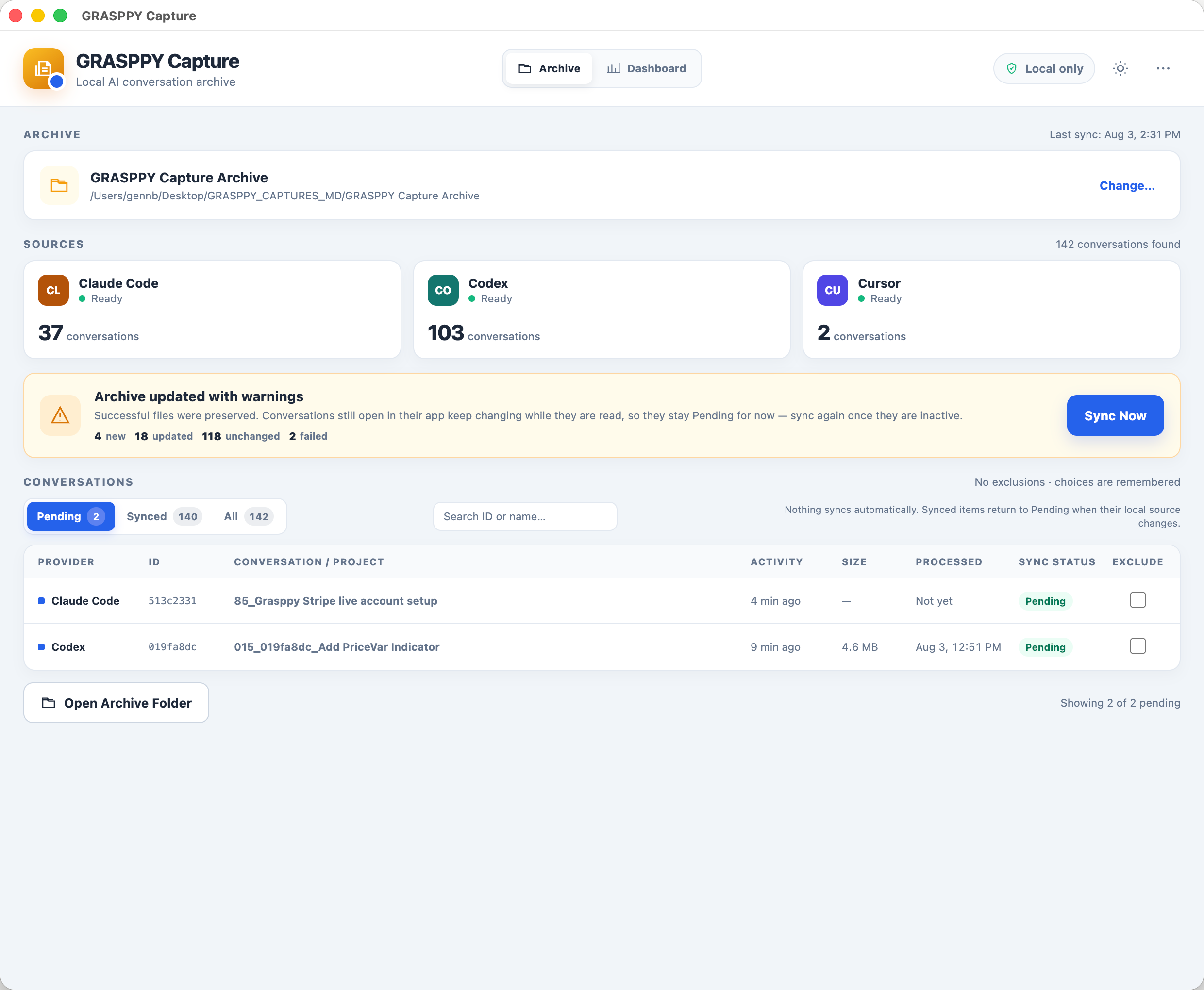
The archive — every conversation found, nothing synced without you.
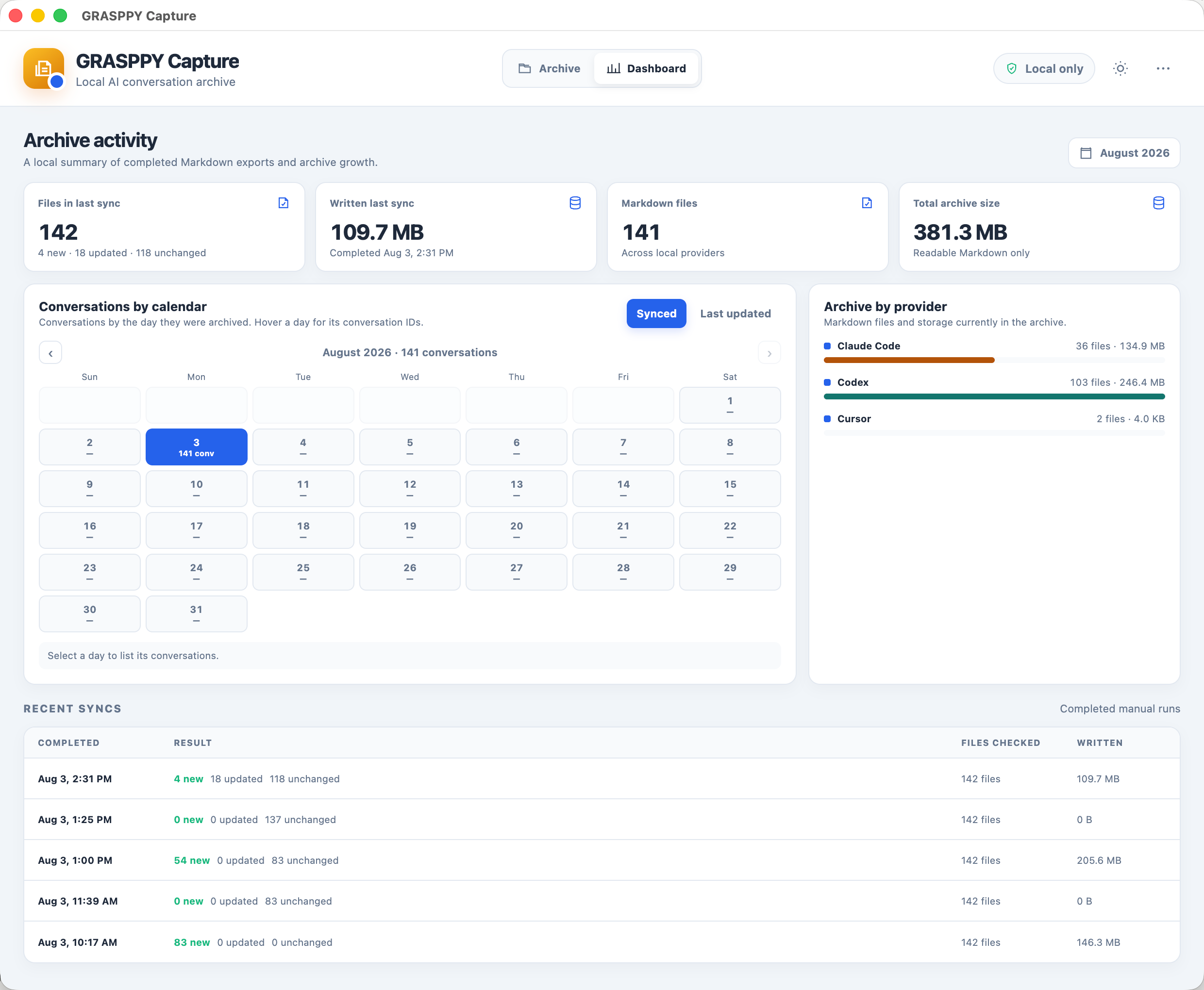
The dashboard — your work, day by day, across every provider.
What you get
Plain Markdown. Readable in 2040.
No proprietary format, no database, no export ritual. Every conversation becomes an ordinary .md file that opens in any editor, any note app, on any machine.
# Refactoring the sync daemon

provider:      claude-code
session:       0ece605d-474e-44db-96e8-48bc59bfe354
exported:      2026-08-02T14:22:07Z
messages:      48

## 👤 USER MESSAGE (1)

The daemon stops picking up new folders after a restart.

## 🤖 ASSISTANT MESSAGE (1)

The watcher list is built once at startup, so a folder added
later is never registered. Two options: rebuild watchers on a
config change, or poll...
Drop it in Obsidian, grep it from the terminal, commit it to git — it’s just a file.
Privacy
“Local” isn’t a promise here. It’s the architecture.
It cannot reach the network
The app’s interface is built so it is structurally incapable of making a network request — enforced by the engine it runs on, not by a policy we wrote.
No account, ever
No sign-up, no email, no licence key, no telemetry. Download it and it works.
Nothing runs in the background
No daemon, no watcher, no scheduled sync. Capture does exactly nothing unless the window is open and you click.
Read the code
Open source. Don’t take our word for any of the above — check it, fork it, build it yourself.
Download
Free, and free of strings.
Questions
Straight answers.
Is it actually free?
Yes. No trial, no tier, no upsell inside the app. It’s open source and it stays that way.
Do I need a Grasppy account?
Not for Capture. You only need one if you want the browser extension to save chats from ChatGPT or Claude.ai into the same archive.
Does it upload my conversations?
No. It has no network capability at all — not to us, not to anyone.
Does it change my original files?
Never. Capture only reads your provider folders. It writes only inside the archive folder you chose.
When a folder of Markdown isn’t enough
Capture keeps what’s on your machine. Grasppy searches across every conversation you’ve ever had, pulls out decisions, artifacts, and context, and covers 17 AI tools including everything in your browser. Same files, a lot more done with them.