Overview
Summary
The useful answer before the supporting detail.
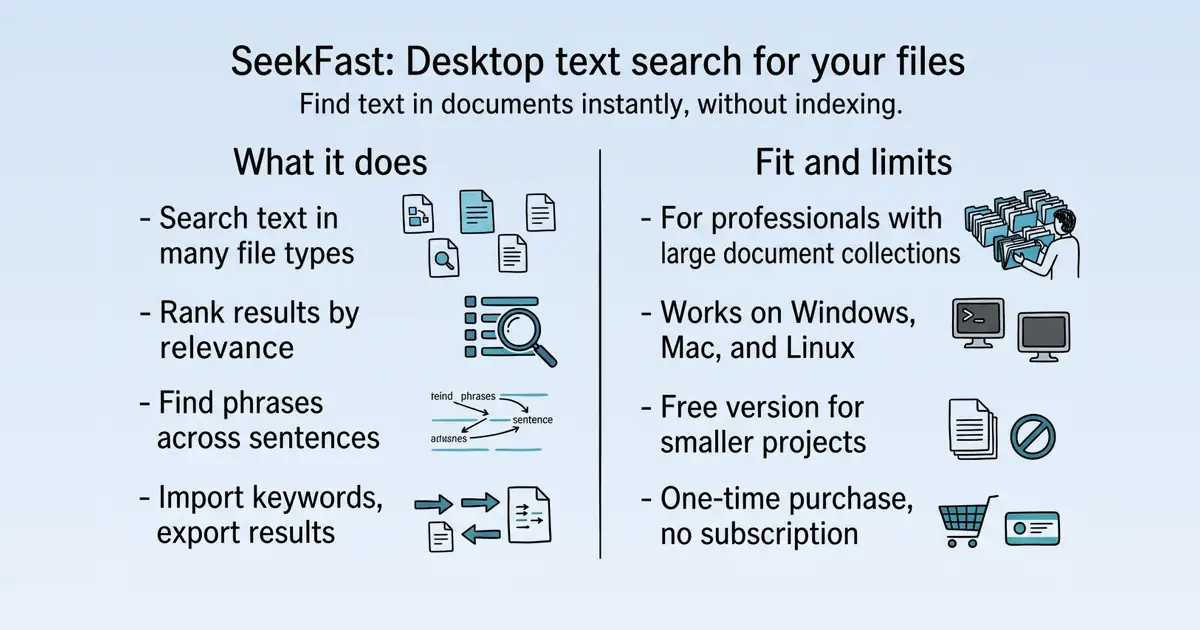
SeekFast is desktop software for intelligent and advanced text search in files on your computer S1. It helps professionals like lawyers, doctors, researchers, and managers quickly find text in large document collections, solving the problem of slow and inaccurate file searches S1. Its practical value lies in relevance-based ranking, support for many file types, and the ability to search without background indexing S1 S8.
Product identity and positioning
Name, category, positioning, audience, and first-party claims.
- Identity: SeekFast, desktop software for intelligent and advanced text search in files S1.
- Core purpose: Solves the problem of finding text in large collections of documents quickly and accurately S1.
- Intended users: Managers, lawyers, doctors, researchers, and other professionals who need fast text search S1.
- Product scope: A single desktop application, not a platform; includes features like relevance ranking and CSV import/export S1 S8.
- Positioning: Positioned as "your computer's search engine" S23.
- Claimed distinction: Differentiated by relevance-based ranking, cross-sentence word combinations, and zero-indexing search S1.
Use cases and audiences
Who the product serves and the jobs it is designed to handle.
| Audience | Practical use case |
|---|---|
| Legal and compliance professionals | Search through large document collections to find relevant clauses or evidence for audits and compliance S8. |
| Researchers and academics | Quickly locate keywords and extract information from hundreds of scientific publications in PDF S23. |
| Medical professionals | Scan and find content in large volumes of patient visit files S23. |
| Writers and editors | Find specific text across thousands of drafts and folders to manage revisions S23. |
| IT and support staff | Continue working when Windows Search is broken by using SeekFast to find documents S56. |
Traffic and search
SEO analysis
Collected Oct 22, 2026seekfast.org: an estimated 39,179 total monthly visits and about 10,244 monthly organic visits across 1,503 ranking keywords. Scout crawled 15 pages and measured a technical health score of 88/100.
Search summary
The useful answer before the supporting detail.
Search Text in Files | SeekFast. seekfast.org: an estimated 39,179 total monthly visits and about 10,244 monthly organic visits across 1,503 ranking keywords. Scout crawled 15 pages and measured a technical health score of 88/100.
- Total traffic (modeled): 39,179 monthly visits across all channels.
- Organic search traffic (estimated): 10,244 monthly visits from search.
- Strongest sampled ranking: how to find a word in a page at position 3.
- Leading page in the collected evidence: https://seekfast.org/blog/search-engines/how-to-search-for-words-on-a-web-page-a-complete-guide/.
- Closest measured organic competitor: reddit.com, appearing 2 times in the sampled first-page SERPs.
- Technical crawl: 15 pages, health score 88/100.
Website intelligence — Collected evidence
Company identity and positioning
| Page type | Evidence | Source |
|---|---|---|
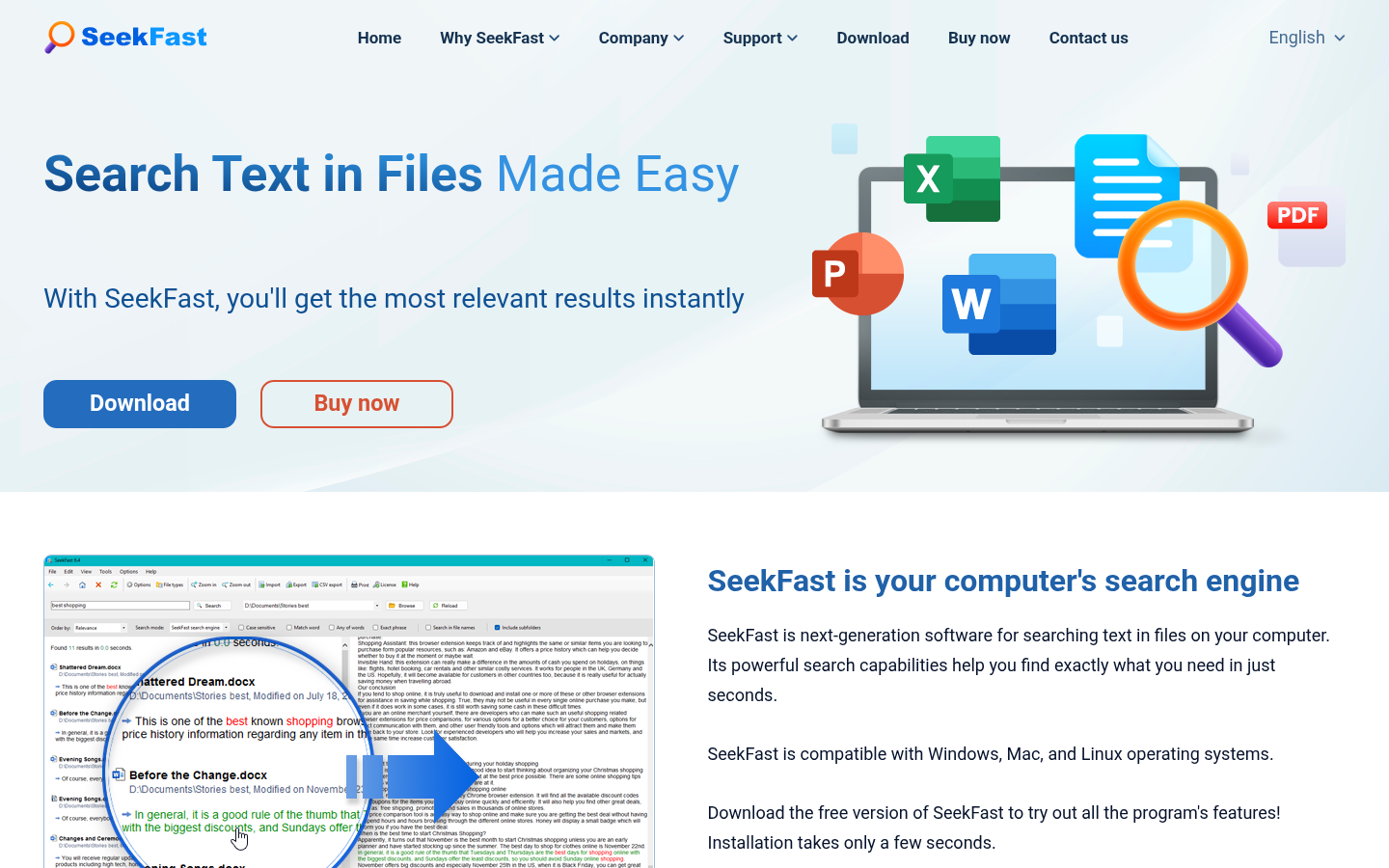
| other | SeekFast is next-generation software for searching text in files on your computer. Its powerful search capabilities help you find exactly what you need in just seconds. | https://seekfast.org/ |
| other | Trusted by over 180,000 customers worldwide | https://seekfast.org/ |
| other | Blazing-fast repeats – remembers past folders for instant results. | https://seekfast.org/ |
| other | What our customers say | https://seekfast.org/ |
| other | I've been looking for a program to do this literally for years! Great program! I have lots of different versions of notes and pieces of a writing project and this helps me find the relevant ones quickly. Well done! | https://seekfast.org/ |
| other | I have used Seekfast for several years now, the upgraded version does exactly what I wanted from the program. The support for the product is amazing, due to their quick and professional reactions. Very much recommended! | https://seekfast.org/ |
| other | The support I received from the SeekFast team is unparalleled. I’m just one customer, yet they worked patiently to help me restore the internet access I needed to activate my license. | https://seekfast.org/ |
| other | Almost all scientific articles are available in PDF format. SeekFast can search for text phrases and strings in such files, doing it better and faster than Windows and Adobe Acrobat. | https://seekfast.org/ |
| other | I find it hard to believe that in 20 years of hunting for a search engine that does what I want that SeekFast would be the ticket. I have downloaded at least a dozen programs over the years, but none did the job I needed and ALL of them did that tiresome indexing that was of little help for my needs. Now you have solved it for me! | https://seekfast.org/ |
| other | I found SeekFast to be an excellent tool for efficiently searching keywords and extracting information from hundreds of scientific publications. It provides rapid access to relevant data, enabling quick identification of key insights, trends, and references within large document sets. | https://seekfast.org/ |
| other | Which license is right for you? | https://seekfast.org/ |
| other | The free version is ideal for trying out the program or for searching smaller folders and projects. | https://seekfast.org/ |
Website intelligence — Scout synthesis
SeekFast is a desktop search tool for finding text in files, positioned as a faster, more relevant alternative to native OS search. The site emphasizes its Google-style relevance ranking, support for 120+ file formats, and cross-platform availability (Windows, Mac, Linux) W7W8W20. It claims over 180,000 customers and 18 years on the market, with a free version available for unlimited use W11W209W145. The website is available in 11 languages, indicating a global audience W2. Key differentiators include zero-indexing, smart phrase search, and CSV import/export, which appeal to professionals managing large document collections W16W15W19. The site includes testimonials from academics and professionals, reinforcing credibility W101W109.
Domain performance
Modeled total traffic, six-month trend, engagement, countries, and domain identity.
Total website traffic
| Month | Modeled visits |
|---|---|
| 2026-04 | 42,973 |
| 2026-05 | 46,572 |
| 2026-06 | 42,694 |
| 2026-07 | 42,431 |
| 2026-08 | 41,746 |
| 2026-09 | 39,179 |
Top visitor countries
| Country | Name | Traffic share |
|---|---|---|
| US | United States | 16.3% |
| BG | Bulgaria | 7.2% |
| FR | France | 5.7% |
| VN | Vietnam | 5.5% |
| ES | Spain | 5.3% |
Domain identity
| Signal | Value |
|---|---|
| Registered | Jul 16, 2008 |
| Last changed | Aug 12, 2026 |
| Expires | Jul 16, 2027 |
| WHOIS server | whois.publicinterestregistry.org |
| DNSSEC | — |
| Nameservers | adam.ns.cloudflare.com, jessica.ns.cloudflare.com |
Website capture
Organic keywords
Top keywords and an independent Google result page.
Top organic keywords
| Keyword | Volume | CPC | Estimated value |
|---|---|---|---|
| seekfast | 600 | $0.00 | $340 |
| buscador de windows alternativo | 670 | $0.00 | $320 |
| seekfast download | 310 | $0.00 | $300 |
| search all files on a website with a keyword | 200 | $0.00 | $190 |
| seekfast 7.4 | 190 | $0.00 | $180 |
Independent Google result page
Query: how to find a word in a page
| Position | Title | URL | Description |
|---|---|---|---|
| 1 | Find text in a document | https://support.microsoft.com/en-us/word/find-text-in-a-document | Use the Find pane to find text in a document. To open the Navigation pane from the Editing view, press Ctrl+F, or select Home > Find. Find text by typing it in ... |
| 2 | Lesson 1.6: Finding text on a web page | https://edu.google.com/coursebuilder/courses/pswg/1.2/assets/notes/Lesson1.6/Lesson1.6Findingtextonawebpage_Text_.html | One option is the Find feature of your web browser, using Control-F (Command-F on Mac), to find a piece of text on a web page. Unlike searching, which looks ... |
| 3 | Is it possible to find (search) a specific word from a text ... | https://www.reddit.com/r/capacitiesapp/comments/1fb2qsj/is_it_possible_to_find_search_a_specific_word/ | Focus on the page you wanna search, press ctrl+f, or cmd+f for macbook, you'll get page specific search page. |
| 4 | How to Use Word's Find Command | https://www.youtube.com/watch?v=4NUGRAb7EvU | It's like flipping through a 400-page book just to find your place. about 12 other tabs open. this video shows you how to use Word's Find ... |
| 5 | Finding Text On A Page | https://knowledge.square-9.com/gs61/finding-text-on-a-page | To search for text on a page: Open a document in the Document Viewer and use the Find hotkey (Ctrl+F). This will open the Find Dialog, located at the top of ... |
| 6 | How to Find Word on a Webpage in Chrome, Firefox, Microsoft ... | https://www.youtube.com/watch?v=Cbj3i-8u3ww | This tutorial explains how to search for a word using either the Find Word function found in most major web browsers or a search engine such as ... |
| 7 | How to Search for a Word on a Website | https://elementor.com/blog/how-to-search-for-a-word-on-a-website/ | Open the Find Bar: Press Ctrl+F or Cmd+F. A search box will appear in the top-right corner of your browser window. Enter Your Search Term: Type ... |
| 8 | How to Search for a Word on a Web Page or Site | https://www.businessinsider.com/reference/how-to-search-for-a-word-on-a-page | On most web pages, word processors, and other programs, you can use the keyboard shortcut Command + F on a Mac, or Control + F on Windows to ... |
| 9 | Is there a way to find a word in a text without having to ... | https://www.quora.com/Is-there-a-way-to-find-a-word-in-a-text-without-having-to-scroll-through-the-entire-document | Try the “Find” command. On most devices, if you type F, it'll pop up a 'search' bar at the top of your current page—whatever app you're in. |
Important pages
Pages earning the most estimated search traffic in the sample.
Website intelligence — Collected evidence
Prioritized website intelligence pages
| Type | Page | Words | Change | URL |
|---|---|---|---|---|
| other | Search Text in Files \ | static | 1,024 | new |
| other | Search Text in Files \ | static | 1,024 | new |
| features | Features \ | static | 624 | new |
| other | Search Text in Files \ | static | 1,024 | new |
| customers | Testimonials \ | static | 835 | new |
| other | Search Text in Files \ | static | 1,024 | new |
| other | Download \ | static | 82 | new |
| other | Download SeekFast for Mac \ | static | 107 | new |
| trust | Privacy Policy \ | static | 738 | new |
| trust | Terms of use \ | static | 710 | new |
| identity | About us \ | static | 277 | new |
| identity | Our team \ | static | 588 | new |
| other | SeekFast Blog - Software Tips and How To Guides | 647 | new | https://seekfast.org/blog/ |
| other | Buy now \ | static | 150 | new |
| other | Compare licenses \ | static | 344 | new |
Features
| Page type | Evidence | Source |
|---|---|---|
| features | https://seekfast.org/features | |
| features | English[Français](https://seekfast.org/fr/features "Français")[Deutsch](https://seekfast.org/de/features "Deutsch")[Español](https://seekfast.org/es/features "Español")[Português](https://seekfast.org/pt/features "Português")[Italiano](https://seekfast.org/it/features "Italiano")[Nederlands](https://seekfast.org/nl/features "Nederlands")[日本語](https://seekfast.org/ja/features "日本語")[العربية](https://seekfast.org/ar/features "العربية")[한국어](https://seekfast.org/kr/features "한국어")[简体中文](https://seekfastcn.com/features "简体中文")[Български](https://seekfast.org/bg/features "Български") | https://seekfast.org/features |
| features | Search thousands of documents in seconds | https://seekfast.org/features |
| features | SeekFast lets you search through documents in a selected folder and all its subfolders with just a few clicks. It is built for fast everyday work: choose a folder, let SeekFast process the files, and then run repeated searches instantly in the same folder. If you often work with the same folders, SeekFast remembers them so you can reopen them in a second. | https://seekfast.org/features |
| features | See the most relevant results first | https://seekfast.org/features |
| features | SeekFast ranks results by relevance, similar to Google or Bing, so the best matches appear at the top. Results are grouped by file, which makes them easy to scan. If needed, you can also sort results by date or file name. | https://seekfast.org/features |
| features | Search word combinations intelligently | https://seekfast.org/features |
| features | SeekFast is not limited to simple single-word searches. It can find combinations of words and phrases, including cases where the words are separated or appear across nearby sentences. You can also refine your search with useful options such as case sensitive search, exact word matching, any of words, search in file names, and include subfolders. | https://seekfast.org/features |
| features | Preview the exact sentence and a larger context | https://seekfast.org/features |
| features | SeekFast shows the exact sentence where your search terms appear and highlights the matching words, so you can spot the right result immediately. With one click, you can expand the result and view a larger part of the text without opening the file. In many cases, this is enough to find the information you need right away. | https://seekfast.org/features |
| features | Open files and folders with a single click | https://seekfast.org/features |
| features | When you find the right result, just click the file name to open the document in its associated application. You can also open the containing folder directly from the search results, which makes it easy to continue working with the file in File Explorer or Finder. | https://seekfast.org/features |
| features | Integration with File Explorer | https://seekfast.org/features |
| features | On Windows, you can launch SeekFast directly from File Explorer. Just right-click a folder and choose "Search with SeekFast..." The folder will open in SeekFast immediately, so you can start searching without first opening the program and browsing manually. | https://seekfast.org/features |
| features | Choose the search mode that fits your work | https://seekfast.org/features |
| features | SeekFast gives you two ways to search. In SeekFast search engine mode, it processes the selected folder and delivers the best relevance ranking and the most accurate text context. On Windows, you can also use Windows index mode for immediate searching across very large indexed locations. In its own search mode, SeekFast does not run background indexing, so your computer stays responsive when the program is not open. | https://seekfast.org/features |
| features | Reuse folders quickly and reload only changed files | https://seekfast.org/features |
| features | If you work with the same folders regularly, SeekFast helps you save time. Recently searched folders are available from the folder list, and reopening them is almost instant. When files have changed, you can reload the folder and SeekFast will update only the changed, new, or deleted files instead of processing everything from the beginning. | https://seekfast.org/features |
| features | Supports 120+ file formats | https://seekfast.org/features |
| features | SeekFast can search across a wide range of file types, including Microsoft Word, PDF, Excel, PowerPoint, OpenOffice, LibreOffice, LaTeX, Rich Text Format, WordPerfect, email files, ebook files, source code files, and many other text-based formats. You can also choose which file types to include, so you can narrow the search and get results faster. | https://seekfast.org/features |
Pricing and plans
No supporting public-page evidence was collected for this category.
Integrations and supported platforms
No supporting public-page evidence was collected for this category.
Product and company updates
No supporting public-page evidence was collected for this category.
Website intelligence — Scout synthesis
First-party claims:
- Homepage: https://seekfast.org/ – main product page with features and testimonials W1W21W24.
- Features page: https://seekfast.org/features – details on search capabilities, file formats, and integrations W49W52W68.
- Testimonials page: https://seekfast.org/testimonials – customer reviews W95.
- Download page: https://seekfast.org/download-seekfast – Windows download W143.
- Download page for Mac: https://seekfast.org/download-seekfast-mac – macOS download W149.
- Privacy Policy: https://seekfast.org/privacy-policy – data handling W158.
- Terms of use: https://seekfast.org/terms – EULA W182.
- About us: https://seekfast.org/about-us – company info W203.
- Our team: https://seekfast.org/our-team – team profiles W213.
- Blog: https://seekfast.org/blog/ – articles W231.
Scout inference:
- The site has a clear hierarchy with product, trust, and content pages.
- The blog is a separate subdirectory, which may be a strong SEO asset.
Rank tracking
Persistent keyword baselines and position movement.
This analysis created the first position baseline at 2026-10-22T03:00:06.922Z. Movement appears after the next fresh analysis using the same location and language.
Website intelligence — Scout synthesis
First-party claims:
Scout inference:
- The catalog does not include rank tracking data. No keyword rankings or SERP positions are provided.
Features
Features and capabilities
Core functions and evidence-backed product capabilities.
| Capability | What it does |
|---|---|
| Relevance-based ranking | Ranks results by relevance, similar to Google or Bing, so best matches appear at the top S8. |
| Search across file types | Searches text in Microsoft Word, PDF, Excel, PowerPoint, OpenOffice, LibreOffice, LaTeX, RTF, WordPerfect, email, ebook, source code, and other text-based formats S8. |
| Folder and subfolder search | Searches through documents in a selected folder and all its subfolders with a few clicks S8. |
| Phrase and combination search | Finds word combinations even across sentences, not limited to simple single-word searches S1 S8. |
| Context highlighting | Shows the exact sentence where search terms appear and highlights matching words S8. |
| CSV import/export | Imports search terms from a CSV file and exports results to text or CSV S8. |
| File Explorer integration | On Windows, launches SeekFast directly from File Explorer S8. |
| Saved folder shortcuts | Remembers past folders for instant results on repeat searches S23. |
Integrations and ecosystem
Connected products, exports, APIs, and workflow compatibility.
| Integration or interface | Type | What it enables |
|---|---|---|
| File Explorer | Integration | Launches SeekFast directly from Windows File Explorer S8. |
| CSV import/export | Data portability | Imports search terms from CSV and exports results to text or CSV for further work S8. |
| Windows and macOS | Platform | Works on Windows, macOS, and Linux operating systems S23. |
Pricing
Pricing and plans
Published plans, free access, trials, credits, and pricing limitations.
| Plan or offer | Verified price and billing | Included | Limits |
|---|---|---|---|
| Free version | Free S23 | Same core features as paid editions S23 | Ideal for smaller folders and projects S23 |
| Personal License | $39 one-time; free lifetime updates S1 | All features S1 | Up to 3 computers; Windows, macOS, Linux S23 |
| Business License | $82 one-time; free lifetime updates S1 | All Personal features; usage rights for up to 20 users; priority support; license management assistance S23 | Server use included S1 |
| Enterprise License | $156 one-time; free lifetime updates S1 | All Business features; usage rights for up to 150 users; dedicated support; custom feature options S23 | Not established |
Competition
Competitive landscape
Domains competing for the same organic search demand.
Sampled competitors
| Competitor | First-page appearances | Sampled queries | Average position | Queries observed |
|---|---|---|---|---|
| reddit.com | 2 | 2 | 2 | how to find a word in a page, seekfast |
| youtube.com | 2 | 2 | 4.5 | how to find a word in a page, seekfast |
| support.microsoft.com | 1 | 1 | 1 | how to find a word in a page |
| edu.google.com | 1 | 1 | 3 | how to find a word in a page |
| ie.trustpilot.com | 1 | 1 | 3 | seekfast |
| seekfast-for-mac.updatestar.com | 1 | 1 | 4 | seekfast |
| knowledge.square-9.com | 1 | 1 | 5 | how to find a word in a page |
| elementor.com | 1 | 1 | 6 | how to find a word in a page |
| careervault.io | 1 | 1 | 7 | how to find a word in a page |
| sourceforge.net | 1 | 1 | 7 | seekfast |
Website intelligence — Collected evidence
Customers, testimonials, and first-party review claims
| Page type | Evidence | Source |
|---|---|---|
| customers | https://seekfast.org/testimonials | |
| customers | English[Français](https://seekfast.org/fr/testimonials "Français")[Deutsch](https://seekfast.org/de/testimonials "Deutsch")[Español](https://seekfast.org/es/testimonials "Español")[Português](https://seekfast.org/pt/testimonials "Português")[Italiano](https://seekfast.org/it/testimonials "Italiano")[Nederlands](https://seekfast.org/nl/testimonials "Nederlands")[日本語](https://seekfast.org/ja/testimonials "日本語")[العربية](https://seekfast.org/ar/testimonials "العربية")[한국어](https://seekfast.org/kr/testimonials "한국어")[简体中文](https://seekfastcn.com/testimonials "简体中文")[Български](https://seekfast.org/bg/testimonials "Български") | https://seekfast.org/testimonials |
| customers | Testimonials | https://seekfast.org/testimonials |
| customers | Ernst Zwaan | https://seekfast.org/testimonials |
| customers | Internationally renowned actor and poet | https://seekfast.org/testimonials |
| customers | July 19, 2026 | https://seekfast.org/testimonials |
| customers | Prof. Donald Mills | https://seekfast.org/testimonials |
| customers | Dean of Academic Affairs | https://seekfast.org/testimonials |
| customers | Providence Bible College | https://seekfast.org/testimonials |
| customers | United States | https://seekfast.org/testimonials |
| customers | August 19, 2025 | https://seekfast.org/testimonials |
| customers | Catherine MacCheyne | https://seekfast.org/testimonials |
| customers | Controls Engineer | https://seekfast.org/testimonials |
| customers | Upstate Controls | https://seekfast.org/testimonials |
| customers | August 14, 2025 | https://seekfast.org/testimonials |
| customers | Almost all scientific articles are available in PDF format. SeekFast can search for text phrases and strings in such files, doing it better and faster than Windows and Adobe Acrobat. | https://seekfast.org/testimonials |
| customers | My favorite feature in SeekFast is Export results to CSV file. I use this feature to obtain a list of full paths to PDF files that contain the information I was looking for. Then, I use a simple batch script to copy all the files in the list to one dedicated folder. I repeat this process with other text phrases or strings and end up with a set of folders containing sorted literature. Finally, I use the files from these folders in any reference manager (I have access to Mendeley) to generate a list of references devoted to a particular topic. Before I found SeekFast, sorting articles for the reference manager was very time-consuming. | https://seekfast.org/testimonials |
| customers | Piotr Slobodzian, PhD, DSc | https://seekfast.org/testimonials |
| customers | Associate Professor | https://seekfast.org/testimonials |
| customers | Wroclaw University of Science and Technology | https://seekfast.org/testimonials |
Independent review sources discovered
No links to supported independent review platforms were discovered on the collected pages.
Website intelligence — Scout synthesis
First-party claims:
- SeekFast positions itself as a next-generation search tool with Google-style relevance W7W14.
- It claims to be better and faster than Windows and Adobe Acrobat for searching PDFs W101.
- It offers zero-indexing, which may differentiate it from tools that require indexing W16.
Scout inference:
- Competitors likely include native OS search (Windows Search, Spotlight), Adobe Acrobat's search, and other desktop search tools like Everything or DocFetcher.
- The emphasis on relevance ranking and phrase search across sentences may be a key differentiator W15.
Backlink profile
Authority and referring-domain signals.
Backlink comparison profile
- Domain rating: 45/100
- Backlinks: 2,070
- Referring domains: 1,033
- Dofollow backlinks: 47.0%
- Dofollow referring domains: 30.0%
Collection decision
The Scout search index remains intentionally excluded from automatic Scout analysis. This Scout traffic model profile costs 5 credits (0.5 cents) and is included in the first comparison run so its usefulness can be judged before the recurring collection is finalized.
Website intelligence — Scout synthesis
First-party claims:
- Testimonials include links to external profiles (LinkedIn, ResearchGate, etc.) W22W97W103.
- The site links to its own blog and localized versions W2W231.
Scout inference:
- The evidence catalog does not provide backlink data. No external backlinks are mentioned beyond user profile links.
AI visibility
Measured ChatGPT and Google AI mentions with cited sources.
AI-assistant referral traffic
- Estimated current generative-AI referral share: 1.5%
Scout traffic model did not return a separate AI-referral trend series for this domain.
Website intelligence — Collected evidence
Site-stated AI capabilities
No supporting public-page evidence was collected for this category.
These are first-party product claims, not independent measurements of AI-search visibility.
Website intelligence — Scout synthesis
First-party claims:
- The site describes SeekFast as a search engine for your computer W6.
- It highlights features like smart phrase search and CSV import/export W15W19.
Scout inference:
- The catalog does not include AI visibility metrics (e.g., mentions in AI chatbots). No evidence to support AI-related visibility.
Marketing opportunities
Actions calculated directly from the collected evidence.
| Opportunity | Recommended action | Evidence |
|---|---|---|
| Competitor gap | Review the sampled queries where reddit.com appears. | 2 first-page appearances across how to find a word in a page, seekfast |
Website intelligence — Collected evidence
Website evidence gaps
- pricing: no usable public page was collected; verify whether the site publishes this evidence.
- integrations: no usable public page was collected; verify whether the site publishes this evidence.
- reviews: no usable public page was collected; verify whether the site publishes this evidence.
- changes: no usable public page was collected; verify whether the site publishes this evidence.
- technical: no usable public page was collected; verify whether the site publishes this evidence.
Website intelligence — Scout synthesis
First-party claims:
- SeekFast offers a free version for unlimited use, which can be a lead magnet W145.
- The blog provides how-to guides that can attract users searching for file search solutions W234W240.
- The site has localized versions for 11 languages, indicating potential for international SEO W2.
- Testimonials highlight use cases in academia, legal, and business W101W109W114.
Scout inference:
- There is an opportunity to create more content around specific file formats (e.g., search in Excel, search in email) to capture long-tail traffic.
- The company could leverage its 18-year history and 200,000+ users as social proof in marketing campaigns W209.
Trust and proof
Customers, proof, and reviews
Published proof, customer signals, and review evidence.
Independent reviews
No citation-grounded independent review links were found.
Customer proof
No named customers, testimonials, or customer case studies were found.
Independent mentions
- Install SeekFast on Linux / Flathub — text in files SeekFast searches text in many document types and shows the most relevant results with document context. It can search documents, PDF files, spreadsheets, presentations, e-books, email files, media metadata, and plain text/source files.
- Search Text in Files / SeekFast — SeekFast is your computer's search engine SeekFast is next-generation software for searching text in files on your computer. Its powerful search capabilities help you find exactly what you need in just seconds. SeekFast is compatible with Windows, Mac, and Linux operating systems. Download the free version of SeekFast to try out all the program's features! Installation takes only a few seconds. Download SeekFast ... Here's what you get with SeekFast Find any text in any file — instantly. SeekFas
- Search text in files made easy / SeekFast — Search Your Documents Easily SeekFast is a software tool, allowing you to quickly and easily search text in files on your computer. It supports all common document file types: ... You choose which types of files and in which folder (and its subfolders) you want to search on your computer. ... SeekFast saves you time with its powerful text-based search capabilities, helping you find the files you are looking for in seconds. Its unique logic shows you the most relevant results first, similar to th
- Search Text in Files / SeekFast — text in files on your computer. Its powerful search capabilities help you find exactly what you need in just seconds. SeekFast is compatible with Windows, Mac, and Linux operating systems. Download the free version of SeekFast to try out all the program's
- How to Search Text in Multiple Files in Linux - SeekFast Blog — The main advantage is convenience. You choose a folder, type your search words, and see the matching sentences before opening each file. This is useful when you do not know the exact file name and need to search inside many documents.
- How to Search Text in Your Documents on Mac - SeekFast Blog — , PDFs, OpenOffice, LibreOffice, email files, many types of text files ... SeekFast ranks results by relevance, which allows you to instantly see the text ... 1. Download and install the application. 2. Click on the "Browse" button to select the desired
- Install SeekFast on Linux / Snap Store — It searches inside many common file formats and shows the most relevant sentences with document context. You can open found files, open their folders, copy results, and quickly navigate through matching text
- Search Text in Multiple Excel Files - SeekFast Blog — of SeekFast is its intelligent ranking system, ... allows you to search for words that occur in random order in a sentence in your documents, with the most relevant results ranked at the top. SeekFast can search in all the sheets of the Excel files
External links were grounded in one live web search. Search snippets are leads, not independently scraped page content; rejected links remain available in Review evidence.
Company, security, and trust
Ownership, policies, security signals, and public trust evidence.
| Signal | Finding | Source |
|---|---|---|
| Company and ownership | Slaviana Soft is an IT company founded in 2008 in Sofia, Bulgaria. We specialize in desktop and web-based software, website and e-commerce development, and online marketing, with a strong focus on SEO. | source |
| Contact and support | Not published on the collected pages. | — |
| Legal and privacy | Click Cancel or press Esc. | source |
| Security and compliance | Not published on the collected pages. | — |
| Uptime and status page | Not published on the collected pages. | — |
| Domain registered | 2008-07-16 | — |
| Domain expires | 2027-07-16 | — |
Not found on the collected pages: contact and support, security and compliance, uptime and status page. This only means Scout did not find it on the pages it read; it says nothing about the company itself.
Documentation and product updates
Help resources, product guidance, and visible changes over time.
Not established in the collected sources.
Technical
Technical and delivery signals
Delivery model, platforms, API, data ownership, reliability claims and release activity.
| Signal | Finding | Source |
|---|---|---|
| Delivery model (cloud, self-hosted, desktop, browser extension) | Desktop software for Windows, macOS, and Linux S1 S23. | S1 S23 |
| Platforms and apps | Compatible with Windows, Mac, and Linux operating systems S23. | S23 |
| API and extensibility (API, SDK, webhooks, MCP, plugins) | Not published on the collected pages. | — |
| Data ownership and export | Results can be exported to text or CSV S8. | S8 |
| Performance and reliability claims | Zero-indexing approach for searching live content without background indexing S1. | S1 |
| Release activity | Not published on the collected pages. | — |
Measured infrastructure
Domain, certificate, and hosting signals, measured directly.
| Signal | Finding |
|---|---|
| Domain registered | 2008-07-16 — eNom, LLC |
| Domain expires | 2027-07-16 |
| First archived | 2008-12-27 — web archive |
| TLS certificate | Google Trust Services, valid, expires 2027-01-17 |
| Security headers | none served |
| Headers not served | HSTS, CSP, X-Content-Type-Options, X-Frame-Options, Referrer-Policy |
| Server header | cloudflare |
| Mail handled by | mail.seekfast.org |
| Nameservers | adam.ns.cloudflare.com, jessica.ns.cloudflare.com |
Not measurable: rdap: exceeded the overall budget; wayback: exceeded the overall budget; tls: exceeded the overall budget; dns: exceeded the overall budget; headers: exceeded the overall budget. A gap here means the lookup was unavailable, not that the finding is negative.
Technical site audit
A bounded multi-page crawl with page-level issues and URLs.
Scout — Bounded technical crawl
- Pages crawled: 15 of 15 maximum
- Technical health: 88/100
- Critical issues: 0
- Warnings: 30
- Notices: 16
Issues
| Severity | Issue | Value | Affected URL |
|---|---|---|---|
| warning | Missing meta description | — | https://seekfast.org/ |
| warning | Page should have one primary H1 | 0 | https://seekfast.org/ |
| notice | Images are missing alt text | 21 | https://seekfast.org/ |
| warning | Missing meta description | — | https://seekfast.org/features |
| warning | Page should have one primary H1 | 0 | https://seekfast.org/features |
| notice | Images are missing alt text | 2 | https://seekfast.org/features |
| warning | Missing meta description | — | https://seekfast.org/file-types |
| warning | Page should have one primary H1 | 0 | https://seekfast.org/file-types |
| notice | Images are missing alt text | 2 | https://seekfast.org/file-types |
| warning | Missing meta description | — | https://seekfast.org/screenshots |
| warning | Page should have one primary H1 | 0 | https://seekfast.org/screenshots |
| notice | Images are missing alt text | 2 | https://seekfast.org/screenshots |
| warning | Missing meta description | — | https://seekfast.org/testimonials |
| warning | Page should have one primary H1 | 0 | https://seekfast.org/testimonials |
| notice | Images are missing alt text | 24 | https://seekfast.org/testimonials |
| warning | Missing meta description | — | https://seekfast.org/requirements |
| warning | Page should have one primary H1 | 0 | https://seekfast.org/requirements |
| notice | Images are missing alt text | 2 | https://seekfast.org/requirements |
| warning | Missing meta description | — | https://seekfast.org/compare-licenses |
| warning | Page should have one primary H1 | 0 | https://seekfast.org/compare-licenses |
| notice | Images are missing alt text | 2 | https://seekfast.org/compare-licenses |
| warning | Missing meta description | — | https://seekfast.org/version-history |
| warning | Page should have one primary H1 | 0 | https://seekfast.org/version-history |
| notice | Images are missing alt text | 2 | https://seekfast.org/version-history |
| warning | Missing meta description | — | https://seekfast.org/about-us |
| warning | Page should have one primary H1 | 0 | https://seekfast.org/about-us |
| notice | Images are missing alt text | 2 | https://seekfast.org/about-us |
| warning | Missing meta description | — | https://seekfast.org/our-team |
| warning | Page should have one primary H1 | 0 | https://seekfast.org/our-team |
| notice | Images are missing alt text | 2 | https://seekfast.org/our-team |
| warning | Missing meta description | — | https://seekfast.org/seekfast |
| warning | Page should have one primary H1 | 0 | https://seekfast.org/seekfast |
| notice | Images are missing alt text | 2 | https://seekfast.org/seekfast |
| warning | Missing meta description | — | https://seekfast.org/faq |
| warning | Page should have one primary H1 | 0 | https://seekfast.org/faq |
| notice | Images are missing alt text | 2 | https://seekfast.org/faq |
| warning | Missing meta description | — | https://seekfast.org/support |
| warning | Page should have one primary H1 | 0 | https://seekfast.org/support |
| notice | Images are missing alt text | 5 | https://seekfast.org/support |
| warning | Missing meta description | — | https://seekfast.org/feedback |
| warning | Page should have one primary H1 | 0 | https://seekfast.org/feedback |
| notice | Images are missing alt text | 4 | https://seekfast.org/feedback |
| warning | Missing meta description | — | https://seekfast.org/download-seekfast |
| warning | Page should have one primary H1 | 0 | https://seekfast.org/download-seekfast |
| notice | Low visible word count | 139 | https://seekfast.org/download-seekfast |
| notice | Images are missing alt text | 2 | https://seekfast.org/download-seekfast |
Crawled pages
| Status | Title | H1s | Words | Response | URL |
|---|---|---|---|---|---|
| 200 | Search Text in Files \ | SeekFast | 0 | 1103 | 46 ms |
| 200 | Features \ | SeekFast | 0 | 695 | 24 ms |
| 200 | Supported file types \ | SeekFast | 0 | 859 | 27 ms |
| 200 | Screenshots \ | SeekFast | 0 | 346 | 21 ms |
| 200 | Testimonials \ | SeekFast | 0 | 1676 | 26 ms |
| 200 | System Requirements \ | SeekFast | 0 | 163 | 19 ms |
| 200 | Compare licenses \ | SeekFast | 0 | 252 | 9 ms |
| 200 | Version history \ | SeekFast | 0 | 1064 | 995 ms |
| 200 | About us \ | SeekFast | 0 | 346 | 21 ms |
| 200 | Our team \ | SeekFast | 0 | 650 | 23 ms |
| 200 | How we created SeekFast \ | SeekFast | 0 | 621 | 15 ms |
| 200 | FAQ \ | SeekFast | 0 | 2941 | 16 ms |
| 200 | Contact support \ | SeekFast | 0 | 198 | 252 ms |
| 200 | Tell us what you think \ | SeekFast | 0 | 180 | 228 ms |
| 200 | Download \ | SeekFast | 0 | 139 | 982 ms |
This is a bounded Scout crawl. Core Web Vitals and Lighthouse scores are not claimed unless a dedicated performance audit is connected.
Search Console and Analytics
First-party search and behavioral data connection state.
Modeled acquisition channels
| Channel | Estimated share |
|---|---|
| direct | 40.6% |
| search | 34.2% |
| search organic | 32.7% |
| search paid | 1.5% |
| social | 6.3% |
| social organic | 5.7% |
| social paid | 0.6% |
| referrals | 10.6% |
| paid referrals | 2.6% |
| 2.7% | |
| gen ai | 1.5% |
| affiliate | 1.4% |
| other | 0.0% |
First-party connections
| Integration | Status | Data available after connection |
|---|---|---|
| Google Search Console | Not connected | Clicks, impressions, CTR, average position, queries, pages, countries, and devices |
| Google Analytics | Not connected | Organic sessions, engagement, landing pages, conversions, geography, and devices |
No first-party Search Console or Analytics numbers are shown until the site owner authorizes the corresponding Google account. Scout traffic model values above are modeled estimates, not private analytics totals.
Website intelligence — Scout synthesis
First-party claims:
Scout inference:
- The catalog does not include search console or analytics data. No evidence of organic traffic, impressions, or clicks.
Limits and method
Limitations and open questions
Known constraints and missing evidence from the collected pages.
The collected pages do not mention any competitor products by name. Evidence gaps include lack of published security certifications, uptime status, API documentation, and detailed release history. Open questions remain about the exact limits of the free version and the scope of custom features in the Enterprise license.
Sources, method, and limitations
Evidence inventory, collection method, provider use, and constraints.
This report is based on 15 collected pages from seekfast.org, including the homepage, features, about, pricing, and blog pages. Static and rendered captures were used. External proof search was performed but no external review profiles were scraped. Limitations: blog content focuses on Windows troubleshooting and may not reflect product updates; pricing was verified from the purchase page.
- Official Websitehttps://seekfast.org/Verified
- Official Websitehttps://seekfast.org/about-usVerified
- Official Websitehttps://seekfast.org/featuresVerified
- Official Websitehttps://seekfast.org/blog/windows-problems-and-solutions/fixing-windows-search-bar-issues-in-windows-10-and-11/Verified
- Official Websitehttps://seekfast.org/blog/ar/windows-problems-and-solutions/fixing-windows-search-bar-issues-in-windows-10-and-11/Verified
- Official Websitehttps://seekfast.org/blog/bg/windows-problems-and-solutions/fixing-windows-search-bar-issues-in-windows-10-and-11/Verified
- Official Websitehttps://seekfast.org/blog/de/windows-problems-and-solutions/fixing-windows-search-bar-issues-in-windows-10-and-11/Verified
- Official Websitehttps://seekfast.org/blog/es/category/windows-problems-and-solutions/Verified
- Official Websitehttps://seekfast.org/blog/es/windows-problems-and-solutions/fixing-windows-search-bar-issues-in-windows-10-and-11/Verified
- Official Websitehttps://seekfast.org/blog/fr/windows-problems-and-solutions/fixing-windows-search-bar-issues-in-windows-10-and-11/Verified
- Official Websitehttps://seekfast.org/blog/it/windows-problems-and-solutions/fixing-windows-search-bar-issues-in-windows-10-and-11/Verified
- Official Websitehttps://seekfast.org/blog/ja/windows-problems-and-solutions/fixing-windows-search-bar-issues-in-windows-10-and-11/Verified
- Official Websitehttps://seekfast.org/blog/ko/windows-problems-and-solutions/fixing-windows-search-bar-issues-in-windows-10-and-11/Verified
- Official Websitehttps://seekfast.org/blog/nl/windows-problems-and-solutions/fixing-windows-search-bar-issues-in-windows-10-and-11/Verified
- Official Websitehttps://seekfast.org/blog/pt/category/windows-problems-and-solutions/Verified
- Articlehttps://flathub.org/en/apps/org.seekfast.SeekFastVerified
- Articlehttps://seekfast.org/downloadVerified
- Articlehttps://seekfast.org/homeVerified
- Articlehttps://seekfast.org/blog/search-text-in-documents/how-to-search-text-in-multiple-files-in-linux/Verified
- Articlehttps://seekfast.org/blog/search-text-in-documents/how-to-search-text-in-your-documents-on-mac/Verified
- Articlehttps://snapcraft.io/seekfastVerified
- Articlehttps://seekfast.org/blog/search-text-in-documents/search-text-in-multiple-excel-files/Verified
- Articlehttps://seekfast.org/files_933/SeekFast_Setup.msiVerified
- Articlehttps://www.softwarebee.com/download/seekfast.htmlVerified