66.1k stars · MIT · v2.126.0 (2026-09-04) · Track this in Rising ↗
IBM's document parser — PDF, DOCX, PPTX, XLSX, EPUB and more into structured Markdown, locally on CPU.
Radar check
What we found when we opened it. Every bar is one fact, with its date.
Last code pushed 25 Oct 2026, 2 days before this check.
Latest release v2.142.1 on 23 Oct 2026.
Public since July 2024, a little over 2 years.
69,583 stars and 5,179 forks.
520 commits and 346 new issues in the last 90 days.
391 contributors. 485 pull requests merged in 90 days.
A security policy says how to report a problem. 28 published security advisories.
How the bars are scored
- Alive. Days since the last code push: a week or less 100, a month 90, three months 70, six months 50, a year 30, eighteen months 15, older 0.
- Releases. Age of the latest GitHub release, on a similar scale; no bar when the project publishes no releases.
- Maturity. Age of the project: eight years 100, five 90, three 70, two 55, one 40, six months 25, younger 10.
- Adoption. Stars on a log scale: 100,000 stars is 100, 10,000 is 80, 1,000 is 60, 100 is 40.
- Activity. Commits in the last 90 days: 300 or more 100, 100 85, 30 65, 10 45, any 25.
- Community. People who have contributed: 100 or more 100, 30 80, 10 60, 5 40, 2 25, one 10.
- Security. A published security policy 80, none 40; published advisories are listed, not scored.
Checked by Repo Radar on 25 Oct 2026 from the repository on GitHub. Covered in Edition 3.
▶Repo detailsthe review · specs · pros & cons · install
What it does
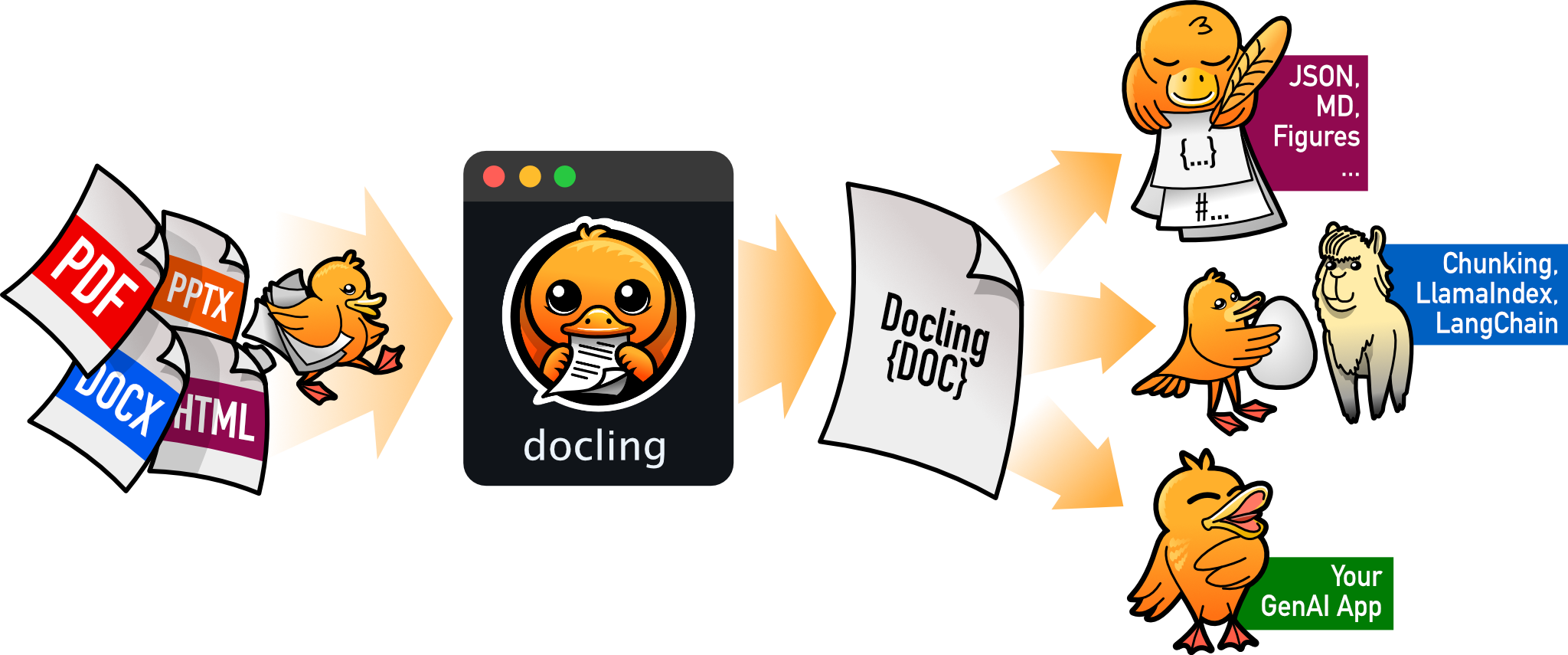
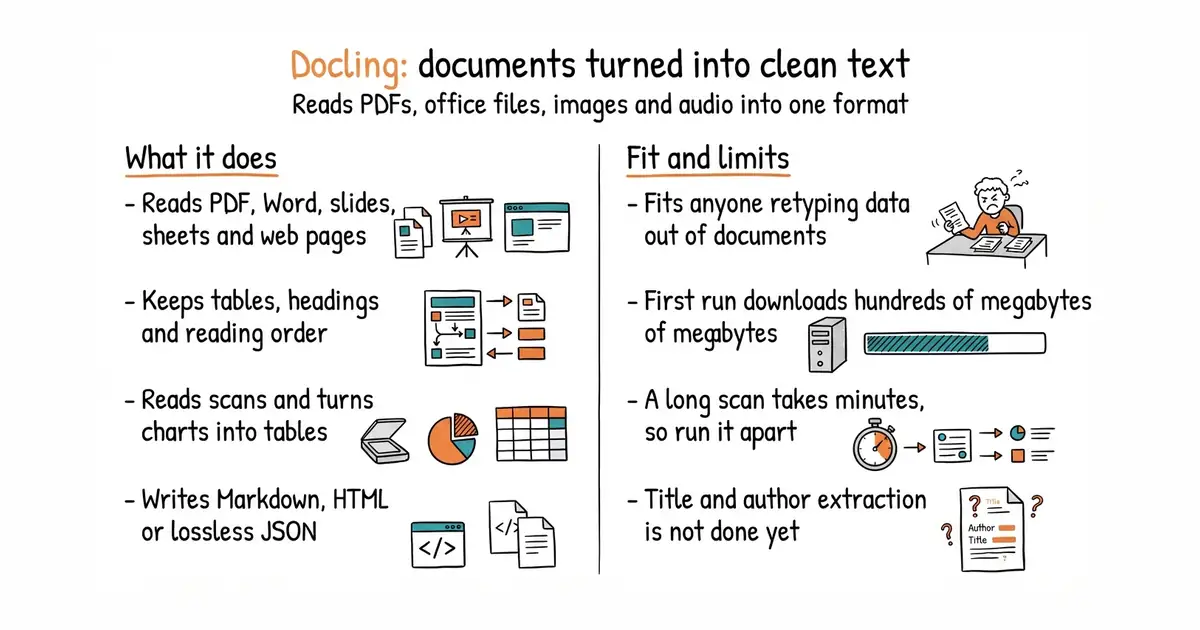
You give it a file and it produces one internal document, which it can then write out as Markdown, HTML, subtitles or lossless JSON. The input list is long and specific: PDF, Word, slides, spreadsheets, web pages, EPUB, Apple's three office formats, email files, images, LaTeX and plain text, with audio and video among its newer additions. For PDFs it works out page layout, reading order, table structure, code blocks and formulas, and it classifies images. It reads scans with character recognition, and it can turn bar, pie and line charts into tables. It runs locally, which the project names as the point for sensitive documents and machines with no internet. It plugs into the common model-application frameworks, and ships a command, a server and a helper for assistants. What it does not do yet is pull out a document's own details or understand chemistry: its README lists metadata extraction, meaning title, authors, references and language, and molecular structures as coming soon rather than present.
Why it matters
Who it suits. Anyone who regularly receives information as a document and types it out again, and anyone building software that has to accept whatever file a person has to hand. It also suits anyone who cannot send documents to an outside service, because nothing leaves the machine that runs it. Skip it if your documents are all plain text already, because then you are downloading several hundred megabytes of models to do nothing.
Verdict. Worth twenty minutes today on a document you have already given up on once. Install it, point it at the file, and read the Markdown it writes. The project is the busiest in this edition by a distance: 68,539 stars, version 2.138.0 released on the morning of this rewrite, code on 8 October 2026, and 860 issues open against 191 pull requests. Three things to plan for. The first run downloads the layout and table models, so the cold start is slow and the disk needs room. A long scanned document takes minutes on an ordinary processor, which makes this a background job with a progress indicator rather than something a visitor waits for. And the version number moves weekly, so pin it or an upgrade will change the shape of your output. Its text feeds naturally into the next two entries. If you want the lighter, narrower tool, py-pdf/pypdf reads and writes PDFs and leaves the understanding to you.
Summary (Key Points)from the README
Key features
- Broad format parsing: Handles PDF, DOCX, PPTX, XLSX, HTML, EPUB, Apple Pages, Numbers and Keynote, WAV, MP3, WebVTT, email (EML, MSG), images, LaTeX, plain text and more.
- Advanced PDF understanding: Covers page layout, reading order, table structure, code, formulas and image classification.
- Unified document model: Represents content in one DoclingDocument format.
- Multiple export formats: Outputs Markdown, HTML, WebVTT, DocLang, DocTags and lossless JSON.
- Application XML schemas: Supports USPTO patents, JATS articles and XBRL financial reports.
- Local execution: Runs on sensitive data and in air-gapped environments.
- OCR and vision models: Provides OCR for scanned PDFs and images, plus Visual Language Models such as GraniteDocling.
- Audio and video: Transcribes audio with ASR models and parses video files (MP4, AVI, MOV, MKV, WebM) into a transcript with keyframes.
- Integrations and serving: Connects to LangChain, LlamaIndex, Crew AI and Haystack, and can run as a service via docling-serve or an MCP server.
Ways to install
| Platform or method | What it needs | Effort |
|---|---|---|
| macOS | Python 3.10 or higher; x86_64 or arm64 | Not stated |
| Linux | Python 3.10 or higher; x86_64 or arm64 | Not stated |
| Windows | Python 3.10 or higher; x86_64 or arm64 | Not stated |
Important
- Python version: Python 3.9 support was dropped in version 2.70.0, so Python 3.10 or higher is required.
- Coming soon only: Metadata extraction (title, authors, references, language) and chemistry (molecular structures) are announced but not yet available.
- Model licenses differ: The codebase is MIT licensed, but individual models follow their own licenses in the original packages.
- Installation details: The README points to the docs for fuller installation instructions.
Written by an AI model from the project’s README; not part of the review, and it can be wrong.
- MIT and local, so there is no per-page fee and no document leaves the machine.
- Tables, headings and reading order survive the conversion, which is exactly what anything built on the text depends on.
- One of the most active projects in this report: a release on the day of this rewrite, and Python 3.10 through current versions supported.
- The first run downloads several hundred megabytes of models, so plan the disk and the cold start.
- A long scanned document takes minutes on a processor without a graphics card, so it cannot sit inside a web request.
- Fast-moving version numbers, 860 open issues, and its own list of missing features includes pulling out a document's title and authors.
Its Markdown output feeds straight into Chonkie (Edition 2).
python3 -m venv venv
source venv/bin/activate
pip install docling
docling my-document.pdf          # writes Markdown beside it
docling https://arxiv.org/pdf/2206.01062