190.8k stars · MIT · v0.1.8 (2026-09-21) · Track this in Rising ↗
Converts PDF, Word, PowerPoint, Excel, HTML, images and audio into Markdown in one command.
Radar check
What we found when we opened it. Every bar is one fact, with its date.
Last code pushed 23 Oct 2026, 4 days before this check.
Latest release v0.1.9 on 21 Oct 2026.
Public since November 2024, a little over 1 year.
192,357 stars and 14,376 forks.
113 commits and 124 new issues in the last 90 days.
135 contributors. 113 pull requests merged in 90 days.
A security policy says how to report a problem. No published security advisories.
How the bars are scored
- Alive. Days since the last code push: a week or less 100, a month 90, three months 70, six months 50, a year 30, eighteen months 15, older 0.
- Releases. Age of the latest GitHub release, on a similar scale; no bar when the project publishes no releases.
- Maturity. Age of the project: eight years 100, five 90, three 70, two 55, one 40, six months 25, younger 10.
- Adoption. Stars on a log scale: 100,000 stars is 100, 10,000 is 80, 1,000 is 60, 100 is 40.
- Activity. Commits in the last 90 days: 300 or more 100, 100 85, 30 65, 10 45, any 25.
- Community. People who have contributed: 100 or more 100, 30 80, 10 60, 5 40, 2 25, one 10.
- Security. A published security policy 80, none 40; published advisories are listed, not scored.
Checked by Repo Radar on 26 Oct 2026 from the repository on GitHub. Covered in Edition 14.
▶Repo detailsthe review · specs · pros & cons · install
What it does
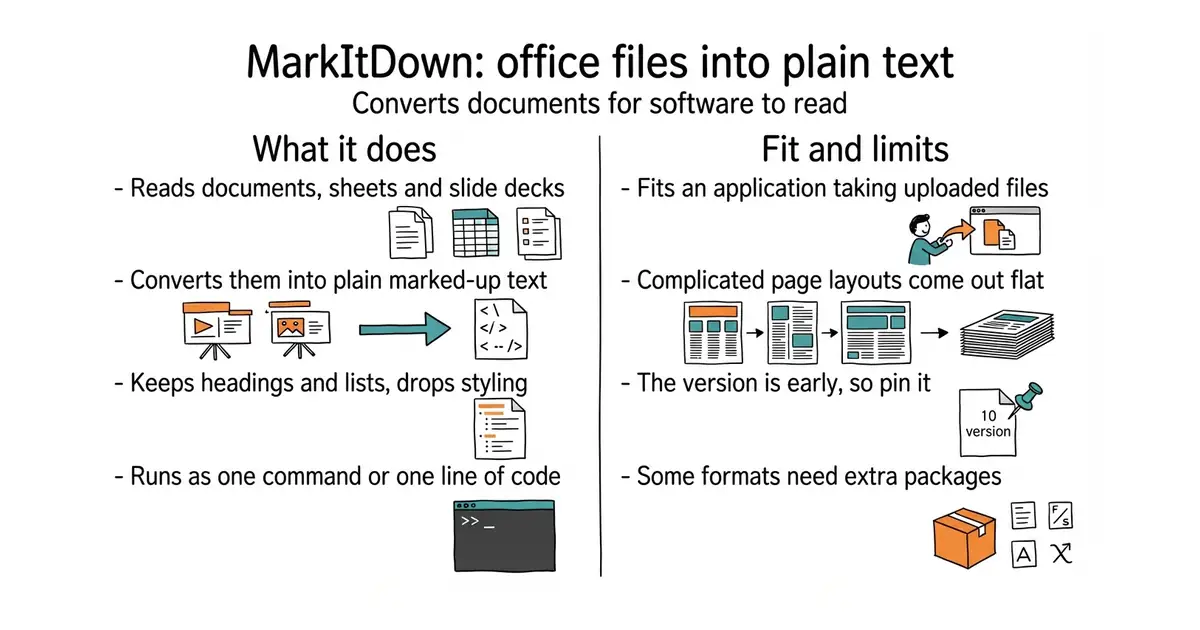
MarkItDown is a Python tool and library from Microsoft. It converts PDF, Word, PowerPoint, Excel, HTML, CSV, JSON, XML, ZIP archives, images and audio into Markdown, which is plain text with simple marks for headings and lists. It is built for feeding text to language models rather than for showing a document to a reader, so it keeps structure and drops styling. Optional extras add support for more formats, and a plug-in interface allows others to be added. Version 0.1.8 was published on 21 September 2026 on the Python package index, PyPI, and code last landed on 4 October 2026. It does not rebuild page layout: complicated PDFs come out flat, and columns can be mixed together.
Why it matters
Who it suits. It suits an application that must accept whatever file a person uploads, especially spreadsheets and slide decks that careful PDF readers do not cover. It suits a quick one-off conversion from the command line. Skip it when the PDFs are the hard kind, with columns, tables and scanned pages.
Verdict. Install it, try it first, and keep a careful reader behind it for the files it flattens. docling-project/docling and datalab-to/marker are the careful ones, and both are slower by design. Pin the version, because the output can change between releases and anything built on that text will notice.
Summary (Key Points)from the README
Key features
- Broad format support: Converts PDF, PowerPoint, Word, Excel, images, audio, HTML, CSV, JSON, XML, ZIP, YouTube URLs and EPub to Markdown.
- Structure preservation: Keeps headings, lists, tables and links in the Markdown output.
- Optional dependency groups: Install only the formats you need, such as `[pdf]`, `[docx]` or `[pptx]`, or everything with `[all]`.
- Third-party plugins: Plugins are off by default, can be listed and enabled, and are discovered through the #markitdown-plugin GitHub tag.
- OCR plugin: The markitdown-ocr plugin extracts text from images embedded in PDF, DOCX, PPTX and XLSX files using an LLM vision client.
- Azure Document Intelligence: Cloud layout extraction with selectable models, analysis add-ons and structured query fields, output as YAML front matter.
- Azure Content Understanding: Cloud conversion for documents, images, audio and video, with structured field extraction and custom analyzers.
- LLM image descriptions: Uses `llm_client` and `llm_model` for image descriptions in PPTX and image files, with `max_retries` defaulting to 2.
Ways to install
| Platform or method | What it needs | Effort |
|---|---|---|
| pip (`pip install 'markitdown[all]'`) | Python 3.10 through 3.14; a virtual environment is recommended | Low |
| Install from source | Source checkout; the README gives no further steps | Not stated |
| Docker | Section exists, but the README gives no details | Not stated |
Important
- Process privileges: MarkItDown performs I/O with the current process's privileges, so untrusted inputs must be validated and restricted before conversion.
- Narrowest API: Prefer `convert_local()` or `convert_stream()` over the permissive `convert()` when the input source is limited.
- Not for high-fidelity output: The output is designed for LLM and text-analysis pipelines and may not suit human-facing document conversion.
- Paid cloud services: Azure Content Understanding and Document Intelligence calls are billable, and several Document Intelligence add-ons (formulas, ocrHighResolution, styleFont, queryFields) carry extra charges.
- Silent OCR skip: If the OCR plugin gets no `llm_client`, OCR is skipped without an error and the built-in converter is used.
- Limited video support: Only Content Understanding handles video; built-in converters have no video support.
- Scope of contributions: The project does not accept web servers, REST APIs, hosted services or GUI applications in this repository.
Written by an AI model from the project’s README; not part of the review, and it can be wrong.
- A very wide range of formats from one command, including spreadsheets and slide decks.
- Fast, because it is not trying to rebuild page layout.
- MIT licence, from Microsoft, with version 0.1.8 published in September 2026 and code landing this month.
- The version number is 0.1.8. The output can change between versions, so pin it and test before upgrading.
- PDFs are the weak point. Complicated layouts come out flat and columns get mixed up.
- Some formats need extra packages. Install the full set, or real user files will produce missing-feature errors.
source venv/bin/activate
pip install 'markitdown[all]'
markitdown report.pdf > report.md