2.2k stars · Apache-2.0 · 4.2.1 (2026-08-13) · Track this in Rising ↗
Pours JSON and CSV into a real SQLite database with no schema design, then indexes it and adds full-text search.
Radar check
What we found when we opened it. Every bar is one fact, with its date.
Last code pushed 11 Oct 2026, 17 days before this check.
Latest release 4.2.1 on 13 Aug 2026.
Public since July 2018, a little over 8 years.
2,180 stars and 205 forks.
28 commits and 29 new issues in the last 90 days.
55 contributors. 10 pull requests merged in 90 days.
No security policy file says how to report a problem. No published security advisories.
How the bars are scored
- Alive. Days since the last code push: a week or less 100, a month 90, three months 70, six months 50, a year 30, eighteen months 15, older 0.
- Releases. Age of the latest GitHub release, on a similar scale; no bar when the project publishes no releases.
- Maturity. Age of the project: eight years 100, five 90, three 70, two 55, one 40, six months 25, younger 10.
- Adoption. Stars on a log scale: 100,000 stars is 100, 10,000 is 80, 1,000 is 60, 100 is 40.
- Activity. Commits in the last 90 days: 300 or more 100, 100 85, 30 65, 10 45, any 25.
- Community. People who have contributed: 100 or more 100, 30 80, 10 60, 5 40, 2 25, one 10.
- Security. A published security policy 80, none 40; published advisories are listed, not scored.
Checked by Repo Radar on 27 Oct 2026 from the repository on GitHub. Covered in Edition 8.
▶Repo detailsthe review · specs · pros & cons · install
What it does
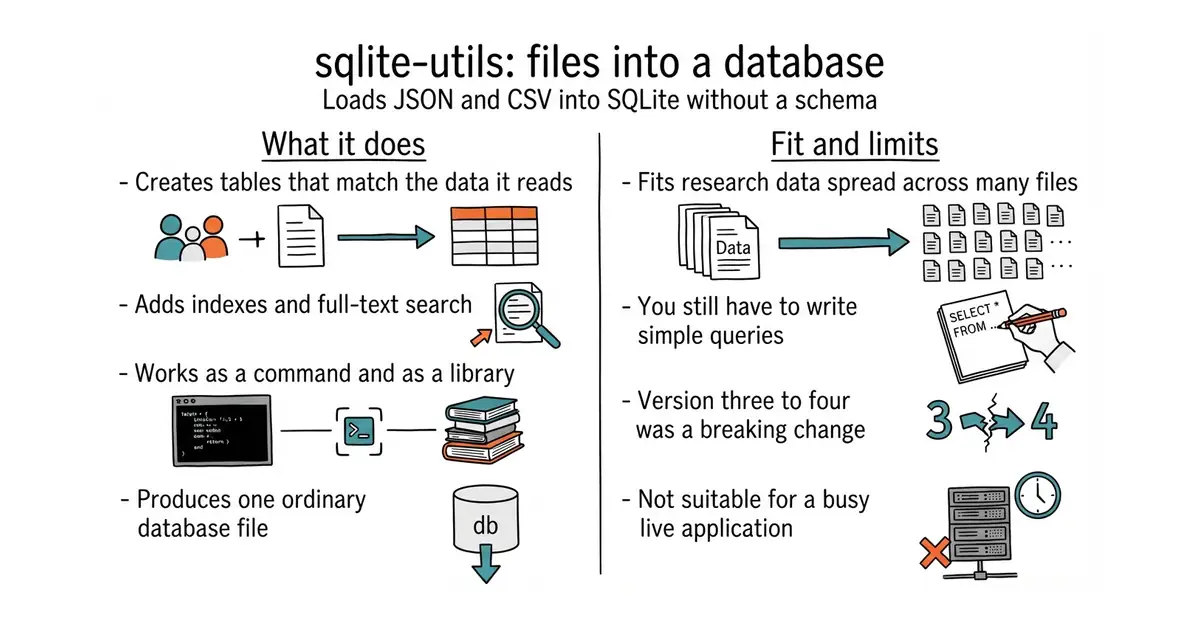
It reads JSON or CSV and creates a SQLite database table that matches the data. SQLite is a database that lives in one ordinary file, with no server to run. The tool works out the columns itself, which suits messy collected data where the shape is not known in advance. It can add indexes, create full-text search over chosen columns, transform columns, and extract repeated values into a lookup table. The same features are available as a Python library. Version 4.2.1 was published on 13 August 2026, and the GitHub releases page now shows it correctly, which it did not a year ago. It is not a database server and not a replacement for PostgreSQL in a live application.
Why it matters
Who it suits. Anyone sitting on a folder of collected files who wants to ask one question that cuts across all of them. It also suits people who want to hand research to a coding assistant as a database it can query, rather than as forty attachments. Skip it if the data already lives in a proper database, because you would be moving it for no reason.
Verdict. Ten minutes of work that makes several earlier collection tools worth more. The real boundary is SQL: the tool does nothing until someone writes a query, and that is a genuine skill step even though the queries here are simple. Keep it on the research side of the line and leave the live application on PostgreSQL. Datasette from the same author puts a browsable web interface over the database it creates. DuckDB is the better choice when the files are large and the questions are analytical.
Summary (Key Points)from the README
Key features
- JSON, CSV and TSV import: Pipe JSON, CSV or TSV straight into a new SQLite database file, with a table and schema created automatically.
- In-memory SQL on files: Run SQL queries, including joins, against CSV, TSV or JSON files without loading them into a database first, and view the results.
- Full-text search: Configure SQLite full-text search on your tables and run queries that return results ordered by relevance.
- Schema transformations: Make changes that SQLite's ALTER TABLE does not directly support, such as changing a column's type.
- Column extraction: Move columns into separate tables to normalize existing data.
- Migrations: Manage database migrations with Python migration files and the `sqlite-utils migrate` command.
- Plugins: Install plugins to add custom SQL functions and other features.
- Python library: Import `sqlite_utils` and use the same functionality from Python code.
Ways to install
| Platform or method | What it needs | Effort |
|---|---|---|
| pip (Python package installer) | A Python environment with pip | Not stated in the README |
| Homebrew | macOS with Homebrew installed | Not stated in the README |
Important
- Upgrading from 3.x: The README points to a separate 4.0 upgrade guide, so read it before upgrading an existing 3.x setup.
- Installation commands: The install commands are not included in the text provided, so check the README directly for exact steps.
- Documentation scope: The CLI and library are covered in separate full documentation, and the README gives only a short overview of each.
Written by an AI model from the project’s README; not part of the review, and it can be wrong.
- No schema design. It reads the data and creates the columns, which is right for messy input.
- Built-in full-text search means "every comment containing this word" is one command.
- The result is one file. Back it up, copy it, open it anywhere, with no server involved.
- You will be writing SQL, or asking an assistant to. The tool stops being useful until you do.
- Version 3 to version 4 was a breaking change. Read the changelog before upgrading an existing database.
- SQLite is the wrong home for a live application with many writers.
Its sibling Datasette will serve the same file as a browsable web UI if you ever want to click instead of type, and entry 06 will chart it.
Standalone on your Mac, alongside the scrapers, which for yt-dlp and the comment downloader is where they have to run anyway.
pip install sqlite-utils
sqlite-utils insert research.db comments comments.json
sqlite-utils enable-fts research.db comments text
sqlite-utils research.db "select count(*) from comments"