39.6k stars · Apache-2.0 · v2.0.0 (2026-07-20) · Track this in Rising ↗
The recognised open state-of-the-art PDF-to-Markdown converter — Docling's head-to-head, on a corpus of your users' actual uploads.
Radar check
What we found when we opened it. Every bar is one fact, with its date.
Last code pushed 22 Oct 2026, 5 days before this check.
Latest release v2.0.0 on 20 Jul 2026.
Public since October 2023, a little over 2 years.
40,639 stars and 2,944 forks.
13 commits and 29 new issues in the last 90 days.
29 contributors. 2 pull requests merged in 90 days.
No security policy file says how to report a problem. No published security advisories.
How the bars are scored
- Alive. Days since the last code push: a week or less 100, a month 90, three months 70, six months 50, a year 30, eighteen months 15, older 0.
- Releases. Age of the latest GitHub release, on a similar scale; no bar when the project publishes no releases.
- Maturity. Age of the project: eight years 100, five 90, three 70, two 55, one 40, six months 25, younger 10.
- Adoption. Stars on a log scale: 100,000 stars is 100, 10,000 is 80, 1,000 is 60, 100 is 40.
- Activity. Commits in the last 90 days: 300 or more 100, 100 85, 30 65, 10 45, any 25.
- Community. People who have contributed: 100 or more 100, 30 80, 10 60, 5 40, 2 25, one 10.
- Security. A published security policy 80, none 40; published advisories are listed, not scored.
Checked by Repo Radar on 25 Oct 2026 from the repository on GitHub. Covered in Edition 9.
▶Repo detailsthe review · specs · pros & cons · install
What it does
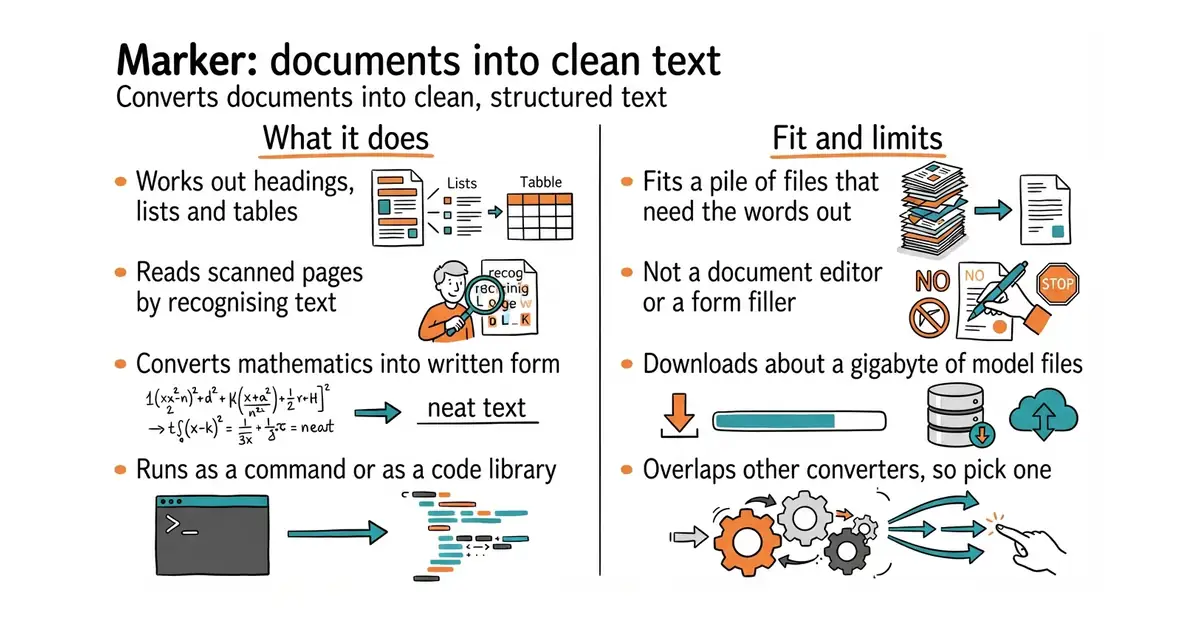
Marker reads a PDF and works out its layout: which blocks are headings, paragraphs, lists, tables, figures and captions. It then writes the content out as Markdown, as HTML or as structured JSON that keeps the block positions. Scanned pages go through text recognition first, and mathematics is converted to LaTeX. Tables are reconstructed as tables rather than flattened into lines. It works as a command, as a Python library and as a hosted service run by the same team, and the models it uses are about a gigabyte on disk. It handles other office formats as well as PDF. It does not edit or create PDFs, it does not fill in forms, and it makes no promise of perfect output on a badly scanned page.
Why it matters
Who it suits. Anyone who has a pile of PDFs and needs the words out of them — research papers, contracts, reports, scanned archives. It is also the right tool when documents uploaded by other people must be turned into searchable text inside a product, because the Apache-2.0 licence puts no conditions on that. Skip it if the PDFs are already text-based and simple, because a much lighter extractor will do.
Verdict. Worth half an hour to test and then a decision. Docling (Ed.3 #9) is the other serious option, and neither wins outright: Marker tends to do better on equations and tables, Docling accepts more input formats. Run both over ten real documents and keep the winner, then run only that one. The memory footprint is the practical limit — a gigabyte of models on a small machine is noticeable, and a graphics card helps although version 2 improved plain-processor speed.
Summary (Key Points)from the README
Key features
- Broad input support: Converts PDF, image, PPTX, DOCX, XLSX, HTML and EPUB files in all languages.
- Multiple outputs: Produces markdown, JSON, chunks or HTML, with chunks flattened for RAG.
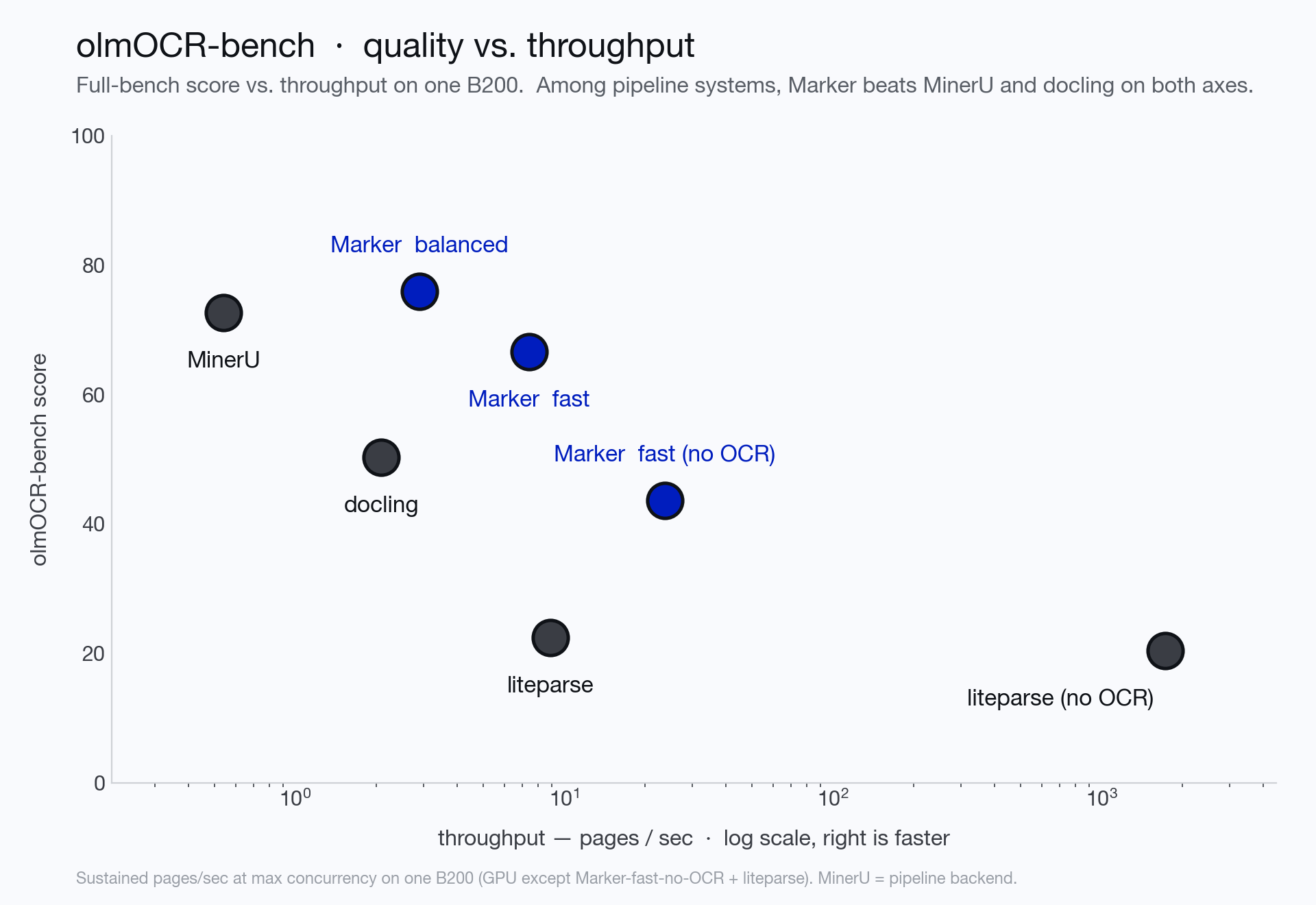
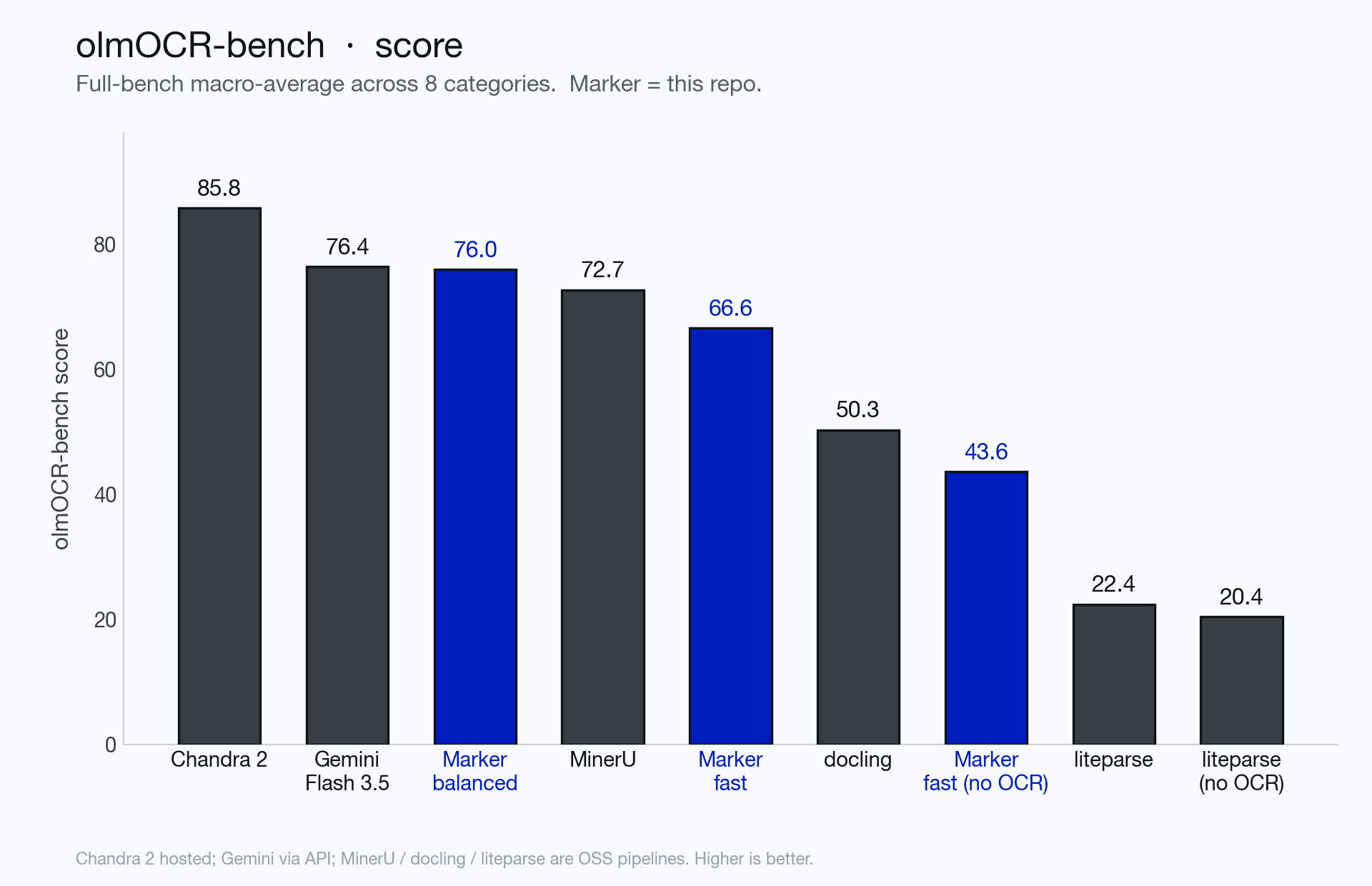
- Benchmarked accuracy: Balanced mode scores 76.0% overall and 83.5% on born-digital PDFs on olmocr-bench (1,403 PDFs).
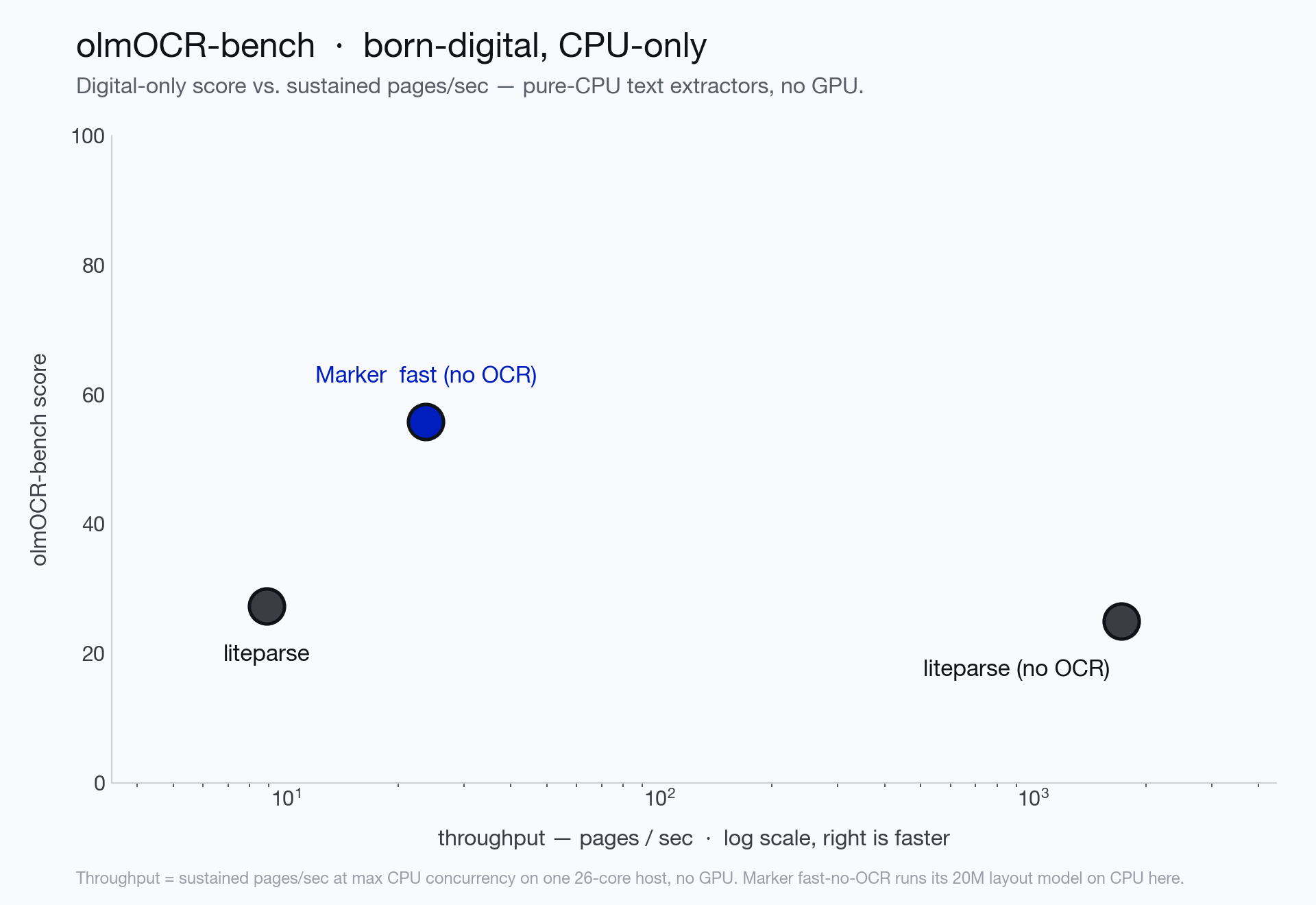
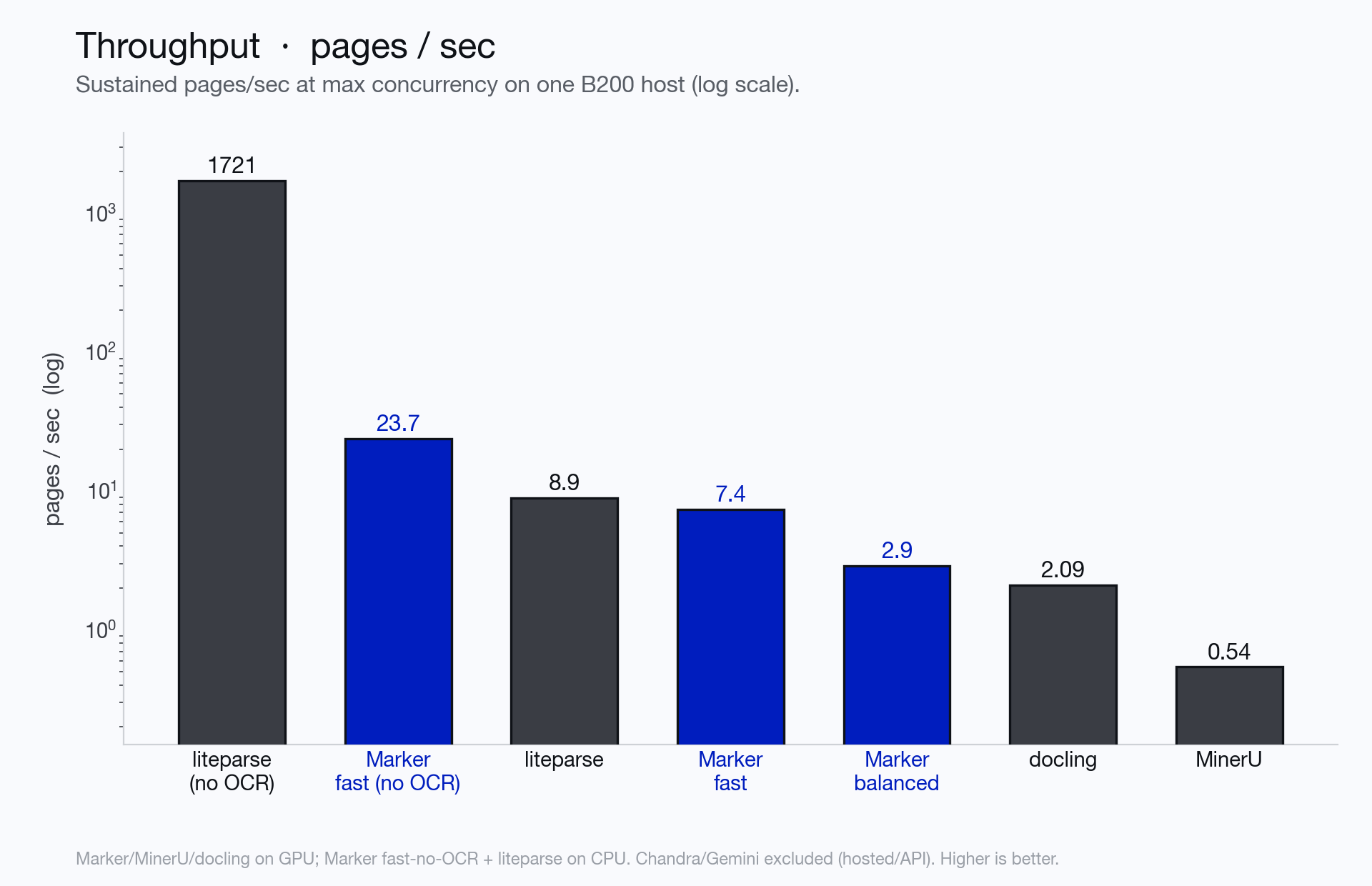
- Fast CPU path: Fast mode runs at 7.4 pages/sec on a GPU, and fast with no OCR runs at 23.7 pages/sec on CPU, per the README's B200 measurements.
- Selective VLM use: Calls the vision-language model only for equations, garbled blocks or scanned pages, and a clean digital document without equations never starts the VLM server.
- Tables and math: Reconstructs tables from the PDF text layer and converts inline math to LaTeX.
- Cleanup: Strips page headers and footers by default and extracts images.
- Optional LLM hybrid: The --use_llm flag adds an LLM pass for cross-page table merges, forms and custom correction prompts, with support for several providers.
- Extensible pipeline: Custom processors, renderers and providers can be added, and the Python API exposes blocks for manipulation.
Ways to install
| Platform or method | What it needs | Effort |
|---|---|---|
| Local, NVIDIA GPU (balanced mode) | Python 3.10+, PyTorch, Docker and the NVIDIA Container Toolkit for the vLLM server | Moderate |
| Local, CPU or Apple Silicon | Python 3.10+, PyTorch, and the llama-server binary from llama.cpp | Moderate |
| Local, CPU only without OCR | Python 3.10+ and PyTorch; no inference server is started | Low |
| Hosted Datalab API | A Datalab account; the README cites about 5,000 free pages monthly with a work email | Low |
| Modal deployment | A Modal account; the README points to an example deployment | Moderate |
Important
- Model license: Code is Apache 2.0, but the model weights use a modified AI Pubs Open Rail-M license, free for research, personal use and startups under $5M funding or revenue; other commercial use needs a paid license.
- Setup requirements: Requires Python 3.10+ and PyTorch, plus Docker with the NVIDIA Container Toolkit (GPU) or llama.cpp (CPU/Apple Silicon) for OCR.
- Fast mode math: Fast mode scores 23.4 on arXiv math versus 83.9 for balanced, so use balanced for math-heavy documents.
- No OCR mode: With --disable_ocr, math scores zero and scanned pages are skipped.
- LLM setup: The --use_llm path needs provider credentials; the default model is gemini-3.5-flash and the troubleshooting section says GOOGLE_API_KEY must be set for Gemini.
- API limits: The built-in API server does not expose --use_llm or --disable_ocr.
- Known layout gaps: Very complex layouts with nested tables and forms may not work, and forms may not render well.
- Benchmark source: The scores are the authors' own runs on olmocr-bench using their harness; the README says they are reproducible with the benchmarks folder.
- Memory: Out-of-memory errors are addressed by lowering worker count or splitting long PDFs.
Written by an AI model from the project’s README; not part of the review, and it can be wrong.
- Keeps tables as tables and converts mathematics to LaTeX
- Apache-2.0, so it is safe inside software that is sold
- Works as a command, as a library and as a hosted service
- About a gigabyte of model files, and a real memory footprint on a small machine
- Noticeably faster with a graphics card than without one
- Overlaps Docling; running both in production wastes resources
Paid PDF-extraction APIs
A chunker downstream, and a background job queue to run it out of the request path
pip install marker-pdf
marker_single input.pdf --output_dir ./out