Overview
Summary
The useful answer before the supporting detail.
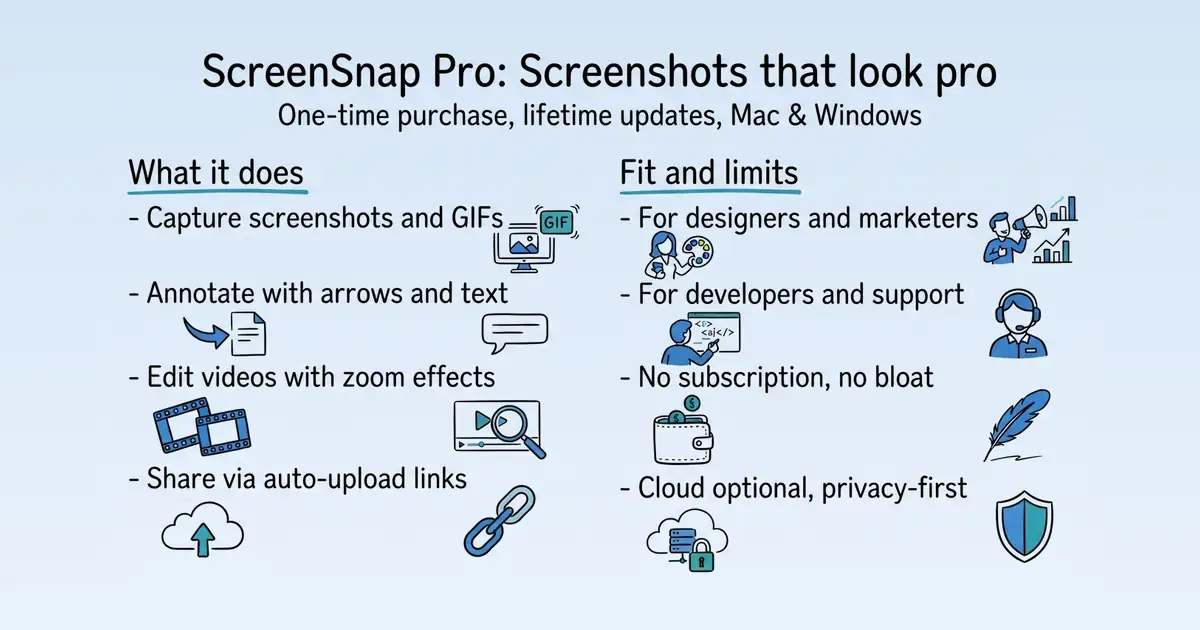
ScreenSnap Pro is a professional screenshot and GIF recording app for Mac and Windows S1. It solves the problem of creating polished, annotated screenshots and recordings for client work, demos, and bug reports, with a one-time purchase model S1. Its practical value is a fast, all-in-one tool that keeps captures on-device unless shared, with lifetime updates included S1 S141.
Product identity and positioning
Name, category, positioning, audience, and first-party claims.
- Identity: ScreenSnap Pro is a professional screenshot and GIF recording app for Mac S1.
- Core purpose: It solves the problem of creating polished, annotated screenshots and recordings for client work, demos, and bug reports S1.
- Intended users: It is designed for professionals who need quick, polished visual communication, such as product designers and marketing consultants S102.
- Product scope: It is a desktop app, not a platform, with capture, annotation, video editing, and sharing features S18.
- Positioning: The vendor positions it as a simple, no-subscription tool that "just works" S102.
- Claimed distinction: It claims to replace multiple apps with a one-time purchase and lifetime updates S102 S141.
Use cases and audiences
Who the product serves and the jobs it is designed to handle.
Traffic and search
SEO analysis
Collected Oct 22, 2026screensnap.pro: an estimated 248,331 total monthly visits and about 100,070 monthly organic visits across 12,777 ranking keywords. Scout crawled 15 pages and measured a technical health score of 98/100.
Search summary
The useful answer before the supporting detail.
Capture, annotate, and send screenshots that explain themselves. Bug reports, manuals, client feedback, video walkthroughs. screensnap.pro: an estimated 248,331 total monthly visits and about 100,070 monthly organic visits across 12,777 ranking keywords. Scout crawled 15 pages and measured a technical health score of 98/100.
- Total traffic (modeled): 248,331 monthly visits across all channels.
- Organic search traffic (estimated): 100,070 monthly visits from search.
- Strongest sampled ranking: best free image upscaler at position 1.
- Leading page in the collected evidence: https://www.screensnap.pro/blog/does-snapchat-notify-screenshots.
- Closest measured organic competitor: facebook.com, appearing 3 times in the sampled first-page SERPs.
- Technical crawl: 15 pages, health score 98/100.
Website intelligence — Collected evidence
Company identity and positioning
| Page type | Evidence | Source |
|---|---|---|
| other | Capture, annotate, and send screenshots that explain themselves. Bug reports, manuals, client feedback, video walkthroughs. Mac & Windows. Pay once. | https://www.screensnap.pro/ |
| other | Capture Modes | https://www.screensnap.pro/ |
| other | Crop & Cut | https://www.screensnap.pro/ |
| other | Padding & Shadow | https://www.screensnap.pro/ |
| other | Background Noise | https://www.screensnap.pro/ |
| other | Blur & Redact | https://www.screensnap.pro/ |
| other | Color Picker | https://www.screensnap.pro/ |
| other | Aspect Ratio | https://www.screensnap.pro/ |
| other | Style Presets | https://www.screensnap.pro/ |
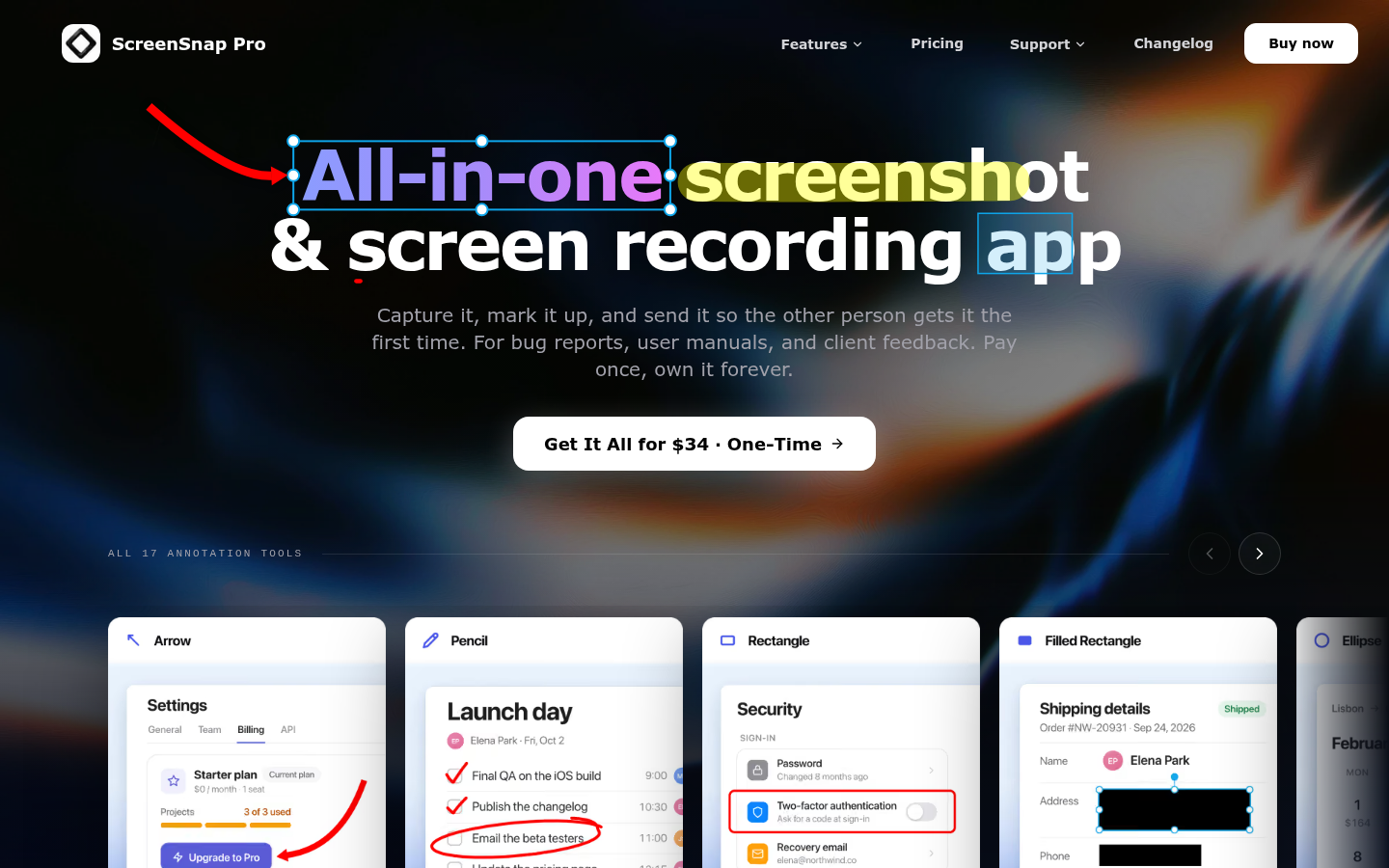
| other | Capture it, mark it up, and send it so the other person gets it the first time. For bug reports, user manuals, and client feedback. Pay once, own it forever. | https://www.screensnap.pro/ |
| other | Get It All for $34 · One-TimeGet It All for $34 | https://www.screensnap.pro/ |
| other | 0MorganIndie developer · Maker of ScreenSnap Pro | https://www.screensnap.pro/ |
Domain performance
Modeled total traffic, six-month trend, engagement, countries, and domain identity.
Total website traffic
| Month | Modeled visits |
|---|---|
| 2026-04 | 60,923 |
| 2026-05 | 132,804 |
| 2026-06 | 155,638 |
| 2026-07 | 176,446 |
| 2026-08 | 237,476 |
| 2026-09 | 248,331 |
Top visitor countries
| Country | Name | Traffic share |
|---|---|---|
| US | United States | 24.9% |
| IN | India | 5.7% |
| DE | Germany | 4.4% |
| GB | United Kingdom | 2.8% |
| ID | Indonesia | 2.5% |
Domain identity
| Signal | Value |
|---|---|
| Registered | Aug 5, 2025 |
| Last changed | Aug 11, 2026 |
| Expires | Aug 5, 2030 |
| WHOIS server | — |
| DNSSEC | Not signed |
| Nameservers | sage.ns.cloudflare.com, saanvi.ns.cloudflare.com |
Website capture
Organic keywords
Top keywords and an independent Google result page.
Top organic keywords
| Keyword | Volume | CPC | Estimated value |
|---|---|---|---|
| screenshot chrome | 5,900 | $1.14 | $500 |
| best image upscaler | 4,800 | $2.76 | $500 |
| similar to obs studio | 460 | $0.00 | $430 |
| ocr mac | 1,060 | $2.47 | $380 |
| shottr | 32,470 | $1.06 | $340 |
Independent Google result page
Query: best free image upscaler
| Position | Title | URL | Description |
|---|---|---|---|
| 1 | Upscale.media: AI Image Upscaler - Enlarge & Enhance Your ... | https://www.upscale.media/ | Upscale images to 2x or 4x without losing textures or details with our AI tool. The best AI image upscaler for stunning visuals. Try Upscale.media now! |
| 2 | Image Upscaler Online – 8x Image Resolution w/ AI | https://www.topazlabs.com/tools/image-upscale?srsltid=AYCX9vJhHTAyr7Lo6cNkrv3SdhnFnOzVLwX6F49_wrOpKVBkynmqWu42 | Upscale your images online with AI. Advanced image upscaling up to 8x resolution. Experience the world's best image upscaling technology. |
| 3 | Best AI Image Upscalers: 9 Tools, 8 Free (2026) | https://www.screensnap.pro/blog/best-ai-image-upscalers | Upscayl is the only fully free, open-source option on this list. It runs on your own machine, so your images never touch a server. That makes it ... |
| 4 | Free AI Image Upscaler Online | High Resolution, No Signup | https://fal.ai/tools/image-upscaler | Upscale images instantly with AI. Increase image resolution for free, no signup needed. Get sharp, high-resolution results in seconds. Try fal.ai's image ... |
| 5 | Is there any free unlimited image upscaler that's actually ... | https://www.reddit.com/r/upscaling/comments/1phzynp/is_there_any_free_unlimited_image_upscaler_thats/ | TBG ETUR is a ComfyUI upscaler and refiner designed for images up to 100MP+. It is not a one-click solution—it's built for professional, ... |
| 6 | Free Online Image Upscaler | Adobe Firefly | https://www.adobe.com/products/firefly/features/image-upscaler.html | Upscale images online for free with AI. Improve resolution, clarity, and sharpness while preserving detail. Perfect for photos, designs, and creatives. |
| 7 | Upscale image: 100% for free with AI | https://cloudinary.com/tools/image-upscale | Instantly upscale your images with AI-powered image upscaler. Maintain sharp details, crisp textures, and high resolution without losing quality. |
| 8 | Best free vs. paid AI image upscalers: 2026 comparison | https://letsenhance.io/blog/all/free-paid-ai-upscaler/ | Generally, Upscayl is the strongest free option available. It's open-source, runs entirely on your machine (Windows, macOS, Linux), uses Real- ... |
| 9 | The Best FREE AI Image Upscalers In 2025 | https://www.youtube.com/watch?v=AHXoH-DcTAE | Discover the best free AI image upscalers of 2025! Have other options I didn't mention here? Let me know in the comments — ILoveIMG: ... |
| 10 | Upscayl - AI Image Upscaler | https://upscayl.org/ | The #1 Free and Open Source AI Image Upscaler for Linux, MacOS and Windows. Upscayl uses the power of AI to upscale your images with the best quality ... |
Important pages
Pages earning the most estimated search traffic in the sample.
Website intelligence — Collected evidence
Prioritized website intelligence pages
| Type | Page | Words | Change | URL |
|---|---|---|---|---|
| other | ScreenSnap Pro: Screenshot Annotation & Screen Recording | 1,513 | new | https://www.screensnap.pro/ |
| pricing | Pricing - ScreenSnap Pro for Mac & Windows | 1,287 | new | https://www.screensnap.pro/pricing |
| integrations | Documentation — ScreenSnap Pro | 1,355 | new | https://www.screensnap.pro/documentation |
| integrations | Best Process Documentation Tools in 2026 \ | static | 3,304 | new |
| integrations | Best Screenshot Apps for Mac (2026): 8 Tested and Ranked | 2,940 | new | https://www.screensnap.pro/blog/best-screenshot-apps-for-mac |
| integrations | Annotation Tools — ScreenSnap Pro Documentation | 1,047 | new | https://www.screensnap.pro/documentation/annotation-tools |
| integrations | Arrows, Shapes & Paths — ScreenSnap Pro Documentation | 614 | new | https://www.screensnap.pro/documentation/arrows-and-shapes |
| integrations | Auto Upload: A Link for Every Screenshot — ScreenSnap Pro Documentation | 528 | new | https://www.screensnap.pro/documentation/auto-upload |
| integrations | Background Blur & Noise — ScreenSnap Pro Documentation | 357 | new | https://www.screensnap.pro/documentation/background-effects |
| integrations | Padding, Inset, Corners & Shadow — ScreenSnap Pro Documentation | 620 | new | https://www.screensnap.pro/documentation/borders-and-shadows |
| integrations | Capture History — ScreenSnap Pro Documentation | 403 | new | https://www.screensnap.pro/documentation/capture-history |
| integrations | Capturing Screenshots — ScreenSnap Pro Documentation | 1,886 | new | https://www.screensnap.pro/documentation/capturing |
| integrations | Library: Local Files and Cloud Uploads — ScreenSnap Pro Documentation | 778 | new | https://www.screensnap.pro/documentation/cloud-folder |
| integrations | Color Picker — ScreenSnap Pro Documentation | 525 | new | https://www.screensnap.pro/documentation/color-picker |
Features
No supporting public-page evidence was collected for this category.
Pricing and plans
| Page type | Evidence | Source |
|---|---|---|
| pricing | $34one-time payment | https://www.screensnap.pro/pricing |
| pricing | Every future update is free. No upgrade fees, ever. View full changelog | https://www.screensnap.pro/pricing |
| pricing | “The tool is good and very simple to use, it does what it says on the website, and finding this type of tool for Windows is tough. I have been searching for one for over a year now and finally liking this one. Regular updates as well.” | https://www.screensnap.pro/pricing |
| pricing | Everything's included with your $34. | https://www.screensnap.pro/pricing |
| pricing | Every future feature plus macOS and Windows compatibility updates, free | https://www.screensnap.pro/pricing |
| pricing | Risk-free. 30 days to decide. | https://www.screensnap.pro/pricing |
| pricing | Try ScreenSnap Pro for a full month. If it's not right for you, email support@screensnap.pro and get a full refund. No questions, no forms, no retention calls. Simple, fair, and straightforward. | https://www.screensnap.pro/pricing |
| pricing | One payment replaces $29/year subscriptions. | https://www.screensnap.pro/pricing |
| pricing | Most screenshot apps charge $29–$39 per year. That's $87–$117 over three years — and you lose access if you stop paying. ScreenSnap Pro is $34 once. After 8 months, you're saving money. After a year, you're way ahead. And you'll never see a renewal charge. | https://www.screensnap.pro/pricing |
| pricing | Your $34 purchase is a single license key with two seats. Activate the first on your main machine and the second on your laptop — a Mac and a PC, two Macs, or two PCs. One key to keep track of, no second checkout, and every future update included on both. | https://www.screensnap.pro/pricing |
| pricing | ScreenSnap Pro isn't backed by venture capital or built to be sold. It's a tool I built because I needed it, and I plan to keep improving it for years. | https://www.screensnap.pro/pricing |
| pricing | Regular updates with new features plus macOS and Windows compatibility, forever free | https://www.screensnap.pro/pricing |
| pricing | Questions about pricing? | https://www.screensnap.pro/pricing |
| pricing | Yes! ScreenSnap Pro is a one-time purchase of $34. No subscriptions, no recurring fees. You pay once and own it forever, including all future updates. | https://www.screensnap.pro/pricing |
Integrations and supported platforms
| Page type | Evidence | Source |
|---|---|---|
| integrations | Documentation | https://www.screensnap.pro/documentation |
| integrations | Everything you need to capture, annotate, and share beautiful screenshots with ScreenSnap Pro. | https://www.screensnap.pro/documentation |
| integrations | Getting Started | https://www.screensnap.pro/documentation |
| integrations | Installing ScreenSnap Pro | https://www.screensnap.pro/documentation |
| integrations | Download and install ScreenSnap Pro on a Mac (Apple Silicon or Intel) or a 64-bit Windows 10 or 11 PC, then open it for the first time. | https://www.screensnap.pro/documentation |
| integrations | ](/documentation/installation)[ | https://www.screensnap.pro/documentation |
| integrations | First Launch and Setup | https://www.screensnap.pro/documentation |
| integrations | Walk through the ScreenSnap Pro setup: activate your license, grant macOS permissions, set shortcuts, cloud links and a save folder, then take a first screenshot. | https://www.screensnap.pro/documentation |
| integrations | ](/documentation/first-launch-setup)[ | https://www.screensnap.pro/documentation |
| integrations | Interface Overview | https://www.screensnap.pro/documentation |
| integrations | A tour of ScreenSnap Pro: the menu bar or tray menu, Capture Controls, Quick Preview and the editor with its Image, Video, Library, History and Settings tabs. | https://www.screensnap.pro/documentation |
| integrations | ](/documentation/interface-overview)[ | https://www.screensnap.pro/documentation |
| integrations | Permissions on macOS and Windows | https://www.screensnap.pro/documentation |
| integrations | Which permissions ScreenSnap Pro needs on macOS (Screen Recording, Accessibility, Microphone, Camera), how to fix a denied one, and Windows capture fixes. | https://www.screensnap.pro/documentation |
| integrations | ](/documentation/permissions)[ | https://www.screensnap.pro/documentation |
| integrations | Activating Your License | https://www.screensnap.pro/documentation |
| integrations | Activate your ScreenSnap Pro license key, use its 2 seats on any mix of Mac and Windows computers, move it to a new computer, and fix activation errors. | https://www.screensnap.pro/documentation |
| integrations | ](/documentation/license-activation)[ | https://www.screensnap.pro/documentation |
| integrations | Updating ScreenSnap Pro | https://www.screensnap.pro/documentation |
| integrations | How ScreenSnap Pro updates itself in the background, how to check for updates manually, find your version, and what to do if an update fails. | https://www.screensnap.pro/documentation |
Product and company updates
No supporting public-page evidence was collected for this category.
Rank tracking
Persistent keyword baselines and position movement.
This analysis created the first position baseline at 2026-10-22T12:07:04.638Z. Movement appears after the next fresh analysis using the same location and language.
Features
Features and capabilities
Core functions and evidence-backed product capabilities.
| Capability | What it does |
|---|---|
| Capture | Capture an area, window, or full screen on Mac and Windows, with delay and repeat options S46. |
| Annotation | Mark up screenshots with arrows, shapes, text, blur, highlight, spotlight, and callouts S1 S23. |
| Video editing | Record screen and edit in a video editor with trim, split, speed, volume, and zoom effects S18. |
| GIF creation | Record short silent GIFs or convert video recordings to GIF S18. |
| OCR | Copy text from any screenshot or screen area using built-in OCR S18. |
| Auto Upload | Automatically upload screenshots and copy share links to clipboard S18 S32. |
| Background effects | Add blur or noise to backgrounds, and control padding, corners, and shadows S33 S37. |
| Capture History | Reopen recent screenshots from a private, time-limited history S42. |
Integrations and ecosystem
Connected products, exports, APIs, and workflow compatibility.
| Integration or interface | Type | What it enables |
|---|---|---|
| Auto Upload | Cloud sharing | Uploads screenshots and copies share links to clipboard S18. |
| OCR | Built-in feature | Extracts text from screenshots S18. |
| Web page capture | Built-in feature | Captures full-page or first-screen screenshots from a URL S18. |
| Export formats | Data portability | Saves screenshots as PNG, JPEG, WebP, or AVIF S18. |
| Video export | Data portability | Exports recordings as MP4 or GIF S18. |
Pricing
Pricing and plans
Published plans, free access, trials, credits, and pricing limitations.
Competition
Competitive landscape
Domains competing for the same organic search demand.
Sampled competitors
| Competitor | First-page appearances | Sampled queries | Average position | Queries observed |
|---|---|---|---|---|
| facebook.com | 3 | 2 | 5.3 | best free image upscaler, does snap notify when you screenshot a story |
| youtube.com | 2 | 1 | 4 | best free image upscaler |
| letsenhance.io | 1 | 1 | 1 | best free image upscaler |
| reddit.com | 1 | 1 | 1 | does snap notify when you screenshot a story |
| imagefree.org | 1 | 1 | 2 | best free image upscaler |
| edimakor.hitpaw.com | 1 | 1 | 2 | does snap notify when you screenshot a story |
| community.pumpic.com | 1 | 1 | 4 | does snap notify when you screenshot a story |
| blur.me | 1 | 1 | 5 | does snap notify when you screenshot a story |
| ezremove.ai | 1 | 1 | 6 | best free image upscaler |
| justanswer.com | 1 | 1 | 6 | does snap notify when you screenshot a story |
Website intelligence — Collected evidence
Customers, testimonials, and first-party review claims
No supporting public-page evidence was collected for this category.
Independent review sources discovered
No links to supported independent review platforms were discovered on the collected pages.
Backlink profile
Authority and referring-domain signals.
Backlink comparison profile
- Domain rating: 41/100
- Backlinks: 29,434
- Referring domains: 2,620
- Dofollow backlinks: 29.0%
- Dofollow referring domains: 66.0%
| Source DR | Source title | Anchor | Source URL | Target URL |
|---|---|---|---|---|
| 66 | How to Use ChatGPT For Free in 2026: 3 Ways That Work | ScreenSnap Pro | https://overchat.ai/ai-hub/use-chatgpt-for-free | https://screensnap.pro/ |
| 1 | How to Crop a Screenshot on Mac, iPhone and iPad \ | Pizazoo | ScreenSnap: How to Crop a Screenshot on Mac (2026) | https://pizazoo.com/blog/how-to-crop-a-screenshot/ |
| 72 | The 11 Best Scribe Alternatives for Process Documentation (2026) \ | Tango | ScreenSnap Pro | https://www.tango.ai/blog/scribe-alternatives |
| 56 | The Best Mac Screenshot Tools for Every Workflow \ | TheSweetBits | ScreenSnap Pro | https://thesweetbits.com/best-screenshot-apps-for-mac/ |
| 54 | Best Screen Recorder for Mac (2026): 9 Free & Paid Compared - Screen Charm | screensnap.pro | https://screencharm.com/blog/best-screen-recording-software-mac | https://www.screensnap.pro/ |
| 69 | LinkedIn Graphic Size Guide 2026: All Dimensions - EvergreenFeed Blog | social media image sizes reference | https://www.evergreenfeed.com/blog/linkedin-graphic-size/ | https://www.screensnap.pro/blog/social-media-image-sizes |
| 97 | GitHub - trungdq88/Awesome-Black-Friday-Cyber-Monday: Awesome apps, software, and SaaS deals on Black Friday. · GitHub | ScreenSnap Pro | https://github.com/trungdq88/Awesome-Black-Friday-Cyber-Monday | https://screensnap.pro/ |
| 6 | OBS vs Streamlabs: OBS Wins Mac — Bundl.run | OBS vs Streamlabs 2026 overview | https://bundl.run/compare/obs-vs-streamlabs | https://www.screensnap.pro/blog/obs-vs-streamlabs |
| 80 | Storyblocks Maker Alternatives & Competitors - SaaSHub | ScreenSnap Pro logo | https://www.saashub.com/storyblocks-maker-alternatives | https://www.screensnap.pro/?saashub |
| 42 | Reels Format Size: The Complete Spec Reference | ScreenSnap's Reels size guide | https://www.hooked.so/blog/reels-format-size | https://www.screensnap.pro/blog/instagram-reels-size-guide |
Collection decision
The Scout search index remains intentionally excluded from automatic Scout analysis. This Scout traffic model profile costs 5 credits (0.5 cents) and is included in the first comparison run so its usefulness can be judged before the recurring collection is finalized.
AI visibility
Measured ChatGPT and Google AI mentions with cited sources.
AI-assistant referral traffic
- Estimated current generative-AI referral share: 1.2%
| Month | Traffic share | Source |
|---|---|---|
| — | — | All AI assistants |
Website intelligence — Collected evidence
Site-stated AI capabilities
No supporting public-page evidence was collected for this category.
These are first-party product claims, not independent measurements of AI-search visibility.
Marketing opportunities
Actions calculated directly from the collected evidence.
| Opportunity | Recommended action | Evidence |
|---|---|---|
| Competitor gap | Review the sampled queries where facebook.com appears. | 3 first-page appearances across best free image upscaler, does snap notify when you screenshot a story |
Website intelligence — Collected evidence
Website evidence gaps
- features: no usable public page was collected; verify whether the site publishes this evidence.
- customers: no usable public page was collected; verify whether the site publishes this evidence.
- reviews: no usable public page was collected; verify whether the site publishes this evidence.
- changes: no usable public page was collected; verify whether the site publishes this evidence.
- identity: no usable public page was collected; verify whether the site publishes this evidence.
- technical: no usable public page was collected; verify whether the site publishes this evidence.
Trust and proof
Customers, proof, and reviews
Published proof, customer signals, and review evidence.
Independent reviews
| Platform | Page | How it was found | Note |
|---|---|---|---|
| Apple App Store | ScreenSnap Pro App - App Store | Grounded web search | Blur or pixelate sensitive info before you share • Emphasize exactly what matters with a tap MADE FOR SHARING ... and creators who want screenshots that look professional — without opening a heavy design tool |
Customer proof
No named customers, testimonials, or customer case studies were found.
Independent mentions
- ScreenSnap Pro: Screenshot Annotation & Screen Recording — ScreenSnap Pro: Screenshot Annotation & Screen Recording ... # All-in-one screenshot & screen recording app ... Capture it, mark it up, and send it so the other person gets it the first time. For bug reports, user manuals, and client feedback. Pay once, own it forever.
- What is ScreenSnap Pro? — Screenshot & GIF Recording App for Mac and Windows — ScreenSnap Pro is a Mac & Windows app for capturing screenshots, recording GIFs and screen videos, adding beautiful gradient backgrounds, annotating images, and sharing them instantly via cloud links. It's a one-time $34 purchase with no subscription.
- About ScreenSnap Pro — Screenshots That Actually Look Pro — Pay once, own forever. ScreenSnap Pro is the screenshot and screen recording app for Mac and Windows, built for developers, designers, and creators who want beautiful captures, pro annotations, and instant cloud links — no subscription, no recurring fees.
- Pricing - ScreenSnap Pro for Mac & Windows — # Pay Once, Own It Forever. ... One license with 2 seats — activate on 2 computers, Mac or Windows, including every future update. No subscriptions. No recurring fees. ... $34 one-time payment ... No subscription. 30-day money-back guarantee. ... Record screen video or GIF with webcam, mic, and system audio. - Capture workflows, demos, and bug reports - Export as video or lightweight GIFs - Include your webcam, mic, and system audio - Cloud Image Sharing ... Upload screenshots and get an instant
- Download ScreenSnap Pro for Mac & Windows — # Download ScreenSnap Pro A license key is required to unlock full functionality including screenshot export and cloud upload. 🎉 v5.10.6 • October 19, 2026 Download for Apple Silicon M1, M2, M3, M4, M5 Macs · 199.0 MB Intel Mac· 206.4 MB Windows· 147.2
- Screenshot Tool for Mac & Windows / ScreenSnap Pro — ScreenSnap Pro is a screenshot tool for Mac and Windows. Capture any region, window or screen, mark it up with 17 annotation tools, blur what’s private and share it in seconds. Pay $34 once, own it forever. ... Drag the thumbnail into Slack, Jira or an email, or just paste: a quick capture is already saved as a PNG and on your clipboard. Want a link instead? Turn on Cloud Upload, click the link button and paste the short link.
- Documentation — ScreenSnap Pro — you need to capture, annotate, and share beautiful screenshots with ScreenSnap Pro. ### Installing ScreenSnap Pro Download and install ScreenSnap Pro on a Mac (Apple Silicon or Intel) or a 64-bit Windows 10 or 11 PC, then open it for the first time.
- FAQ — ScreenSnap Pro — Can I use ScreenSnap Pro without an internet connection? Is there a ... ### Still have questions? Can't find the answer you're looking for? We're here to help — usually a reply from the founder within 24 hours. Contact Support (support@screensnap.pro)
External links were grounded in one live web search. Search snippets are leads, not independently scraped page content; rejected links remain available in Review evidence.
Company, security, and trust
Ownership, policies, security signals, and public trust evidence.
| Signal | Finding | Source |
|---|---|---|
| Company and ownership | Morgan — founder & developer | source |
| Contact and support | Capture the full page, just the first screen, or how it looks on a phone. | source |
| Legal and privacy | Try ScreenSnap Pro for a full month. If it's not right for you, email support@screensnap.pro and get a full refund. No questions, no forms, no retention calls. Simple, fair, and straightforward. | source |
| Security and compliance | Not published on the collected pages. | — |
| Uptime and status page | Watch a vendor changelog or status page. Set the goal to "a breaking change or a deprecation notice is published" on a payments or auth provider's changelog. The point is that a breaking API change reaches you before | source |
| Domain registered | 2025-08-05 | — |
| Domain expires | 2030-08-05 | — |
Not found on the collected pages: security and compliance. This only means Scout did not find it on the pages it read; it says nothing about the company itself.
Documentation and product updates
Help resources, product guidance, and visible changes over time.
| Resource or update | Type | What is available | Date or freshness |
|---|---|---|---|
| Documentation — ScreenSnap Pro | Documentation | Learn how to use ScreenSnap Pro on Mac and Windows. Guides on capturing, annotating, styling, and sharing beautiful screenshots. (source) | Not dated |
| Internal Documentation Guide 2026: Structure + Tips | Guide | Guides, comparisons, pricing breakdowns, use cases, and how-to articles. (source) | Not dated |
| Annotation Tools — ScreenSnap Pro Documentation | Documentation | Mark up screenshots in the ScreenSnap Pro editor: pick tools from the toolbar, adjust color and size, and choose which tools stay one click away. (source) | Not dated |
| Arrows, Shapes & Paths — ScreenSnap Pro Documentation | Documentation | How to use the Arrow, Rectangle, Filled Rectangle, Ellipse, Filled Ellipse, Line and Path tools in ScreenSnap Pro, with shortcuts and options. (source) | Not dated |
| Auto Upload: A Link for Every Screenshot — ScreenSnap Pro Documentation | Documentation | Turn on Auto Upload and every screenshot you save is uploaded right away, with its share link copied to your clipboard and ready to paste. (source) | Not dated |
| Background Blur & Noise — ScreenSnap Pro Documentation | Documentation | Soften a busy wallpaper with Blur or add film grain with Noise. Background effects change only the background, never your screenshot. (source) | Not dated |
| Padding, Inset, Corners & Shadow — ScreenSnap Pro Documentation | Documentation | Control the space around a screenshot, add an inset border that matches it, round the corners and pick a Spread or Hug shadow in the editor. (source) | Not dated |
| Capture History — ScreenSnap Pro Documentation | Documentation | Reopen recent screenshots from a private, time-limited history, even after deleting the original file, and choose how long ScreenSnap Pro keeps it. (source) | Not dated |
Not found in the collected public sources: public roadmap, changelog or release notes, status page, separate help center or knowledge base.
Technical
Technical and delivery signals
Delivery model, platforms, API, data ownership, reliability claims and release activity.
| Signal | Finding | Source |
|---|---|---|
| Delivery model (cloud, self-hosted, desktop, browser extension) | Desktop app for Mac and Windows S1 S18. | S1 S18 |
| Platforms and apps | Mac and Windows S18. | S18 |
| API and extensibility (API, SDK, webhooks, MCP, plugins) | Not published on the collected pages. | — |
| Data ownership and export | Captures stay on device unless shared; export formats include PNG, JPEG, WebP, AVIF S1 S18. | S1 S18 |
| Performance and reliability claims | Not published on the collected pages. | — |
| Release activity | 32 updates in last 3 months S141. | S141 |
Measured infrastructure
Domain, certificate, and hosting signals, measured directly.
| Signal | Finding |
|---|---|
| Domain registered | 2025-08-05 — Cloudflare, Inc |
| Domain expires | 2030-08-05 |
| First archived | 2025-08-22 — web archive |
| TLS certificate | Let's Encrypt, valid, expires 2027-01-18 |
| Security headers | HSTS, X-Content-Type-Options, X-Frame-Options, Referrer-Policy |
| Headers not served | CSP |
| Server header | Vercel |
| Mail handled by | mail.protonmail.ch, mailsec.protonmail.ch |
| Nameservers | sage.ns.cloudflare.com, saanvi.ns.cloudflare.com |
Technical site audit
A bounded multi-page crawl with page-level issues and URLs.
Scout — Bounded technical crawl
- Pages crawled: 15 of 15 maximum
- Technical health: 98/100
- Critical issues: 0
- Warnings: 6
- Notices: 2
Issues
| Severity | Issue | Value | Affected URL |
|---|---|---|---|
| warning | Page should have one primary H1 | 20 | https://www.screensnap.pro/changelog |
| notice | Images are missing alt text | 15 | https://www.screensnap.pro/changelog |
| warning | Title length should be reviewed | 76 | https://www.screensnap.pro/what-is-screensnap-pro |
| notice | Meta description length should be reviewed | 195 | https://www.screensnap.pro/what-is-screensnap-pro |
| warning | Duplicate title in audit sample | 2 | https://www.screensnap.pro/ |
| warning | Duplicate title in audit sample | 2 | https://www.screensnap.pro/ |
| warning | Duplicate meta description in audit sample | 2 | https://www.screensnap.pro/ |
| warning | Duplicate meta description in audit sample | 2 | https://www.screensnap.pro/ |
Crawled pages
| Status | Title | H1s | Words | Response | URL |
|---|---|---|---|---|---|
| 200 | ScreenSnap Pro: Screenshot Annotation & Screen Recording | 1 | 1766 | 52 ms | https://www.screensnap.pro/ |
| 200 | ScreenSnap Pro: Screenshot Annotation & Screen Recording | 1 | 1766 | 48 ms | https://www.screensnap.pro/ |
| 200 | Pricing - ScreenSnap Pro for Mac & Windows | 1 | 1773 | 26 ms | https://www.screensnap.pro/pricing |
| 200 | Download ScreenSnap Pro for Mac & Windows | 1 | 515 | 161 ms | https://www.screensnap.pro/download |
| 200 | FAQ — ScreenSnap Pro | 1 | 602 | 194 ms | https://www.screensnap.pro/faq |
| 200 | Support - ScreenSnap Pro | 1 | 503 | 155 ms | https://www.screensnap.pro/support |
| 200 | Documentation — ScreenSnap Pro | 1 | 1900 | 21 ms | https://www.screensnap.pro/documentation |
| 200 | Installing ScreenSnap Pro — ScreenSnap Pro Documentation | 1 | 1328 | 260 ms | https://www.screensnap.pro/documentation/installation |
| 200 | Capturing Screenshots — ScreenSnap Pro Documentation | 1 | 2531 | 31 ms | https://www.screensnap.pro/documentation/capturing |
| 200 | Screen Recording — ScreenSnap Pro Documentation | 1 | 1931 | 222 ms | https://www.screensnap.pro/documentation/screen-recording |
| 200 | Keyboard Shortcuts — ScreenSnap Pro Documentation | 1 | 2052 | 243 ms | https://www.screensnap.pro/documentation/keyboard-shortcuts |
| 200 | Changelog - ScreenSnap Pro | 20 | 15723 | 270 ms | https://www.screensnap.pro/changelog |
| 200 | Screenshot Tool for Mac & Windows \ | ScreenSnap Pro | 1 | 3413 | 258 ms |
| 200 | Screen Recorder with Audio & Editor for Mac & Windows | 1 | 3973 | 222 ms | https://www.screensnap.pro/screen-recorder |
| 200 | What is ScreenSnap Pro? — Screenshot & GIF Recording App for Mac and Windows | 1 | 991 | 147 ms | https://www.screensnap.pro/what-is-screensnap-pro |
This is a bounded Scout crawl. Core Web Vitals and Lighthouse scores are not claimed unless a dedicated performance audit is connected.
Search Console and Analytics
First-party search and behavioral data connection state.
Modeled acquisition channels
| Channel | Estimated share |
|---|---|
| direct | 14.2% |
| search | 74.3% |
| search organic | 74.3% |
| search paid | 0.0% |
| social | 1.8% |
| social organic | 1.8% |
| social paid | 0.0% |
| referrals | 7.0% |
| paid referrals | 0.1% |
| 1.4% | |
| gen ai | 1.2% |
| affiliate | 0.0% |
| other | 0.0% |
First-party connections
| Integration | Status | Data available after connection |
|---|---|---|
| Google Search Console | Not connected | Clicks, impressions, CTR, average position, queries, pages, countries, and devices |
| Google Analytics | Not connected | Organic sessions, engagement, landing pages, conversions, geography, and devices |
No first-party Search Console or Analytics numbers are shown until the site owner authorizes the corresponding Google account. Scout traffic model values above are modeled estimates, not private analytics totals.
Limits and method
Limitations and open questions
Known constraints and missing evidence from the collected pages.
Sources, method, and limitations
Evidence inventory, collection method, provider use, and constraints.
This report is based on 15 collected pages from screensnap.pro, including the homepage, about, pricing, documentation, and blog. Static and browser rendering providers were used; external proof search was enabled but only verified existence of a review. Claims are cited from the catalog; no external snippets were used as evidence.
- Official Websitehttps://www.screensnap.pro/Verified
- Official Websitehttps://www.screensnap.pro/aboutVerified
- Documentationhttps://www.screensnap.pro/documentationVerified
- Pricing Pagehttps://www.screensnap.pro/pricingVerified
- Documentationhttps://www.screensnap.pro/blog/best-mac-apps-for-developersVerified
- Documentationhttps://www.screensnap.pro/blog/best-screenshot-apps-for-macVerified
- Documentationhttps://www.screensnap.pro/blog/best-study-notes-appVerified
- Documentationhttps://www.screensnap.pro/blog/internal-documentationVerified
- Documentationhttps://www.screensnap.pro/documentation/annotation-toolsVerified
- Documentationhttps://www.screensnap.pro/documentation/arrows-and-shapesVerified
- Documentationhttps://www.screensnap.pro/documentation/auto-uploadVerified
- Documentationhttps://www.screensnap.pro/documentation/background-effectsVerified
- Documentationhttps://www.screensnap.pro/documentation/borders-and-shadowsVerified
- Documentationhttps://www.screensnap.pro/documentation/capture-historyVerified
- Documentationhttps://www.screensnap.pro/documentation/capturingVerified
- Review Sitehttps://apps.apple.com/us/app/screensnap-pro/id6751470976Verified
- Articlehttps://www.screensnap.pro/what-is-screensnap-proVerified
- Articlehttps://www.screensnap.pro/downloadVerified
- Articlehttps://www.screensnap.pro/screenshot-toolVerified
- Articlehttps://www.screensnap.pro/faqVerified
- Articlehttps://www.screensnap.pro/documentation/installationVerified