Overview
Summary
The useful answer before the supporting detail.
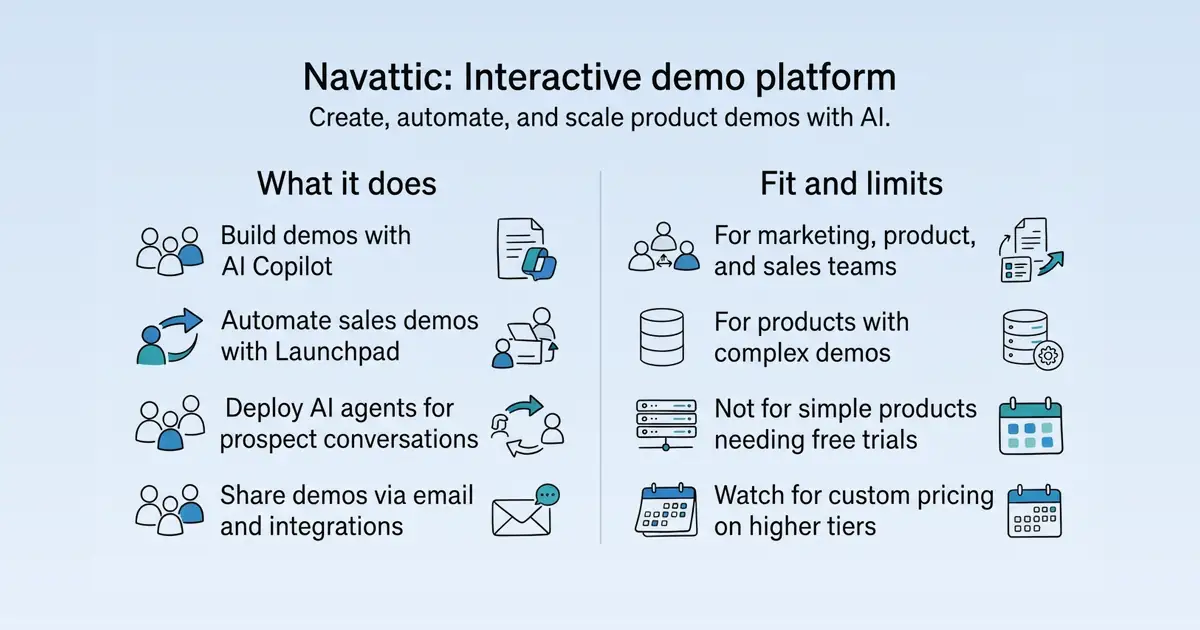
Navattic is a no-code platform for building interactive product demos, with AI-assisted creation via Copilot, sales automation via Launchpad, and autonomous AI agents for prospect conversations S63 S1 S6 S10. Marketing, product, and sales teams use it to create demos for launches, target accounts, and sales cycles, reducing repetitive presales work S63 S6. The main value is speeding up the buyer journey by letting prospects explore a realistic product clone without engineering resources S63 S10.
Product identity and positioning
Name, category, positioning, audience, and first-party claims.
- Identity: Navattic is a no-code interactive product demo software platform S63.
- Core purpose: It solves the problem of slow, resource-heavy product demonstrations by automating demo creation and delivery S63 S6.
- Intended users: Marketing, product, and sales teams, including solution engineers and sales leaders S63 S6.
- Product scope: A platform with three main components: Copilot for AI demo building, Launchpad for sales demo automation, and Agents for autonomous AI conversations S1 S6 S10.
- Positioning: Navattic positions itself as demo automation that speeds up the buyer journey S63.
- Claimed distinction: It claims to generate demos in seconds with built-in best practices S1.
Use cases and audiences
Who the product serves and the jobs it is designed to handle.
| Audience | Practical use case |
|---|---|
| Marketing teams | Create interactive demos for product launches, target accounts, and website visitors S63. |
| Product teams | Build demos to showcase new features or product lines in-app and in lifecycle campaigns S63. |
| Sales teams | Share demos earlier in the sales cycle and uncover buyer interest S6. |
| Solution engineers | Free up time from repetitive early-stage demos by using sandboxes for live calls S6. |
| Customer success teams | Onboard new customers or reps with self-serve product and training content S10. |
Traffic and search
SEO analysis
Collected Oct 22, 2026navattic.com: an estimated 253,933 total monthly visits and about 4,706 monthly organic visits across 436 ranking keywords. Scout crawled 15 pages and measured a technical health score of 92/100.
Search summary
The useful answer before the supporting detail.
Speed up your buyer journey with no-code demo automation. Sales demo software to create interactive demos for B2B SaaS teams. navattic.com: an estimated 253,933 total monthly visits and about 4,706 monthly organic visits across 436 ranking keywords. Scout crawled 15 pages and measured a technical health score of 92/100.
- Total traffic (modeled): 253,933 monthly visits across all channels.
- Organic search traffic (estimated): 4,706 monthly visits from search.
- Strongest sampled ranking: navattic at position 1.
- Leading page in the collected evidence: https://www.navattic.com/.
- Closest measured organic competitor: dpconline.org, appearing 1 times in the sampled first-page SERPs.
- Technical crawl: 15 pages, health score 92/100.
Website intelligence — Collected evidence
Company identity and positioning
| Page type | Evidence | Source |
|---|---|---|
| features | Speed up your buyer journey with no-code demo automation. Sales demo software to create interactive demos for B2B SaaS teams. Try Navattic free. | https://www.navattic.com/ |
| features | Try for freeTry for freeBook a demoBook a demo | https://www.navattic.com/ |
| features | The Navattic demo shows how marketing and product teams create interactive demos for product launches, target accounts, customers, and website visitors. A user starts by selecting a role, enters a product URL, and uses Copilot to generate an initial demo draft while capturing product screens. Copilot suggests demo copy, anchors tooltips, and structures a story using configured brand and messaging guidelines. The user can edit application data, remove or blur text and charts, and use the no-code Magic Editor or AI Copilot to personalize or update demo data across multiple screens. Use Case prompts repurpose a demo for sales enablement or customer training, while AI-generated themes apply colors from the company website. The finished demo can be shared by email, social campaigns, ads, or a downloadable GIF, or embedded on a website and in a product using a “Take a tour” call to action, pop-up, lightbox, desktop flow, or mobile swipe experience. Visitors can choose a product area, persona, or use case to follow a personalized path. The demo also presents Navattic Launchpad for sales and presales workflows. A rep selects and sends an interest-level interactive demo from Gmail, Outlook, Salesforce, Outreach, Salesloft, LinkedIn, or the Launchpad Chrome Extension before a meeting with a prospect. Engagement alerts show when the prospect views the demo, what they explore, and which stakeholders become involved; the prospect can share the demo with colleagues for additional stakeholder identification. Teams can send demo events and account activity to a CRM, Slack, or other event platforms through integration playbooks and the Navattic JS snippet. Built-in analytics and A/B testing compare demo length, copy, style, engagement, CTA clicks, conversion, and drop-off, while Salesforce sync connects demo activity to opportunities, pipeline, win rate, and sales cycle metrics. Users can also connect the Navattic MCP to Claude, ChatGPT, Cursor, or another AI agent to query demo per | https://www.navattic.com/ |
| features | Navattic Launchpad lets sales teams send customized, interest-level demos to prospects through email, the Navattic Chrome Extension, and platforms such as Gmail, Outlook, Outreach, Gong, Salesloft, and Front. In the demo, a seller sends Sandra a custom-built demo before a scheduled call, allowing her to select an interest level and explore the product independently. Sellers can connect Claude, ChatGPT, or another LLM to the Navattic MCP and ask which demo to send based on conversion data, then receive a custom demo link. Launchpad sends an email notification when Sandra views the demo and identifies the interests she selects. After the call, Sandra receives a follow-up demo and shares it with colleagues such as Jason and Miranda directly from the demo, helping the seller identify and follow up with new stakeholders. The demo also shows how reps use the Navattic Chrome Extension or an email integration to select a one-to-one demo, identify prospects by company domain, associate demo activity with an opportunity in Salesforce, and insert a shareable link and GIF into an email. Reps receive engagement notifications and can review shared demos and prospect activity. The Sales Impact Dashboard includes a Visitors tab showing prospects who viewed demos, newly identified stakeholders, rep activity, and prospects or accounts reached. With the Salesforce integration, teams can view demo data on lead, contact, opportunity, and account records, and measure demos sent, impacted pipeline, win rate, sales cycle length, and won opportunities influenced by interactive demos. The walkthrough also points to adding demos to Outreach sequences and using Navattic offline mode for in-person events with unreliable Wi-Fi. | https://www.navattic.com/ |
| features | Meet our customersMeet our customers | https://www.navattic.com/ |
| features | AI Copilot creates demos based on your product screens, trained on best practices from high-performing demos built on Navattic. | https://www.navattic.com/ |
| features | Demo automation for live demos and pre & post-call discovery | https://www.navattic.com/ |
| features | Launchpad is demo automation purpose-built for sales teams to share demos earlier in the sales cycle and free up presales time. | https://www.navattic.com/ |
| features | Enable your champion with a custom post-demo asset that they can share with their team internally. | https://www.navattic.com/ |
| features | Include demos of upsell features or different product lines in-app and in lifecycle campaigns so customers can see what they're missing out on. | https://www.navattic.com/ |
| features | Top-rated platform and customer service | https://www.navattic.com/ |
| features | The fastest growing software teams use Navattic | https://www.navattic.com/ |
Domain performance
Modeled total traffic, six-month trend, engagement, countries, and domain identity.
Total website traffic
| Month | Modeled visits |
|---|---|
| 2026-04 | 205,964 |
| 2026-05 | 185,964 |
| 2026-06 | 176,061 |
| 2026-07 | 195,687 |
| 2026-08 | 214,768 |
| 2026-09 | 253,933 |
Top visitor countries
| Country | Name | Traffic share |
|---|---|---|
| US | United States | 53.1% |
| GB | United Kingdom | 6.1% |
| CA | Canada | 3.7% |
| DE | Germany | 3.2% |
| AU | Australia | 3.2% |
Domain identity
| Signal | Value |
|---|---|
| Registered | Oct 6, 2019 |
| Last changed | Nov 23, 2022 |
| Expires | Oct 6, 2030 |
| WHOIS server | whois.verisign-grs.com |
| DNSSEC | Not signed |
| Nameservers | NS1.VERCEL-DNS.COM, NS2.VERCEL-DNS.COM |
Website capture
Organic keywords
Top keywords and an independent Google result page.
Top organic keywords
| Keyword | Volume | CPC | Estimated value |
|---|---|---|---|
| navattic | 6,930 | $35.35 | $7,390 |
| consensus | 501,910 | $0.25 | $380 |
| 1mind | 11,490 | $28.46 | $250 |
| consensus ai | 207,270 | $0.32 | $220 |
| storylane | 9,590 | $16.71 | $150 |
Independent Google result page
Query: navattic
| Position | Title | URL | Description |
|---|---|---|---|
| 1 | Navattic: Interactive Product Demo Software | https://www.navattic.com/ | The Navattic demo shows how marketing and product teams create interactive demos for product launches, target accounts, customers, and website visitors. |
| 2 | Navattic | https://www.linkedin.com/company/navattic | AI-powered interactive demos, demo automation, and agentic demos that let users explore your product on their own schedule. |
| 3 | Navattic - Gong Collective | https://collective.gong.io/integrations/navattic | Navattic helps teams create and share interactive product demos that prospects can explore at their own pace, providing deep engagement insights into buyer. |
| 4 | Navattic | https://www.youtube.com/@Navattic | Navattic agents, demo automation, and interactive demos that let users explore your product on their own schedule. |
| 5 | Navattic Reviews & Ratings 2026 | Gartner Peer Insights | https://www.gartner.com/reviews/product/navattic | Navattic empowers go-to-market teams to instantly create interactive product demos. Interactive demos let companies give prospects hands-on access to their ... |
| 6 | Navattic: Interactive product demos | https://www.ycombinator.com/companies/navattic | Navattic helps sales and marketing teams instantly create interactive product demos. Active Location:New York City, NY |
| 7 | Navattic Reviews 2026: Details, Pricing, & Features | https://www.g2.com/products/navattic/reviews | Navattic is a demo automation platform for small business, mid-market, and enterprise teams, giving sales, marketing, sales engineers, |
Important pages
Pages earning the most estimated search traffic in the sample.
Website intelligence — Collected evidence
Prioritized website intelligence pages
| Type | Page | Words | Change | URL |
|---|---|---|---|---|
| features | Navattic: Interactive Product Demo Software | 1,118 | new | https://www.navattic.com/ |
| pricing | Navattic Pricing \ | playwright | 555 | new |
| features | Navattic Agents: Autonomous AI Demo Agents | 502 | new | https://www.navattic.com/product/agent-demos |
| features | Navattic Copilot: AI Interactive Demo Software | 339 | new | https://www.navattic.com/product/copilot |
| features | Integrated into your go-to-market stack | 343 | new | https://www.navattic.com/product/integrations |
| features | Navattic Interactive Demos: AI Product Demo Software | 721 | new | https://www.navattic.com/product/interactive-demos |
| features | Navattic Launchpad: Demo Automation for Sales Teams | 722 | new | https://www.navattic.com/product/launchpad |
| features | State of the Interactive Product Demo 2026 | 3,862 | new | https://www.navattic.com/report/state-of-the-interactive-product-demo-2026 |
| features | Turn uninterested and unqualified buyers into product-qualified leads | 657 | new | https://www.navattic.com/solutions/growth-demand |
| features | Interactive Demos for Marketing Leaders | 626 | new | https://www.navattic.com/solutions/marketing-leaders |
| features | Show your product without technical resourcing slowing you down | 654 | new | https://www.navattic.com/solutions/product-marketers |
| features | Interactive Demos for Sales Reps | 589 | new | https://www.navattic.com/solutions/sales-reps |
| features | Remove demo obstacles slowing down your sales team | 623 | new | https://www.navattic.com/solutions/sales-se-leaders |
Features
| Page type | Evidence | Source |
|---|---|---|
| features | Navattic Agents: AI agents that guide and qualify prospects, answer questions, demo key workflows, and show content in real timeNavattic Agents: AI agents that guide and qualify prospects, answer questions, demo key workflows, and show content in real time | https://www.navattic.com/ |
| features | ](https://www.navattic.com/product/agent-demos) | https://www.navattic.com/ |
| features | [](/ "Home") | https://www.navattic.com/ |
| features | Sign inSign in | https://www.navattic.com/ |
| features | Try for freeTry for freeBook a demoBook a demo | https://www.navattic.com/ |
| features | Book a demoBook a demo | https://www.navattic.com/ |
| features | software easier | https://www.navattic.com/ |
| features | Give your prospects a modern buying experience. Navattic agents, demo automation, and interactive demos that let users explore your product on their own schedule. | https://www.navattic.com/ |
| features | Try a demoTry a demoTry an agentTry an agent | https://www.navattic.com/ |
| features | Navattic Agents | https://www.navattic.com/ |
| features | Interactive Demos | https://www.navattic.com/ |
| features | The Navattic demo shows how marketing and product teams create interactive demos for product launches, target accounts, customers, and website visitors. A user starts by selecting a role, enters a product URL, and uses Copilot to generate an initial demo draft while capturing product screens. Copilot suggests demo copy, anchors tooltips, and structures a story using configured brand and messaging guidelines. The user can edit application data, remove or blur text and charts, and use the no-code Magic Editor or AI Copilot to personalize or update demo data across multiple screens. Use Case prompts repurpose a demo for sales enablement or customer training, while AI-generated themes apply colors from the company website. The finished demo can be shared by email, social campaigns, ads, or a downloadable GIF, or embedded on a website and in a product using a “Take a tour” call to action, pop-up, lightbox, desktop flow, or mobile swipe experience. Visitors can choose a product area, persona, or use case to follow a personalized path. The demo also presents Navattic Launchpad for sales and presales workflows. A rep selects and sends an interest-level interactive demo from Gmail, Outlook, Salesforce, Outreach, Salesloft, LinkedIn, or the Launchpad Chrome Extension before a meeting with a prospect. Engagement alerts show when the prospect views the demo, what they explore, and which stakeholders become involved; the prospect can share the demo with colleagues for additional stakeholder identification. Teams can send demo events and account activity to a CRM, Slack, or other event platforms through integration playbooks and the Navattic JS snippet. Built-in analytics and A/B testing compare demo length, copy, style, engagement, CTA clicks, conversion, and drop-off, while Salesforce sync connects demo activity to opportunities, pipeline, win rate, and sales cycle metrics. Users can also connect the Navattic MCP to Claude, ChatGPT, Cursor, or another AI agent to query demo per | https://www.navattic.com/ |
| features | Navattic Launchpad lets sales teams send customized, interest-level demos to prospects through email, the Navattic Chrome Extension, and platforms such as Gmail, Outlook, Outreach, Gong, Salesloft, and Front. In the demo, a seller sends Sandra a custom-built demo before a scheduled call, allowing her to select an interest level and explore the product independently. Sellers can connect Claude, ChatGPT, or another LLM to the Navattic MCP and ask which demo to send based on conversion data, then receive a custom demo link. Launchpad sends an email notification when Sandra views the demo and identifies the interests she selects. After the call, Sandra receives a follow-up demo and shares it with colleagues such as Jason and Miranda directly from the demo, helping the seller identify and follow up with new stakeholders. The demo also shows how reps use the Navattic Chrome Extension or an email integration to select a one-to-one demo, identify prospects by company domain, associate demo activity with an opportunity in Salesforce, and insert a shareable link and GIF into an email. Reps receive engagement notifications and can review shared demos and prospect activity. The Sales Impact Dashboard includes a Visitors tab showing prospects who viewed demos, newly identified stakeholders, rep activity, and prospects or accounts reached. With the Salesforce integration, teams can view demo data on lead, contact, opportunity, and account records, and measure demos sent, impacted pipeline, win rate, sales cycle length, and won opportunities influenced by interactive demos. The walkthrough also points to adding demos to Outreach sequences and using Navattic offline mode for in-person events with unreliable Wi-Fi. | https://www.navattic.com/ |
| features | Trusted by the world's leading enterprises | https://www.navattic.com/ |
| features | Meet our customersMeet our customers | https://www.navattic.com/ |
| features | [G2 Fall 2026 Leader Enterprise award in Demo AutomationG2 Leader in | https://www.navattic.com/ |
| features | Demo Automation](https://www.g2.com/products/navattic/reviews) | https://www.navattic.com/ |
| features | Read case studyRead case study | https://www.navattic.com/ |
| features | ](/customer/highlights/ramp) | https://www.navattic.com/ |
| features | View showcaseView showcase | https://www.navattic.com/ |
Pricing and plans
| Page type | Evidence | Source |
|---|---|---|
| pricing | Try for freeTry for freeBook a demoBook a demo | https://www.navattic.com/pricing |
| pricing | Try one interactive demo for free or scale demo automation across your GTM team. | https://www.navattic.com/pricing |
| pricing | Best for: Individuals testing one free HTML demo with AI-assisted demo building | https://www.navattic.com/pricing |
| pricing | Free for everyone | https://www.navattic.com/pricing |
| pricing | Start for freeStart for free | https://www.navattic.com/pricing |
| pricing | Start with BaseStart with Base | https://www.navattic.com/pricing |
| pricing | Start with GrowthStart with Growth | https://www.navattic.com/pricing |
| pricing | Custom pricing | https://www.navattic.com/pricing |
| pricing | Contact for pricingContact for pricing | https://www.navattic.com/pricing |
| pricing | Pricing is based on number of conversations and agents. Also includes access to the Base plan. | https://www.navattic.com/pricing |
| pricing | Startup plan | https://www.navattic.com/pricing |
| pricing | A plan for early-stage teams that want to put interactive demos in front of buyers before they have a full GTM budget. | https://www.navattic.com/pricing |
| pricing | Available to bootstrapped and seed-stage teams of 30 or fewer. Contact us for pricing. | https://www.navattic.com/pricing |
| pricing | Contact usContact usCompare plansCompare plans | https://www.navattic.com/pricing |
| pricing | increase in trial signups | https://www.navattic.com/pricing |
| pricing | BaseGet BaseGet Base | https://www.navattic.com/pricing |
| pricing | GrowthGet GrowthGet Growth | https://www.navattic.com/pricing |
| pricing | EnterpriseContact usContact us | https://www.navattic.com/pricing |
| pricing | Start with BaseStart with Base | https://www.navattic.com/pricing |
| pricing | Start with GrowthStart with Growth | https://www.navattic.com/pricing |
Integrations and supported platforms
No supporting public-page evidence was collected for this category.
Product and company updates
No supporting public-page evidence was collected for this category.
Rank tracking
Persistent keyword baselines and position movement.
This analysis created the first position baseline at 2026-10-22T11:39:06.155Z. Movement appears after the next fresh analysis using the same location and language.
Features
Features and capabilities
Core functions and evidence-backed product capabilities.
| Capability | What it does |
|---|---|
| AI demo generation | Copilot creates an initial demo draft from your product URL and captured screens, with suggested copy and tooltips S63. |
| Demo editing and customization | Use prompts to edit demos, apply brand guidelines, blur or edit text/data, and add voiceovers or AI avatars S1 S24. |
| Sales demo automation | Launchpad lets sales teams send customized demos via email and platforms like Gmail, Outlook, Outreach, Gong, Salesloft, and Front, with interest-level tracking S6. |
| Sandbox demos | Create lightweight sandboxes for live presales calls and presentations S6. |
| Autonomous AI agents | Agents guide and qualify prospects, answer questions, demo workflows, and show content in real time, with configurable company context and CTAs S10. |
| Team collaboration | Collaborate on demos across presales and sales, with version tracking and management S6. |
Integrations and ecosystem
Connected products, exports, APIs, and workflow compatibility.
| Integration or interface | Type | What it enables |
|---|---|---|
| Gmail, Outlook, Outreach, Gong, Salesloft, Front | Integration | Send customized demos to prospects through these platforms S6. |
| Navattic Chrome Extension | Browser extension | Share demos directly from the browser S6. |
| MCP server | API | Connect AI model, ChatGPT, or another LLM to ask which demo to send based on conversion data S6. |
| AI tools (e.g., via MCP) | API | Edit and build demos, query analytics, pull workspace data, and create custom share links S1. |
Pricing
Pricing and plans
Published plans, free access, trials, credits, and pricing limitations.
| Plan or offer | Verified price and billing | Included | Limits |
|---|---|---|---|
| Starter | $0, not applicable S101 | 1 seat, 1 demo (HTML or media), basic analytics S101 | Default theme S101 |
| Base | $500 per month, billed annually S101 | 5 seats, unlimited HTML demos, 100 minutes of AI avatars S101 | Integrations, MCP server, account identification S101 |
| Growth | $1,200 per month, billed annually S101 | 10 seats, unlimited HTML demos, 300 minutes of AI avatars S101 | Sandbox demos, translation, SSO S101 |
| Enterprise | Custom pricing, not published S101 | Custom seats, unlimited HTML demos S101 | Offline demos, audit logs S101 |
| Navattic Agents | Contact sales, not published S101 | Pricing based on number of conversations and agents S101 | Separate product S101 |
| Startup plan | Contact sales, not published S101 | For bootstrapped/seed-stage teams of 30 or fewer S101 | Eligibility rules apply S101 |
Competition
Competitive landscape
Domains competing for the same organic search demand.
Sampled competitors
| Competitor | First-page appearances | Sampled queries | Average position | Queries observed |
|---|---|---|---|---|
| dpconline.org | 1 | 1 | 1 | demonstration tool |
| linkedin.com | 1 | 1 | 2 | navattic |
| reddit.com | 1 | 1 | 2 | demonstration tool |
| collective.gong.io | 1 | 1 | 3 | navattic |
| itbriefcase.net | 1 | 1 | 3 | demonstration tool |
| storylane.io | 1 | 1 | 4 | navattic |
| guideflow.com | 1 | 1 | 4 | demonstration tool |
| ycombinator.com | 1 | 1 | 5 | navattic |
| amazon.com | 1 | 1 | 5 | demonstration tool |
| smoothcapture.app | 1 | 1 | 6 | demonstration tool |
Website intelligence — Collected evidence
Customers, testimonials, and first-party review claims
No supporting public-page evidence was collected for this category.
Independent review sources discovered
No links to supported independent review platforms were discovered on the collected pages.
AI visibility
Measured ChatGPT and Google AI mentions with cited sources.
AI-assistant referral traffic
- Estimated current generative-AI referral share: 0.4%
| Month | Traffic share | Source |
|---|---|---|
| — | — | All AI assistants |
Website intelligence — Collected evidence
Site-stated AI capabilities
| Page type | Evidence | Source |
|---|---|---|
| features | The Navattic demo shows how marketing and product teams create interactive demos for product launches, target accounts, customers, and website visitors. A user starts by selecting a role, enters a product URL, and uses Copilot to generate an initial demo draft while capturing product screens. Copilot suggests demo copy, anchors tooltips, and structures a story using configured brand and messaging guidelines. The user can edit application data, remove or blur text and charts, and use the no-code Magic Editor or AI Copilot to personalize or update demo data across multiple screens. Use Case prompts repurpose a demo for sales enablement or customer training, while AI-generated themes apply colors from the company website. The finished demo can be shared by email, social campaigns, ads, or a downloadable GIF, or embedded on a website and in a product using a “Take a tour” call to action, pop-up, lightbox, desktop flow, or mobile swipe experience. Visitors can choose a product area, persona, or use case to follow a personalized path. The demo also presents Navattic Launchpad for sales and presales workflows. A rep selects and sends an interest-level interactive demo from Gmail, Outlook, Salesforce, Outreach, Salesloft, LinkedIn, or the Launchpad Chrome Extension before a meeting with a prospect. Engagement alerts show when the prospect views the demo, what they explore, and which stakeholders become involved; the prospect can share the demo with colleagues for additional stakeholder identification. Teams can send demo events and account activity to a CRM, Slack, or other event platforms through integration playbooks and the Navattic JS snippet. Built-in analytics and A/B testing compare demo length, copy, style, engagement, CTA clicks, conversion, and drop-off, while Salesforce sync connects demo activity to opportunities, pipeline, win rate, and sales cycle metrics. Users can also connect the Navattic MCP to Claude, ChatGPT, Cursor, or another AI agent to query demo per | https://www.navattic.com/ |
| features | Navattic Launchpad lets sales teams send customized, interest-level demos to prospects through email, the Navattic Chrome Extension, and platforms such as Gmail, Outlook, Outreach, Gong, Salesloft, and Front. In the demo, a seller sends Sandra a custom-built demo before a scheduled call, allowing her to select an interest level and explore the product independently. Sellers can connect Claude, ChatGPT, or another LLM to the Navattic MCP and ask which demo to send based on conversion data, then receive a custom demo link. Launchpad sends an email notification when Sandra views the demo and identifies the interests she selects. After the call, Sandra receives a follow-up demo and shares it with colleagues such as Jason and Miranda directly from the demo, helping the seller identify and follow up with new stakeholders. The demo also shows how reps use the Navattic Chrome Extension or an email integration to select a one-to-one demo, identify prospects by company domain, associate demo activity with an opportunity in Salesforce, and insert a shareable link and GIF into an email. Reps receive engagement notifications and can review shared demos and prospect activity. The Sales Impact Dashboard includes a Visitors tab showing prospects who viewed demos, newly identified stakeholders, rep activity, and prospects or accounts reached. With the Salesforce integration, teams can view demo data on lead, contact, opportunity, and account records, and measure demos sent, impacted pipeline, win rate, sales cycle length, and won opportunities influenced by interactive demos. The walkthrough also points to adding demos to Outreach sequences and using Navattic offline mode for in-person events with unreliable Wi-Fi. | https://www.navattic.com/ |
| features | AI Copilot creates demos based on your product screens, trained on best practices from high-performing demos built on Navattic. | https://www.navattic.com/ |
| features | Qualify and conduct demos for SMB leads through a chat widget or an optional AI avatar. | https://www.navattic.com/product/agent-demos |
| features | The Navattic AI Copilot demo shows how teams create and maintain interactive product demos for a global fintech launch. A user adds custom context from a website or uploaded file so Copilot can reference brand, product, and go-to-market information, then captures a product walkthrough with the Navattic Chrome Extension. Copilot generates an initial draft with demo copy, anchored tooltips, modals, beacons, and a cohesive story. The user reviews the draft, makes natural-language edits to step names, content, and CTAs with Copilot Prompt, and approves multiple Prompt edits in bulk. Copilot Review analyzes the demo for structure, clarity, engagement, missing calls to action, unclear copy, and missing steps, while AI Copilot updates, removes, or blurs text or charts across multiple screens with a single prompt. An AI-generated theme can pull brand colors from the company website and apply them to the demo. The demo then shows how to repurpose an existing demo for different audiences and regions. Translation updates text callouts, voiceovers, and product captures in more than 20 languages; the user compares the original English version with a French version and enables a language selector so visitors can switch languages inside the demo. Use Case Prompts create alternate training and enablement versions, while AI Avatars can be generated or uploaded as video. AI voiceovers update automatically when the demo is translated, and users can manually change the voices. The final fintech product walkthrough includes Dashboard, Accounts, and Transactions views, showing payment insights, account activity, success rates, balances, statuses, owners, MRR, and real-time transaction updates, followed by a prompt to schedule a call or try the sample app for free. | https://www.navattic.com/product/interactive-demos |
| features | Navattic Launchpad lets sales teams send customized, interest-level demos to prospects through email, the Navattic Chrome Extension, and platforms such as Gmail, Outlook, Outreach, Gong, Salesloft, and Front. In the demo, a seller sends Sandra a custom-built demo before a scheduled call, allowing her to select an interest level and explore the product independently. Sellers can connect Claude, ChatGPT, or another LLM to the Navattic MCP and ask which demo to send based on conversion data, then receive a custom demo link. Launchpad sends an email notification when Sandra views the demo and identifies the interests she selects. After the call, Sandra receives a follow-up demo and shares it with colleagues such as Jason and Miranda directly from the demo, helping the seller identify and follow up with new stakeholders. The demo also shows how reps use the Navattic Chrome Extension or an email integration to select a one-to-one demo, identify prospects by company domain, associate demo activity with an opportunity in Salesforce, and insert a shareable link and GIF into an email. Reps receive engagement notifications and can review shared demos and prospect activity. The Sales Impact Dashboard includes a Visitors tab showing prospects who viewed demos, newly identified stakeholders, rep activity, and prospects or accounts reached. With the Salesforce integration, teams can view demo data on lead, contact, opportunity, and account records, and measure demos sent, impacted pipeline, win rate, sales cycle length, and won opportunities influenced by interactive demos. The walkthrough also points to adding demos to Outreach sequences and using Navattic offline mode for in-person events with unreliable Wi-Fi. | https://www.navattic.com/product/launchpad |
| features | Navattic Agents: AI agents that guide and qualify prospects, answer questions, demo key workflows, and show content in real timeNavattic Agents: AI agents that guide and qualify prospects, answer questions, demo key workflows, and show content in real time | https://www.navattic.com/ |
| features | The Navattic demo shows how marketing and product teams create interactive demos for product launches, target accounts, customers, and website visitors. A user starts by selecting a role, enters a product URL, and uses Copilot to generate an initial demo draft while capturing product screens. Copilot suggests demo copy, anchors tooltips, and structures a story using configured brand and messaging guidelines. The user can edit application data, remove or blur text and charts, and use the no-code Magic Editor or AI Copilot to personalize or update demo data across multiple screens. Use Case prompts repurpose a demo for sales enablement or customer training, while AI-generated themes apply colors from the company website. The finished demo can be shared by email, social campaigns, ads, or a downloadable GIF, or embedded on a website and in a product using a “Take a tour” call to action, pop-up, lightbox, desktop flow, or mobile swipe experience. Visitors can choose a product area, persona, or use case to follow a personalized path. The demo also presents Navattic Launchpad for sales and presales workflows. A rep selects and sends an interest-level interactive demo from Gmail, Outlook, Salesforce, Outreach, Salesloft, LinkedIn, or the Launchpad Chrome Extension before a meeting with a prospect. Engagement alerts show when the prospect views the demo, what they explore, and which stakeholders become involved; the prospect can share the demo with colleagues for additional stakeholder identification. Teams can send demo events and account activity to a CRM, Slack, or other event platforms through integration playbooks and the Navattic JS snippet. Built-in analytics and A/B testing compare demo length, copy, style, engagement, CTA clicks, conversion, and drop-off, while Salesforce sync connects demo activity to opportunities, pipeline, win rate, and sales cycle metrics. Users can also connect the Navattic MCP to Claude, ChatGPT, Cursor, or another AI agent to query demo per | https://www.navattic.com/ |
| features | Navattic Launchpad lets sales teams send customized, interest-level demos to prospects through email, the Navattic Chrome Extension, and platforms such as Gmail, Outlook, Outreach, Gong, Salesloft, and Front. In the demo, a seller sends Sandra a custom-built demo before a scheduled call, allowing her to select an interest level and explore the product independently. Sellers can connect Claude, ChatGPT, or another LLM to the Navattic MCP and ask which demo to send based on conversion data, then receive a custom demo link. Launchpad sends an email notification when Sandra views the demo and identifies the interests she selects. After the call, Sandra receives a follow-up demo and shares it with colleagues such as Jason and Miranda directly from the demo, helping the seller identify and follow up with new stakeholders. The demo also shows how reps use the Navattic Chrome Extension or an email integration to select a one-to-one demo, identify prospects by company domain, associate demo activity with an opportunity in Salesforce, and insert a shareable link and GIF into an email. Reps receive engagement notifications and can review shared demos and prospect activity. The Sales Impact Dashboard includes a Visitors tab showing prospects who viewed demos, newly identified stakeholders, rep activity, and prospects or accounts reached. With the Salesforce integration, teams can view demo data on lead, contact, opportunity, and account records, and measure demos sent, impacted pipeline, win rate, sales cycle length, and won opportunities influenced by interactive demos. The walkthrough also points to adding demos to Outreach sequences and using Navattic offline mode for in-person events with unreliable Wi-Fi. | https://www.navattic.com/ |
| features | Run demos and showcase content with AI agents | https://www.navattic.com/ |
| features | Navattic’s AI agents run fully autonomous conversations that guide and qualify prospects, answer questions, demo key workflows, and show content in real-time. | https://www.navattic.com/ |
| features | AI Copilot creates demos based on your product screens, trained on best practices from high-performing demos built on Navattic. | https://www.navattic.com/ |
| features | Bring your product to life with AI agents that guide and qualify prospects, answer questions, demo key workflows, and show content in real time. | https://www.navattic.com/product/agent-demos |
| features | Qualify and conduct demos for SMB leads through a chat widget or an optional AI avatar. | https://www.navattic.com/product/agent-demos |
| features | Additional AI demo enhancements | https://www.navattic.com/product/copilot |
| features | AI Voiceovers | https://www.navattic.com/product/copilot |
| features | Add pre-recorded or AI-generated voice-overs to read out the step or written text. | https://www.navattic.com/product/copilot |
| features | Select from a variety of AI-generated video avatars and voices that align with your brand tone. | https://www.navattic.com/product/copilot |
| features | Capture your screen with voice narration, then generate a demo with synced audio, voiceovers, or AI avatars. | https://www.navattic.com/product/copilot |
| pricing | Best for: Individuals testing one free HTML demo with AI-assisted demo building | https://www.navattic.com/pricing |
These are first-party product claims, not independent measurements of AI-search visibility.
Marketing opportunities
Actions calculated directly from the collected evidence.
| Opportunity | Recommended action | Evidence |
|---|---|---|
| Competitor gap | Review the sampled queries where dpconline.org appears. | 1 first-page appearances across demonstration tool |
| Technical priority | Missing page title | https://www.navattic.com/customer/showcase |
Website intelligence — Collected evidence
Website evidence gaps
- integrations: no usable public page was collected; verify whether the site publishes this evidence.
- customers: no usable public page was collected; verify whether the site publishes this evidence.
- reviews: no usable public page was collected; verify whether the site publishes this evidence.
- changes: no usable public page was collected; verify whether the site publishes this evidence.
- identity: no usable public page was collected; verify whether the site publishes this evidence.
- technical: no usable public page was collected; verify whether the site publishes this evidence.
Trust and proof
Customers, proof, and reviews
Published proof, customer signals, and review evidence.
Independent reviews
No citation-grounded independent review links were found.
Customer proof
No named customers, testimonials, or customer case studies were found.
Independent mentions
- Navattic: Accelerate the buyer journey with demos — # Navattic: Accelerate the buyer journey with demos ... > Navattic is a no-code platform built for go-to-market teams to create interactive product demos without engineering help. Founded in 2020, Navattic now powers the interactive demo experiences for over 1,000 customers ranging from fast-growing startups to global SaaS leaders. ... - Product Overview: High-level introduction to Navattic's interactive demo platform and its benefits for go-to-market teams. - Interactive Product Demos: Interact
- Welcome to Navattic - Navattic Documentation — Navattic makes it easy to build and share interactive product demos across your team. With Navattic, teams can organize, access, and distribute demos in a consistent, scalable way. This documentation guides you through setting up your workspace, from creating demos to tracking engagement, so you can use interactive demos throughout your workflows. ... Take your demos a step further with advanced features that add flexibility and depth. In this section, you’ll learn how to personalize content, su
- Navattic Interactive Demos: AI Product Demo Software — center of your go-to-market. Easy for your Sales, Marketing ... The Navattic AI Copilot demo shows how teams create and maintain interactive product demos for a global fintech launch. A user adds custom
- Navattic Pricing / Interactive Demo Software Plans — ## Try one interactive demo for free or scale demo automation across your GTM team. Annual Monthly Starter Best for: Individuals testing one free HTML demo with AI-assisted demo building Includes: 1 seat 1 demo (HTML or media)
- Navattic Agents: Autonomous AI Demo Agents — ## Bring your product to life with AI agents that guide and qualify prospects, answer questions, demo key workflows, and show content in real time. ... Website Agent Engage website visitors with conversations and answer prospect questions in real time.
- Navattic: Interactive Product Demo Software — The Navattic demo shows how marketing and product teams create interactive demos for product launches, target accounts, customers, and website visitors. A user starts by selecting a role, enters a product URL, and uses Copilot to generate an initial demo draft while capturing product screens. Copilot suggests demo copy, anchors tooltips, and structures a story using configured brand and
- Navattic Academy — We studied the top 1% of interactive demos built on Navattic to find best practices for any use case. ... Every course is about 30-60 minutes long and incorporates videos, written content, and (of course) interactive demos.
- Download Navattic for Desktop — Download Navattic for Desktop # Download Navattic for desktop Create interactive demos, macOS 14.0 and later
External links were grounded in one live web search. Search snippets are leads, not independently scraped page content; rejected links remain available in Review evidence.
Company, security, and trust
Ownership, policies, security signals, and public trust evidence.
| Signal | Finding | Source |
|---|---|---|
| Company and ownership | > "When I joined Dropbox, my manager looked for ways to scale our team because we kept giving generic demos that customers weren't getting full value from." | source |
| Contact and support | Contact us for details | source |
| Legal and privacy | Not published on the collected pages. | — |
| Security and compliance | SSO and directory sync | source |
| Uptime and status page | Not published on the collected pages. | — |
| Domain registered | 2019-10-06 | — |
| Domain expires | 2030-10-06 | — |
Not found on the collected pages: legal and privacy, uptime and status page. This only means Scout did not find it on the pages it read; it says nothing about the company itself.
Documentation and product updates
Help resources, product guidance, and visible changes over time.
| Resource or update | Type | What is available | Date or freshness |
|---|---|---|---|
| Build a Better Software Product Demo Experience How to Move Beyond Traditional Product Demos | Guide | Guides, comparisons, pricing breakdowns, use cases, and how-to articles. (source) | Not dated |
| 5 Examples of AI Feature Launch with Interactive Demo | Product update | Product update is publicly available. (source) | Not dated |
Not found in the collected public sources: public roadmap, changelog or release notes, status page, separate help center or knowledge base.
Technical
Technical and delivery signals
Delivery model, platforms, API, data ownership, reliability claims and release activity.
| Signal | Finding | Source |
|---|---|---|
| Delivery model (cloud, self-hosted, desktop, browser extension) | Navattic is a web-based platform with a Chrome extension for sharing demos S63 S6. | S63 S6 |
| Platforms and apps | Available on web; Chrome extension for sales teams S6. | S6 |
| API and extensibility (API, SDK, webhooks, MCP, plugins) | Offers an MCP server for connecting AI tools like AI modelor ChatGPT S6. | S6 |
| Data ownership and export | Not published on the collected pages. | — |
| Performance and reliability claims | Not published on the collected pages. | — |
| Release activity | Not published on the collected pages. | — |
Measured infrastructure
Domain, certificate, and hosting signals, measured directly.
| Signal | Finding |
|---|---|
| Domain registered | 2019-10-06 — NameCheap, Inc. |
| Domain expires | 2030-10-06 |
| TLS certificate | Let's Encrypt, valid, expires 2026-11-23 |
| Security headers | HSTS |
| Headers not served | CSP, X-Content-Type-Options, X-Frame-Options, Referrer-Policy |
| Server header | Vercel |
| Mail handled by | aspmx.l.google.com, alt2.aspmx.l.google.com |
| Nameservers | ns1.vercel-dns-2.com, ns2.vercel-dns-2.com |
Not measurable: wayback: rate limited by archive.org, ladder stopped after 1 probe(s). A gap here means the lookup was unavailable, not that the finding is negative.
Technical site audit
A bounded multi-page crawl with page-level issues and URLs.
Scout — Bounded technical crawl
- Pages crawled: 15 of 15 maximum
- Technical health: 92/100
- Critical issues: 1
- Warnings: 21
- Notices: 5
Issues
Crawled pages
| Status | Title | H1s | Words | Response | URL |
|---|---|---|---|---|---|
| 200 | Navattic: Interactive Product Demo Software | 1 | 1474 | 85 ms | https://www.navattic.com/ |
| 200 | Navattic Agents: Autonomous AI Demo Agents | 2 | 623 | 85 ms | https://www.navattic.com/product/agent-demos |
| 200 | Navattic: Interactive Product Demo Software | 1 | 1474 | 73 ms | https://www.navattic.com/ |
| 200 | Navattic for Enterprise | 1 | 638 | 43 ms | https://www.navattic.com/enterprise |
| 200 | Navattic Pricing \ | Interactive Demo Software Plans | 2 | 1186 | 51 ms |
| 200 | Book a demo | 1 | 195 | 216 ms | https://www.navattic.com/get-demo |
| 200 | The trusted platform for product-led growth teams | 2 | 1223 | 177 ms | https://www.navattic.com/customer/highlights |
| 200 | How Ramp Drove 15% of Website Leads with Self-Service Product Tours | 2 | 497 | 125 ms | https://www.navattic.com/customer/highlights/ramp |
| 200 | Missing title | 0 | 148 | 162 ms | https://www.navattic.com/customer/showcase |
| 200 | Navattic Interactive Demos: AI Product Demo Software | 2 | 839 | 20 ms | https://www.navattic.com/product/interactive-demos |
| 200 | Navattic Launchpad: Demo Automation for Sales Teams | 2 | 832 | 23 ms | https://www.navattic.com/product/launchpad |
| 200 | Coupa: How Interactive Demos Influenced $10M of ARR within Six Months | 2 | 866 | 171 ms | https://www.navattic.com/customer/highlights/coupa |
| 200 | How Trainual Boosted Trial Signups by 450% with Interactive Demos | 2 | 640 | 168 ms | https://www.navattic.com/customer/highlights/trainual |
| 200 | How Insider Drove 3x Engagement Time with Interactive Product Demos | 2 | 888 | 134 ms | https://www.navattic.com/customer/highlights/insider_one |
| 200 | Navattic Copilot: AI Interactive Demo Software | 2 | 496 | 25 ms | https://www.navattic.com/product/copilot |
This is a bounded Scout crawl. Core Web Vitals and Lighthouse scores are not claimed unless a dedicated performance audit is connected.
Search Console and Analytics
First-party search and behavioral data connection state.
Modeled acquisition channels
| Channel | Estimated share |
|---|---|
| direct | 56.4% |
| search | 4.8% |
| search organic | 3.6% |
| search paid | 1.2% |
| social | 1.6% |
| social organic | 1.2% |
| social paid | 0.4% |
| referrals | 28.8% |
| paid referrals | 1.5% |
| 6.5% | |
| gen ai | 0.4% |
| affiliate | 0.0% |
| other | 0.0% |
First-party connections
| Integration | Status | Data available after connection |
|---|---|---|
| Google Search Console | Not connected | Clicks, impressions, CTR, average position, queries, pages, countries, and devices |
| Google Analytics | Not connected | Organic sessions, engagement, landing pages, conversions, geography, and devices |
No first-party Search Console or Analytics numbers are shown until the site owner authorizes the corresponding Google account. Scout traffic model values above are modeled estimates, not private analytics totals.
Limits and method
Limitations and open questions
Known constraints and missing evidence from the collected pages.
The collected pages do not mention any competitor products by name. Evidence gaps include lack of published security certifications, uptime status, and detailed data export options. Pricing for Enterprise and Agents requires contacting sales, and the startup plan's pricing is not published S101.
Sources, method, and limitations
Evidence inventory, collection method, provider use, and constraints.
This report is based on 15 collected pages from navattic.com, including product pages, pricing, and blog posts, gathered via static and browser rendering rendering. External proof search was used to verify review profiles but not scraped for content. Limitations: some pages were not fully captured, and blog content may reflect older pricing or features.
- Official Websitehttps://www.navattic.com/Verified
- Official Websitehttps://www.navattic.com/product/copilotVerified
- Official Websitehttps://www.navattic.com/product/launchpadVerified
- Official Websitehttps://www.navattic.com/product/agent-demosVerified
- Pricing Pagehttps://www.navattic.com/lp/get-startedVerified
- Pricing Pagehttps://www.navattic.com/pricingVerified
- Pricing Pagehttps://www.navattic.com/blog/freemium-plan-navatticVerified
- Pricing Pagehttps://www.navattic.com/blog/how-to-plan-build-and-share-demos-for-demand-genVerified
- Pricing Pagehttps://www.navattic.com/blog/when-to-use-interactive-demos-vs-free-trial-or-freemium-plansVerified
- Official Websitehttps://www.navattic.com/blog/ai-feature-launchesVerified
- Official Websitehttps://www.navattic.com/blog/become-product-ledVerified
- Official Websitehttps://www.navattic.com/blog/best-product-tour-softwareVerified
- Official Websitehttps://www.navattic.com/blog/better-software-product-demosVerified
- Official Websitehttps://www.navattic.com/blog/changing-product-demoVerified
- Official Websitehttps://www.navattic.com/blog/customer-interview-series-ai-feature-launch-with-maria-castanedaVerified
- Articlehttps://docs.navattic.com/Verified
- Articlehttps://www.navattic.com/product/interactive-demosVerified
- Articlehttps://www.navattic.com/demoVerified
- Articlehttps://academy.navattic.com/Verified
- Articlehttps://www.navattic.com/desktopVerified
- Articlehttps://docs.navattic.com/help/basicsVerified