In simple English
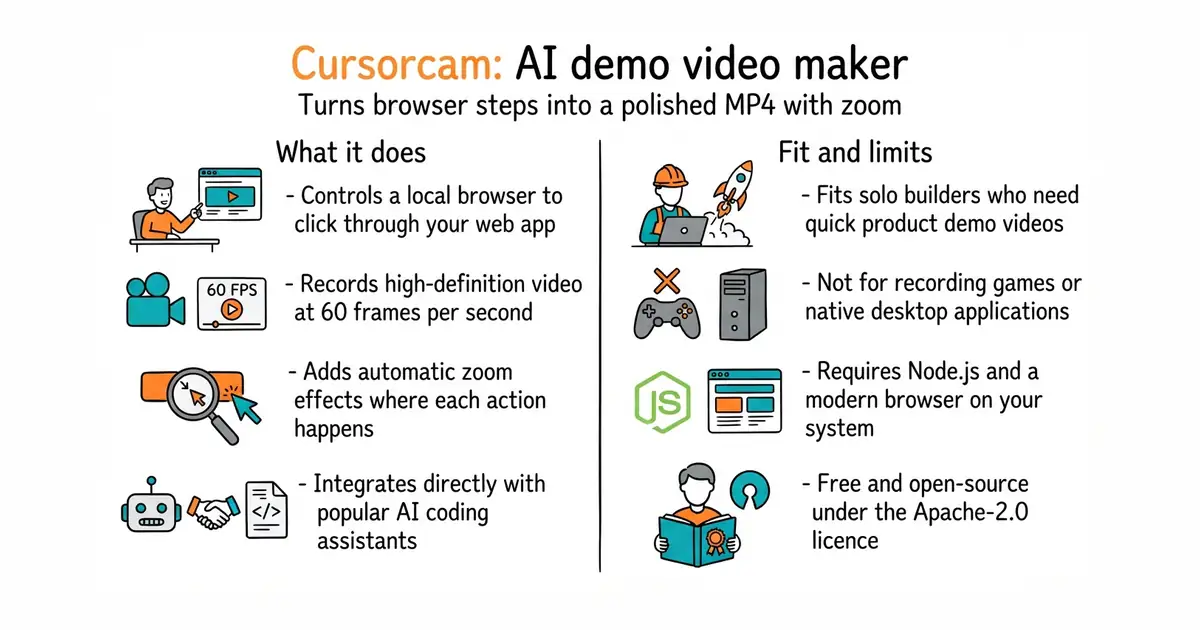
You can ask your artificial intelligence helper to record a walkthrough video of your website. It opens your app in a hidden browser window and clicks around like a real user. The tool records the screen and adds smooth zoom effects on every click. You receive a finished video file that is ready to share on social media. It runs on your own computer and costs nothing to use.
What it is
A command-line tool (a program you run from your text terminal) and plugin set that turns scripted web browser actions into high-definition demo videos. It controls a local web browser, records the session, checks the visual results and outputs a compressed MP4 file.
What it is good for
Solo builders who need to make product demo videos for social media or launch pages without recording their own screen and editing the footage manually.
- Works with popular coding assistants like Claude Code, Cursor and VS Code.
- Produces smooth 1080p video at 60 frames per second with automatic zoom effects.
- Runs entirely on your machine using your existing browser without cloud accounts.
- Requires Node.js version 22.13 or newer installed on your computer.
- Needs a compatible web browser like Chrome, Edge or Brave version 120 or newer.
- Complex web apps with tricky authentication might need manual help during the recording.
Manual screen recording and video editor zooming
Claude Code
- puppeteer/puppeteer96k stars
Automates web browsers with code, but does not record zoomed-in demo videos automatically.
- remotion-dev/remotion66k stars
Creates programmatic videos with code, but requires building templates from scratch.


- GoogleChromeLabs/squoosh26k stars
A web page that compresses images in the browser and shows you the result before you save it.
- simple-icons/simple-icons26k stars
More than 3,400 brand logos as single-colour SVG files, released into the public domain.
- phosphor-icons/core394 stars
The raw SVG files and the catalogue for the Phosphor icon family, with no framework package attached.
npx -y cursorcam mcp