In simple English
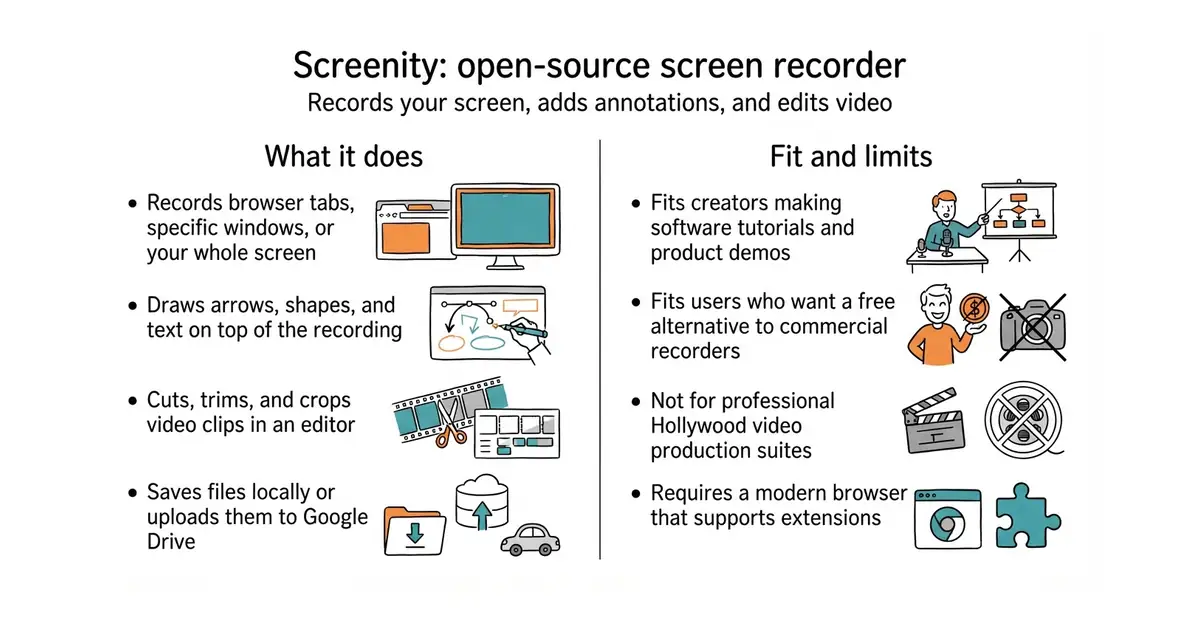
This tool records what happens on your computer screen. You can talk into your microphone while you record. You can draw arrows and highlight text on the screen as you speak. You can cut out mistakes and save the final video as a normal file. It costs nothing and runs right inside your web browser.
What it is
Screenity is an open-source screen recorder built as a browser extension. It gives you drawing tools, audio editing, and camera overlays without any time limits.
What it is good for
This is good for solo builders who need to record bug reports, product demos, or tutorials for customers without paying for commercial recording software.
- No limits on how many videos you record or how long they are.
- Includes drawing and annotation tools to point out specific parts of the screen.
- Works entirely in your browser without sending your personal recordings to outside servers.
- Requires Node.js (a tool that lets you run JavaScript outside a browser) on your computer if you want to build it from source.
- Google Drive upload requires setting up your own credentials in the Google Cloud Console.
- Browser extensions can occasionally run slowly when handling long, high-resolution video recordings.
Loom
FFmpeg
- webrtc/samples15k stars
This provides low-level browser media APIs instead of a finished recorder application.

- snapcast/snapcast8.0k stars
A server and clients that play one audio stream in several rooms, kept in time with each other.
- MusicPlayerDaemon/MPD2.8k stars
A background music player with no interface of its own, controlled over a network by separate client programs.
- AcademySoftwareFoundation/OpenTimelineIO2.0k stars
An interchange format and library for editing timelines: the order and length of cuts, and references to the media, but not the media.
git clone https://github.com/alyssaxuu/screenity.git
cd screenity
npm install
npm start