Overview
Summary
The useful answer before the supporting detail.
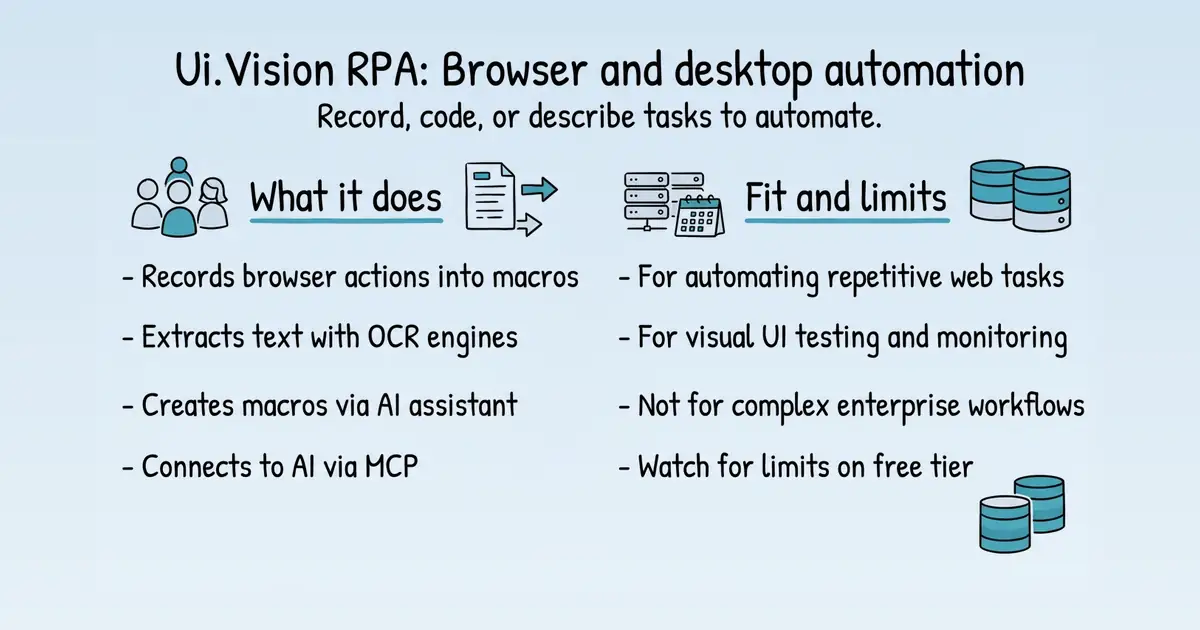
Ui.Vision RPA is a browser and desktop automation tool that lets users record and run macros to automate repetitive tasks S1. It is used by individuals and businesses to automate web workflows, data entry, and testing, solving the problem of manual, error-prone processes S1. Its practical value lies in its visual recording, OCR, and AI-assisted macro creation, making automation accessible without deep coding S10.
Product identity and positioning
Name, category, positioning, audience, and first-party claims.
- Identity: Ui.Vision RPA, a browser extension and desktop app for robotic process automation S1.
- Core purpose: Converts computer vision advances into usable automation products S1.
- Intended users: Individuals and businesses automating web and desktop tasks S1.
- Product scope: A single RPA tool with browser extension, desktop app, and command-line interface S10.
- Positioning: First web macro recorder with built-in flow control and visual recognition S10.
- Claimed distinction: First Chrome/Firefox extension with image and text recognition for visual testing S10.
Use cases and audiences
Who the product serves and the jobs it is designed to handle.
| Audience | Practical use case |
|---|---|
| Testers | Automate visual UI tests and capture screenshots for regression testing S10 S30. |
| Data analysts | Scrape data from websites using CSV workflows and OCR S10 S20. |
| Business users | Automate repetitive web tasks like form filling and data entry S156. |
| Developers | Build custom automation scripts using the JavaScript API and command-line interface S39 S10. |
Features
Features and capabilities
Core functions and evidence-backed product capabilities.
| Capability | What it does |
|---|---|
| Visual recording | Records user actions in the browser to create macros without coding S156. |
| OCR text recognition | Extracts text from screens or images for automation, with local and cloud engines S20. |
| AI macro assistant | Describes a task in natural language to generate a macro S10. |
| JavaScript API | Write macros as JavaScript programs using the uiv.* API for advanced control S39. |
| Selenium IDE compatibility | Imports and exports Selenium IDE test cases, and supports classic commands S30. |
| Desktop automation | Automates desktop applications via XModules like XClick and XType S55 S138. |
| Command-line API | Controls macros from external scripts or programs S10. |
| MCP integration | Connects external AI assistants to create, run, and debug macros S156. |
Integrations and ecosystem
Connected products, exports, APIs, and workflow compatibility.
| Integration or interface | Type | What it enables |
|---|---|---|
| Selenium IDE | Integration | Import and export test cases, and run classic Selenium commands S30. |
| OCR.space API | API | Use cloud OCR with PRO endpoints for higher quality and speed S20. |
| MCP (Model Context Protocol) | AI interface | Connect external AI assistants to create and run macros S156. |
| Command-line API | API | Control macros from any scripting language or program S10. |
| JavaScript API (uiv.*) | SDK | Write macros as JavaScript programs with advanced automation capabilities S39. |
| FileAccess XModule | Extension | Store macros on hard drive instead of browser storage S10. |
Pricing
Pricing and plans
Published plans, free access, trials, credits, and pricing limitations.
| Plan or offer | Verified price and billing | Included | Limits |
|---|---|---|---|
| Free Plan | $0, free | 100 OCR requests/day S1 | 25 XClick/XType/XMove commands per macro S1 |
| Personal Edition | US$89 one-time, one year of updates S1 | 250 OCR requests/day S1 | Up to 20 files on disk S1 |
| PRO Edition | US$199 one-time, one year of updates S1 | 500 OCR requests/day, email support S1 | Not established |
| Enterprise Edition | US$299 one-time, one year of updates S1 | 2,500 OCR requests/day, local OCR server, update management S1 | Not established |
| Enterprise Bundle 5 | US$499 one-time S1 | Up to 5 users S1 | Not established |
| Extra OCR conversions | US$10 per 10,000 S1 | Additional OCR requests for PRO/Enterprise S1 | Not established |
Trust and proof
Customers, proof, and reviews
Published proof, customer signals, and review evidence.
Independent reviews
| Platform | Page | How it was found | Note |
|---|---|---|---|
| Trustpilot | UI Reviews 3 | Grounded web search | Jul 22, 2024 ## Ui vision is an excellent tool for… Ui vision is an excellent tool for automation and testing, offering a straightforward interface and robust functionality. its ability to automate repetitive tasks and validate web processes efficiently makes it a valuable asset ... ## I have wasted many hours and days… I have wasted many hours and days trying to get ui vision to work. But it is a masterclass in always having one more trick so your macro never really works, unless you PAY UP. Th |
Customer proof
No named customers, testimonials, or customer case studies were found.
Independent mentions
- Ui.Vision 10 Beta: AI, Javascript uiv.* macros and new real user browser clicks that need no focus - Announcements - Ui.Vision, AI & OCR Community Forums — Ui.Vision 10 Beta: AI, Javascript uiv.* macros and new real user browser clicks that need no focus - Announcements - Ui.Vision, AI & OCR Community Forums Ui.Vision 10 Beta: AI, Javascript uiv.\* macros and new real user browser clicks that need no
- Targeted icon is not selected in the desktop, the XClick is clicking on the icon, which was present below the targeted icon with latest version 10.0.166 - Ui.Vision - Ui.Vision, AI & OCR Community Forums — V10.0.166 is still beta, but already quite stable. But reports like yours show there is still work to do For non-beta use V9. ... Please update your XModules to V2.0 .12 and extension to 10.0 .178. It contains some improvements to the targeting.
- Ui.Vision, AI & OCR Community Forums — Top and Botton of log shows previous macro that ran - status CA.js started rather actual macro name Bug Reports / / 0 / 13 / October 17, 2026 / / Game on the mission imposible Ui.Vision / / 1 / 31 / October 17, 2026
- What's new with Ui.Vision RPA - Visual Automation, Computer Use, plus Selenium IDE — ## What's new with V10.0.276 ... - - Added: A macro can now be a modern JavaScript program built on the new uiv.* API — the primary format for new macros. Loops, conditions and error handling are plain JavaScript; finders auto-wait and pierce all frames. See Selenium-derived commands vs the modern uiv.* API for the full conversion table. - - Added: Browser Vision: trusted browser-scope mouse/keyboard input — uiv.browser.click/type/move/down/up — via the browser debugger API, no XModule installat
- Why did they remove the loop button? - Ui.Vision - Ui.Vision, AI & OCR Community Forums — As of V10.0. 130 the loop button is back by popular request It is now in the right-click context menu, in both the IDE and the sidebar. And it works for classic and new JS macros: ... Aldo_Albar From… to… is back since V10.0. 181 (Its very new, you may
- Software keeps getting worse - Ui.Vision - Ui.Vision, AI & OCR Community Forums — What exactly gets worse? I think it is just the opposite: The RPA tool is progressing nicely. Useful new features are added and I have not seen any new regression bugs recently, maybe except the rather harmless “turns white” issue? Is there anything else I missed? newuserkantu May 12, 2023, 2:33pm 3 Ui vision has improved a lot in recent years, it is true that it has still unsolved bugs such as “error #101: UI.Vision RPA is not connected to a browser tab” but overall it is an excellent software.
- Ui.Vision OCR Options explained - HowTo - Ui.Vision, AI & OCR Community Forums — In general the key difference between local OCR and cloud OCR is: - Local OCR: Very fast and your data never leaves your machine - Cloud OCR: Better overall OCR quality, but slower and processing in the cloud.
- Ui.Vision AI - Create and Repair Browser Automation Macros — Ui.Vision has always combined classic web automation with local, fast and free computer vision and OCR. On top of that foundation sit large language models — and Version 10 turns that AI from a set of commands into an assistant: the AI tab in the side panel now builds and fixes complete macros for you. Thanks to the new free Ui.Vision AI tier it works right after installation, with no API key and no
External links were grounded in one live web search. Search snippets are leads, not independently scraped page content; rejected links remain available in Review evidence.
Company, security, and trust
Ownership, policies, security signals, and public trust evidence.
| Signal | Finding | Source |
|---|---|---|
| Company and ownership | a9t9 software was founded in 2020 by two robotic process automation (RPA) industry veterans. Earlier, they both founded iOpus Software, which is best known for its iMacros browser macro recorder with more than 1,000,000 | source |
| Contact and support | Contact us: Please email team (at) ui.vision or use this contact form. | source |
| Legal and privacy | Copyright © 2016-2026 by a9t9 software GmbH. Our Privacy Policy. Website Version: V5.17 | source |
| Security and compliance | Not published on the collected pages. | — |
| Uptime and status page | Not published on the collected pages. | — |
| Domain registered | 2019-05-06 | — |
| Domain expires | 2036-05-06 | — |
Not found on the collected pages: security and compliance, uptime and status page. This only means Scout did not find it on the pages it read; it says nothing about the company itself.
Documentation and product updates
Help resources, product guidance, and visible changes over time.
| Resource or update | Type | What is available | Date or freshness |
|---|---|---|---|
| Ui.Vision Docs - JavaScript, AI, MCP & Classic Macros | Documentation | Learn Ui.Vision browser and desktop automation: the uiv JavaScript API, AI macro creation, MCP setup, classic commands, CSV workflows, vision and OCR. (source) | Not dated |
| Firefox - Differences to Chrome/Edge | Documentation | Firefox - Differences to Chrome/Edge (source) | Not dated |
| RPA with Text Recognition (OCR) | Documentation | RPA with Text Recognition (OCR) (source) | Not dated |
| Selenium IDE Commands 2025 - Overview and Tutorials | Guide | Guides, comparisons, pricing breakdowns, use cases, and how-to articles. (source) | Not dated |
| Selenium Commands vs the Modern uiv.* API / Ui.Vision RPA | Documentation | Selenium IDE style commands vs the modern uiv.* automation API: the complete Ui.Vision conversion table (source) | Not dated |
| Side Panel - UIV Open-Source RPA Software | Documentation | Side Panel - UIV Open-Source RPA Software (source) | Not dated |
| The uiv.* API: JS Script Macros Overview / Ui.Vision RPA | Documentation | The uiv.* API: modern JavaScript macros in Ui.Vision RPA - finders, input tiers, OCR, AI, CSV, downloads and screenshots (source) | Not dated |
| Codeless UI Testing. Automated GUI Testing and Monitoring | Documentation | Codeless UI Testing. Automated GUI Testing and Monitoring (source) | Not dated |
Not found in the collected public sources: public roadmap, changelog or release notes, status page, separate help center or knowledge base.
Technical
Technical and delivery signals
Delivery model, platforms, API, data ownership, reliability claims and release activity.
| Signal | Finding | Source |
|---|---|---|
| Delivery model (cloud, self-hosted, desktop, browser extension) | Browser extension for Chrome/Firefox/Edge and desktop app for Windows, macOS, Linux S156 S17. | S156 S17 |
| Platforms and apps | Works on Windows, macOS, and Linux S156. | S156 |
| API and extensibility (API, SDK, webhooks, MCP, plugins) | Provides JavaScript API, command-line API, MCP integration, and XModules for desktop automation S39 S10 S156. | S39 S10 S156 |
| Data ownership and export | Macros stored in browser local storage by default; can export to hard drive with FileAccess XModule S10. | S10 |
| Performance and reliability claims | Not published on the collected pages. | — |
| Release activity | V10 introduced AI macro assistant and MCP integration S156. | S156 |
Measured infrastructure
Domain, certificate, and hosting signals, measured directly.
| Signal | Finding |
|---|---|
| Domain registered | 2019-05-06 — NameCheap, Inc. |
| Domain expires | 2036-05-06 |
| First archived | 2019-06-10 — web archive |
| TLS certificate | Google Trust Services, valid, expires 2026-12-11 |
| Security headers | X-Content-Type-Options, Referrer-Policy |
| Headers not served | HSTS, CSP, X-Frame-Options |
| Server header | cloudflare |
| Mail handled by | aspmx.l.google.com, alt1.aspmx.l.google.com |
| Nameservers | sara.ns.cloudflare.com, jonah.ns.cloudflare.com |
Limits and method
Limitations and open questions
Known constraints and missing evidence from the collected pages.
The collected pages do not mention any competitors by name. Evidence gaps include lack of customer testimonials, independent reviews, and detailed security/compliance information. Open questions remain about the exact capabilities of the AI macro assistant and the scope of the desktop automation features.
Sources, method, and limitations
Evidence inventory, collection method, provider use, and constraints.
This report is based on 15 collected pages from ui.vision, including the homepage, documentation, and about page. The evidence catalog includes 180 items, with sources ranging from product documentation to pricing pages. External proof search was performed but did not yield verifiable customer reviews or ratings. Limitations include the absence of third-party reviews and limited information on company trust signals.
- Documentationhttps://ui.vision/Verified
- Official Websitehttps://ui.vision/aboutVerified
- Documentationhttps://ui.vision/rpa/docs/Verified
- Pricing Pagehttps://ui.vision/rpa/x/pricingVerified
- Documentationhttps://ui.vision/rpa/docs/firefoxVerified
- Documentationhttps://ui.vision/rpa/docs/ocrVerified
- Documentationhttps://ui.vision/rpa/docs/selenium-ide/Verified
- Documentationhttps://ui.vision/rpa/docs/selenium-vs-uivVerified
- Documentationhttps://ui.vision/rpa/docs/sidepanelVerified
- Documentationhttps://ui.vision/rpa/docs/uivVerified
- Documentationhttps://ui.vision/rpa/docs/visual-ui-testingVerified
- Documentationhttps://ui.vision/rpa/docs/xclickVerified
- Documentationhttps://ui.vision/rpa/docs/xrunVerified
- Documentationhttps://ui.vision/rpa/docs/xtypeVerified
- Documentationhttps://ui.vision/rpa/docs/selenium-ide/addselection-removeselectionVerified
- Articlehttps://forum.ui.vision/t/ui-vision-10-0-beta-javascript-macros-a-smarter-ai-assistant-real-browser-clicks-that-need-no-focus/29839Verified
- Articlehttps://forum.ui.vision/t/targeted-icon-is-not-selected-in-the-desktop-the-xclick-is-clicking-on-the-icon-which-was-present-below-the-targeted-icon-with-latest-version-10-0-166/29911Verified
- Review Sitehttps://www.trustpilot.com/review/ui.visionVerified
- Articlehttps://forum.ui.vision/Verified
- Articlehttps://ui.vision/rpa/home/whatsnewVerified
- Articlehttps://forum.ui.vision/t/why-did-they-remove-the-loop-button/29867Verified
- Articlehttps://forum.ui.vision/t/software-keeps-getting-worse/12506Verified
- Articlehttps://forum.ui.vision/t/ui-vision-ocr-options-explained/29927Verified
- Articlehttps://ui.vision/aiVerified
- Articlehttps://forum.ui.vision/t/selectwindow-for-previous-tab-not-working/29826Verified