Overview
Summary
The useful answer before the supporting detail.
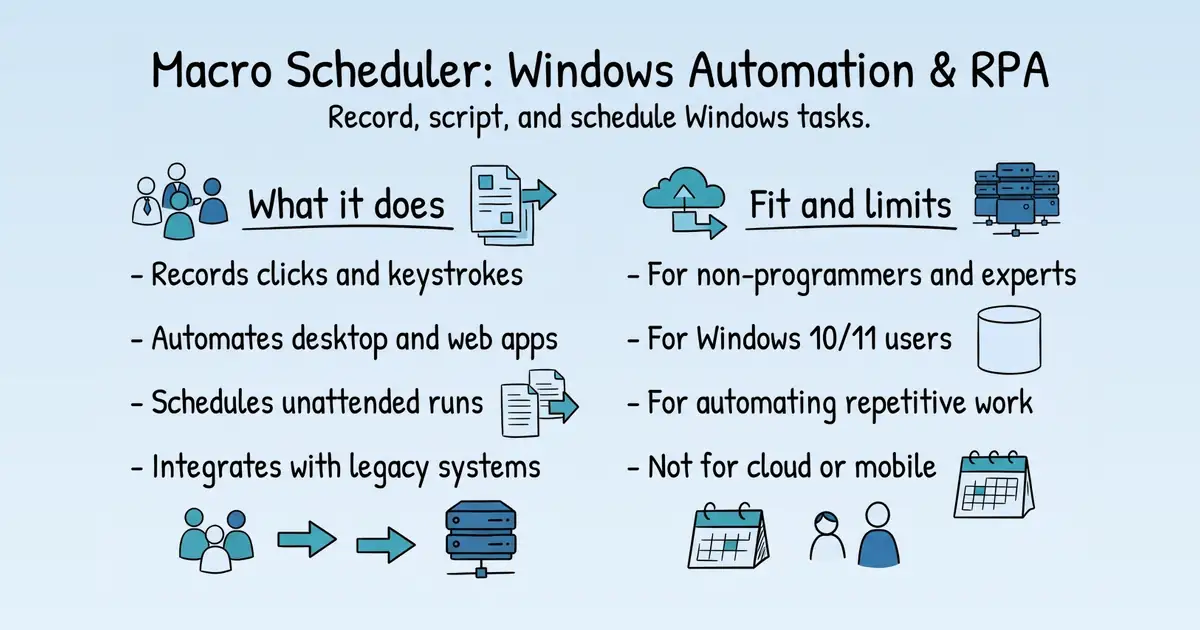
Macro Scheduler is a Windows automation and RPA tool that records and scripts desktop and browser tasks, including legacy applications S1. It is used by businesses and individuals to automate repetitive workflows, schedule unattended runs, and integrate with other systems S1. The product offers a 30-day free trial and flexible licensing, with a claimed track record of stability since 1997 S1.
Product identity and positioning
Name, category, positioning, audience, and first-party claims.
- Identity: Macro Scheduler, a Windows automation and RPA tool by MJT Net Ltd S1 S76.
- Core purpose: Automates repetitive Windows tasks and integrates legacy applications S76.
- Intended users: Non-programmers and enterprise teams needing automation S1.
- Product scope: A desktop application with recorder, editor, scheduler, and compiler S1.
- Positioning: Easy for non-programmers, powerful for complex enterprise scenarios S1.
- Claimed distinction: Handles Windows applications that modern RPA platforms can't S1.
Use cases and audiences
Who the product serves and the jobs it is designed to handle.
| Audience | Practical use case |
|---|---|
| IT professionals | Automate legacy system integration and data entry S1. |
| Small business owners | Create and sell software products built with Macro Scheduler S77. |
| Operations teams | Automate order fulfilment and activation-code emails S1. |
| Healthcare providers | Automate form filling and data processing S1. |
| Production engineers | Automate manufacturing workflows S1. |
Features
Features and capabilities
Core functions and evidence-backed product capabilities.
| Capability | What it does |
|---|---|
| Macro recording | Records clicks and keystrokes to automate Windows applications S1. |
| Scripting editor | Provides a visual editor and scripting language for refining automations S1. |
| Scheduling | Runs automations unattended, including overnight S1. |
| Web automation | Includes Chrome and Edge functions for browser-based workflows S1. |
| Screen recognition | Uses image recognition to automate any process S1. |
| Debugger | Steps through macros and inspects variables S1. |
| Compiler | Compiles scripts into standalone .exe files S1. |
| AI assistant | Assists with script analysis and generation S1. |
Integrations and ecosystem
Connected products, exports, APIs, and workflow compatibility.
| Integration or interface | Type | What it enables |
|---|---|---|
| COM interface | API | Interact with other software via scripting S1. |
| Standard Windows APIs | API | Access system-level functions S1. |
| File, database, web API | Data portability | Read/write data for workflow integration S1. |
| Excel, CSV, databases | Data integration | Automate data-driven processes S79. |
| Visual Studio | Extension | Integrate with development environment S79. |
| Chrome and Edge | Integration | Automate browser tasks S1. |
Pricing
Pricing and plans
Published plans, free access, trials, credits, and pricing limitations.
| Plan or offer | Verified price and billing | Included | Limits |
|---|---|---|---|
| Lite | USD 99.99 one-time, 12 months maintenance S67 | Macro recording, basic functions S67 | Not established |
| Standard | USD 249.99 one-time, 12 months maintenance S67 | Advanced features, web automation S67 | Not established |
| Professional | USD 449.99 one-time, 12 months maintenance S67 | Compiler, royalty-free .exe distribution S67 | Not established |
| Personal | USD 29.99 per year S67 | Non-commercial use S67 | 1 user, 1 machine S67 |
| Business | USD 19.00 per user/month S67 | Standard edition with support S67 | Not established |
| Enterprise | Talk to sales S67 | SSO, SLA, volume discounts S67 | Custom S67 |
| Free trial | Free S1 | 30-day Standard trial S1 | Windows 10/11 S1 |
Competition
Alternative tools
Named from this report, then each website opened and checked before it is shown.
3 verified
Trust and proof
Customers, proof, and reviews
Published proof, customer signals, and review evidence.
Independent reviews
No citation-grounded independent review links were found.
Customer proof
| Proof type | Named customer or source | Evidence |
|---|---|---|
| Customer evidence | We | We use Macro Scheduler to automate the process of extracting data files from our financial system and process the data for use by third party reporting software. (source) |
| Testimonial | Jonathan Goss | testimonial — ## What Our Customers Say ... (Macro Scheduler — Windows Automation and RPA Tool / Trusted Since 1997) |
Independent mentions
- Macro Scheduler Forums - Index page — Technical / Scripting Technical support and scripting issues Moderators: Dorian (MJT support), JRL Topics: 5650 ... General Discussion General Macro Scheduler discussion Moderators: Dorian (MJT support), JRL Topics: 1338 ... Beginners Hints, tips and tricks for newbies Moderators: Dorian (MJT support), JRL ... In total there are 165 users online :: 0 registered, 0 hidden and 165 guests (based on users active over the past 5 minutes)Most users ever online was 711 on Thu Apr 25, 2024 7:16 pm ... T
- Macro Scheduler Forums - Active topics — Jump to - ↳ Macro Scheduler Consultants - ↳ Enhancement Suggestions - ↳ Scripts and Tips - ↳ Beginners - ↳ General Discussion - ↳ Technical / Scripting - Macro Scheduler - ↳ The Water Cooler - General and Info
- Mjtnet.com - Mjtnet: Automate Windows with Macro Scheduler - Windows automation tools and automation software - Computer — Mjtnet.com has 1,335 daily visitors and has the potential to earn up to 160 USD per month by showing ads. See traffic statistics for more information. ... Mjtnet.com has an estimated worth of 5,768 USD. ... / Facebook Shares / 6 / / --- / --- / / Facebook Likes / 3 / / Facebook Comments / 2 / / Total Likes / 11 /
- Web Automation Software — > We quickly ran through 4 other web automation packages - none of which were up to the job for our task, or the learning curve was too steep to find out - then stumbled on your Macro Scheduler. If only we'd got to you first.
- Apps that can't receive Send output? - Macro Scheduler Forums — could not seem to receive Send output? I have successfully sent text and/or control sequences to Notepad, the Ruby 1.92 interactive interpreter, and the ActiveState Komodo 6.1 multilanguage editor. ... 's possible that the correct child window is not. I
- What is the Macro Recorder? - Macro Scheduler Knowledge Base — 's Macro Recorder allows you to record a sequence of events to create a Windows macro. The Macro Recorder will record keystrokes, mouse events and window activations, including window positions and dimensions. This makes it easy to create a macro that can
- Adding random number to mouse click - Macro Scheduler Forums — range, use the result as an offset to apply to the MouseMove: ... Thank you so much for this. I went another route with it, and instead of clicking different places i just moved the ... . Even then the random wasn't random enough so i run the script 2
- Macro scheduler pro analysis at MainKeys — #### Most Traffic to / Site / Traffic / Engagement / / --- / --- / --- / / mjtnet.com / 67.2% / 0x / / rutracker.org / 14.4% / 0x / / vsofte.ru / 3.6% / 0x / / informer.com / 3.3% / 0x / / allyoulike.com / 2.7% / 0x /
External links were grounded in one live web search. Search snippets are leads, not independently scraped page content; rejected links remain available in Review evidence.
Company, security, and trust
Ownership, policies, security signals, and public trust evidence.
| Signal | Finding | Source |
|---|---|---|
| Company and ownership | Sometimes you don’t have the time to build automations yourself — and that’s where we can help. Our team has delivered custom automation solutions for organizations of all sizes — from small businesses to large enterpris | source |
| Contact and support | Contact Us to Discuss Your Project | source |
| Legal and privacy | If you are, for any reason, not entirely happy with your purchase, simply send us an email. If we cannot solve the problem or help you find a solution, we will cheerfully issue a full refund. | source |
| Security and compliance | SSO, SLA, volume discounts | source |
| Uptime and status page | SSO, SLA, volume discounts | source |
| Domain registered | 1997-08-15 | — |
| Domain expires | 2029-08-14 | — |
Every trust signal above is backed by a collected page or a registration record.
Documentation and product updates
Help resources, product guidance, and visible changes over time.
| Resource or update | Type | What is available | Date or freshness |
|---|---|---|---|
| Product FAQ | FAQ | Answers common product, workflow, pricing, privacy, ownership, API, and team questions. (source) | Not dated |
| Contact and support | Support | Public contact and support channel. (source) | Not dated |
| Macro Scheduler Blog - Windows Automation Tips & Tutorials / MJT Net Ltd | Guide | Marcus' Macro Scheduler Blog - Macro Recording and Automating Windows with Macro Scheduler – Tips & News (source) | Not dated |
Not found in the collected public sources: public roadmap, changelog or release notes, status page, separate help center or knowledge base.
Technical
Technical and delivery signals
Delivery model, platforms, API, data ownership, reliability claims and release activity.
| Signal | Finding | Source |
|---|---|---|
| Delivery model (cloud, self-hosted, desktop, browser extension) | Desktop application for Windows S1. | |
| Platforms and apps | Windows 10/11 S1. | |
| API and extensibility (API, SDK, webhooks, MCP, plugins) | COM interface, scripting, command line, standard Windows APIs S1. | |
| Data ownership and export | Supports reading/writing files, databases, web APIs S1. | |
| Performance and reliability claims | Track record of stable, dependable automation S1. | |
| Release activity | Not published on the collected pages. | — |
Measured infrastructure
Domain, certificate, and hosting signals, measured directly.
| Signal | Finding |
|---|---|
| Domain registered | 1997-08-15 — Network Solutions, LLC |
| Domain expires | 2029-08-14 |
| First archived | 2000-03-01 — web archive |
| TLS certificate | Google Trust Services, valid, expires 2027-01-14 |
| Security headers | none served |
| Headers not served | HSTS, CSP, X-Content-Type-Options, X-Frame-Options, Referrer-Policy |
| Server header | cloudflare |
| Mail handled by | aspmx.l.google.com, alt1.aspmx.l.google.com |
| Nameservers | jill.ns.cloudflare.com, norman.ns.cloudflare.com |
Limits and method
Limitations and open questions
Known constraints and missing evidence from the collected pages.
The collected pages do not name specific competitors. Evidence gaps include lack of detailed pricing for enterprise plans, no explicit uptime or status page, and no independent review ratings collected. Open questions remain about the full scope of the AI assistant and the specifics of the enterprise workflow designer.
Sources, method, and limitations
Evidence inventory, collection method, provider use, and constraints.
This report is based on 14 collected pages from mjtnet.com, including the homepage, pricing, subscriptions, testimonials, and about pages. Static and browser rendering providers were used; deep page fetch was disabled. External proof search was enabled but no verification requests were made. Limitations include incomplete pricing details and lack of independent review data.
- Official Websitehttps://www.mjtnet.com/Verified
- Pricing Pagehttps://www.mjtnet.com/pricing.htmVerified
- Official Websitehttps://www.mjtnet.com/privacy.htmVerified
- Official Websitehttps://www.mjtnet.com/terms.htmVerified
- Official Websitehttps://www.mjtnet.com/about.htmVerified
- Official Websitehttps://www.mjtnet.com/contact.htmVerified
- Official Websitehttps://www.mjtnet.com/blog/Verified
- Official Websitehttps://www.mjtnet.com/index.htmVerified
- Official Websitehttps://www.mjtnet.com/kudos.htmVerified
- Official Websitehttps://www.mjtnet.com/macro-scheduler.htmVerified
- Official Websitehttps://www.mjtnet.com/services.htmVerified
- Pricing Pagehttps://www.mjtnet.com/subscriptions.htmVerified
- Official Websitehttps://www.mjtnet.com/manuals/b/v15/topics/welcome.htmVerified
- Articlehttps://mjtnet.com/forum/Verified
- Articlehttps://mjtnet.com/forum/search.php?search_id=active_topicsVerified
- Articlehttps://www.hupso.com/www/mjtnet.comVerified
- Articlehttps://www.mjtnet.com/web-automation.htmVerified
- Articlehttps://www.mjtnet.com/forum/viewtopic.php?t=6838Verified
- Articlehttps://help.mjtnet.com/article/51-what-is-the-macro-recorderVerified
- Articlehttps://www.mjtnet.com/forum/viewtopic.php?t=10111Verified
- Articlehttps://mainkeys.net/macro-scheduler-pro/Verified
- Articlehttps://www.mjtnet.com/forum/viewtopic.php?t=5857Verified