Overview
Summary
The useful answer before the supporting detail.
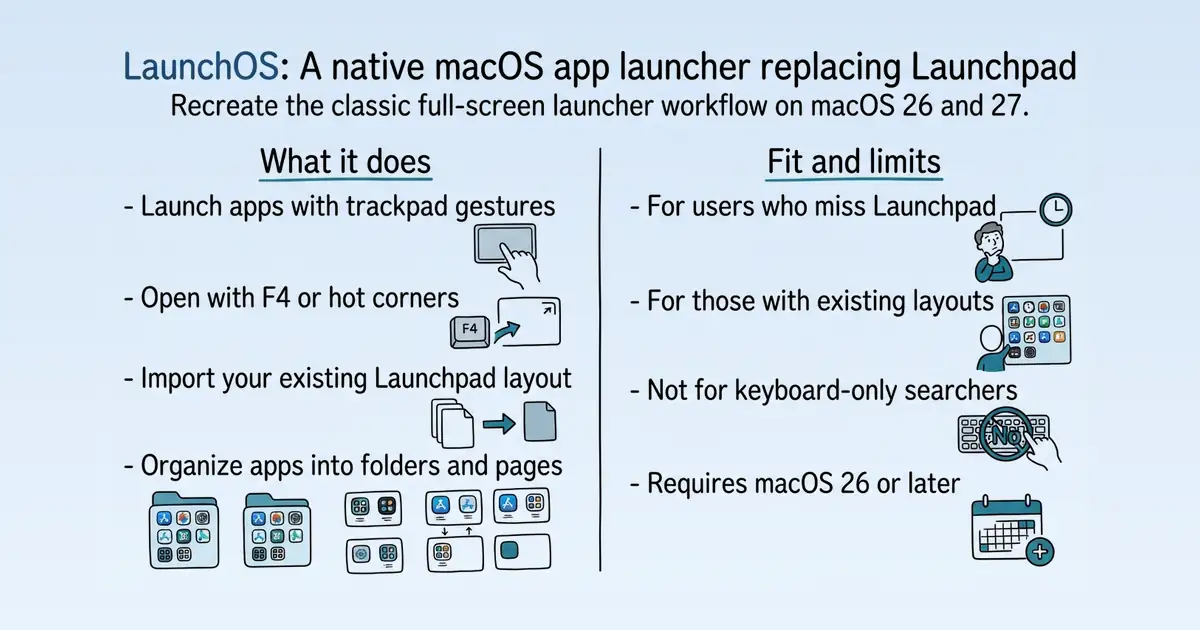
LaunchOS is a native macOS app launcher that recreates the classic Launchpad workflow for macOS 26 and 27 S5. It serves users who relied on Launchpad's full-screen visual organization and want to keep that routine after Apple integrated app browsing into Spotlight S40. The app provides familiar entry points like trackpad gestures, F4, hot corners, and layout import, making the transition practical S16.
Product identity and positioning
Name, category, positioning, audience, and first-party claims.
- Identity: LaunchOS is a native macOS app launcher positioned as a Launchpad alternative S5.
- Core purpose: It recreates the classic full-screen Launchpad workflow that macOS 26 and 27 no longer provide S40.
- Intended users: Mac users who miss Launchpad's visual organization and want to keep their existing habits S16 S35.
- Product scope: A single desktop app with a visual grid, folders, pages, gestures, and layout import S16.
- Positioning: The vendor markets it as the best Launchpad alternative for macOS 26 and 27 S5.
- Claimed distinction: It is built natively for smoothness and speed, and focuses on the classic workflow rather than feature stacking S1 S5.
Use cases and audiences
Who the product serves and the jobs it is designed to handle.
| Audience | Practical use case |
|---|---|
| Users who relied on Launchpad | Recreate the classic full-screen launcher workflow with familiar entry points S16 S40. |
| Users with existing Launchpad layouts | Import native Launchpad data to restore their previous organization without rebuilding manually S49. |
| Keyboard-centric users | Use F4 or shortcuts to launch apps without searching S16 S40. |
| Users who prefer visual browsing | Browse apps in a visual grid with folders and pages instead of a list S16 S40. |
Features
Features and capabilities
Core functions and evidence-backed product capabilities.
| Capability | What it does |
|---|---|
| Trackpad gesture entry | Launch the launcher with a three- or five-finger pinch, with real-time opacity and scale tracking S1. |
| F4 and hot corner workflow | Open the launcher using the F4 key or a hot corner, preserving familiar entry habits S16. |
| Import native Launchpad layout | One-click import of existing Launchpad data to restore folders, pages, and positions S16 S49. |
| Folder and page organization | Arrange apps into custom folders, pages, and positions to match personal workflows S40 S49. |
| Full-screen visual launcher | Display the app library as a large visual surface with icons, folders, and layout memory S16. |
| Dock, menu bar, and shortcuts | Access the launcher via Dock, menu bar, or keyboard shortcuts S16. |
Integrations and ecosystem
Connected products, exports, APIs, and workflow compatibility.
| Integration or interface | Type | What it enables |
|---|---|---|
| Native Launchpad layout import | Data portability | Imports existing Launchpad folders, pages, and positions as a starting point S16 S49. |
| Trackpad gestures | Input interface | Launches the app with three- or five-finger pinch gestures S1. |
| F4 key | Input interface | Opens the launcher with the F4 key S16. |
| Hot corners | Input interface | Triggers the launcher via macOS hot corners S16. |
| Dock and menu bar | Input interface | Provides additional entry points from the Dock or menu bar S16. |
Pricing
Pricing and plans
Published plans, free access, trials, credits, and pricing limitations.
Trust and proof
Customers, proof, and reviews
Published proof, customer signals, and review evidence.
Independent reviews
| Platform | Page | How it was found | Note |
|---|---|---|---|
| LaunchOS Blog | How to Get Launchpad Back on macOS 26 Tahoe (Feb 2026) - LaunchOS | Grounded web search | Early on when macOS 26 was first released, many Launchpad alternatives emerged. At that time, the experience of these alternatives was far from the native Launchpad—poor smoothness, unresponsive mouse drag page-turning, inadequate keyboard shortcut support, etc. But as we’ve moved into 2026, third-party Launchpad alternatives have become relatively mature. After trying over a dozen different third-party alternatives, LaunchOS is my current favorite and the most mainstream one, with a great reput |
| launchosapp.com | LaunchOS for Mac — Best Launchpad Alternative for macOS 26 & 27 | Grounded web search | ## The Best Launchpad Alternative for macOS 26 and macOS 27 Spotlight is great, but I still need Launchpad. It keeps my life and work in order, the way I navigate my Mac. That’s why I built LaunchOS — for me, and for you. |
| launchosapp.com | Why We Built LaunchOS - LaunchOS | Grounded web search | ## In the Reddit comments section, many users said “this is the best Launchpad alternative I’ve ever used.” What are our design principles behind this Launchpad that everyone loves? ... already existed without breaking habits Like the jumping around when |
| launchosapp.com | Creator Review Program - LaunchOS | Grounded web search | Review Program offers a complimentary Pro license to eligible creators who wish to explore, test, and review LaunchOS. Whether you’re a blogger, YouTuber, TikTok creator, newsletter writer, or tech reviewer, you’re welcome to apply |
| launchosapp.com | Creator Review Program - LaunchOS | Grounded web search | Review Program offers a complimentary Pro license to eligible creators who wish to explore, test, and review LaunchOS. Whether you’re a blogger, YouTuber, TikTok creator, newsletter writer, or tech reviewer, you’re welcome to apply |
Customer proof
No named customers, testimonials, or customer case studies were found.
Independent mentions
- LaunchOS FAQ: Setup, Trial, Safety, Permissions, and Licensing — Download LaunchOS only from launchosapp.com or the official download links provided there. A genuine copy is signed with a Developer ID certificate and notarized by Apple, so macOS Gatekeeper should recognize it without asking you
- Introducing LaunchOS — a smoother, more native replacement for the macOS 26 Launchpad - LaunchOS — , the team behind LaunchOS, a new take on the macOS ... - Built with Swift + AppKit, runs fast and light (only 8.2MB) - Right-click shortcuts (e.g. instantly unfold folders ... - Vertical scroll mode — surprisingly addictive - Hide apps you never use
- Claim LaunchOS Pro for Free - LaunchOS — If you use LaunchOS, you are welcome to share your real experience on X, YouTube, TikTok, Instagram, Reddit, Threads, a blog, newsletter, or any other public platform. ... about your experience, make a video walkthrough, share your Mac organization
- LaunchOS for Mac - Release Notes — ## v2.4.0 Sep 23, 2026 ### Multi-select & Batch Operations Are Finally Here!👏 Hold ⌘ (Command) while clicking or dragging to select multiple apps or folders, then reorder, move, or hide them together...
- Features - LaunchOS — It focuses on the details that quietly shape every daily interaction, the parts that feel obvious until they disappear, the parts that ... surface but require a great deal of polishing underneath, the parts your muscle memory reaches for without thinking
External links were grounded in one live web search. Search snippets are leads, not independently scraped page content; rejected links remain available in Review evidence.
Company, security, and trust
Ownership, policies, security signals, and public trust evidence.
| Signal | Finding | Source |
|---|---|---|
| Company and ownership | Not published on the collected pages. | — |
| Contact and support | Not published on the collected pages. | — |
| Legal and privacy | Keeps the original logic that decides whether to open or cancel based on how far the gesture completes | source |
| Security and compliance | Not published on the collected pages. | — |
| Uptime and status page | Not published on the collected pages. | — |
| Domain registered | 2025-09-26 | — |
| Domain expires | 2027-09-26 | — |
Not found on the collected pages: company and ownership, contact and support, security and compliance, uptime and status page. This only means Scout did not find it on the pages it read; it says nothing about the company itself.
Documentation and product updates
Help resources, product guidance, and visible changes over time.
| Resource or update | Type | What is available | Date or freshness |
|---|---|---|---|
| No Launchpad in macOS 27: How to Open and Browse Apps - LaunchOS | Guide | Learn how to open apps in macOS 27 without Launchpad, find software when you forget its name, and choose between Apps, Spotlight, Dock, Finder, and a visual launcher. (source) | Not dated |
| How to Organize Apps on Mac Without Launchpad - LaunchOS | Guide | Launchpad used to make app organization simple on Mac. Here are practical ways to organize apps after macOS 26, from Spotlight and Dock workflows to a visual Launchpad replacement. (source) | Not dated |
Not found in the collected public sources: public roadmap, changelog or release notes, status page, separate help center or knowledge base.
Technical
Technical and delivery signals
Delivery model, platforms, API, data ownership, reliability claims and release activity.
| Signal | Finding | Source |
|---|---|---|
| Delivery model (cloud, self-hosted, desktop, browser extension) | Delivered as a native desktop app for macOS S5. | S5 |
| Platforms and apps | Requires macOS 26 or later S5. | S5 |
| API and extensibility (API, SDK, webhooks, MCP, plugins) | Not published on the collected pages. | — |
| Data ownership and export | Supports importing native Launchpad layout data S49. | S49 |
| Performance and reliability claims | Built natively for smoothness and speed S5. | S5 |
| Release activity | Last updated September 23, 2026 S5. | S5 |
Measured infrastructure
Domain, certificate, and hosting signals, measured directly.
| Signal | Finding |
|---|---|
| Domain registered | 2025-09-26 — DNSPod, Inc. |
| Domain expires | 2027-09-26 |
| First archived | 2025-09-28 — web archive |
| TLS certificate | Google Trust Services, valid, expires 2026-12-14 |
| Security headers | X-Content-Type-Options, Referrer-Policy |
| Headers not served | HSTS, CSP, X-Frame-Options |
| Server header | cloudflare |
| Mail handled by | mxbiz1.qq.com |
| Nameservers | ivy.ns.cloudflare.com, elliott.ns.cloudflare.com |
Limits and method
Limitations and open questions
Known constraints and missing evidence from the collected pages.
The collected pages do not mention any competitor products by name. Evidence gaps include: no pricing for the Pro plan, no company or legal information, no API or extensibility details, and no independent review ratings. The blog posts discuss macOS's built-in Spotlight and Finder as alternatives, but these are not presented as competing products S40 S49.
Sources, method, and limitations
Evidence inventory, collection method, provider use, and constraints.
This report is based on 15 collected pages from launchosapp.com, including the homepage, features page, and blog posts in English, German, and French. Static and browser rendering rendering were used; external proof search was enabled but only verified the existence of linked results, not their content. Pricing was taken from an authoritative research snapshot. Limitations: no third-party review sites were scraped, and some pages were not dated.
- Official Websitehttps://launchosapp.com/Verified
- Official Websitehttps://launchosapp.com/features/Verified
- Documentationhttps://launchosapp.com/fullscreen-app-launcher-mac/Verified
- Documentationhttps://launchosapp.com/blog/de/macos-27-app-launching-change/Verified
- Documentationhttps://launchosapp.com/blog/de/organize-apps-on-mac-without-launchpad/Verified
- Documentationhttps://launchosapp.com/blog/en/macos-27-app-launching-change/Verified
- Documentationhttps://launchosapp.com/blog/en/organize-apps-on-mac-without-launchpad/Verified
- Documentationhttps://launchosapp.com/blog/fr/macos-27-app-launching-change/Verified
- Documentationhttps://launchosapp.com/blog/fr/organize-apps-on-mac-without-launchpad/Verified
- Documentationhttps://launchosapp.com/blog/ja/macos-27-app-launching-change/Verified
- Documentationhttps://launchosapp.com/blog/ja/organize-apps-on-mac-without-launchpad/Verified
- Documentationhttps://launchosapp.com/blog/zh-TW/macos-27-app-launching-change/Verified
- Documentationhttps://launchosapp.com/blog/zh-TW/organize-apps-on-mac-without-launchpad/Verified
- Documentationhttps://launchosapp.com/blog/zh/macos-27-app-launching-change/Verified
- Documentationhttps://launchosapp.com/blog/zh/organize-apps-on-mac-without-launchpad/Verified
- Review Sitehttps://launchosapp.com/blog/en/how-to-get-launchpad-back/Verified
- Articlehttps://launchosapp.com/faq/Verified
- Articlehttps://launchosapp.com/blog/en/introducing-launchos/Verified
- Review Sitehttps://launchosapp.com/blog/en/why-we-built-launchos/Verified
- Review Sitehttps://launchosapp.com/reviews/Verified
- Articlehttps://launchosapp.com/article/en/free-event/Verified
- Review Sitehttps://launchosapp.com/article/en/creator-program/Verified
- Articlehttps://launchosapp.com/release.enVerified