Overview
Summary
The useful answer before the supporting detail.
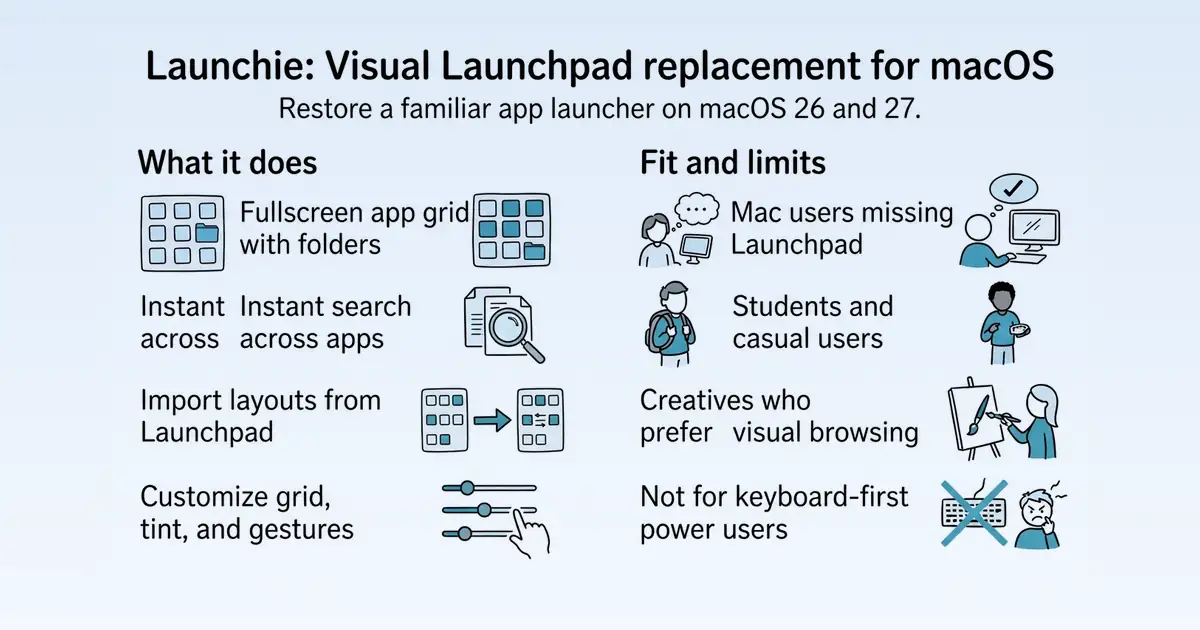
Launchie is a visual app launcher for macOS that replaces the Launchpad removed in macOS 26 Tahoe and 27 Golden Gate S12. It serves Mac users who prefer a graphical, browseable launcher over keyboard-first tools like Raycast or Alfred S1. The app provides a fullscreen app grid with folders, search, and customization, available free with an optional Pro tier S1 S12.
Product identity and positioning
Name, category, positioning, audience, and first-party claims.
- Identity: Launchie is a visual app launcher for macOS, positioned as a Launchpad replacement S12.
- Core purpose: It restores a familiar visual launcher workflow for users affected by Launchpad's removal in macOS 26 and 27 S1 S12.
- Intended users: Mac users, including students, casual users, creatives, and iPad switchers, who prefer visual browsing over command-line launchers S1.
- Product scope: A single desktop app offering a fullscreen app grid, folders, search, and customization S1.
- Positioning: Launchie is marketed as the best Launchpad alternative for macOS Tahoe, with active development and frequent updates S12.
- Claimed distinction: It offers more features and configuration options than the original Launchpad, even on the free tier S12.
Use cases and audiences
Who the product serves and the jobs it is designed to handle.
| Audience | Practical use case |
|---|---|
| Mac users upgrading to macOS 26/27 | Restore a familiar visual launcher after Launchpad is removed S12. |
| Students and casual users | Browse and launch apps visually without learning command-line tools S1. |
| Creatives | Use a visual, discoverable launcher that feels less intimidating than keyboard-first alternatives S1. |
| iPad users switching to Mac | Find a Launchpad-like experience that matches their prior workflow S1. |
| Users of LaunchNext or LaunchOS | Switch to Launchie without rebuilding their app grid by importing their layout S12. |
Features
Features and capabilities
Core functions and evidence-backed product capabilities.
| Capability | What it does |
|---|---|
| Fullscreen app grid | Displays apps in a Launchpad-style fullscreen grid with pages and Spaces S1 S12. |
| Folders | Create unlimited folders and organize apps within them S12. |
| Search | Instantly find apps by typing, with reliable keyboard focus and standard macOS text-editing shortcuts S12 S54. |
| Customization | Adjust grid padding, window tint, folder spacing, and per-display window profiles S54. |
| Layout import | Import your existing layout from original Launchpad, LaunchNext, or LaunchOS, including folders and app order S12. |
| Trackpad gestures | Use pinch and three-finger swipe to open and close Launchie, matching Launchpad behavior (Pro feature) S54. |
| Quick Access | Add favorite apps to a Quick Access area for faster launching (Pro feature) S54. |
| Hot corner activation | Trigger Launchie from a configurable hot corner, with monitor selection S54. |
Integrations and ecosystem
Connected products, exports, APIs, and workflow compatibility.
| Integration or interface | Type | What it enables |
|---|---|---|
| Launchpad layout import | Data portability | Import folders and app order from the original Launchpad, surviving the macOS 26 upgrade S12 S54. |
| LaunchNext import | Data portability | Import LaunchNext folders and app order, or a backup file, to switch without rebuilding S12. |
| LaunchOS import | Data portability | Import LaunchOS folders and app order in a few clicks S12. |
| Homebrew | Distribution | Install and update Launchie via `brew install --cask launchie` S50. |
| GitHub releases | Distribution | Download the latest .dmg from the GitHub release page S50 S82. |
| Mac App Store | Distribution | Install and purchase Pro via Apple's in-app purchase system S50. |
Pricing
Pricing and plans
Published plans, free access, trials, credits, and pricing limitations.
| Plan or offer | Verified price and billing | Included | Limits |
|---|---|---|---|
| Free | $0, free S1 | App grid, folders, search, layout import S51 S12 | Hot corner, backups, and gestures require Pro S1 |
| Pro (direct) | $14.99 one-time purchase, up to 5 Macs S1 | All Pro features including trackpad gestures, per-display profiles, Favorites in Quick Access S54 | License key does not unlock the App Store version S1 |
| Pro (Mac App Store) | Monthly or yearly subscription, amounts not published S1 | Pro features via in-app purchase S50 | Subscription cannot be moved to direct version S50 |
Trust and proof
Customers, proof, and reviews
Published proof, customer signals, and review evidence.
Independent reviews
| Platform | Page | How it was found | Note |
|---|---|---|---|
| osxdaily.com | Do You Miss LaunchPad in MacOS Tahoe? Using the New LaunchPad, Plus a LaunchPad Alternative - OS X Daily | Grounded web search | aims to replicate the look, feel, and functionality of the original LaunchPad. It’s not a precise replica, but it’ll be close enough for many Tahoe users who miss the old LaunchPad. ... and drag it into your Dock on the far left, just like the original |
| idownloadblog.com | 7 Launchpad alternatives for Mac on macOS Tahoe 26 | Grounded web search | is the best Launchpad alternative for macOS Tahoe. ... offers handy customization options, and it’s the closest you can get to an actual Launchpad on a Mac running macOS 26. It even allows you to create app folders for improved organization, just like |
| launchie.app | Launchie vs. LaunchNext: Two Ways to Bring Launchpad Back - Launchie | Grounded web search | LaunchNext is a free, open-source launcher built on LaunchNow. Launchie offers a scrolling app grid, Spaces and a Mac App Store version, with an optional Pro upgrade. Both are alternatives for macOS 26 and newer; the main choice is which browsing style and |
Customer proof
No named customers, testimonials, or customer case studies were found.
Independent mentions
- nick-friedrich/launchie-launchpad-replacement-mac-os — macOS 26 Deserves Apple removed icon rearranging and folders from Launchpad in macOS 26 Tahoe. Launchie brings back the power and adds even more control to your app launching experience. For more details visit www.launchie.app or get it directly on
- Launchpad Replacement for macOS 26 Tahoe & 27 - Launchie — ### Every app, where you put it. ... A full-screen grid you arrange yourself, with drag-and-drop ordering that sticks. Launchie is the macOS 26 Tahoe Launchpad replacement for people who browse by eye instead of typing a name. ... Spaces are separate sections, each holding its own apps and folders, so a big library stops being one long wall of icons. The old Launchpad never had this. ... Make as many folders as you like, drop apps into them, and find anything instantly with search. Hide the apps
- Install Launchie on macOS - Launchie Help — Install Launchie on macOS 26 Tahoe and macOS 27 Golden Gate from the Mac App Store, with Homebrew, or as a direct download. ... Launchie is available from the Mac App Store and as a direct download, which is also what Homebrew installs. Both versions are maintained, receive the same updates at the same time, and have the same features. Pick whichever fits how you manage your Mac. ... 1. Download the latest `.dmg` from the GitHub release page. 2. Open it and drag `Launchie.app` into `/Application
- Introducing Launchie: The Launchpad Replacement macOS 26 Deserves - Launchie — Launchie is designed specifically for Apple Silicon Macs running macOS 26 and later. We’ve optimized every interaction to feel native and responsive, just like you’d expect from a first-party Apple app.
- Welcome to Launchie Help - Launchie Help — ### macOS 27 Launchpad: Still Gone in Golden Gate macOS 27 Golden Gate is out, and Launchpad is still gone. What changed for app launching, how to open Apps, and how to get a Launchpad grid back on macOS 27.
- Missing Launchpad in MacOS 26? Here’s How to Bring It Back / WIRED — 't have any kind of in-app purchases. It's the best Launchpad replacement I could find. Open the application and you'll see all of your apps listed in alphabetical order. You can use your arrow keys to choose an application, if you want, or you can scroll
- Missing Launchpad After Upgrading to macOS Tahoe? Here's How to Get it Back — . It restores drag-and-drop reordering, custom folders, and a fast search bar, with optional custom hotkeys (e.g., ⌘K). A clean, focused choice if you just want Launchpad back with a few quality-of-life upgrades.
External links were grounded in one live web search. Search snippets are leads, not independently scraped page content; rejected links remain available in Review evidence.
Company, security, and trust
Ownership, policies, security signals, and public trust evidence.
| Signal | Finding | Source |
|---|---|---|
| Company and ownership | Not published on the collected pages. | — |
| Contact and support | Personal information such as your name, email, address or phone number | source |
| Legal and privacy | App Store subscription: a monthly or yearly subscription cannot be moved. Cancel it in the App Store (your account → Subscriptions), and it stays active until the end of the period you paid for. | source |
| Security and compliance | Your apps, folders, preferences and settings remain on your Mac. All network requests Launchie makes use encrypted HTTPS connections. | source |
| Uptime and status page | Not published on the collected pages. | — |
| Domain registered | 2025-09-17 | — |
| Domain expires | 2027-09-17 | — |
Not found on the collected pages: company and ownership, uptime and status page. This only means Scout did not find it on the pages it read; it says nothing about the company itself.
Documentation and product updates
Help resources, product guidance, and visible changes over time.
| Resource or update | Type | What is available | Date or freshness |
|---|---|---|---|
| Launchie Changelog - Latest macOS Launchpad Replacement Updates | Changelog | See what changed in each Launchie release, including new features, improvements, bug fixes, and macOS Launchpad replacement updates. (source) | Not dated |
| Launchie 1.2.8 released — Spaces, smarter folders, and more - Launchie | Release notes | Launchie 1.2.8 introduces Spaces, polished folder animations, clearer permissions, and refreshed translations, plus highlights from versions 1.2.7 and 1.2.6. (source) | Not dated |
| Launchie Blog - Launchpad Replacement Guides, Updates, and Comparisons | Guide | Guides, comparisons, pricing breakdowns, use cases, and how-to articles. (source) | Not dated |
| Launchpad Replacement for macOS 26 Tahoe & 27 - Launchie | Release notes | Public product change history. (source) | Not dated |
Not found in the collected public sources: public roadmap, status page, separate help center or knowledge base.
Technical
Technical and delivery signals
Delivery model, platforms, API, data ownership, reliability claims and release activity.
| Signal | Finding | Source |
|---|---|---|
| Delivery model (cloud, self-hosted, desktop, browser extension) | Desktop app for macOS, available via Mac App Store, direct download, and Homebrew S50. | S50 |
| Platforms and apps | macOS only; supports macOS 26 Tahoe and 27 Golden Gate S12. | S12 |
| API and extensibility (API, SDK, webhooks, MCP, plugins) | Not published on the collected pages. | — |
| Data ownership and export | User data (apps, folders, preferences) stays on the Mac; layout can be backed up and imported S157 S12. | S157 S12 |
| Performance and reliability claims | Not published on the collected pages. | — |
| Release activity | Active development with frequent changelog updates; latest release 1.6.4 S54 S12. | S54 S12 |
Measured infrastructure
Domain, certificate, and hosting signals, measured directly.
| Signal | Finding |
|---|---|
| Domain registered | 2025-09-17 — 1&1 Internet SE |
| Domain expires | 2027-09-17 |
| First archived | 2025-09-18 — web archive |
| TLS certificate | Let's Encrypt, valid, expires 2027-01-04 |
| Security headers | none served |
| Headers not served | HSTS, CSP, X-Content-Type-Options, X-Frame-Options, Referrer-Policy |
| Mail handled by | mx02.mail.icloud.com, mx01.mail.icloud.com |
| Nameservers | ns1125.ui-dns.biz, ns1017.ui-dns.com |
Not measurable: rdap: exceeded the overall budget; wayback: exceeded the overall budget; tls: exceeded the overall budget; dns: exceeded the overall budget; headers: exceeded the overall budget. A gap here means the lookup was unavailable, not that the finding is negative.
Limits and method
Limitations and open questions
Known constraints and missing evidence from the collected pages.
The collected pages do not mention any direct competitors by name beyond general references to Raycast and Alfred as keyboard-first alternatives S1. Pricing for the Mac App Store Pro subscription is not published S1. No information is available on company ownership, uptime, or performance benchmarks. The free tier lacks hot corner, backups, and gestures, which require Pro S1.
Sources, method, and limitations
Evidence inventory, collection method, provider use, and constraints.
This report is based on 15 collected pages from launchie.app, including the homepage, help articles, changelog, reviews, privacy policy, and terms of use. The evidence catalog includes 180 entries from static and browser rendering rendering. External proof search was used to verify the Mac App Store rating. Pricing was cross-referenced with an owner-reviewed research table. Limitations: some pages were not deeply scraped, and external review snippets were not independently verified.
- Documentationhttps://www.launchie.app/Verified
- Documentationhttps://www.launchie.app/why-people-miss-launchpadVerified
- Documentationhttps://www.launchie.app/help/app-directoriesVerified
- Documentationhttps://www.launchie.app/help/app-positionsVerified
- Documentationhttps://www.launchie.app/help/hidden-appsVerified
- Documentationhttps://www.launchie.app/help/switch-to-app-storeVerified
- Documentationhttps://www.launchie.app/reviewsVerified
- Documentationhttps://www.launchie.app/changelogVerified
- Documentationhttps://www.launchie.app/blog/launchie-1-2-8-releaseVerified
- Documentationhttps://www.launchie.app/help/update-older-versionsVerified
- Documentationhttps://www.launchie.app/privacyVerified
- Documentationhttps://www.launchie.app/termsVerified
- Documentationhttps://www.launchie.app/best-launchpad-replacement-macVerified
- Documentationhttps://www.launchie.app/blogVerified
- Articlehttps://github.com/nick-friedrich/launchie-launchpad-replacement-mac-osVerified
- Articlehttps://www.launchie.app/installationVerified
- Articlehttps://www.launchie.app/blog/introducing-launchieVerified
- Articlehttps://www.launchie.app/helpVerified
- Articlehttps://www.wired.com/story/how-to-bring-back-launchpad-in-macos/Verified
- Review Sitehttps://osxdaily.com/2025/09/23/miss-launchpad-macos-tahoe-solutions/Verified
- Review Sitehttps://www.idownloadblog.com/2025/11/25/launchpad-alternatives-for-mac/Verified
- Articlehttps://eshop.macsales.com/blog/97761-missing-launchpad-after-upgrading-to-macos-tahoe-heres-how-to-get-it-back/Verified
- Review Sitehttps://www.launchie.app/blog/launchie-vs-launchnextVerified