Overview
Summary
The useful answer before the supporting detail.
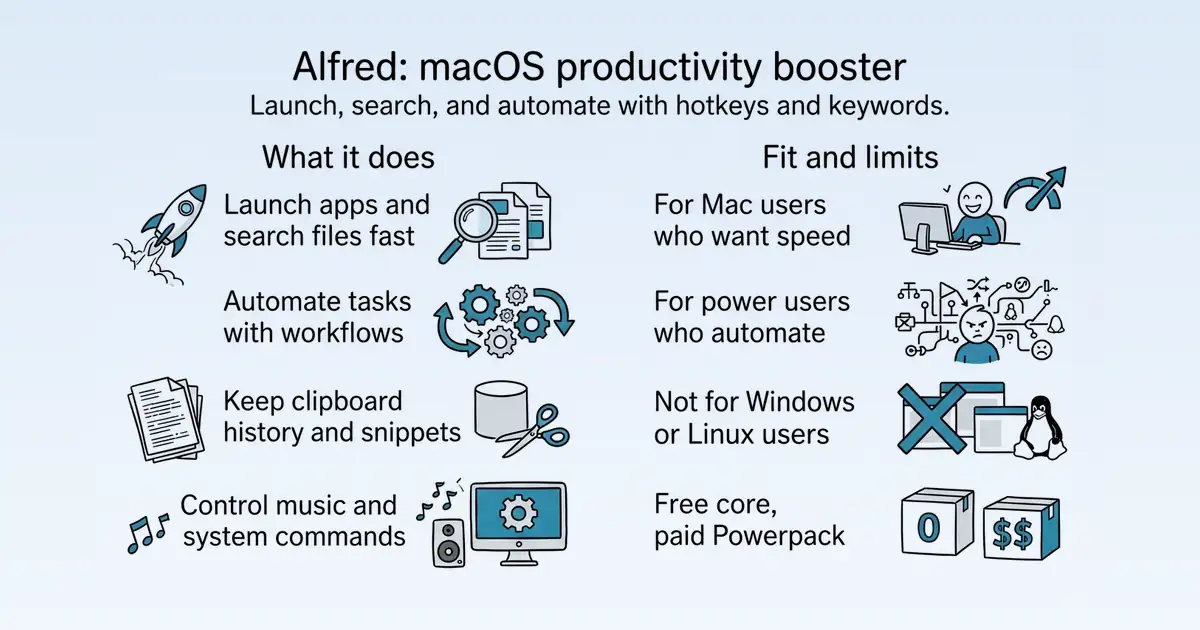
Alfred is a productivity application for macOS that boosts efficiency with hotkeys, keywords, and text expansion S1. It is used by Mac users to launch apps, search files, and automate repetitive tasks, solving the problem of slow manual workflows S30. Its main practical value is saving time through fast search, clipboard history, snippets, and customizable workflows S30.
Product identity and positioning
Name, category, positioning, audience, and first-party claims.
- Identity: Alfred is a productivity application for macOS, developed by Running with Crayons Ltd S1.
- Core purpose: It boosts efficiency by enabling fast actions through hotkeys, keywords, and text expansion S1.
- Intended users: Mac users seeking to speed up everyday tasks like launching apps, searching files, and automating workflows S1 S30.
- Product scope: A single desktop app with a free core and a paid Powerpack that adds workflows, clipboard history, and snippets S30.
- Positioning: Alfred is positioned as an award-winning, essential tool for Mac productivity S30.
- Claimed distinction: It is highly flexible and extensible, with a community of millions and thousands of shared workflows S1 S30.
Use cases and audiences
Who the product serves and the jobs it is designed to handle.
| Audience | Practical use case |
|---|---|
| Mac users | Launch applications and search files quickly using hotkeys and keywords S30 S59. |
| Power users | Automate repetitive tasks by creating custom workflows without coding S30. |
| Writers and support staff | Save time by using clipboard history and text snippets for frequently typed responses S30. |
| Music listeners | Control Music.app playback and rate tracks without leaving the keyboard S58. |
Features
Features and capabilities
Core functions and evidence-backed product capabilities.
| Capability | What it does |
|---|---|
| Default Results | Search apps, files, and more from a single search box, with customizable file types and fallback searches S5 S92. |
| File Search | Find files quickly using keywords like "open" and "find", with navigation through folders S5 S118. |
| Clipboard History | Automatically store copied text, files, and images in a searchable history, with merging and privacy controls S5 S57. |
| Snippets & Text Expansion | Create and auto-expand text snippets from abbreviations, saving typing time S5 S30. |
| Workflows | Link hotkeys, keywords, and actions to create custom automations without coding, or import from the community S5 S30. |
| Web Search & Bookmarks | Use built-in or custom web searches, and search Safari and Chrome bookmarks S5. |
| System Commands | Control macOS directly from the keyboard, such as ejecting, quitting, and hiding apps S5. |
| Music Mini Player | Control Music.app playback, rate tracks, and play random albums without a mouse S5 S58. |
Integrations and ecosystem
Connected products, exports, APIs, and workflow compatibility.
| Integration or interface | Type | What it enables |
|---|---|---|
| 1Password | Integration | Search and open 1Password bookmarks securely; passwords remain secret S5 S60. |
| Email clients | Integration | Send file attachments via Mail.app, Mailplane, Postbox, Sparrow, AirMail, MailMate, and some Outlook versions S83. |
| Terminal and iTerm2 | Integration | Open the terminal and run shell commands; iTerm2 integration scripts available S5 S109. |
| Workflows | Extension framework | Create or import custom workflows linking hotkeys, keywords, and actions S30. |
| Snippets export | Data portability | Export snippet collections to share with others S107. |
Pricing
Pricing and plans
Published plans, free access, trials, credits, and pricing limitations.
| Plan or offer | Verified price and billing | Included | Limits |
|---|---|---|---|
| Alfred (free) | £0, free forever S30 | Core app launching and file search S30 | No workflows, clipboard history, or snippets S1 |
| Powerpack Single License | £34 one-time purchase S1 | Powerpack features including workflows, clipboard history, snippets S30 | Alfred 5 licence with free upgrade to Alfred 6 S1 |
| Powerpack Mega Supporter | £59 one-time purchase S1 | Powerpack features S1 | Free lifetime upgrades S1 |
Trust and proof
Customers, proof, and reviews
Published proof, customer signals, and review evidence.
Independent reviews
| Platform | Page | How it was found | Note |
|---|---|---|---|
| Product Hunt | Alfred: Productivity App for macOS / Product Hunt | Grounded web search | Reviewers mostly see Alfred as an essential Mac utility that is faster and more capable than Spotlight, especially for keyboard-driven work. They repeatedly praise quick search, launching apps and web queries, shortcuts, text snippets, clipboard history, and lightweight workflows or scripts that save time every day. Several say it is one of the first apps they install and hard to live without. A founder from Apparent for Gmail says they use it daily, but notes a small calculator workflow annoyan |
| ShouldIUse.io | Alfred Review 2026: Pricing, Pros & Cons / Should I Use It | Grounded web search | Longtime Mac users call Alfred fantastic, though a vocal group debates whether it's aging against ... . > “Alfred is fantastic (review from a longtime user)” Reddit, r/macapps > “Am I the only one feeling it's time to let Alfred go” Reddit, r/Alfred |
| Tool News | Alfred — No-code / Low-code App Builders — tool.news | Grounded web search | matching - Powerful Workflows with scripting hooks - Clipboard history and snippet ... ### Cons - Workflows locked behind Powerpack license - macOS only, no Windows or Linux - Raycast now offers similar features free - Setup curve for advanced workflows |
| factchecktool.com | Alfred Review (2026) — Pros, Cons & Rating | Grounded web search | ## Productivity App for macOS ★★★★★ 4.9/5 from 17 reviews ... application for macOS, which boosts your efficiency with hotkeys, keywords and text expansion. Search your Mac and the web, and control your Mac using custom actions with the Powerpack. |
| bundl.run | Alfred for Mac (2026) — Review & Install — Bundl.run | Grounded web search | . The core launcher is better than Spotlight, and the Powerpack transforms it into a programmable command palette for your entire Mac. Workflows are the standout feature, they let you automate anything that can be scripted and trigger it with a keyword or |
| Product Hunt | Alfred Product Information and Latest Updates (2025) / Product Hunt | Grounded web search | Alfred Product Information and Latest Updates (2025) / Product Hunt # Alfred Productivity App for macOS • 93 reviews• 839 followers Visit website Follow - More - Alternatives - Awards - Team - Reviews - Forums - Launches - Overview |
Customer proof
No named customers, testimonials, or customer case studies were found.
Independent mentions
- Any Aflred fans here? / MacRumors Forums — Alfred is a great app. It is Finder on steroids amongst ... It all depends on how you use Spotlight or want it to work. Alfred is my go to for most things, you mentioned DuckDuckGo having a similar feature, but the issue with that is I have to go to the browser and then DuckDuckGo. I hit command space - type amz and then what I want to search for on Amazon hit enter and boom safari opens with my amazon search. I also have a lot of scripting set up in Alfred, so I can type Dial - 0000000000 and i
- Alfred - Productivity App for macOS — # Alfred 5 for Mac ## Alfred is an award-winning app for macOS which boosts your efficiency with hotkeys, keywords, text expansion and more. Search your Mac and the web, and be more productive with custom actions to control your Mac.
- Alfred — used by 17 indie makers / WIP — # Alfred Productivity app for macOS with hotkeys, search, snippets, and workflow automation. alfredapp.com Productivity & collaboration ... - Using it 83% - Adopting it 3% - Evaluating it 9% - Leaving it 6% - Other 0%
External links were grounded in one live web search. Search snippets are leads, not independently scraped page content; rejected links remain available in Review evidence.
Company, security, and trust
Ownership, policies, security signals, and public trust evidence.
| Signal | Finding | Source |
|---|---|---|
| Company and ownership | In 2010, Running with Crayons Ltd was founded by Andrew Pepperrell (@preppeller) and Vero Pepperrell (@vero), and we launched Alfred, a new productivity application. Applying our years of UX / UI experience, we continual | source |
| Contact and support | Pop up a phone number or any text in large text on your screen. | source |
| Legal and privacy | Terms & Conditions, Privacy Policy, Cookies. | source |
| Security and compliance | Not published on the collected pages. | — |
| Uptime and status page | Not published on the collected pages. | — |
| Domain registered | 2010-01-17 | — |
| Domain expires | 2027-01-17 | — |
Not found on the collected pages: security and compliance, uptime and status page. This only means Scout did not find it on the pages it read; it says nothing about the company itself.
Documentation and product updates
Help resources, product guidance, and visible changes over time.
| Resource or update | Type | What is available | Date or freshness |
|---|---|---|---|
| Contact and support | Support | Public contact and support channel. (source) | Not dated |
| Contact and support | Support | Public contact and support channel. (source) | Not dated |
| Contact and support | Support | Public contact and support channel. (source) | Not dated |
| Contact and support | Support | Public contact and support channel. (source) | Not dated |
| Contact and support | Support | Public contact and support channel. (source) | Not dated |
| Contact and support | Support | Public contact and support channel. (source) | Not dated |
| Contact and support | Support | Public contact and support channel. (source) | Not dated |
| Contact and support | Support | Public contact and support channel. (source) | Not dated |
Not found in the collected public sources: public roadmap, changelog or release notes, status page, separate help center or knowledge base.
Technical
Technical and delivery signals
Delivery model, platforms, API, data ownership, reliability claims and release activity.
| Signal | Finding | Source |
|---|---|---|
| Delivery model (cloud, self-hosted, desktop, browser extension) | Alfred is a desktop application for macOS S1. | S1 |
| Platforms and apps | Runs on macOS 10.14+ (64-bit Intel, Apple Silicon) S30. | S30 |
| API and extensibility (API, SDK, webhooks, MCP, plugins) | Extensible via workflows that link hotkeys, keywords, and actions; no coding required S30. | S30 |
| Data ownership and export | Snippets can be exported for sharing S107. | S107 |
| Performance and reliability claims | Not published on the collected pages. | — |
| Release activity | Version 5.8.1 b2349 is the current release S30. | S30 |
Measured infrastructure
Domain, certificate, and hosting signals, measured directly.
| Signal | Finding |
|---|---|
| Domain registered | 2010-01-17 — Squarespace Domains II LLC |
| Domain expires | 2027-01-17 |
| TLS certificate | GlobalSign nv-sa, valid, expires 2027-03-22 |
| Security headers | HSTS, X-Frame-Options |
| Headers not served | CSP, X-Content-Type-Options, Referrer-Policy |
| Server header | nginx |
| Mail handled by | aspmx.l.google.com, alt1.aspmx.l.google.com |
| Nameservers | ns1.linode.com, ns3.linode.com |
Not measurable: wayback: rate limited by archive.org, ladder stopped after 1 probe(s). A gap here means the lookup was unavailable, not that the finding is negative.
Limits and method
Limitations and open questions
Known constraints and missing evidence from the collected pages.
The collected pages do not mention any competitors by name. Evidence gaps include lack of detailed pricing information on the website (pricing was provided via research), no explicit security certifications, and no uptime or status page information. Open questions include the exact feature set of the free tier versus Powerpack, and the availability of future Alfred 6 features beyond a free upgrade.
Sources, method, and limitations
Evidence inventory, collection method, provider use, and constraints.
This report is based on 15 collected pages from alfredapp.com, including the homepage, About page, and help documentation for various features. The static collector completed all 15 requests, and browser rendering rendered 8 pages. External proof search was enabled but only performed a web search, not verification. Pricing information was supplemented by an owner-reviewed research source. Limitations include the lack of independent review data and the absence of some company details.
- Documentationhttps://www.alfredapp.com/Verified
- Official Websitehttps://www.alfredapp.com/about/Verified
- Official Websitehttps://www.alfredapp.com/help/overview/Verified
- Official Websitehttps://www.alfredapp.com/help/features/1password/Verified
- Official Websitehttps://www.alfredapp.com/help/features/calculator/Verified
- Official Websitehttps://www.alfredapp.com/help/features/clipboard/Verified
- Official Websitehttps://www.alfredapp.com/help/features/contacts/Verified
- Official Websitehttps://www.alfredapp.com/help/features/default-results/Verified
- Official Websitehttps://www.alfredapp.com/help/features/dictionary/Verified
- Official Websitehttps://www.alfredapp.com/help/features/file-search/Verified
- Official Websitehttps://www.alfredapp.com/help/features/itunes/Verified
- Official Websitehttps://www.alfredapp.com/help/features/snippets/Verified
- Official Websitehttps://www.alfredapp.com/help/features/system/Verified
- Official Websitehttps://www.alfredapp.com/help/features/terminal/Verified
- Official Websitehttps://www.alfredapp.com/help/features/web-search/Verified
- Review Sitehttps://www.producthunt.com/products/alfredVerified
- Review Sitehttps://shouldiuse.io/r/alfredappVerified
- Articlehttps://forums.macrumors.com/threads/any-aflred-fans-here.2278299/Verified
- Review Sitehttps://tool.news/tools/alfred-app/Verified
- Review Sitehttps://factchecktool.com/en/tools/productivity/alfredVerified
- Review Sitehttps://bundl.run/apps/alfredVerified
- Articlehttps://wip.co/tools/alfredVerified
- Review Sitehttps://www.producthunt.com/products/alfred?comment=3348297Verified