Overview
Summary
The useful answer before the supporting detail.
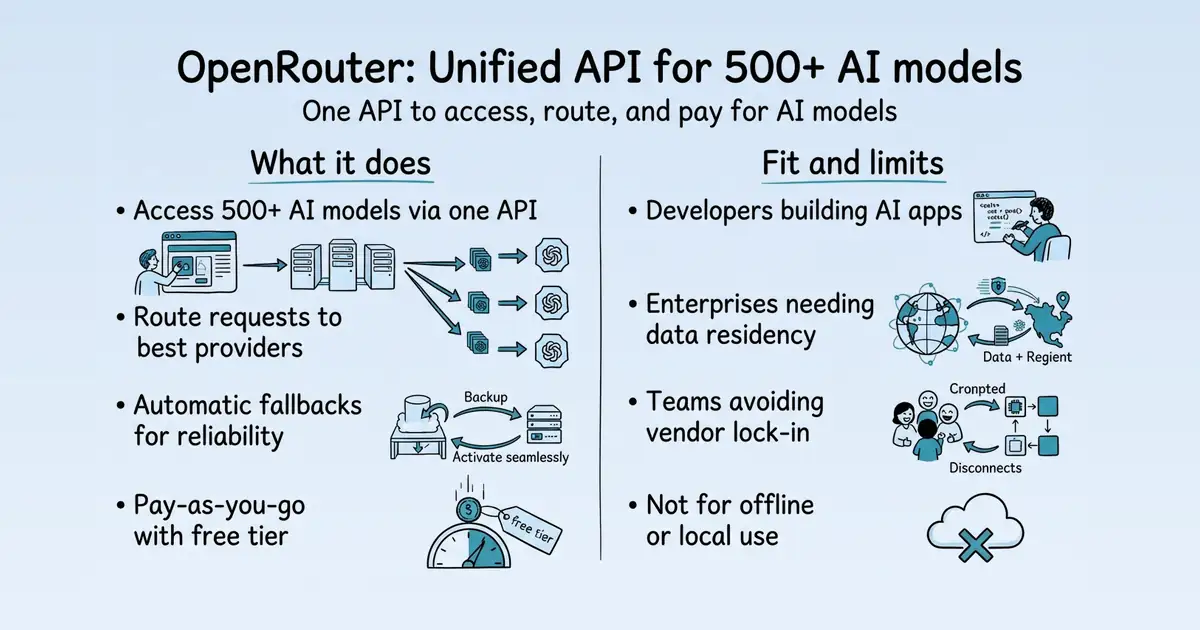
AI synthesis is a unified API gateway that gives developers access to 500+ AI models through a single endpoint S1. It solves the problem of vendor lock-in and complex multi-provider integration by offering smart routing, automatic fallbacks, and cost optimization S1 S11. The main practical value is simplified access to a wide model catalog with pay-as-you-go pricing and enterprise features like private endpoints and regional routing S58 S110.
Product identity and positioning
Name, category, positioning, audience, and first-party claims.
- Identity: AI synthesis is an AI gateway and model marketplace providing a unified API for LLMs S1.
- Core purpose: It solves the problem of accessing and managing multiple AI models from different providers through a single interface S1.
- Intended users: Developers and enterprises building AI-powered applications S1 S58.
- Product scope: It is a cloud-based API platform, not a standalone app, offering a public model catalog, routing, and enterprise features S58.
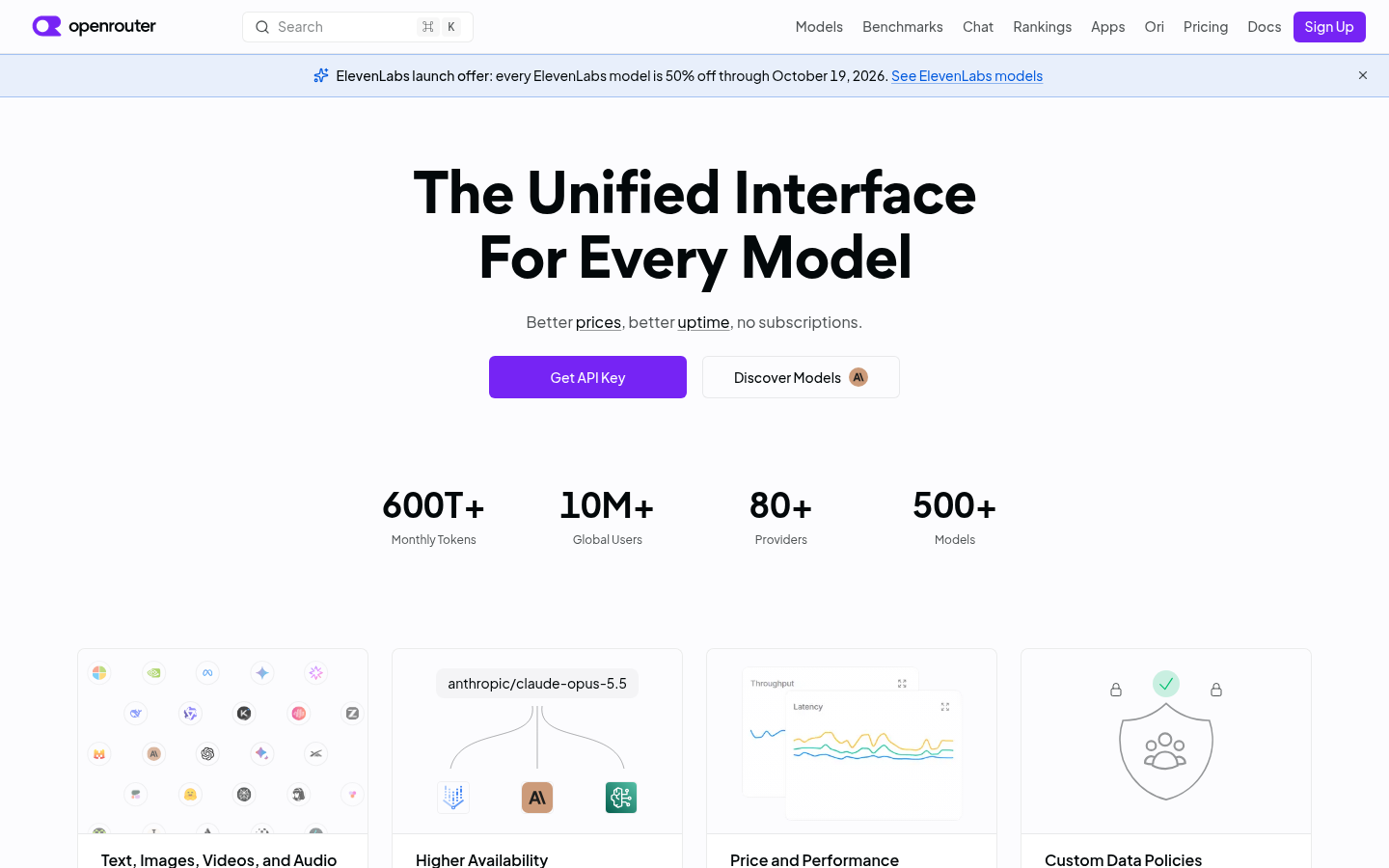
- Positioning: Positioned as "the unified interface for every model," emphasizing choice, cost-effectiveness, and reliability S58 S1.
- Claimed distinction: Claims to be the largest and most popular AI gateway, eliminating vendor lock-in S1.
Use cases and audiences
Who the product serves and the jobs it is designed to handle.
| Audience | Practical use case |
|---|---|
| Developers | Build AI-powered applications with a single API, avoiding integration with multiple providers S1 S11. |
| Enterprises | Route their own fine-tuned models through private endpoints and meet data residency requirements with regional routing S58 S110. |
| AI coding tool users | Connect AI synthesis to coding assistants like AI modelCode and Cursor via the MCP server for model access S11. |
| AI agent builders | Use the Agent SDK to build agents with tool use, loops, and state S11. |
Traffic and search
Search summary
The useful answer before the supporting detail.
The unified interface for every model. Find the best models & prices for your prompts. openrouter.ai: an estimated 21,267,929 total monthly visits and about 224,292 monthly organic visits across 8,136 ranking keywords. Scout crawled 15 pages and measured a technical health score of 95/100.
- Total traffic (modeled): 21,267,929 monthly visits across all channels.
- Organic search traffic (estimated): 224,292 monthly visits from search.
- Strongest sampled ranking: ai models free at position 1.
- Leading page in the collected evidence: https://openrouter.ai/collections/free-models.
- Closest measured organic competitor: github.com, appearing 2 times in the sampled first-page SERPs.
- Technical crawl: 15 pages, health score 95/100.
Website intelligence — Collected evidence
Company identity and positioning
| Page type | Evidence | Source |
|---|---|---|
| other | The unified interface for every model. Find the best models & prices for your prompts | https://openrouter.ai/ |
| other | The Unified Interface For Every Model | https://openrouter.ai/ |
| other | Keep costs in check without sacrificing speed. OpenRouter runs at the edge for minimal latency between your users and their inference. | https://openrouter.ai/ |
| other | Create an account to get started. You can set up an org for your team later. | https://openrouter.ai/ |
| other | Private Endpoints let Enterprise customers route their own fine-tuned models and dedicated deployments through OpenRouter, alongside the public catalog. Private endpoints are only visible within your organization, and requests go through the API your team already uses. Available by request on the Enterprise plan. | https://openrouter.ai/ |
| other | How an AI Sales Agent Saved Our Sales Team 600 Hours a Month | https://openrouter.ai/ |
| other | Rasp gives OpenRouter's five-person sales team about 600 hours a month back, adds room for two more calls a day per rep, and runs for about $30 a day on Ori. | https://openrouter.ai/ |
| other | ](/blog/case-studies/how-an-ai-sales-agent-saved-our-sales-team-600-hours-a-month/)[ | https://openrouter.ai/ |
| other | ElevenLabs is now on OpenRouter with 9 Text to Speech and 2 Speech to Text models. Deliver speech with human-like emotion with Eleven v4, give your agent low-latency replies with v4 Turbo, and turn meetings into notes that show who said what with Scribe v2. Here's which model to pick, and one project built start to finish. | https://openrouter.ai/ |
| features | \ | Headline metrics for the selected range: total spend, requests, token volume, blended cost per million tokens, and cache hit rate. Ranked cards list top API keys, apps, and users, alongside charts for usage by model, token breakdown (prompt, completion, reasoning), prompt caching, and usage type (credits vs BYOK). \ |
| features | \ | Time series for requests, spend, or tokens, plus a “Trending” card that highlights the biggest movers versus the prior period. \ |
| features | Group and Subgroup: one or two dimensions to break the metric down by, with a Limit and Rank by setting for how many series to show. Series beyond the limit are collapsed into an “Other” row. | https://openrouter.ai/docs/guides/features/activity |
Domain performance
Modeled total traffic, six-month trend, engagement, countries, and domain identity.
Total website traffic
| Month | Modeled visits |
|---|---|
| 2026-04 | 17,919,468 |
| 2026-05 | 16,784,945 |
| 2026-06 | 17,256,950 |
| 2026-07 | 19,200,038 |
| 2026-08 | 22,011,839 |
| 2026-09 | 21,267,929 |
Top visitor countries
| Country | Name | Traffic share |
|---|---|---|
| US | United States | 16.4% |
| IN | India | 11.0% |
| CN | China | 8.4% |
| DE | Germany | 5.4% |
| ID | Indonesia | 3.8% |
Domain identity
| Signal | Value |
|---|---|
| Registered | Apr 17, 2023 |
| Last changed | Aug 12, 2026 |
| Expires | Apr 17, 2027 |
| WHOIS server | whois.nic.ai |
| DNSSEC | Not signed |
| Nameservers | clark.ns.cloudflare.com, ulla.ns.cloudflare.com |
Website capture
Organic keywords
Top keywords and an independent Google result page.
Top organic keywords
| Keyword | Volume | CPC | Estimated value |
|---|---|---|---|
| openrouter | 1,672,810 | $1.74 | $1,784,270 |
| janitor ai | 1,416,060 | $1.55 | $430,760 |
| open router | 359,230 | $1.73 | $375,090 |
| ox alpha | 274,700 | $0.00 | $78,120 |
| openrouter ai | 41,800 | $2.10 | $53,990 |
Independent Google result page
Query: ai models free
| Position | Title | URL | Description |
|---|---|---|---|
| 1 | Free AI Models on OpenRouter | https://openrouter.ai/collections/free-models | Access powerful AI models at zero cost. The current top models are Nemotron 3 Ultra (free), Nemotron 3.5 Lightning (free), and Laguna S 2.1 (free). learn, and ... |
| 2 | 12britz/awesome-free-models: A curated list of free AI ... | https://github.com/12britz/awesome-free-models | Curated AI gateway with free general and coding models (DeepSeek V4 Flash Free, MiMo-V2.5 Free, Nemotron 3 Ultra Free, Big Pickle, Qwen 3.6 Plus Free, MiniMax ... |
| 3 | What's the best free AI model? : r/AIToolBench | https://www.reddit.com/r/AIToolBench/comments/1twjfpp/whats_the_best_free_ai_model/ | In my experience I feel like Gemini is genuinely the most logical straight up free ai model. Tbh I don't have good experience with any premium ai's as I'm ... |
| 4 | List of free AI Models | https://dev.to/sbalasa/list-of-ai-models-17on | Here is a list of free AI models you can use for programming: Chat GPT: https://chatgpt.com/; Mistral AI: https://chat.mistral.ai/ ... |
| 5 | Free AI Models: Run LLMs at $0 via One API | https://www.requesty.ai/models/free | 13 free AI models. Every model on Requesty with a zero-cost tier, including open-weight LLMs from Google Gemma, NVIDIA Nemotron, DeepSeek, Meta Llama and more. |
| 6 | Free AI Models - 63 Free LLM & Image APIs | https://aihubmix.com/models/free | Call 63 genuinely free AI models — GPT, Gemini, GLM, Kimi, MiniMax and more — through one OpenAI-compatible API. No credit card required, 10 trial calls |
| 7 | Best Free AI Coding Models Available Now | https://kilo.ai/landing/free-models | The current free catalog has 5 active models, including Nemotron 3.5 Super VL (free), Dots3-Note Preview (free) and Laguna S 2.1 (free). |
| 8 | AI Models | https://developer.nvidia.com/ai-models | Explore and deploy top AI models built by the community, accelerated by NVIDIA's AI inference platform, and run on NVIDIA-accelerated infrastructure. |
| 9 | The Most Powerful Free AI Models in 2025 | https://medium.com/@dulthiwanka2015/the-most-powerful-free-ai-models-in-2025-what-developers-can-build-with-them-and-how-to-get-2141f77490db | The Most Powerful Free AI Models in 2025 What Developers Can Build with Them (and How to Get Started) · 1. GPT-5 (OpenAI) · 2. Gemini 1.5 ( ... |
| 10 | Explore free & open source AI models | https://freeapihub.com/ai-models | Browse free AI models: open-source LLMs and generative AI models for text, code, images, speech and video. Filter by task, licence, size and context window. |
Important pages
Pages earning the most estimated search traffic in the sample.
| URL | Ranking keywords | Estimated traffic | Best position |
|---|---|---|---|
| https://openrouter.ai/collections/free-models | 5 | 149 | 1 |
| https://openrouter.ai/arcee-ai/trinity-large-preview | 3 | 82.1 | 1 |
| https://openrouter.ai/models | 2 | 48.6 | 1 |
| https://openrouter.ai/apps/category/coding | 2 | 45.6 | 1 |
| https://openrouter.ai/apps | 1 | 42.6 | 1 |
| https://openrouter.ai/openrouter/auto | 1 | 42.6 | 1 |
| https://openrouter.ai/rankings/embeddings | 1 | 42.6 | 1 |
| https://openrouter.ai/blog/tutorials/free-llm-apis-compared/ | 1 | 27.4 | 1 |
| https://openrouter.ai/docs/guides/overview/models | 1 | 21.3 | 1 |
| https://openrouter.ai/rankings | 1 | 21.3 | 1 |
Website intelligence — Collected evidence
Prioritized website intelligence pages
| Type | Page | Words | Change | URL |
|---|---|---|---|---|
| other | OpenRouter | 465 | new | https://openrouter.ai/ |
| pricing | Pricing \ | static | 1,655 | new |
| pricing | Sign In \ | playwright | 32 | new |
| integrations | Auto Router - Intelligent Model Selection | 1,779 | new | https://openrouter.ai/docs/guides/routing/routers/auto-router |
| integrations | Prompt Caching - Optimize AI Model Costs with Smart Caching | 3,682 | new | https://openrouter.ai/docs/guides/best-practices/prompt-caching |
| integrations | Uptime Optimization - Ensure Reliable AI Model Access | 3,673 | new | https://openrouter.ai/docs/guides/best-practices/uptime-optimization |
| features | Activity - Analyze Your OpenRouter Usage | 641 | new | https://openrouter.ai/docs/guides/features/activity |
| features | Custom Classifiers - Automatic AI Usage Classification | 1,440 | new | https://openrouter.ai/docs/guides/features/classifiers |
| features | Containers - Sandbox Containers for Server Tools | 1,381 | new | https://openrouter.ai/docs/guides/features/containers |
| features | Files API - Upload and Manage Workspace Files | 953 | new | https://openrouter.ai/docs/guides/features/files-api |
| features | In-Region Routing - Keep AI Requests in Europe or the US | 3,562 | new | https://openrouter.ai/docs/guides/features/in-region-routing |
| features | Input & Output Logging - Privately Store Prompts and Completions | 833 | new | https://openrouter.ai/docs/guides/features/input-output-logging |
| features | Logs - Inspect Every OpenRouter Generation | 661 | new | https://openrouter.ai/docs/guides/features/logs |
| features | Message Transforms - Optimize AI Model Inputs | 475 | new | https://openrouter.ai/docs/guides/features/message-transforms |
| features | Notifications - Choose Your OpenRouter Alerts | 958 | new | https://openrouter.ai/docs/guides/features/notifications |
Features
| Page type | Evidence | Source |
|---|---|---|
| features | > ## Documentation Index | https://openrouter.ai/docs/guides/features/activity |
| features | > Fetch the complete documentation index at: /docs/llms.txt | https://openrouter.ai/docs/guides/features/activity |
| features | > Use this file to discover all available pages before exploring further. | https://openrouter.ai/docs/guides/features/activity |
| features | [Skip to main content](#content-area) | https://openrouter.ai/docs/guides/features/activity |
| features | [OpenRouter \ | playwright |
| features | Ctrl KAsk AssistantCtrl+I | https://openrouter.ai/docs/guides/features/activity |
| features | Observability | https://openrouter.ai/docs/guides/features/activity |
| features | ](/docs/quickstart)[API Reference | https://openrouter.ai/docs/guides/features/activity |
| features | ](/docs/api_reference/overview)[Client SDKs | https://openrouter.ai/docs/guides/features/activity |
| features | ](/docs/client-sdks/overview)[Agent SDK | https://openrouter.ai/docs/guides/features/activity |
| features | ](/docs/agent-sdk/overview)[Cookbook | https://openrouter.ai/docs/guides/features/activity |
| features | ](/docs/cookbook/get-started/quickstart) | https://openrouter.ai/docs/guides/features/activity |
| features | Copy pageCopy page | https://openrouter.ai/docs/guides/features/activity |
| features | Analyze spend, request volume, tokens, and trends across your OpenRouter usage from the Activity dashboard | https://openrouter.ai/docs/guides/features/activity |
| features | The Activity page is the aggregate view of OpenRouter’s observability suite. Where Logs lists individual generations, Activity rolls them up into spend, request, and token metrics you can slice by model, provider, API key, app, or user over any date range. | https://openrouter.ai/docs/guides/features/activity |
| features | \ | What it shows \ |
| features | \ | --- \ |
| features | \ | Headline metrics for the selected range: total spend, requests, token volume, blended cost per million tokens, and cache hit rate. Ranked cards list top API keys, apps, and users, alongside charts for usage by model, token breakdown (prompt, completion, reasoning), prompt caching, and usage type (credits vs BYOK). \ |
| features | \ | Time series for requests, spend, or tokens, plus a “Trending” card that highlights the biggest movers versus the prior period. \ |
| features | \ | A configurable chart and table builder. Pick a metric, group by one or two dimensions, choose a time rollup, and switch between bar, line, and dot plot views. \ |
Pricing and plans
| Page type | Evidence | Source |
|---|---|---|
| pricing | OpenRouter pricing | https://openrouter.ai/pricing |
| pricing | Get startedTalk to sales | https://openrouter.ai/pricing |
| pricing | \ | Free \ |
| pricing | \ | 25+ free models \ |
| pricing | \ | 4 free providers \ |
| pricing | Get started for free | https://openrouter.ai/pricing |
| pricing | \ | Free \ |
| pricing | \ | Get started for free \ |
| pricing | <table class="or-table or-table-page-scroll__table table-fixed"><colgroup><col class="w-auto"><col class="w-1/5"><col class="w-1/5"><col class="w-1/5"><col class="w-1/5"></colgroup><tbody class="or-table__body"><tr class="or-table__row"><th class="or-table__cell or-table__cell--wrap-words font-medium text-right text-foreground! text-balance" scope="row">Platform fees</th><td class="or-table__cell or-table__cell--wrap-words text-center text-balance"><span class="sr-only">Free </span>N/A</td><td class="or-table__cell or-table__cell--wrap-words text-center text-balance bg-muted"><span class="sr-only">Standard </span>5.5%</td><td class="or-table__cell or-table__cell--wrap-words text-center text-balance"><span class="sr-only">Business </span>8%</td><td class="or-table__cell or-table__cell--wrap-words text-center text-balance"><span class="sr-only">Enterprise </span><a class="text-foreground underline underline-offset-2 decoration-current/40 hover:text-accent-foreground hover:decoration-current transition-colors cursor-pointer text-body" href="/enterprise/form?ref=pricing-table-platform-fees">Fee discounts available</a></td></tr><tr class="or-table__row"><th class="or-table__cell or-table__cell--wrap-words font-medium text-right text-foreground! text-balance" scope="row"><span class="flex flex-col gap-1"><span>Models</span><small><a class="text-foreground underline underline-offset-2 decoration-current/40 hover:text-accent-foreground hover:decoration-current transition-colors text-xs cursor-pointer" href="/models">Explore all models →</a></small></span></th><td class="or-table__cell or-table__cell--wrap-words text-center text-balance"><span class="sr-only">Free </span>25+ free models</td><td class="or-table__cell or-table__cell--wrap-words text-center text-balance bg-muted"><span class="sr-only">Standard </span>500+ models</td><td class="or-table__cell or-table__cell--wrap-words text-center text-balance"><span class="sr-only">Business </span>500+ models</td><td class="or- | https://openrouter.ai/pricing |
| pricing | Billing and Pricing | https://openrouter.ai/pricing |
| pricing | Do you mark up provider pricing? | https://openrouter.ai/pricing |
| pricing | No. Inference is billed at the provider's list price on every plan. OpenRouter's fee is charged when you buy credits, 5.5% on Standard and 8% on Business, never on individual requests. | https://openrouter.ai/pricing |
| pricing | How is billing structured for Standard, Business, Enterprise and BYOK? | https://openrouter.ai/pricing |
| pricing | Standard and Business: you buy credits, manually or with auto top-up, and each request deducts its cost from your balance. The only billing difference between the two is the fee on credit purchases, 5.5% on Standard and 8% on Business. | https://openrouter.ai/pricing |
| pricing | Enterprise: pricing is set by contract and based on volume, prepaid credits and annual commitments, with invoicing. | https://openrouter.ai/pricing |
| pricing | BYOK: the provider bills you for inference directly. Standard and Business include $25,000 of list-price inference per month through BYOK with no OpenRouter fee; Enterprise allowances are custom. Above the allowance, OpenRouter charges 5% of what the same request would cost at list price on OpenRouter, deducted from your credits. | https://openrouter.ai/pricing |
| pricing | Do you offer volume discounts or annual plans? | https://openrouter.ai/pricing |
| pricing | We offer discounted OpenRouter fees in our enterprise plan. We do not discount inference. | https://openrouter.ai/pricing |
| pricing | No. Pricing is per token whether or not you stream. | https://openrouter.ai/pricing |
| pricing | What does the Business plan fee apply to? | https://openrouter.ai/pricing |
Integrations and supported platforms
| Page type | Evidence | Source |
|---|---|---|
| integrations | > ## Documentation Index | https://openrouter.ai/docs/guides/routing/routers/auto-router |
| integrations | > Fetch the complete documentation index at: /docs/llms.txt | https://openrouter.ai/docs/guides/routing/routers/auto-router |
| integrations | > Use this file to discover all available pages before exploring further. | https://openrouter.ai/docs/guides/routing/routers/auto-router |
| integrations | [Skip to main content](#content-area) | https://openrouter.ai/docs/guides/routing/routers/auto-router |
| integrations | [OpenRouter \ | playwright |
| integrations | Ctrl KAsk AssistantCtrl+I | https://openrouter.ai/docs/guides/routing/routers/auto-router |
| integrations | ](/docs/quickstart)[API Reference | https://openrouter.ai/docs/guides/routing/routers/auto-router |
| integrations | ](/docs/api_reference/overview)[Client SDKs | https://openrouter.ai/docs/guides/routing/routers/auto-router |
| integrations | ](/docs/client-sdks/overview)[Agent SDK | https://openrouter.ai/docs/guides/routing/routers/auto-router |
| integrations | ](/docs/agent-sdk/overview)[Cookbook | https://openrouter.ai/docs/guides/routing/routers/auto-router |
| integrations | ](/docs/cookbook/get-started/quickstart) | https://openrouter.ai/docs/guides/routing/routers/auto-router |
| integrations | Copy pageCopy page | https://openrouter.ai/docs/guides/routing/routers/auto-router |
| integrations | Automatically select the best model for your prompt | https://openrouter.ai/docs/guides/routing/routers/auto-router |
| integrations | The Auto Router automatically selects the best model for your prompt. It is powered by the market: the aggregate spend of millions of people using OpenRouter, measured over a trailing 7-day window for each task type. Think of it like a market index that stays up to date and gets more efficient as more people use OpenRouter. See [How It Works](#how-it-works) and the [Cost Tier](#cost-tier) settings. Two slugs run this router: | https://openrouter.ai/docs/guides/routing/routers/auto-router |
| integrations | Auto (`openrouter/auto`) — works like any other model slug; sending it as the `model` is all you need to do. | https://openrouter.ai/docs/guides/routing/routers/auto-router |
| integrations | Auto Beta (`openrouter/auto-beta`) — the early-access track. New routing behaviors land here before they reach `openrouter/auto`. Everything on this page applies to it too, except that per-request settings must use the plugin id `auto-beta-router` instead of `auto-router`: | https://openrouter.ai/docs/guides/routing/routers/auto-router |
| integrations | const completion = await openRouter.chat.send({ | https://openrouter.ai/docs/guides/routing/routers/auto-router |
| integrations | chatRequest: { | https://openrouter.ai/docs/guides/routing/routers/auto-router |
| integrations | model: 'openrouter/auto-beta', | https://openrouter.ai/docs/guides/routing/routers/auto-router |
| integrations | messages: [{ role: 'user', content: 'Summarize this paragraph' }], | https://openrouter.ai/docs/guides/routing/routers/auto-router |
Product and company updates
No supporting public-page evidence was collected for this category.
Rank tracking
Persistent keyword baselines and position movement.
This analysis created the first position baseline at 2026-10-19T04:47:57.646Z. Movement appears after the next fresh analysis using the same location and language.
| Keyword | Current | Previous | Movement | Volume | Ranking URL |
|---|---|---|---|---|---|
| ai models free | 1 | Baseline | Baseline | 260 | https://openrouter.ai/collections/free-models |
| agent ranking | 1 | Baseline | Baseline | 140 | https://openrouter.ai/apps |
| autorouter | 1 | Baseline | Baseline | 140 | https://openrouter.ai/openrouter/auto |
| best embedding model | 1 | Baseline | Baseline | 140 | https://openrouter.ai/rankings/embeddings |
| best coding agent right now | 1 | Baseline | Baseline | 110 | https://openrouter.ai/apps/category/coding |
| ai model providers | 1 | Baseline | Baseline | 90 | https://openrouter.ai/models |
| arcee ai trinity large preview | 1 | Baseline | Baseline | 90 | https://openrouter.ai/arcee-ai/trinity-large-preview |
| arcee ai trinity large preview free | 1 | Baseline | Baseline | 90 | https://openrouter.ai/arcee-ai/trinity-large-preview |
| arcee ai/trinity large preview free | 1 | Baseline | Baseline | 90 | https://openrouter.ai/arcee-ai/trinity-large-preview |
| best free llm api | 1 | Baseline | Baseline | 90 | https://openrouter.ai/blog/tutorials/free-llm-apis-compared/ |
| ai model api | 1 | Baseline | Baseline | 70 | https://openrouter.ai/docs/guides/overview/models |
| ai model router | 1 | Baseline | Baseline | 70 | https://openrouter.ai/models |
| best coding models right now | 1 | Baseline | Baseline | 70 | https://openrouter.ai/rankings |
| best free models | 1 | Baseline | Baseline | 70 | https://openrouter.ai/collections/free-models |
| best free models on openrouter | 1 | Baseline | Baseline | 70 | https://openrouter.ai/collections/free-models |
| aion 3.0 | 1 | Baseline | Baseline | 50 | https://openrouter.ai/aion-labs/aion-3.0 |
| best free models for janitor ai | 1 | Baseline | Baseline | 50 | https://openrouter.ai/collections/free-models |
| ai coding agent ranking | 1 | Baseline | Baseline | 40 | https://openrouter.ai/apps/category/coding |
| ai models for free | 1 | Baseline | Baseline | 40 | https://openrouter.ai/collections/free-models |
| audio generation model | 1 | Baseline | Baseline | 40 | https://openrouter.ai/collections/audio-models |
Features
Features and capabilities
Core functions and evidence-backed product capabilities.
| Capability | What it does |
|---|---|
| Unified API | Access 500+ AI models through a single API endpoint, compatible with OpenAI SDK S1 S11. |
| Smart routing | Automatically routes requests to the best provider based on price, throughput, or latency, with fallbacks S110. |
| Plugins | Extend model capabilities with web search, PDF processing, response healing, and context compression S20. |
| Agent SDK | Build AI agents with tool use, loops, and state management using higher-level primitives S11. |
| Client SDKs | Type-safe SDKs for multiple languages, auto-generated from the OpenAPI spec S11. |
| MCP server | Connect AI synthesis to AI coding tools like AI modelCode and Cursor via the MCP server S11. |
| Private Endpoints | Enterprise customers can route their own fine-tuned models through AI synthesis, visible only within their organization S58. |
| Regional routing | Supports EU and US in-region routing on Business and Enterprise plans for data residency S110 S11. |
Integrations and ecosystem
Connected products, exports, APIs, and workflow compatibility.
| Integration or interface | Type | What it enables |
|---|---|---|
| OpenAI SDK | API compatibility | Use AI synthesis as a drop-in replacement for the OpenAI SDK by changing the base URL S11 S136. |
| Client SDKs | SDK | Type-safe model calls with minimal overhead, auto-generated from the OpenAPI spec S11. |
| Agent SDK | SDK | Build AI agents with higher-level primitives for tool use, loops, and state S11. |
| MCP server | AI interface | Connect AI synthesis to AI coding tools like AI modelCode and Cursor S11. |
| REST API | API | Full control over requests to the /api/v1/chat/completions endpoint, works with any language S11. |
| OpenAPI specification | API documentation | Use with Swagger UI, Postman, or code generators to explore the API and generate clients S20. |
Pricing
Pricing and plans
Published plans, free access, trials, credits, and pricing limitations.
| Plan or offer | Verified price and billing | Included | Limits |
|---|---|---|---|
| Free | $0 S131 | 25+ free models from 4 providers S131 | 50 requests per day S131 |
| Standard Pay-as-you-go | 5.5% fee on credit purchases S131 | 500+ models, routing, budgets S131 | Not established |
| Business Pay-as-you-go | 8% fee on credit purchases S131 | Advanced notifications, EU/US in-region routing S131 | Not established |
| Enterprise | Contract (contact sales) S131 | SSO/SAML, fee discounts, private endpoints S131 S58 | Not established |
Competition
Competitive landscape
Domains competing for the same organic search demand.
Sampled competitors
| Competitor | First-page appearances | Sampled queries | Average position | Queries observed |
|---|---|---|---|---|
| github.com | 2 | 2 | 3.5 | ai models free, agent ranking |
| reddit.com | 2 | 2 | 5 | ai models free, agent ranking |
| edenai.co | 1 | 1 | 1 | ai models free |
| arena.ai | 1 | 1 | 2 | agent ranking |
| artificialanalysis.ai | 1 | 1 | 3 | agent ranking |
| towardsai.com | 1 | 1 | 4 | ai models free |
| docs.aihubmix.com | 1 | 1 | 5 | ai models free |
| llm-stats.com | 1 | 1 | 5 | agent ranking |
| deepmind.google | 1 | 1 | 6 | ai models free |
| huggingface.co | 1 | 1 | 6 | agent ranking |
Website intelligence — Collected evidence
Customers, testimonials, and first-party review claims
No supporting public-page evidence was collected for this category.
Independent review sources discovered
| Platform | Status | Discovered source |
|---|---|---|
| discovered_not_scraped | https://ai.google.dev/gemini-api/docs/pricing |
AI visibility
Measured ChatGPT and Google AI mentions with cited sources.
AI-assistant referral traffic
- Estimated current generative-AI referral share: 2.5%
| Month | Traffic share | Source |
|---|---|---|
| — | — | All AI assistants |
| — | — | All AI assistants |
| — | — | All AI assistants |
Website intelligence — Collected evidence
Site-stated AI capabilities
| Page type | Evidence | Source |
|---|---|---|
| other | How an AI Sales Agent Saved Our Sales Team 600 Hours a Month | https://openrouter.ai/ |
| other | ](/blog/case-studies/how-an-ai-sales-agent-saved-our-sales-team-600-hours-a-month/)[ | https://openrouter.ai/ |
| features | Custom classifiers let you define a structured taxonomy and use a model of your choosing (OpenRouter will recommend fast, inexpensive models during classifier setup) to tag and classify your prompts. The classifier model runs asynchronously after each request completes (zero added latency), tagging generations with dimensions like department, task type, complexity, or anything you can think of. Tags appear in your logs, and roll-up reporting is available in your activity view. Together, these help you understand how AI is being used across your organization. | https://openrouter.ai/docs/guides/features/classifiers |
| features | For organization accounts, only org admins can see classification tags on log rows and in the generation detail panel. Workspace admins who aren’t org admins can create and manage classifiers but don’t see the resulting tags. Filter and analyze your classified generations in the Activity and Logs views, or with the [API](#query-classifications-with-the-api). | https://openrouter.ai/docs/guides/features/classifiers |
| features | In-Region Routing (IRR) processes the prompts and completions in your requests within a designated region. When you send a request through a region-specific base URL, the request is decrypted within that region and routed only to shared provider endpoints in that region: Europe (the EU/EEA, the UK, and Switzerland) for `eu.openrouter.ai`, and the US for `us.openrouter.ai`. If no endpoint eligible for the region (shared, BYOK, or private) can serve the request, it errors instead of leaving the region. Requests served by your own BYOK key go to your deployment’s region, which you control. Account and operational records are handled separately; see [What stays outside the region](#what-stays-outside-the-region). EU in-region routing (`eu.openrouter.ai`) and US in-region routing (`us.openrouter.ai`) are available on the Business and Enterprise plans. There is no setting to turn on: once your account is on one of these plans, you choose the region for each request by sending it to that region’s base URL. Organization admins can upgrade to Business in Settings > Manage plan. For Enterprise, contact our enterprise team. | https://openrouter.ai/docs/guides/features/in-region-routing |
| features | Some providers bill a premium for serving a model from a specific region. On the global domain (`https://openrouter.ai`), default routing skips these regional-surcharge endpoints whenever the model also has a standard-priced endpoint. The model page lists them under Not used in Standard routing. That grouping describes shared routing without your BYOK keys, so an endpoint that only your own key unlocks still appears there. A regional-surcharge endpoint is used when: | https://openrouter.ai/docs/guides/features/in-region-routing |
| features | A request that arrives through a domain not in the list is rejected with a 403 Forbidden error before any inference or endpoint selection happens, so no prompt is ever processed outside the permitted regions. Leaving the setting unrestricted (`null`) accepts requests from any domain. Enforcement applies to every OpenRouter API surface, including chat completions, embeddings, rerank, image, audio, and video generation, server tools, the Batch API, and generation lookups. When more than one guardrail governs a request (the workspace default guardrail, the member’s guardrail, and the API key’s guardrail), the effective set of regions is the intersection of every guardrail that sets one, so a lower-level guardrail can only narrow the regions permitted above it. For example, if the workspace default guardrail allows `europe` and `us` and an API key guardrail allows only `europe`, requests with that key must arrive through `https://eu.openrouter.ai`. To enforce EU residency for a whole workspace, set `allowed_data_regions` to `["europe"]` on the workspace default guardrail. This can be configured in the guardrail editor under Data regions or through the Guardrails API. | https://openrouter.ai/docs/guides/features/in-region-routing |
| features | In-region routing covers the prompts and completions in requests sent to a regional domain and served by shared provider endpoints. Account and operational records, BYOK deployments, and destinations you configure are outside that boundary. For `eu.openrouter.ai`: | https://openrouter.ai/docs/guides/features/in-region-routing |
| features | Navigate to your **Observability** settings and toggle Input & Output Logging to enable it. For organizations, only admins can view and toggle this setting. | https://openrouter.ai/docs/guides/features/input-output-logging |
| features | Retention: Data is retained for a minimum of 3 months, and may be retained beyond 3 months at OpenRouter’s discretion unless you request deletion. Account owners can request deletion of their stored data at any time by contacting support@openrouter.ai. | https://openrouter.ai/docs/guides/features/input-output-logging |
| features | Privacy: OpenRouter does not access or use your prompt and response data logged with this feature for model training, analytics, or any other purpose. The data is stored solely for your own review and use. See the Privacy Policy for full details. | https://openrouter.ai/docs/guides/features/input-output-logging |
| features | Input & Output Logging allows you to view your prompts and completions in your logs on the OpenRouter platform. Broadcast sends your data to an external observability tool. Both features are configured in your workspace’s Observability settings and can be used together for comprehensive observability. | https://openrouter.ai/docs/guides/features/input-output-logging |
| features | [OpenRouter \ | playwright |
| features | The Activity page is the aggregate view of OpenRouter’s observability suite. Where Logs lists individual generations, Activity rolls them up into spend, request, and token metrics you can slice by model, provider, API key, app, or user over any date range. | https://openrouter.ai/docs/guides/features/activity |
| features | [OpenRouter \ | playwright |
| features | Automatically categorize LLM generations in your workspace | https://openrouter.ai/docs/guides/features/classifiers |
| features | Custom classifiers let you define a structured taxonomy and use a model of your choosing (OpenRouter will recommend fast, inexpensive models during classifier setup) to tag and classify your prompts. The classifier model runs asynchronously after each request completes (zero added latency), tagging generations with dimensions like department, task type, complexity, or anything you can think of. Tags appear in your logs, and roll-up reporting is available in your activity view. Together, these help you understand how AI is being used across your organization. | https://openrouter.ai/docs/guides/features/classifiers |
| features | Navigate to your workspace’s classifiers page: Classifiers | https://openrouter.ai/docs/guides/features/classifiers |
| features | Generations in that workspace will now be classified by the selected model. Open any generation in your logs to see its classification tags. | https://openrouter.ai/docs/guides/features/classifiers |
| features | [OpenRouter \ | playwright |
These are first-party product claims, not independent measurements of AI-search visibility.
Marketing opportunities
Actions calculated directly from the collected evidence.
| Opportunity | Recommended action | Evidence |
|---|---|---|
| Competitor gap | Review the sampled queries where github.com appears. | 2 first-page appearances across ai models free, agent ranking |
Website intelligence — Collected evidence
Website evidence gaps
- customers: no usable public page was collected; verify whether the site publishes this evidence.
- reviews: no usable public page was collected; verify whether the site publishes this evidence.
- changes: no usable public page was collected; verify whether the site publishes this evidence.
- identity: no usable public page was collected; verify whether the site publishes this evidence.
- technical: no usable public page was collected; verify whether the site publishes this evidence.
Trust and proof
Customers, proof, and reviews
Published proof, customer signals, and review evidence.
Independent reviews
No citation-grounded independent review links were found.
Customer proof
No named customers, testimonials, or customer case studies were found.
Independent mentions
- Have you tried AI synthesis (https://openrouter.ai)? I’ve been happy using it as a... / Hacker News — Have you tried AI synthesis (https://openrouter.ai)? I’ve been happy using it as a... / Hacker News ... jdanbrown 3 months ago / parent / context / favorite / on: AI model: Frontier intelligence built for sp... ... Have you tried AI synthesis (https://openrouter.ai)? I’ve been happy using it as a unified api provider with great model coverage (including Google, Anthropic, OpenAI, Grok, and the major open models). They charge 5% on top of each model’s api costs, but I think it’s worth it to hav
External links were grounded in one live web search. Search snippets are leads, not independently scraped page content; rejected links remain available in Review evidence.
Company, security, and trust
Ownership, policies, security signals, and public trust evidence.
| Signal | Finding | Source |
|---|---|---|
| Company and ownership | Not published on the collected pages. | — |
| Contact and support | Not published on the collected pages. | — |
| Legal and privacy | / DPA / Via Terms of Service / | source |
| Security and compliance | Regional data residency (Business and Enterprise)AI synthesis supports in-region routing in the EU and US on the Business and Enterprise plans. There is no provider preference or setting to turn on: send the request to | source |
| Uptime and status page | Better prices, better uptime, no subscriptions. | source |
| Domain registered | 2023-04-17 | — |
| Domain expires | 2027-04-17 | — |
Not found on the collected pages: company and ownership, contact and support. This only means Scout did not find it on the pages it read; it says nothing about the company itself.
Documentation and product updates
Help resources, product guidance, and visible changes over time.
| Resource or update | Type | What is available | Date or freshness |
|---|---|---|---|
| AI synthesis Quickstart Guide | Guide | Get started with AI synthesis (source) | Not dated |
| Uptime Optimization - Ensure Reliable AI Model Access | Guide | AI synthesis tracks provider availability (source) | Not dated |
| AI synthesis API Reference - Complete Documentation | API reference | Covers quick start, endpoints and payloads, rate limits and errors. (source) | Not dated |
| Provider Logging - Provider Data Retention Policies | Guide | Provider logging and data retention policies (source) | Not dated |
| Provider Routing - Smart Multi-Provider Request Management | Guide | Guides, comparisons, pricing breakdowns, use cases, and how-to articles. (source) | Not dated |
Not found in the collected public sources: public roadmap, changelog or release notes, status page, separate help center or knowledge base.
Technical
Technical and delivery signals
Delivery model, platforms, API, data ownership, reliability claims and release activity.
| Signal | Finding | Source |
|---|---|---|
| Delivery model (cloud, self-hosted, desktop, browser extension) | Cloud-based API platform S1. | S1 |
| Platforms and apps | Web-based, accessible via API S1. | S1 |
| API and extensibility (API, SDK, webhooks, MCP, plugins) | Offers REST API, client SDKs, Agent SDK, MCP server, and plugins S11 S20. | S11 S20 |
| Data ownership and export | Not published on the collected pages. | — |
| Performance and reliability claims | Tracks provider availability and routes to healthy providers for high uptime S108. | S108 |
| Release activity | Not published on the collected pages. | — |
Measured infrastructure
Domain, certificate, and hosting signals, measured directly.
| Signal | Finding |
|---|---|
| Domain registered | 2023-04-17 — NameCheap, Inc. |
| Domain expires | 2027-04-17 |
| First archived | 2023-05-25 — web archive |
| TLS certificate | Google Trust Services, valid, expires 2027-01-15 |
| Security headers | HSTS, CSP, X-Content-Type-Options, X-Frame-Options, Referrer-Policy |
| Server header | cloudflare |
| Mail handled by | aspmx.l.google.com, alt1.aspmx.l.google.com |
| Nameservers | ulla.ns.cloudflare.com, clark.ns.cloudflare.com |
Technical site audit
A bounded multi-page crawl with page-level issues and URLs.
Scout — Bounded technical crawl
- Pages crawled: 15 of 15 maximum
- Technical health: 95/100
- Critical issues: 0
- Warnings: 12
- Notices: 11
Issues
Crawled pages
| Status | Title | H1s | Words | Response | URL |
|---|---|---|---|---|---|
| 200 | AI synthesis | 1 | 539 | 180 ms | https://openrouter.ai/ |
| 200 | Compare AI Models: Pricing, Context & Benchmarks \ | AI synthesis | 1 | 2017 | 99 ms |
| 200 | AI Model Benchmarks \ | AI synthesis | 1 | 833 | 217 ms |
| 200 | AI Chat Playground - Compare AI Models Side by Side \ | AI synthesis | 1 | 123 | 60 ms |
| 200 | LLM Rankings \ | AI synthesis | 1 | 3985 | 301 ms |
| 200 | App & Agent Rankings \ | AI synthesis | 1 | 1136 | 241 ms |
| 200 | Ori - Use Every Model, Right Where You Are \ | AI synthesis | 1 | 543 | 66 ms |
| 200 | Pricing \ | AI synthesis | 1 | 1750 | 59 ms |
| 200 | AI synthesis Quickstart Guide | 1 | 1589 | 195 ms | https://openrouter.ai/docs/quickstart |
| 200 | Sign In \ | AI synthesis | 0 | 50 | 188 ms |
| 200 | Elevenlabs API and Models \ | AI synthesis | 1 | 753 | 173 ms |
| 200 | Uptime Optimization - Ensure Reliable AI Model Access | 1 | 423 | 73 ms | https://openrouter.ai/docs/guides/best-practices/uptime-optimization |
| 200 | Sign In \ | AI synthesis | 0 | 50 | 176 ms |
| 200 | Discover models \ | AI synthesis | 1 | 1276 | 229 ms |
| 200 | Uptime Optimization - Ensure Reliable AI Model Access | 1 | 423 | 88 ms | https://openrouter.ai/docs/guides/best-practices/uptime-optimization |
This is a bounded Scout crawl. Core Web Vitals and Lighthouse scores are not claimed unless a dedicated performance audit is connected.
Search Console and Analytics
First-party search and behavioral data connection state.
Modeled acquisition channels
| Channel | Estimated share |
|---|---|
| direct | 58.4% |
| search | 26.7% |
| search organic | 26.2% |
| search paid | 0.5% |
| social | 5.2% |
| social organic | 5.1% |
| social paid | 0.0% |
| referrals | 5.9% |
| paid referrals | 0.1% |
| 1.2% | |
| gen ai | 2.5% |
| affiliate | 0.0% |
| other | 0.0% |
First-party connections
| Integration | Status | Data available after connection |
|---|---|---|
| Google Search Console | Not connected | Clicks, impressions, CTR, average position, queries, pages, countries, and devices |
| Google Analytics | Not connected | Organic sessions, engagement, landing pages, conversions, geography, and devices |
No first-party Search Console or Analytics numbers are shown until the site owner authorizes the corresponding Google account. Scout traffic model values above are modeled estimates, not private analytics totals.
Limits and method
Limitations and open questions
Known constraints and missing evidence from the collected pages.
The collected pages do not mention specific competitors. Evidence gaps include lack of detailed security certifications, data ownership policies, and independent customer reviews. Open questions remain about the specifics of the Enterprise plan and the full extent of the model catalog.
Sources, method, and limitations
Evidence inventory, collection method, provider use, and constraints.
This report is based on 15 collected pages from openrouter.ai, including the homepage, about page, pricing page, developer platform, and documentation. The evidence catalog includes 180 items from these pages. External proof search was used to verify the funding claim. Limitations: no independent reviews or detailed security documentation were collected.
- Official Websitehttps://openrouter.ai/Verified
- Official Websitehttps://openrouter.ai/aboutVerified
- Documentationhttps://openrouter.ai/docs/quickstartVerified
- Pricing Pagehttps://openrouter.ai/pricingVerified
- Documentationhttps://openrouter.ai/docs/guides/best-practices/uptime-optimizationVerified
- Official Websitehttps://openrouter.ai/benchmarks/media/images/productVerified
- Official Websitehttps://openrouter.ai/benchmarks/media/images/product-placementVerified
- Documentationhttps://openrouter.ai/appsVerified
- Official Websitehttps://openrouter.ai/developersVerified
- Documentationhttps://openrouter.ai/apps/url/https%3A%2F%2Fhermes-agent.nousresearch.com%2FVerified
- Documentationhttps://openrouter.ai/docs/api_reference/overviewVerified
- Documentationhttps://openrouter.ai/docs/guides/privacy/provider-loggingVerified
- Documentationhttps://openrouter.ai/docs/guides/routing/provider-selectionVerified
- Articlehttps://news.ycombinator.com/item?id=46308866Verified