10.4k stars · MIT · 4.0.7 (2026-06-30), GitHub and PyPI agree · Track this in Scout
It works out who spoke when in a recording, and gives you the building blocks separately.
▶Repo detailsthe review · specs · pros & cons · install
What it is
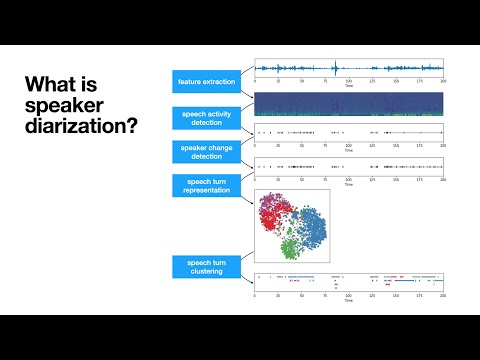
A Python toolkit built on PyTorch for speaker diarization, the task of dividing a recording into stretches labelled by speaker. It also exposes the building blocks separately: voice activity detection, speaker change detection, overlapped speech detection and speaker embeddings.What it is good for. Anyone who records conversations and needs the transcript to name the speakers. Interviews, podcasts, two-host videos, recorded calls. The problem it removes is the hour you would otherwise spend listening back and splitting the text by hand. For a YouTube channel that publishes interviews, this is what turns one wall of transcript into subtitles that say who is talking, in both languages.
- It runs on an ordinary processor. The project reports about 31 seconds of work per hour of audio on standard hardware, so no graphics card is needed.
- MIT licence on the code, and the pipeline is a few lines of Python.
- It gives you the separate pieces as well as the finished pipeline, so you can use only the part you need.
- Getting the model is not just a download. You need a Hugging Face account, you must accept the model's conditions, which include agreeing to share your contact information and receive occasional emails, and you must create an access token. The model itself is CC-BY-4.0.
- It needs
ffmpeginstalled and Python 3.10 or newer, and it pulls in PyTorch, which is a large download. - It tells you who spoke, not what they said. You still need a transcription tool beside it.
 m-bain/whisperX
Does the transcription and the speaker labelling together, giving you word-level timings as well, which makes it the one-step answer where pyannote is the specialist.
Track this in Scout- speechbrain/speechbrain
A general PyTorch toolkit for speech that covers recognition, speaker identification, diarization and enhancement with ready-made recipes, so it is much wider and correspondingly heavier.
Track this in Scout - NVIDIA-NeMo/Speech
NVIDIA's framework for training and running large speech models, including diarization, aimed at people building models rather than using one; it was renamed from NVIDIA/NeMo.
Track this in Scout
# ffmpeg must be on the machine first:
sudo apt install ffmpeg          # or: brew install ffmpeg
python3 -m venv venv && source venv/bin/activate
pip install pyannote.audio
# Then, once, in a browser:
# 1. Make an account at https://huggingface.co
# 2. Accept the conditions at
#    https://huggingface.co/pyannote/speaker-diarization-community-1
# 3. Create a token at https://huggingface.co/settings/tokens