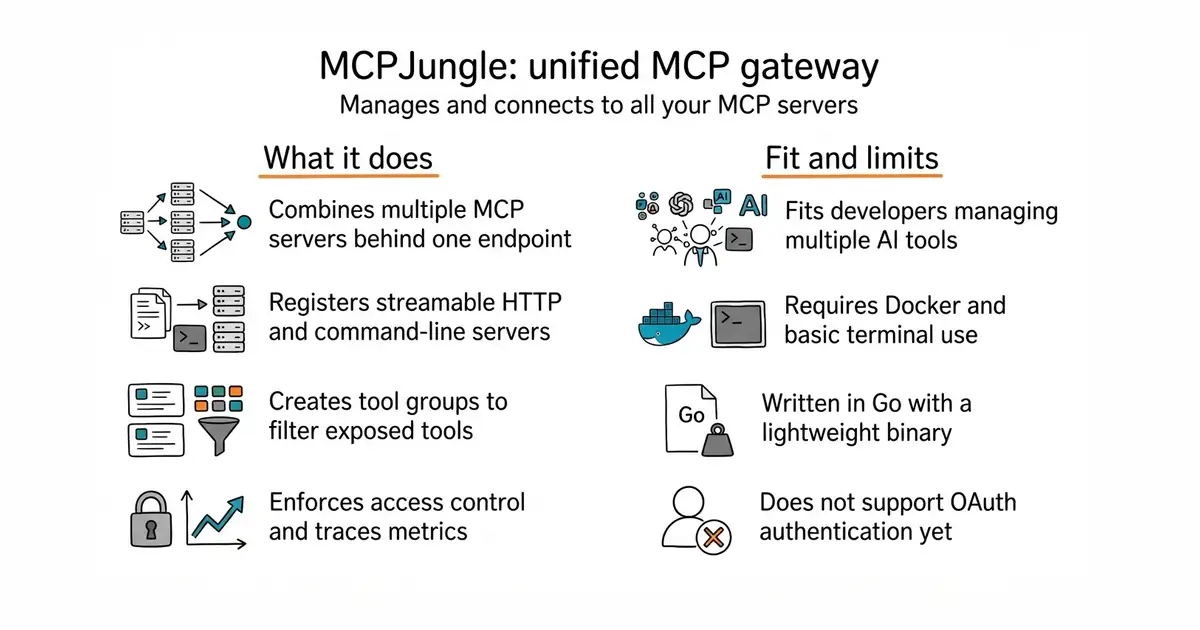
In simple English
This tool acts as a single gateway for all your Model Context Protocol servers. Instead of configuring every AI client separately, you register your servers once here. Claude, Cursor, or custom agents then connect to one clean endpoint. It is self-hosted, so you run it yourself on your own machine or server.
What it is
MCPJungle is a self-hosted gateway for the Model Context Protocol (MCP) written in Go. It manages multiple MCP servers, handles access control, and exposes a unified endpoint for AI clients.
What it is good for
Solo builders who use multiple AI clients and want to stop copy-pasting the same MCP server configurations into every tool.
- Connects multiple AI clients to one shared MCP endpoint.
- Supports both remote streamable HTTP servers and local command-line servers.
- Provides tool groups to limit which tools each client can see.
- Setup requires basic familiarity with Docker and configuration files.
- Running local command-line servers inside Docker needs extra volume mounts.
- OAuth authentication for upstream servers is not supported yet.
manual per-client MCP server configuration files
Claude Desktop, Cursor
- modelcontextprotocol/servers91k stars
Official collection of individual MCP servers, whereas MCPJungle manages and proxies them behind one gateway.

- mudler/LocalAI50k stars
Serves text, vision, speech, image and video models from one self-hosted service that imitates the paid interfaces.
- janhq/jan45k stars
Downloads and runs language models entirely offline as a desktop application, and opens a local server other programs can use.
- Mintplex-Labs/anything-llm67k stars
One program that reads your documents and answers questions about them, with the model running locally if you want.
curl -O https://raw.githubusercontent.com/mcpjungle/MCPJungle/refs/heads/main/docker-compose.yaml
docker compose up -d
brew install mcpjungle/mcpjungle/mcpjungle