Radar check
What we found when we opened it. Every bar is one fact, with its date.
Last code pushed 17 Aug 2026, 2 months before this check.
Latest release v4.9 on 20 May 2026.
Public since December 2022, a little over 3 years.
47,724 stars and 5,981 forks.
1 commits and 7 new issues in the last 90 days.
394 contributors. No pull requests merged in 90 days; changes go in directly.
No security policy file says how to report a problem. 12 published security advisories.
How the bars are scored
- Alive. Days since the last code push: a week or less 100, a month 90, three months 70, six months 50, a year 30, eighteen months 15, older 0.
- Releases. Age of the latest GitHub release, on a similar scale; no bar when the project publishes no releases.
- Maturity. Age of the project: eight years 100, five 90, three 70, two 55, one 40, six months 25, younger 10.
- Adoption. Stars on a log scale: 100,000 stars is 100, 10,000 is 80, 1,000 is 60, 100 is 40.
- Activity. Commits in the last 90 days: 300 or more 100, 100 85, 30 65, 10 45, any 25.
- Community. People who have contributed: 100 or more 100, 30 80, 10 60, 5 40, 2 25, one 10.
- Security. A published security policy 80, none 40; published advisories are listed, not scored.
Checked by Repo Radar on 28 Oct 2026 from the repository on GitHub.
In simple English
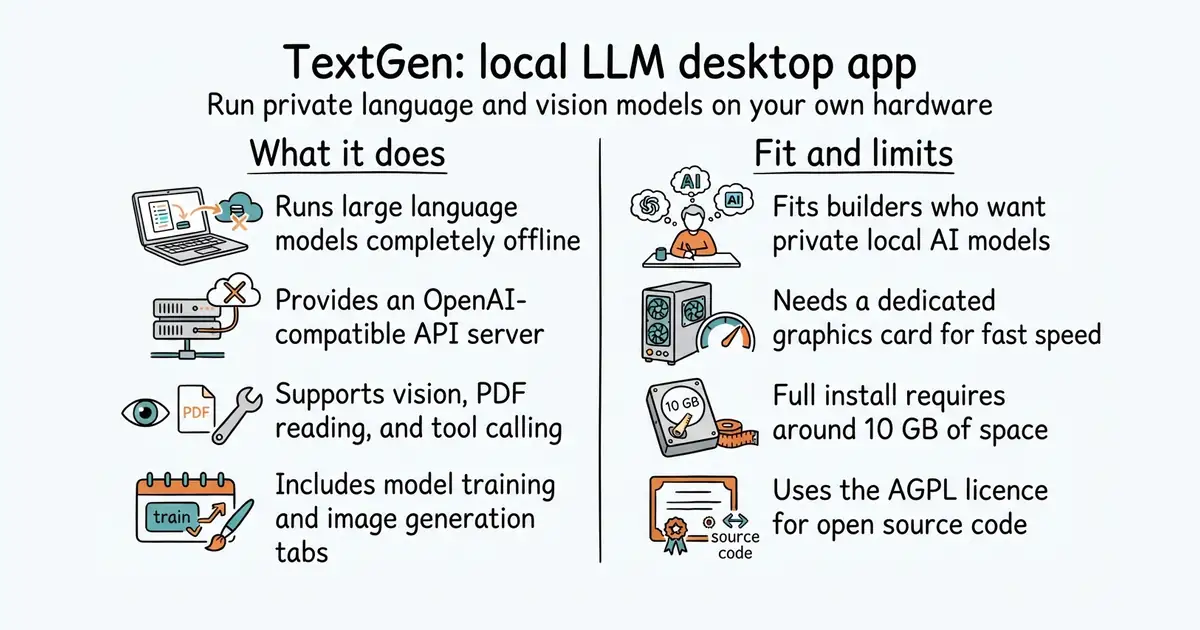
This tool lets you run powerful artificial intelligence models right on your own computer. You can chat with characters, analyze images, and read PDF files without sending any data to the cloud. It costs nothing to run, though you need a computer with enough memory and graphics power. The setup takes some time if you want advanced features like model training. Your conversations stay completely private and require no internet connection after you download the model.
What it is
A desktop app and web user interface for running local language models (computer programs that understand and generate text) and image models. It supports multiple backends (software layers that run models on hardware) like llama.cpp and ExLlamaV3, and includes an API (a way for other programs to talk to this service) that mimics OpenAI.
What it is good for
Solo builders who want to run local AI agents, build applications with private language models, or test different open-source models without paying for cloud API calls.
Summary (Key Points)from the README
Key features
- Desktop app or browser UI: Portable builds open a desktop window. The other install routes serve the web UI at `http://127.0.0.1:7860`.
- Chat modes: `instruct`, `chat-instruct`, and `chat` modes, with prompts formatted automatically through Jinja2 templates.
- Attachments: Send images for vision models, plus text files, PDFs, and .docx documents.
- Multiple backends: llama.cpp, ik_llama.cpp, Transformers, ExLlamaV3, and TensorRT-LLM, switchable without restarting.
- OpenAI/Anthropic-compatible API: Chat, Completions, and Messages endpoints with tool-calling, usable as a local drop-in replacement.
- Tool-calling: Each tool is a single `.py` file. MCP servers are also supported.
- LoRA training: Fine-tune on multi-turn chat or raw text datasets, with support for resuming interrupted runs.
- Image generation: A tab for `diffusers` models such as Z-Image-Turbo, with 4-bit/8-bit quantization and a persistent gallery.
- Privacy: The README states it runs 100% offline, with zero telemetry and no remote update requests.
Ways to install
| Platform or method | What it needs | Effort |
|---|---|---|
| Portable build (desktop app) | Download from the releases page. Linux, Windows, and macOS builds with CUDA, Vulkan, ROCm, or CPU-only options. GGUF models only. | Low: unzip and double-click `textgen` |
| Manual venv install | Python 3.9+, a virtual environment, and a requirements file under `requirements/portable` matching your hardware | Low to moderate |
| One-click installer | Clone or download the source, then run the `start_` script for your OS and pick your GPU vendor | Low |
| Full install with Conda | Miniforge, Python 3.13, a PyTorch build for your hardware, and about 10GB of disk space | High |
| Docker | Docker Compose v2.17 or higher, one of the NVIDIA, AMD, Intel, or CPU Dockerfiles, and a configured `.env` file | Moderate to high |
Important
- Portable limits: Portable builds hide features such as training. ExLlamaV3, Transformers, training, and image generation need the full installation.
- Disk and downloads: The full installation needs roughly 10GB of disk space and downloads PyTorch.
- Network exposure: `--listen` makes the UI reachable from your local network. `--share` and `--public-api` create public URLs. Set `--gradio-auth` or `--api-key` before exposing either.
- Multi-user mode: `--multi-user` does not save or automatically load chat histories. The README says it suits only small trusted teams.
- Remote code: `--trust-remote-code` is needed by some models. The README says `--force-safetensors` helps prevent arbitrary code execution.
- Model layout: Single GGUF files go directly in `user_data/models`. Multi-file Transformers and EXL3 models must sit in a subfolder there.
Written by an AI model from the project’s README; not part of the review, and it can be wrong.
- Runs 100 percent offline with zero telemetry.
- Provides an OpenAI-compatible API for your own applications.
- Supports multiple backends and model formats including GGUF and vision files.
- Requires a powerful computer with a dedicated graphics card for fast replies.
- Full installation downloads large PyTorch packages and takes up disk space.
- AGPL-3.0 licence (a software licence that requires you to share your code if you modify this app and host it for others) may restrict some commercial use.
Paid cloud AI APIs
llama.cpp
- ggml-org/llama.cpp133k stars
Runs GGUF models directly with low memory usage but without a built-in chat interface.
- lm-sys/FastChat40k stars
Provides a web UI and multi-model evaluation platform for large language models.


- vllm-project/vllm96k stars
A serving engine that makes one graphics card answer many requests at once.
- infiniflow/ragflow93k stars
A question-answering system built on a document collection, with the sources shown beside every answer.
- basicmachines-co/basic-memory4.3k stars
Gives an AI assistant a memory that is stored as plain text files you can read.
git clone https://github.com/oobabooga/textgen
cd textgen
python -m venv venv
source venv/bin/activate
pip install -r requirements/portable/requirements.txt --upgrade
python server.py --portable --api --auto-launch