2.7k stars · MIT · v3.2.2 (2026-08-19) · Track this in Rising ↗
The invisible little box in front of every form, and Google is not reading the room.
Radar check
What we found when we opened it. Every bar is one fact, with its date.
Last code pushed 22 Oct 2026, 6 days before this check.
Latest release v3.5.0 on 22 Oct 2026.
Public since November 2023, a little over 2 years.
2,848 stars and 143 forks.
22 commits and 9 new issues in the last 90 days.
1 contributor. No pull requests merged in 90 days; changes go in directly. A small team carries it.
A security policy says how to report a problem. No published security advisories.
How the bars are scored
- Alive. Days since the last code push: a week or less 100, a month 90, three months 70, six months 50, a year 30, eighteen months 15, older 0.
- Releases. Age of the latest GitHub release, on a similar scale; no bar when the project publishes no releases.
- Maturity. Age of the project: eight years 100, five 90, three 70, two 55, one 40, six months 25, younger 10.
- Adoption. Stars on a log scale: 100,000 stars is 100, 10,000 is 80, 1,000 is 60, 100 is 40.
- Activity. Commits in the last 90 days: 300 or more 100, 100 85, 30 65, 10 45, any 25.
- Community. People who have contributed: 100 or more 100, 30 80, 10 60, 5 40, 2 25, one 10.
- Security. A published security policy 80, none 40; published advisories are listed, not scored.
Checked by Repo Radar on 25 Oct 2026 from the repository on GitHub. Covered in Edition 9.
▶Repo detailsthe review · specs · pros & cons · install
What it does
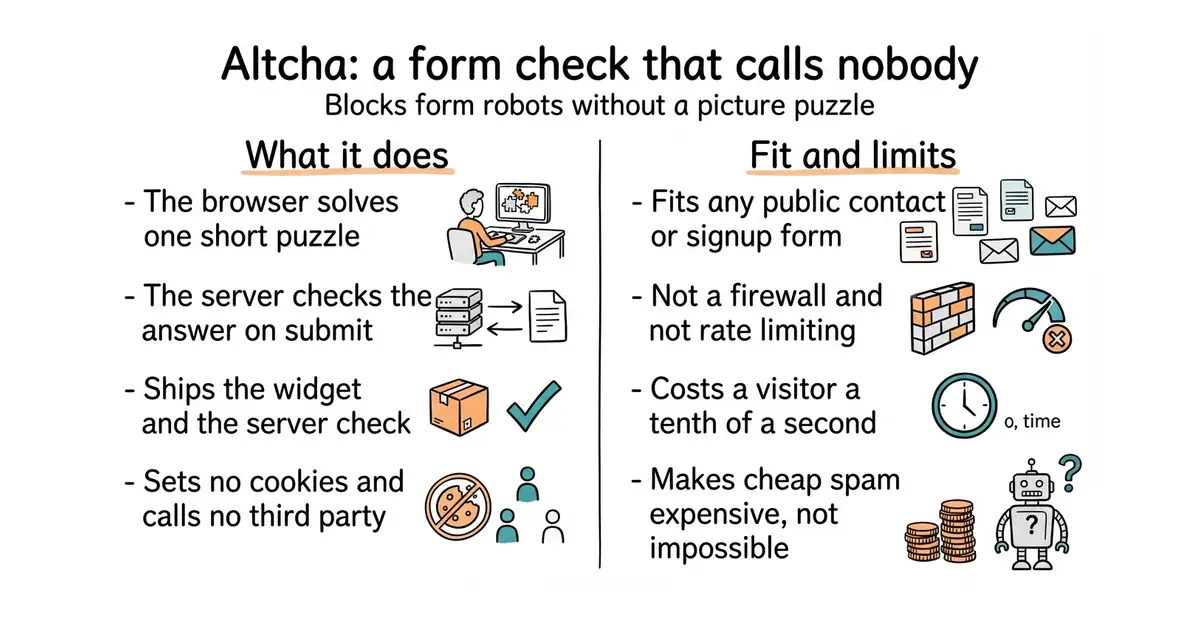
Altcha gives a website a small widget to put in front of a form. When the visitor submits, their browser solves a short mathematical puzzle, called proof of work, and sends the answer along. The server checks the answer and rejects anything that did not do the work. The project ships both the browser widget and server libraries, so both halves come from one place. The widget is a few tens of kilobytes of JavaScript and sets no cookies, which is why it needs no consent banner. The project states compliance with European data rules, with the WCAG 2.2 AA accessibility standard and with the European Accessibility Act. It does not stop a determined attacker, it does not limit how often one address can submit, and it is not a web application firewall.
Why it matters
Who it suits. Anyone with a public contact form, a newsletter signup or a survey, which means almost every website. The default answer is a puzzle widget run by a large advertising company, and that sends every visitor's details to a third party. For a site whose selling point is privacy, that is an awkward trade. Skip it if the forms already sit behind a sign-in, because there is nothing for robots to reach.
Verdict. About twenty minutes of work and almost no ongoing cost, which makes it one of the easiest wins here. Two things to watch: very old phones feel the computation, and cheap spam becomes expensive rather than impossible, so rate limiting is still a separate job. The latest release is v3.3.0 on 5 October 2026 and the published package agrees. mCaptcha is the heavier alternative when a central service for many sites is wanted.
Summary (Key Points)from the README
Key features
- Small bundle: The widget is about 34 kB gzipped, or 52 kB with all translations, roughly 90% smaller than reCAPTCHA (300+ kB).
- Proof-of-work verification: Background PoW replaces visual puzzles, so most users don't face a challenge.
- Memory-bound algorithms: Argon2 and Scrypt are offered to resist ASIC and GPU acceleration, alongside bundled PBKDF2 and SHA variants.
- Code-challenge fallback: "Enter code from image" challenges include audio support, though they need ALTCHA Sentinel or a custom server.
- Cookie-free design: The README states there is no tracking, fingerprinting, or cookie use by default, and the payload can be sent as a form field.
- Broad localization: The widget supports 50+ languages and detects language from the attribute or browser settings.
- Flexible display modes: Options include standard, bar, floating, overlay, and invisible layouts, plus checkbox, switch, and native styles.
- Server and framework coverage: The README lists server integrations for ten languages and starter templates for six frontend frameworks.
Ways to install
| Platform or method | What it needs | Effort |
|---|---|---|
| Import in your main file | A module-aware build setup to import the widget | Low, a single import |
| Load via script tag | A page where you can add a script tag | Low, a single tag |
Important
- Browser support: Internet Explorer 11 and older are not supported; the widget needs Web Components and Web Crypto (crypto.subtle).
- Argon2 and Scrypt setup: These algorithms require separately importing their workers and registering them through $altcha.algorithms before the widget initializes.
- Worker loading without a bundler: Environments without ?worker import support must load the prebuilt worker files directly.
- Strict CSP: The default bundle combines styles and workers in one file, so strict policies need scripts from /dist/external.
- Initialization timing: Programmatic configuration and event listeners must run after the ALTCHA script loads, for example inside a window load handler.
- Code challenges: These depend on ALTCHA Sentinel or a custom server implementation.
- Compliance claims: The privacy and accessibility compliance statements are the project's own; the README gives no independent verification.
Written by an AI model from the project’s README; not part of the review, and it can be wrong.
- MIT licensed and small — tens of kilobytes in the browser
- No outside service, no cookies and therefore no consent banner change
- Ships the widget and the server-side check together
- The computation costs a visitor about a tenth of a second, which is noticeable on very old phones
- It makes cheap spam expensive; it does not make spam impossible
- Rate limiting and abuse handling remain a separate job
reCAPTCHA and hCaptcha — and the visitor data they collect
Typebot forms, Listmonk signup, and any contact form on the site
pip install altcha
npm install altcha
# In a React page: import { Altcha } from 'altcha' and mount <Altcha challengeurl="/api/altcha" />