8,300 stars · MIT · v0.9.5 (2026-09-30) · Track this in Scout
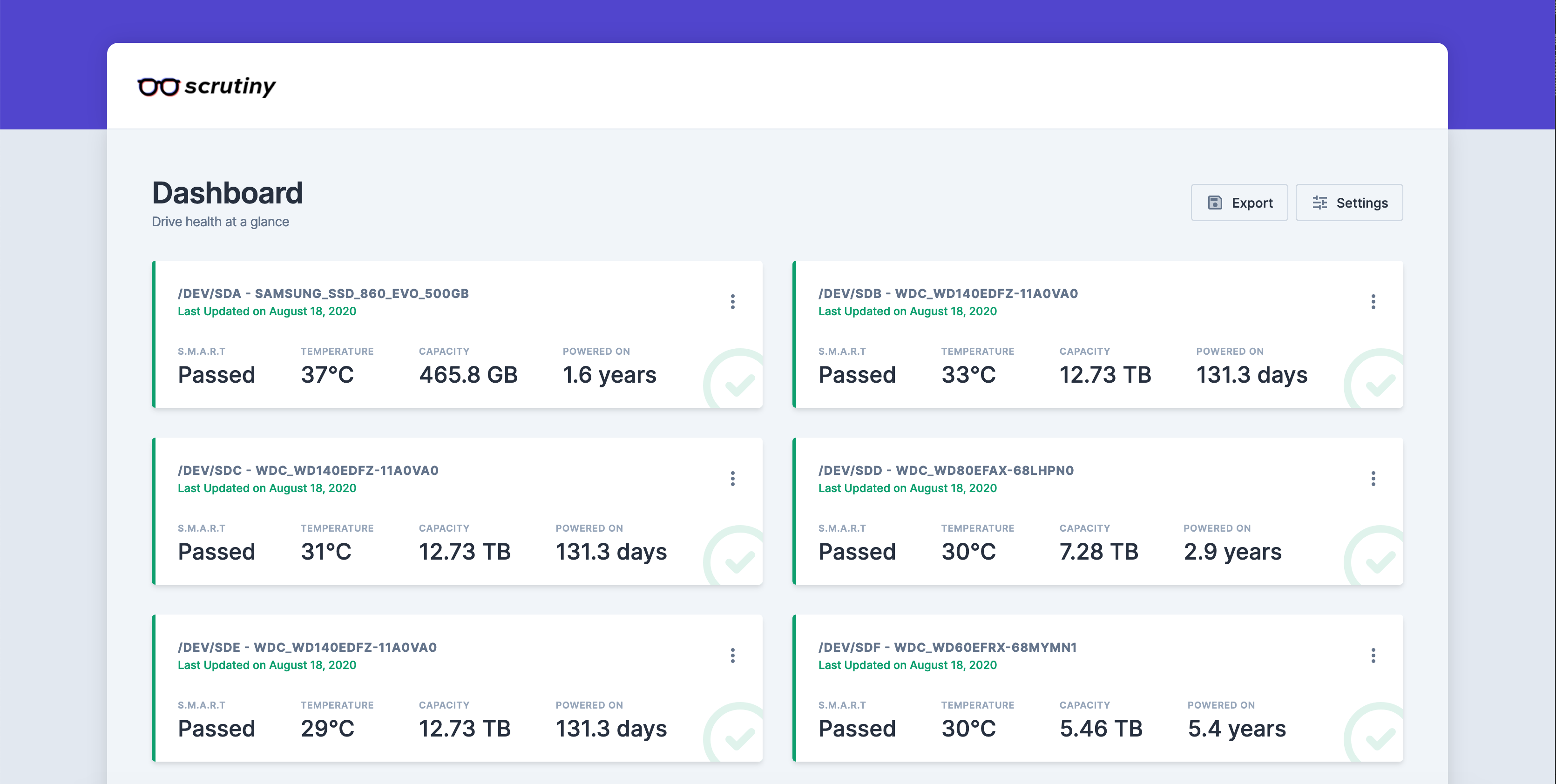
Shows whether the drives in a machine are healthy, failing, or already in trouble.
▶Repo detailsthe review · specs · pros & cons · install
What it is
Scrutiny runs the standard drive-health tool smartctl on a schedule and stores what it reads in a time-series database, so you see trends and not just today's number. It ships as a Docker image (Docker is a way to run a program inside its own sealed box, so it cannot disturb anything else on the machine).
What it is good for. Anyone whose photographs, recordings or backups sit on drives nobody is watching. The useful part is not the raw numbers, which are hard to read, but the verdict Scrutiny puts on top of them and the history behind it.
- It turns an obscure, hard-to-read set of drive figures into a page anyone can understand.
- It keeps the history, so a slow decline over months is visible rather than a single reading today.
- MIT licence (a very short, very permissive licence with no conditions beyond keeping the notice), read from the file, plain and unmodified, with the holder named: "Copyright (c) 2020 Jason Kulatunga".
- The setup is hand-written. There is no installer. You must list every drive in the command by its system name, such as
/dev/sda, and getting one wrong leaves an empty page with no explanation of why. - It needs deep access to the hardware to work, which the command grants with
--cap-add SYS_RAWIOand one--deviceflag per drive; solid-state NVMe drives also need--cap-add SYS_ADMIN. And the web page has no password at all in the documented setup, so anyone on the same network can read it. - It runs a full time-series database whose data grows for as long as it is installed, and the project publishes no memory or disk figure anywhere, so there is nothing to plan storage against.
- prometheus-community/smartctl_exporter
Reads the same drive-health figures but only publishes them for Prometheus, so there is no web page, no verdict and no stored history.
Track this in Scout - smartmontools/smartmontools
The original tool Scrutiny calls underneath; command line only, with no charts and no trends.
Track this in Scout  netdata/netdata
Also charts drive health on a web page, but as one measurement among hundreds and with none of Scrutiny's failure-threshold judgement.
Track this in Scout
# Needs: Docker installed, and the names of your drives (/dev/sda, /dev/sdb, ...).
docker run -p 8080:8080 -p 8086:8086 --restart unless-stopped \
  -v `pwd`/scrutiny:/opt/scrutiny/config \
  -v `pwd`/influxdb2:/opt/scrutiny/influxdb \
  -v /run/udev:/run/udev:ro \
  --cap-add SYS_RAWIO \
  --device=/dev/sda \
  --device=/dev/sdb \
  --name scrutiny \
  ghcr.io/analogj/scrutiny:latest-omnibus