
Edition No. 42 · 6 Oct 2026
Twelve repositories for watching a machine, keeping things out, and money
Netdata's own release notes tell you not to install the version GitHub serves as its latest, and a trading library with 2,501 stars ships no licence file at all.
6 October 2026. Twelve open-source projects, each one opened and checked this morning. Ten of the sixteen areas this report covers. Three hidden gems under 3,000 stars. No repeats.
Today's reach went into the five areas that neither of the last two editions touched, and four of the five carry an entry: watching a running machine, keeping unwanted things out, models you run yourself, and trading tools.
We aim for twelve every day. Some candidates fall out while we check them — those are listed at the end, with the reason.
Three things worth knowing, separate from the recommendations
- A project's newest release is not always the one it wants you to have. Netdata's v2.12.0 of 30 September 2026 is what GitHub serves as the latest release, and the release notes for that very version say it "has been discovered to have serious stability issues that cause it to crash randomly on startup" and point to v2.11.1 instead. The warning is inside the thing it warns about. - A licence badge is not a licence file, and sometimes there is no file. Ta4j has 2,501 stars, nine years of history and a release cut yesterday, and we could not find a licence file at any of the eight paths we tried. The "MIT" on its page appears to come from a link in the readme to someone else's website, and no copyright holder is named anywhere in the repository. Seven of today's twelve licence files were read in full; four of them name nobody at all. - Documentation can lose a fact that people relied on. Ollama used to publish how much memory each model size needs. That table is gone — we checked the readme, the documentation site, the graphics-card page, the questions page and the download page. What remains relates a graphics card's own memory to how much text a model can hold, which answers a different question. There is now no published way to know whether a model will run before trying it.
If you only do three things
- aquasecurity/trivy (#3) — ten minutes, one command, and it changes nothing on the machine. It reads a project folder or a packaged program and lists the known security holes inside it, with the severity of each. Today's gold.
- AnalogJ/scrutiny (#2) — half an hour, one container. It reads the health figures that hard drives already keep about themselves and draws them as a web page, so a disk that is quietly dying shows up before it takes the files with it.
- pi-hole/pi-hole (#4) — one evening, one small always-on computer. Ads and tracking are blocked for every device in the house at once, including phones and televisions, with nothing installed on any of them. ---
Every link in one place
| # | Repository | Official website | What it does |
|---|---|---|---|
| 1 | netdata/netdata | www.netdata.cloud | Live charts of everything a server is doing |
| 2 | AnalogJ/scrutiny | none | A web page showing hard-drive health |
| 3 | aquasecurity/trivy | trivy.dev | Finds known security holes in code and images |
| 4 | pi-hole/pi-hole | pi-hole.net | Blocks ads for a whole network |
| 5 | ollama/ollama | ollama.com | Runs AI language models on your own computer |
| 6 | ta4j/ta4j | www.ta4j.com | Chart indicators and strategy testing, in Java |
| 7 | microsoft/qlib | qlib.readthedocs.io | A research workbench for machine learning on market data |
| 8 | ananthakumaran/paisa | paisa.fyi | Charts and reports over a plain-text money ledger |
| 9 | zammad/zammad | zammad.org | A shared support inbox with tickets |
| 10 | firecow/gitlab-ci-local | none | Runs a GitLab pipeline on the machine in front of you |
| 11 | googlefonts/fontmake | none | Turns font source files into finished font files |
| 12 | tinytag/tinytag | none | Reads the tags inside music and audio files |
Netdata's newest release is one it tells you not to install
Twelve repositories, checked and reviewed. Every version verified against the GitHub API and dated.
80,789 stars · GPL-3.0-or-later · v2.12.0 (2026-09-30) · Track this in Scout
Draws hundreds of live charts about a single computer with almost no setting up.
▶Repo detailsthe review · specs · pros & cons · install
What it is
Netdata is a program you install on a machine; it finds what is running by itself and starts charting it. The charts appear on a web page served by that same machine, at port 19999.
What it is good for. Anyone who runs a server and only finds out something is wrong when a person complains. Also useful on a home machine that stores family photographs or backups, because the charts make a filling disk or a failing network obvious at a glance.
- One command installs it, and it discovers what to measure without being told.
- The charts update every second, which is far finer than most monitoring tools and makes short spikes visible.
- The project publishes honest sizing figures: "1%-5% of a single core with default settings", "100-200 MB on an empty system" and "250-350 MB in typical production", and about 4 GiB of disk by default.
- The newest release is one the project tells you not to run. The release notes for v2.12.0 of 30 September 2026 say it "has been discovered to have serious stability issues that cause it to crash randomly on startup" and advise using "the latest known working version (v2.11.1)". GitHub still shows v2.12.0 as the latest release, so copying the obvious thing installs the broken one.
- The one-line installer's defaults sign you up for nightly builds, automatic updates and anonymous usage reporting. You have to know to add
--stable-channel --disable-telemetryto avoid all three. - Only the part that runs on the machine is open source. The repository's own notes say the hosted service is proprietary and the web interface itself is closed source, free to use. The licence file is GNU GPL version 3 (a licence that requires anyone distributing a changed copy to publish their changes), and it names no Netdata copyright holder at all — the only copyright line in it belongs to the Free Software Foundation.
- prometheus/prometheus
Collects the same kind of measurements over time and raises alerts, but it stores and queries only, so you add separate collectors and a separate charting tool.
Track this in Scout - zabbix/zabbix
Monitors servers, network equipment and services with alerts and charts, but needs its own database and web server and measures at roughly minute intervals.
Track this in Scout - nicolargo/glances
Shows the same live figures for one machine but mainly in a terminal, with no long-term storage and no alerts.
Track this in Scout
# Needs: a Linux machine with systemd, root access, and outgoing internet.
wget -O /tmp/netdata-kickstart.sh https://get.netdata.cloud/kickstart.sh
sh /tmp/netdata-kickstart.sh --stable-channel --disable-telemetry




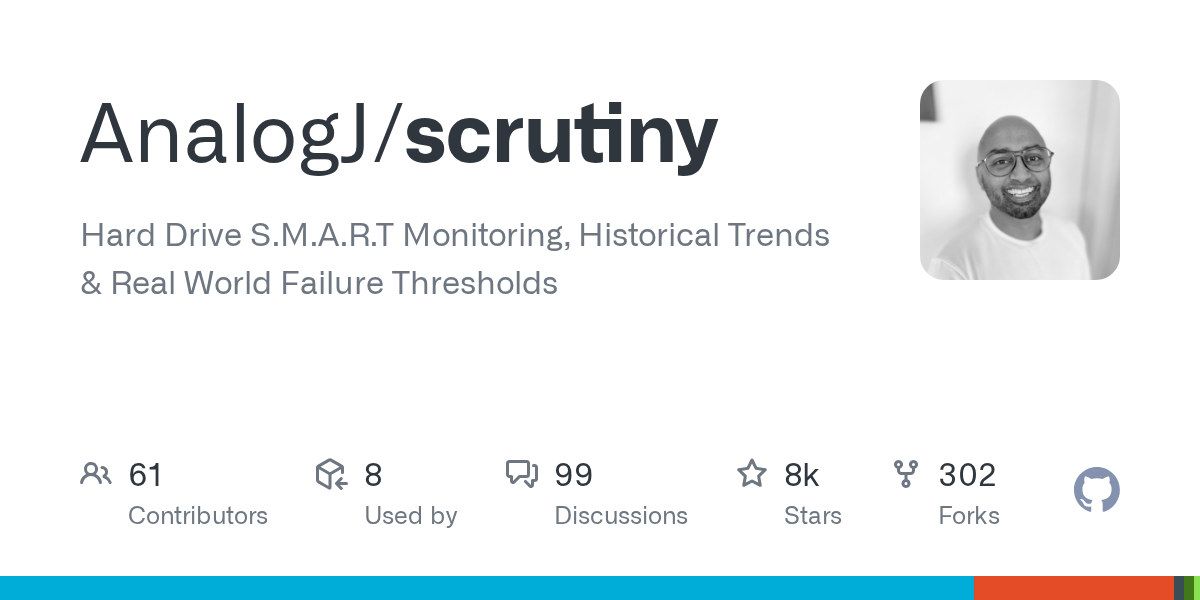
8,300 stars · MIT · v0.9.5 (2026-09-30) · Track this in Scout
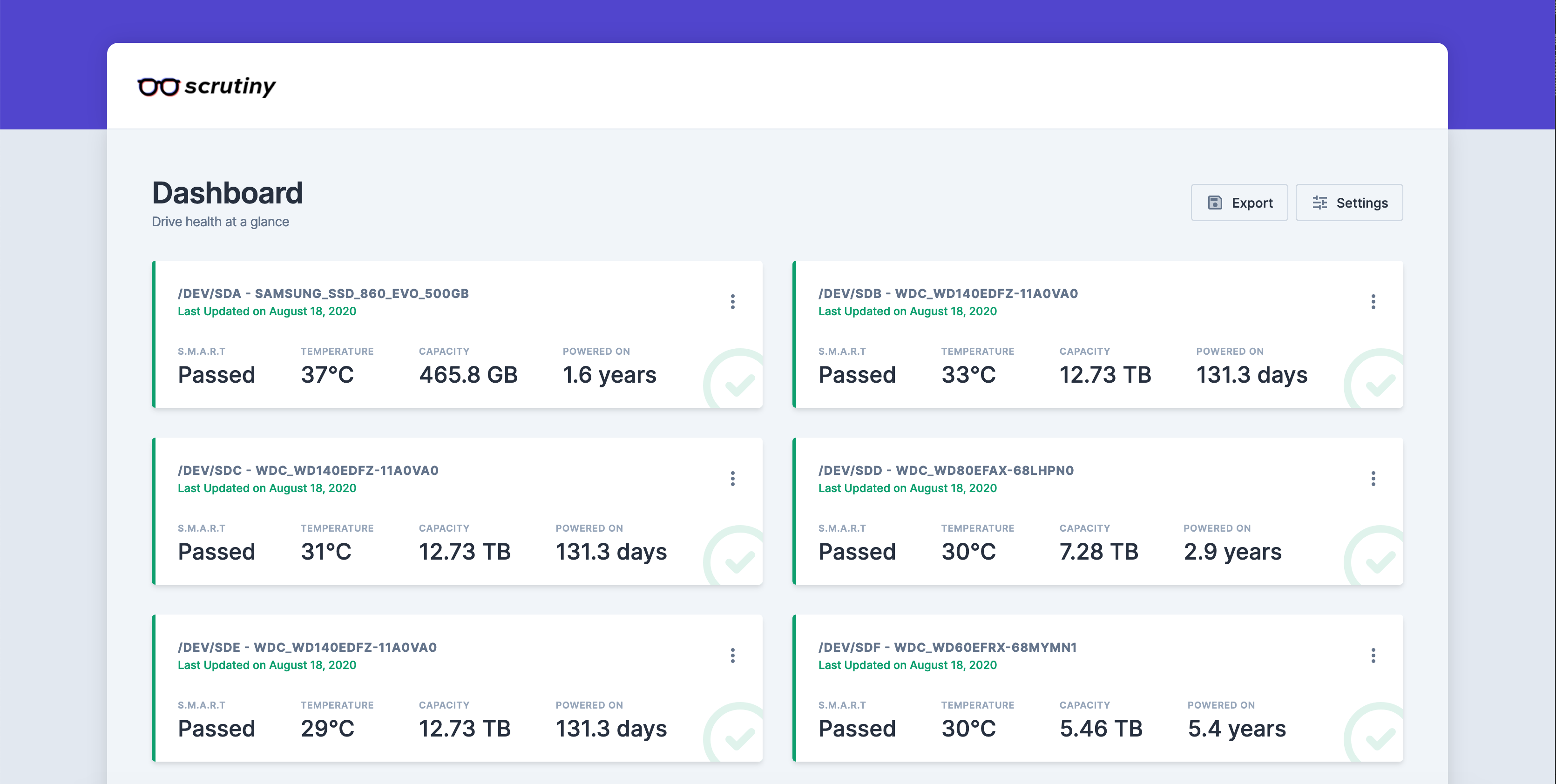
Shows whether the drives in a machine are healthy, failing, or already in trouble.
▶Repo detailsthe review · specs · pros & cons · install
What it is
Scrutiny runs the standard drive-health tool smartctl on a schedule and stores what it reads in a time-series database, so you see trends and not just today's number. It ships as a Docker image (Docker is a way to run a program inside its own sealed box, so it cannot disturb anything else on the machine).
What it is good for. Anyone whose photographs, recordings or backups sit on drives nobody is watching. The useful part is not the raw numbers, which are hard to read, but the verdict Scrutiny puts on top of them and the history behind it.
- It turns an obscure, hard-to-read set of drive figures into a page anyone can understand.
- It keeps the history, so a slow decline over months is visible rather than a single reading today.
- MIT licence (a very short, very permissive licence with no conditions beyond keeping the notice), read from the file, plain and unmodified, with the holder named: "Copyright (c) 2020 Jason Kulatunga".
- The setup is hand-written. There is no installer. You must list every drive in the command by its system name, such as
/dev/sda, and getting one wrong leaves an empty page with no explanation of why. - It needs deep access to the hardware to work, which the command grants with
--cap-add SYS_RAWIOand one--deviceflag per drive; solid-state NVMe drives also need--cap-add SYS_ADMIN. And the web page has no password at all in the documented setup, so anyone on the same network can read it. - It runs a full time-series database whose data grows for as long as it is installed, and the project publishes no memory or disk figure anywhere, so there is nothing to plan storage against.
- prometheus-community/smartctl_exporter
Reads the same drive-health figures but only publishes them for Prometheus, so there is no web page, no verdict and no stored history.
Track this in Scout - smartmontools/smartmontools
The original tool Scrutiny calls underneath; command line only, with no charts and no trends.
Track this in Scout  netdata/netdata
Also charts drive health on a web page, but as one measurement among hundreds and with none of Scrutiny's failure-threshold judgement.
Track this in Scout
# Needs: Docker installed, and the names of your drives (/dev/sda, /dev/sdb, ...).
docker run -p 8080:8080 -p 8086:8086 --restart unless-stopped \
  -v `pwd`/scrutiny:/opt/scrutiny/config \
  -v `pwd`/influxdb2:/opt/scrutiny/influxdb \
  -v /run/udev:/run/udev:ro \
  --cap-add SYS_RAWIO \
  --device=/dev/sda \
  --device=/dev/sdb \
  --name scrutiny \
  ghcr.io/analogj/scrutiny:latest-omnibus

38,100 stars · Apache-2.0 · v0.75.0 (2026-10-01) · Track this in Scout
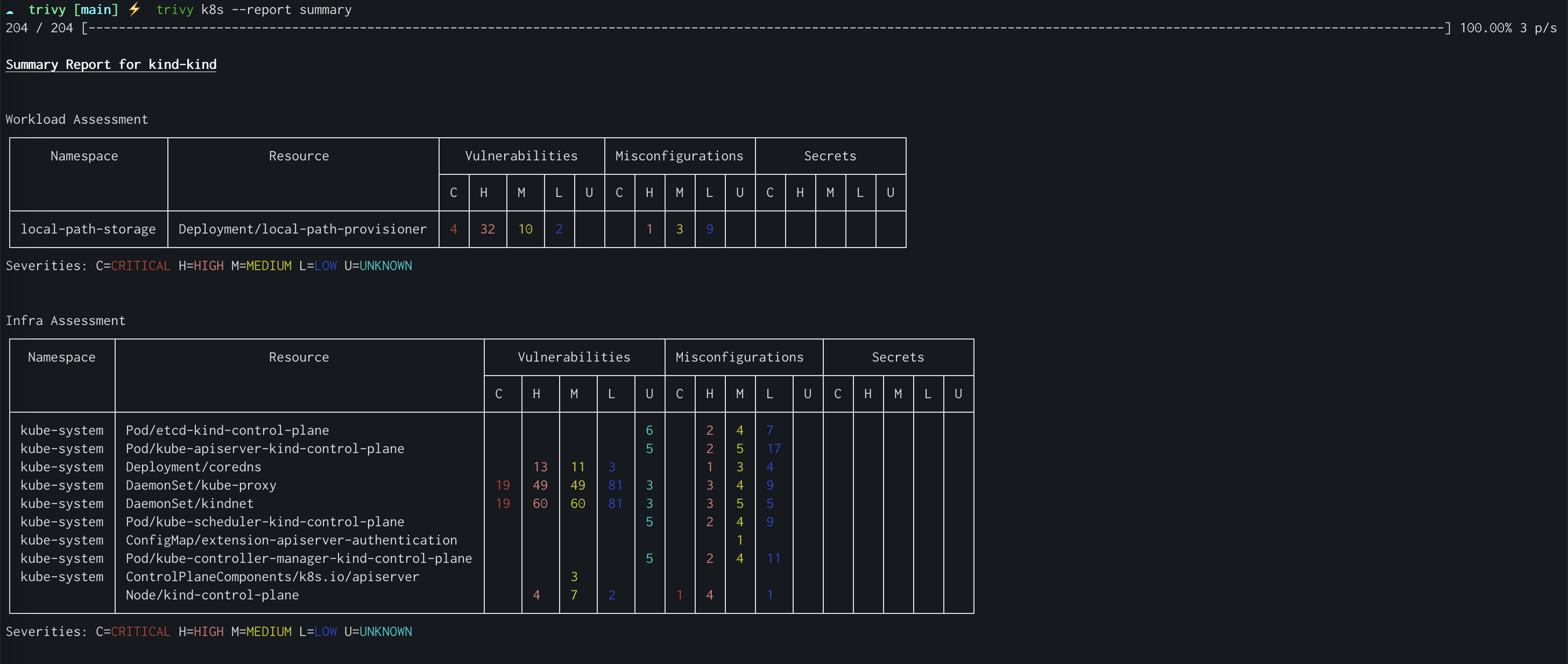
Lists the known security holes in a project's parts and in packaged programs.
▶Repo detailsthe review · specs · pros & cons · install
What it is
Trivy is a single command-line program that scans container images, ordinary folders, code repositories and infrastructure settings files. It compares what it finds against public databases of reported security problems.
What it is good for. Anyone who ships software without a security team to check it, and anyone running programs somebody else packaged. Running it on a folder that already exists, before touching anything, is a ten-minute answer to "is there anything badly wrong in here".
- It is read-only, so there is no risk in trying it, and the first useful answer arrives in one command.
- It covers more than one kind of problem: known holes in code libraries, mistakes in settings files, and passwords left in the files by accident.
- Apache licence 2.0 (a permissive licence that also grants patent rights), read from the file at
main/LICENSEand plain and unmodified, with no commercial carve-out.
- The copyright holder in the licence file was never filled in. The line reads exactly
Copyright [yyyy] [name of copyright owner]— the template Apache ships, left as it came. The licence terms themselves are standard; nobody is named as owning the work. - Output is a long wall of terminal text, with no interface. It tells you a problem exists and leaves the judgement about what matters to you.
- The documented way to scan container images mounts
/var/run/docker.sockinto the scanner, which gives that container root-level control over the whole machine. It is one copied line and it is easy to run without understanding what was granted.
 anchore/grype
Finds the same known holes in images and file listings, covered in Edition 39, but with no settings-file or password checking.
Track this in Scout- quay/clair
Analyses container images for the same problems, but as a service you run and feed images into rather than a single command.
Track this in Scout - future-architect/vuls
Finds known holes in installed software, but scans whole machines over a remote login rather than images, and is GPL-3.0.
Track this in Scout
# Debian or Ubuntu. Needs: sudo, and an internet connection for the first scan.
sudo apt-get install -y wget gnupg
wget -qO - https://aquasecurity.github.io/trivy-repo/deb/public.key \
  | gpg --dearmor | sudo tee /usr/share/keyrings/trivy.gpg > /dev/null
echo "deb [signed-by=/usr/share/keyrings/trivy.gpg] https://aquasecurity.github.io/trivy-repo/deb generic main" \
  | sudo tee -a /etc/apt/sources.list.d/trivy.list
sudo apt-get update
sudo apt-get install -y trivy
# Scan a folder that already exists:
trivy fs .


60,800 stars · EUPL-1.2 · v6.4.3 (2026-07-06) · Track this in Scout
Blocks advertising and tracking for every device on a network by refusing to look up those addresses.
▶Repo detailsthe review · specs · pros & cons · install
What it is
Pi-hole is a name-lookup server with blocklists in front of it. Devices ask it for addresses, and for anything on a list it answers that there is nothing there, so the advertisement never loads.
What it is good for. Any household or small office with devices that cannot run an ad blocker of their own — smart televisions, games consoles, phones with locked-down browsers. It also gives a plain log of which device asked for what, which is often the first time anyone sees how much background traffic a television produces.
- One blocking setup covers every device on the network, including ones that can never install software.
- The published requirements are small: "512MB RAM", "Min. 2GB free space, 4GB recommended", and the documentation says "Pi-hole is very lightweight and does not require much processing power."
- Thirteen years old, actively maintained, with 26 open issues against 17 open requests to change the code — an unusually tidy state for a project this size.
- It becomes a single point of failure for the whole network. If that machine is off, rebooting, or its memory card has died, nothing on the network can look up anything until the router change is undone.
- The documented install pipes a script from the internet straight into a command shell running as the administrator, and the step people actually get stuck on is not the install but changing the router.
- The licence is the European Union Public Licence version 1.2, read from the file — a copyleft licence that also applies when software is offered over a network, and far less familiar than MIT or GPL. The file also adds a scope note before the licence text: "This license applies to the whole project EXCEPT: any commits made to the master branch prior to the release of version 3.0". Anyone redistributing it should take advice rather than assume it behaves like MIT.
- AdguardTeam/AdGuardHome
Does the same network-wide blocking but ships as one file with its own web interface, encrypted lookups, parental controls and an address server.
Track this in Scout - 0xERR0R/blocky
Blocks the same addresses from the same lists as one small file configured by text, with no web interface and no usage reporting.
Track this in Scout - StevenBlack/hosts
Blocks the same addresses but as a list file installed per device, so there is no machine to run and no query log.
Track this in Scout
# Needs: an actively maintained Linux machine that stays on, sudo, port 53 free,
# and a fixed network address for that machine.
curl -sSL https://install.pi-hole.net | bash

182,121 stars · MIT · v0.35.1 (2026-09-29) · Track this in Scout
Downloads and runs AI language models on the computer in front of you.
▶Repo detailsthe review · specs · pros & cons · install
What it is
Ollama is a background program with a small command-line front end and a catalogue of ready-packaged models. It also offers an interface other programs can call, so applications can talk to a local model the way they would talk to a hosted one.
What it is good for. Anyone who wants to use a language model on text that must not leave the building — contracts, medical notes, customer records — and anyone who wants to try models without an account or a card. It is also the simplest way to put a local model behind an existing application.
- One command installs it and one more command gets a working model; nothing else to configure.
- MIT licence, read from the file at
main/LICENSE, plain and unmodified, with the holder given as "Copyright (c) Ollama". - Very actively developed: 182,121 stars, code pushed on 4 October 2026, and release v0.35.1 dated 29 September 2026.
- The memory guidance has been removed from the documentation. The project used to state how much memory each model size needs. Today no model-size-to-memory table exists anywhere in its documentation — we checked the readme file, the documentation site, the graphics-card page, the questions page and the download page. The only published memory figures relate a graphics card's own memory to how much text the model can hold at once: "< 24 GiB VRAM: 4k context", "24-48 GiB VRAM: 32k context", ">= 48 GiB VRAM: 256k context". So there is no published way to know in advance whether a model will run; you find out by watching it fail or crawl.
- Models are multi-gigabyte downloads that are kept for ever and never cleaned up, under
~/.ollama/modelson Linux and macOS. Nothing warns before the disk fills. - The background program listens for requests with no password by default. One wrong setting of
OLLAMA_HOSTopens the model to the network. And the MIT licence covers Ollama's own code only — each model you download carries its own separate licence, which MIT says nothing about.
- ggml-org/llama.cpp
Runs the same models on the same hardware and is the engine lineage Ollama is built on, but is a library and CLI you compile and feed model files to by hand.
Track this in Scout - mudler/LocalAI
Also runs models locally behind a callable interface, but covers pictures, speech and video too and needs more configuring.
Track this in Scout - janhq/jan
Runs the same models entirely offline but as a desktop application rather than a background service.
Track this in Scout
# macOS and Linux:
curl -fsSL https://ollama.com/install.sh | sh
# Then run a model (this downloads it the first time):
ollama run gemma3


2,501 stars · MIT (claimed; NO LICENCE FILE IN THE REPOSITORY) · 0.26.0 (2026-10-05) · Track this in Scout
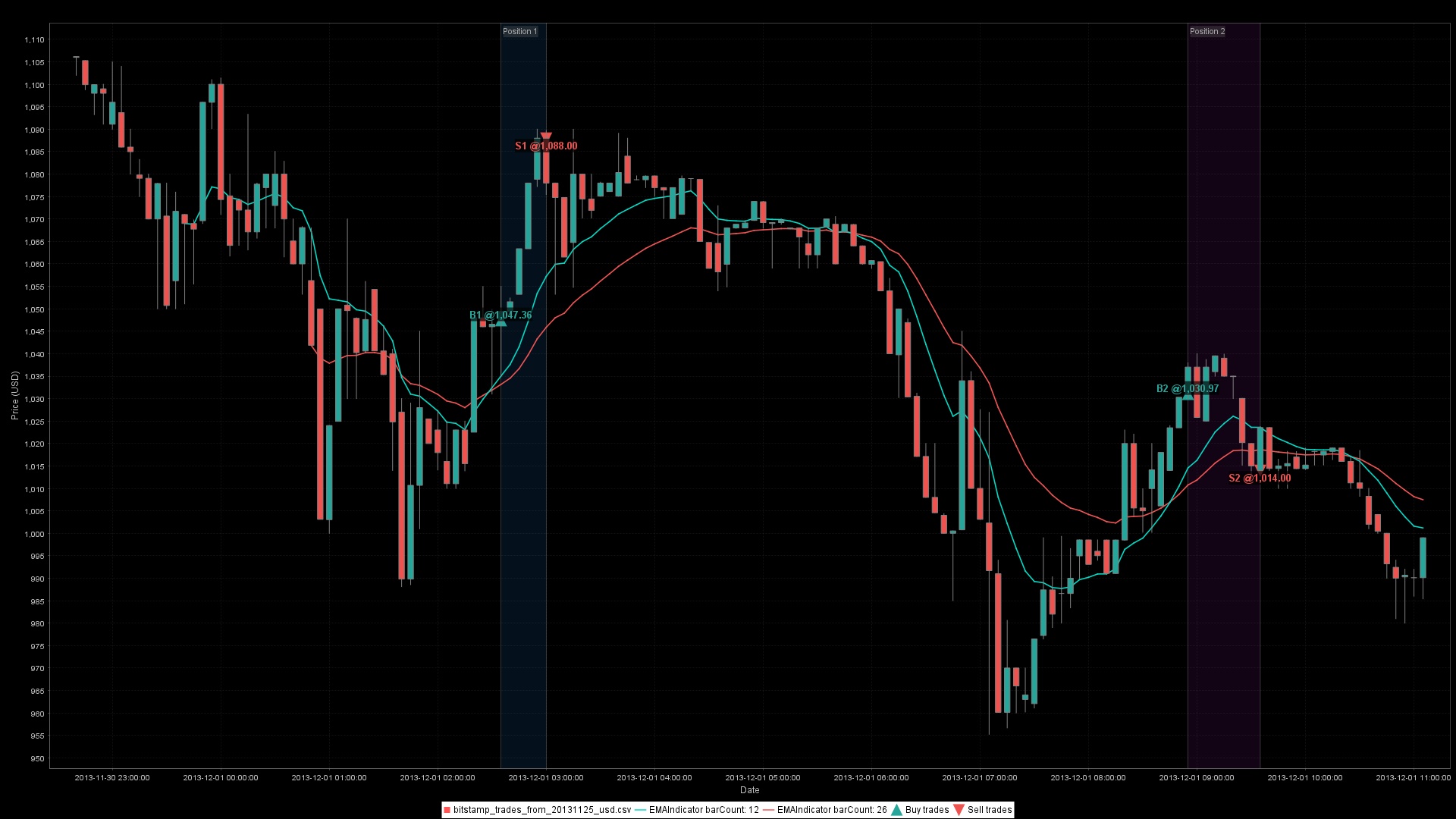
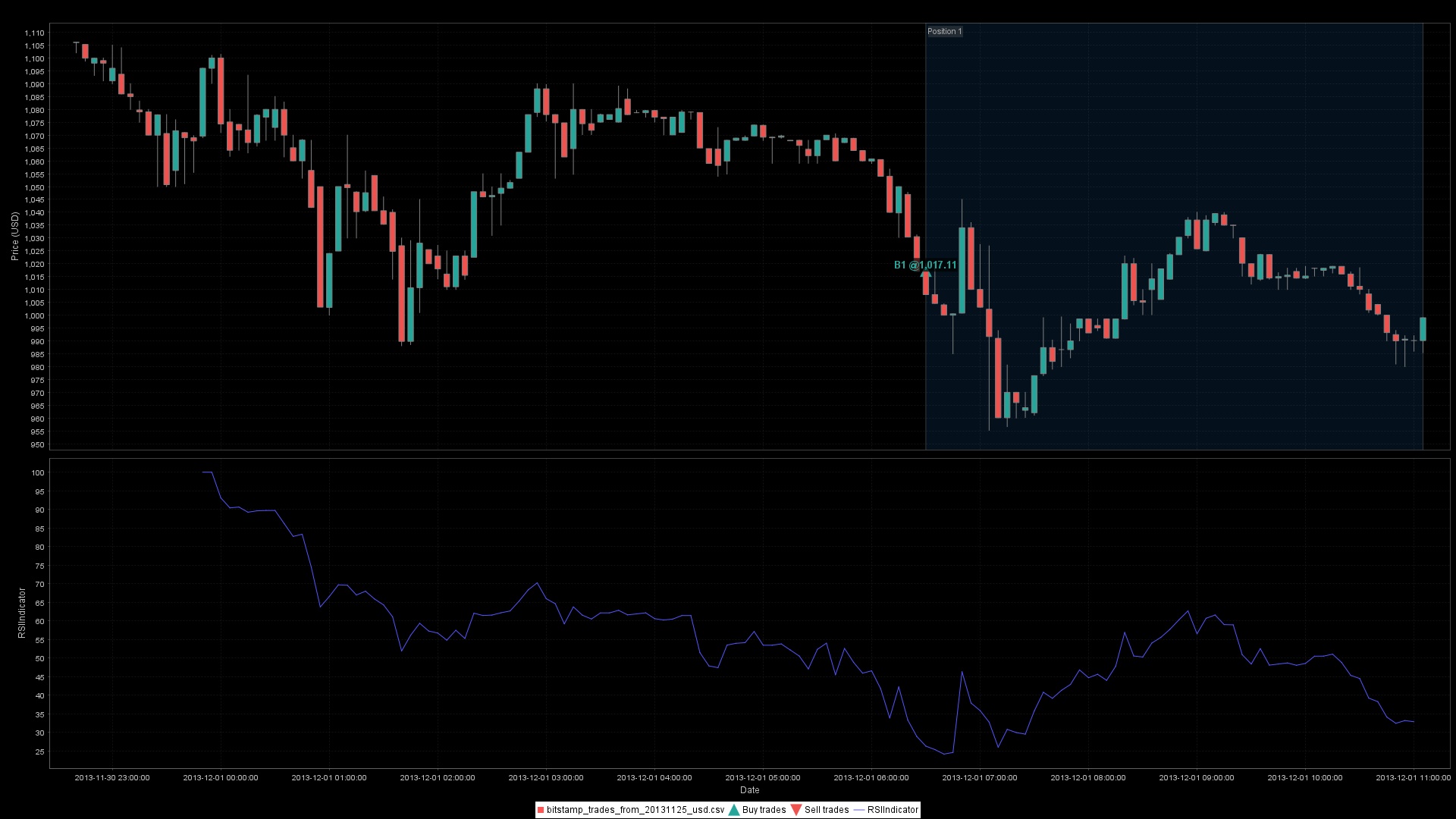
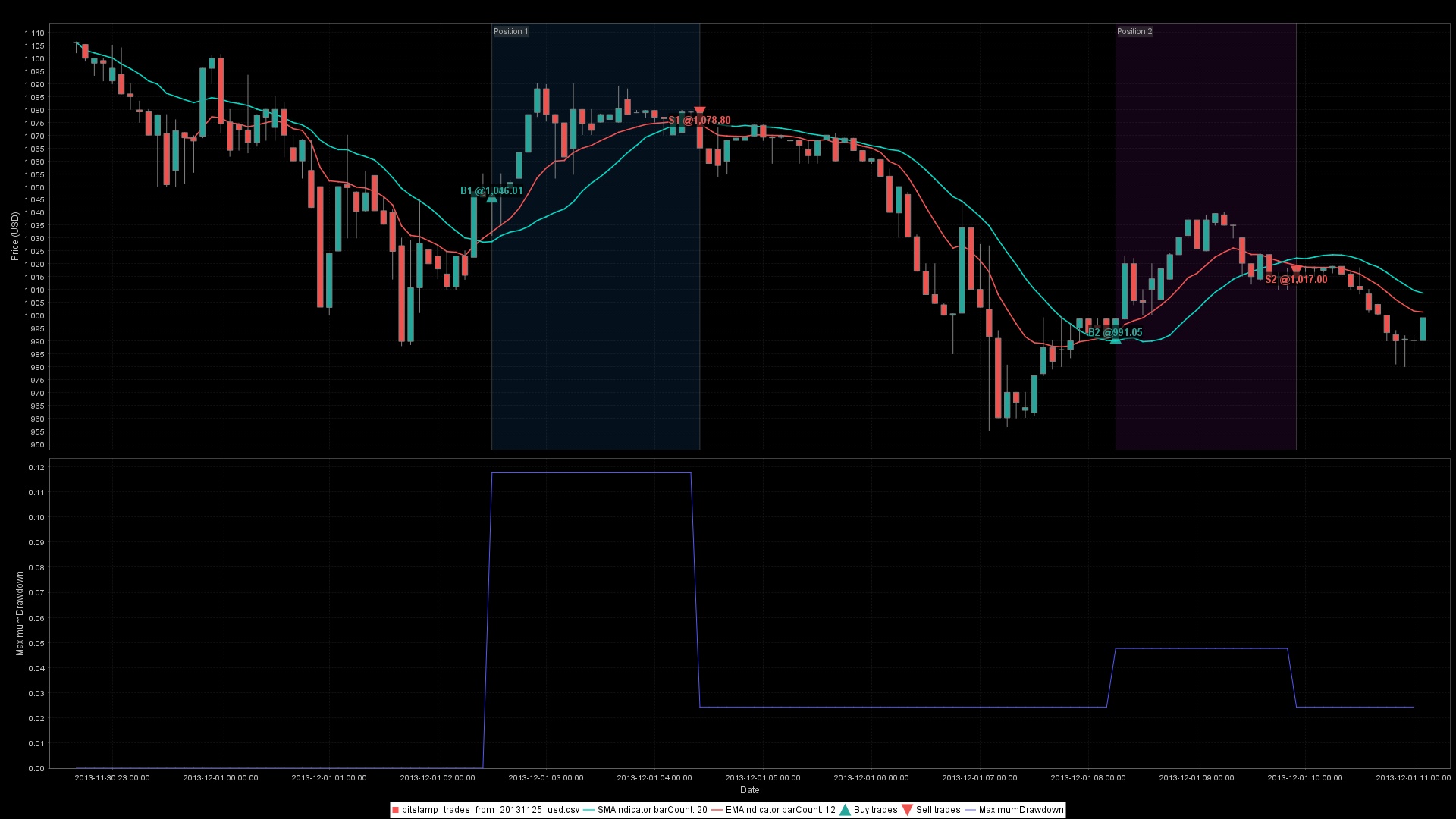
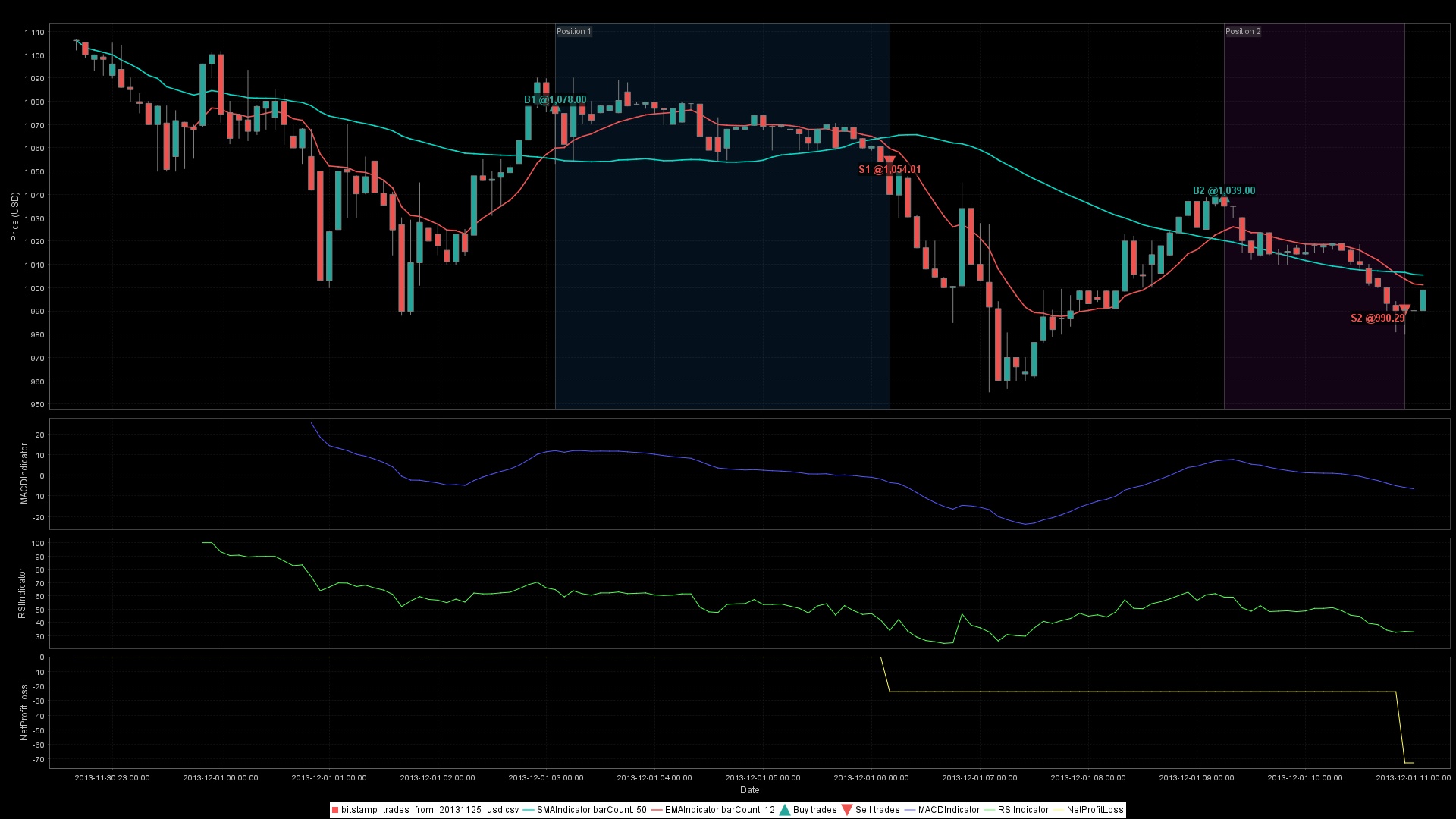
A Java toolbox of chart indicators and a tester for trading rules.
▶Repo detailsthe review · specs · pros & cons · install
What it is
Ta4j provides the common indicators — moving averages, momentum measures, volatility bands — and a framework for stating a rule, running it over historical prices and reporting what it would have done. It is published as a Java library, fetched through the standard Java package tool.
What it is good for. Someone who already writes Java and wants to test a trading idea without building the indicator mathematics themselves. It is the most complete answer in Java; almost everything comparable is written in Python.
- Nine years old, 2,501 stars, with code pushed on the morning of this edition and release 0.26.0 dated 5 October 2026.
- It covers both halves of the job — the indicators and the strategy testing — where most libraries do only one.
- This is one of the few release pages we read today that printed its own year. Every other project in this edition showed a date with no year, which had to be settled against a second source. Ta4j's 2026-10-05 was readable as it stood and matched the Java package registry exactly.
- The repository contains no licence file. We tried
LICENSE,LICENSE.md,LICENSE.txt,MIT-LICENSE,COPYING,COPYING.md,License.htmland aLICENSESfolder, on the default branch and the other usual branch names; every one returned "not found". GitHub shows "MIT" in the sidebar, and that appears to come from a link in the readme file to the MIT licence text on another website. The only statement inside the repository is in the build file:<name>MIT License</name>with the comment "All source code is under the MIT license." and no web address. No copyright holder is named anywhere we could read. That is a real gap if the work is ever redistributed or put through a legal review. - The readme file states "ta4j requires Java 25+", and the build file enforces it. Java 25 is very new; a typical or company-managed computer will have Java 17 or Java 21, so a new Java installation comes first.
- It is a library with nothing to run. There is no window, no command, no example you can click. And a subtle mistake in an indicator does not break a build — it produces a plausible, wrong number about money. The build file on the main branch also still says
0.23.1-SNAPSHOT, three minor versions behind the 0.26.0 that is actually published.
 TA-Lib/ta-lib-python
The same kind of indicator library with more than 150 indicators, covered in Edition 35, but Python over a C library and with no strategy testing.
Track this in Scout- AI4Finance-Foundation/FinRL
Also tests trading strategies on historical prices, but in Python, around learning by trial, and as teaching material.
Track this in Scout  freqtrade/freqtrade
Tests and then runs strategies, covered in Edition 29; a finished bot with an interface, but tied to cryptocurrency venues.
Track this in Scout
# Needs: Java 25 or newer, plus Maven or Gradle. Check what you have:
java -version

49,178 stars · MIT · v0.9.7 (2025-08-15) · Track this in Scout
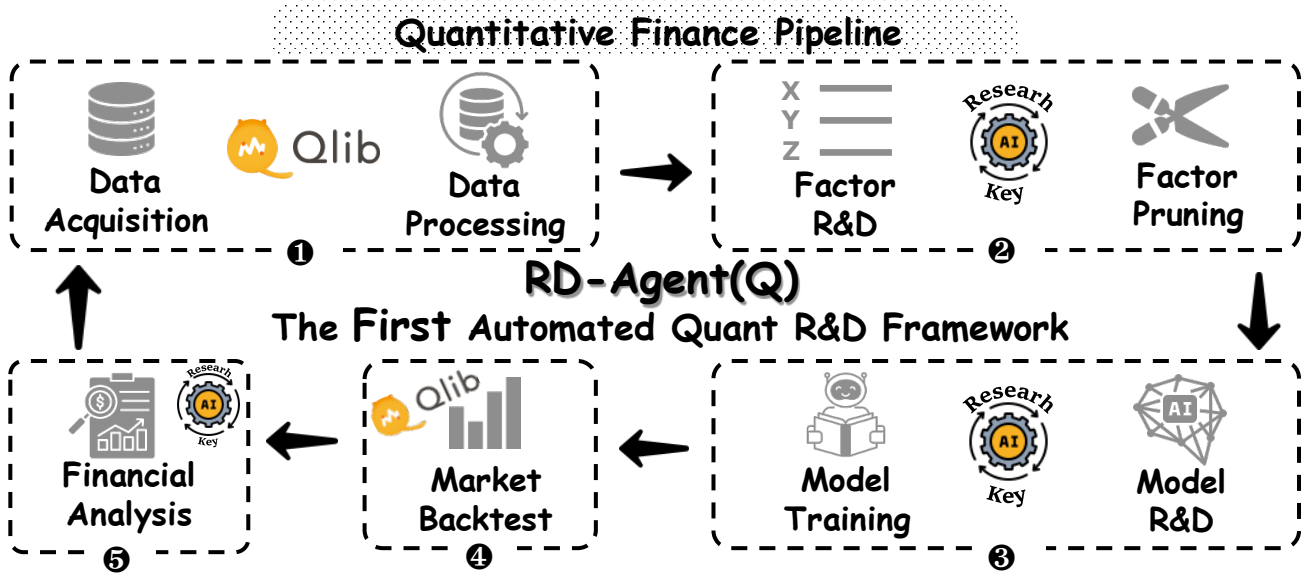
A Python research workbench for machine-learning experiments on market data.
▶Repo detailsthe review · specs · pros & cons · install
What it is
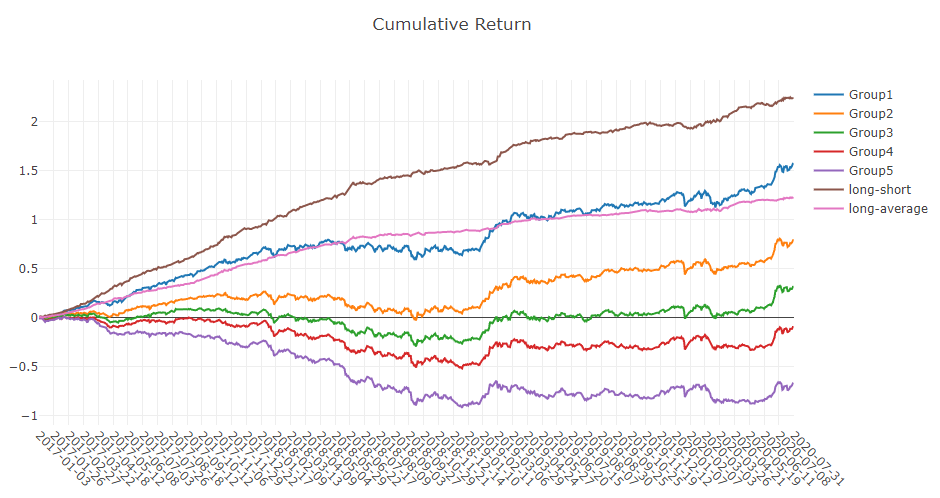
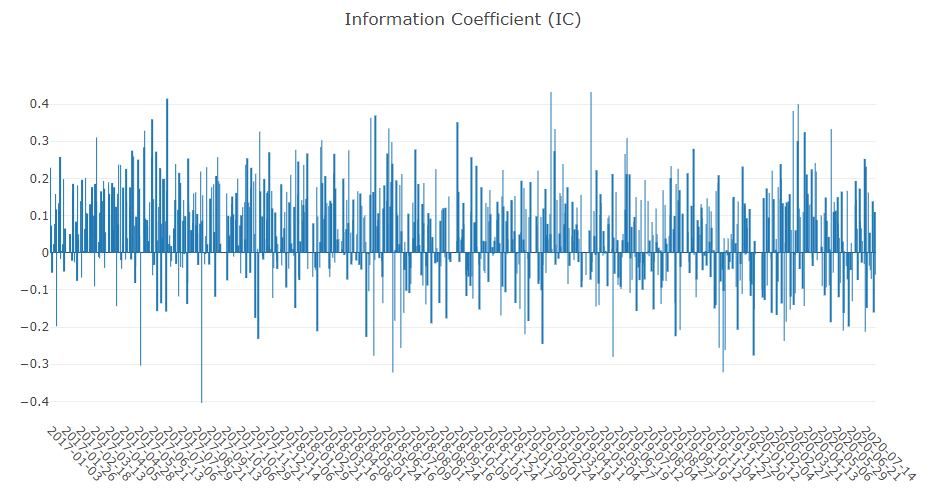
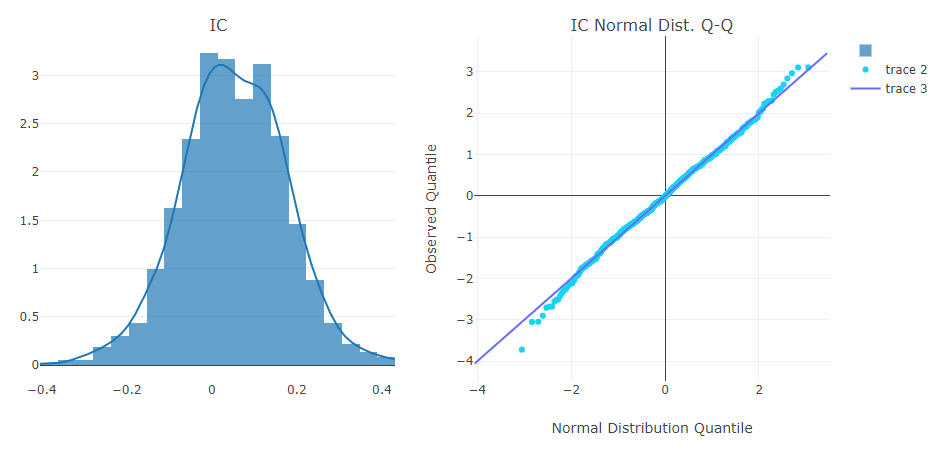
Qlib is a set of Python components that cover the whole path from stored price history to a scored prediction, with a collection of ready-made models to compare. Microsoft publishes it, under a plain MIT licence.
What it is good for. Someone with Python experience who wants to test a prediction idea properly rather than by eye — with separate training and testing periods and a fair comparison against other models. The value is the discipline it imposes, not the models themselves.
- 49,178 stars, created in August 2020, with code pushed on 5 October 2026 — the day before this edition.
- MIT licence, read from the file at
main/LICENSE, plain and unmodified, holder named as "Copyright (c) Microsoft Corporation." - It supplies the scaffolding that most people building this themselves get wrong: proper separation of training and testing periods, and a comparable scoring of several models at once.
- The newest release is about fourteen months old. Version 0.9.7 is dated 15 August 2025 — the release page prints only "15 Aug", with no year, and we settled it against both the project's own release records and the Python package index, which gives 0.9.7 as 15 August 2025. Code is pushed almost daily, so installing the published package gives something materially older than the repository.
- The readme file states the official datasets are temporarily unavailable and points to community-provided alternatives instead. So the first tutorial can stop dead, and the fallback is market data of uncertain origin.
- There is nothing to open. Setting it up means creating a Python environment, compiling parts of it, fetching data separately and writing scripts. The project publishes no memory, disk or processor figure anywhere. Nothing here is advice about money, and a model that scores well on past prices is not evidence about future ones.
- AI4Finance-Foundation/FinRL
Also a Python framework for machine-learning trading strategies, but built around learning by trial and aimed at teaching.
Track this in Scout - freqtrade/freqtrade
Also builds, tests and runs strategies, covered in Edition 29, but as a ready-to-run bot and cryptocurrency only.
Track this in Scout - quantopian/zipline
Tests trading algorithms against historical prices in Python, but has taken no new code since 13 February 2024.
Track this in Scout
# Needs: Python 3.8 to 3.12. The project recommends the conda environment tool.
conda create -n qlib python=3.11 -y
conda activate qlib
# On an Apple-silicon Mac only, first:  brew install libomp
pip install pyqlib
# Market data has to be fetched separately:
python -m qlib.cli.data qlib_data --target_dir ~/.qlib/qlib_data/cn_data --region cn

3,217 stars · AGPL-3.0 · v0.7.6 (2026-09-06) · Track this in Scout
Charts and reports over a plain-text money ledger you already keep.
▶Repo detailsthe review · specs · pros & cons · install
What it is
Paisa reads a plain-text accounting file and serves a web page of charts, budgets, retirement projections and investment summaries. It ships as a desktop application, a single command-line file, and a container image.
What it is good for. Anyone already keeping accounts in ledger, hledger or beancount format who is tired of reading numbers in a terminal. Also for anyone considering plain-text accounting who wants to see what the reports look like before committing.
- A desktop application for Linux, macOS and Windows, so there is a route that needs no terminal at all.
- It reads all three common plain-text formats —
ledger,hledgerandbeancount— chosen with one line in its settings file. - The
ledgerprogram is included, so that route works with nothing else installed. The documentation is explicit about the other two: "Paisa ships with ledger binary. If you use hledger or beancount, make sure that the binaries are installed."
- You still have to understand double-entry bookkeeping and write the transactions by hand or import them. Its own questions page sends newcomers off to learn the underlying tool first.
- The licence is AGPL-3.0, read from the file — but not at
LICENSEorLICENSE.md, which both return "not found". It is atmaster/COPYING. The text is the standard Affero licence, unmodified, and it names no project copyright holder: the only copyright line in the file is the Free Software Foundation's own. Personal use is unaffected; offering a changed copy to other people over a network means publishing your changes. - The command-line and container routes serve a web page on port 7500 with no password unless you switch sign-in on, so it should not be exposed beyond the machine itself. On macOS you also have to strip the download warning flag by hand. One maintainer, 82 open issues, and no published memory, disk or processor figure.
 beancount/fava
The same web interface over a plain-text ledger, covered in Edition 22, but beancount only and a faithful report viewer rather than a money dashboard.
Track this in Scout firefly-iii/firefly-iii
Also a self-hosted personal money manager, covered in Edition 28, but with its own database and web entry forms instead of a plain-text file.
Track this in Scout actualbudget/actual
Also a free money application you run yourself, built around envelope budgeting with its own syncing server and no plain-text file.
Track this in Scout
# Easiest: download the desktop app for your system from the releases page.
# On Debian or Ubuntu:
sudo dpkg -i paisa-app-linux-amd64.deb
# Command line instead:
chmod u+x paisa && sudo mv paisa /usr/local/bin
paisa serve        # then open http://localhost:7500
# Or with Docker:
docker run -p 7500:7500 -v /path/to/paisa:/root/Documents/paisa/ ananthakumaran/paisa:latest

5,895 stars · AGPL-3.0 · no GitHub releases at all · Track this in Scout
Turns a shared email address into a list of support tickets with owners and history.
▶Repo detailsthe review · specs · pros & cons · install
What it is
Zammad is a help-desk application with email, web forms, telephone notes and chat in one place, searchable, with rules that assign and escalate tickets. It is fourteen years old and maintained by a foundation.
What it is good for. A small team that has outgrown a shared mailbox and needs to know who is answering what, which questions keep coming back, and what has been waiting too long. It is the right size when "who replied to this?" has become a daily question.
- AGPL-3.0, read from the file at
develop/LICENSE, the standard text completely unmodified. We also checked specifically for a paid-features carve-out: the two other licence files at the top of the repository are third-party credits only, with no Zammad terms in them. The commercial offering is support and services, not held-back code. - The project publishes its hardware needs plainly, which most self-hosted applications do not: minimum "2 CPU cores" and "6 GB of RAM (+4 GB if you want to run Elasticsearch on the same server)".
- Real ticket discipline out of the box — ownership, escalation rules, full history, and search across everything.
- The install is system administration. The documented order has you fix the machine's language settings by hand, install the Elasticsearch search engine first, and only then install Zammad, plus a database and a web server with certificates.
- The memory floor is a real floor: 6 GB before the search engine and 10 GB with it on the same machine, so a cheap small server will not run it. And no disk figure is published at all — the documentation says "We can't make any disk space recommendations, as this highly depends on how you work." — so storage for mail attachments is a guess.
- It publishes no releases on GitHub at all. The releases page says "There aren't any releases here", and the project's own release records are empty too. Version numbers come from its package repository instead, so there is no page on GitHub to read before upgrading. Self-hosting is free, but vendor support for it starts at €2,999 a year, and the optional AI features are billed at "€0.03 per AI call". The licence is also the usual Affero obligation: customise it for people who use it over a network and you must offer them your changes. 430 open issues against 25 open change requests.
 chatwoot/chatwoot
The same shared-inbox and ticket job, covered in Edition 9, but leading with live chat and social messaging and weaker on email tickets.
Track this in Scout- osTicket/osTicket
The same email and web-form ticket system, but PHP and MySQL, so it runs on cheap shared hosting with no memory floor and a more dated interface.
Track this in Scout  freescout-help-desk/freescout
The same free self-hosted help desk, covered in Edition 27, deliberately lightweight but with several capabilities sold as paid modules.
Track this in Scout
# Ubuntu 22.04. Needs: sudo, a UTF-8 language setting, and Elasticsearch first.
sudo apt install curl apt-transport-https gnupg
sudo locale-gen en_US.UTF-8
echo "LANG=en_US.UTF-8" | sudo tee /etc/default/locale
sudo curl -fsSL "https://go.packager.io/srv/deb/zammad/zammad/gpg-key.gpg" \
  -o /usr/share/keyrings/zammad.gpg && sudo chmod 644 /usr/share/keyrings/zammad.gpg
sudo curl -fsSL "https://go.packager.io/srv/zammad/zammad/stable/installer/ubuntu/22.04.list" \
  -o /etc/apt/sources.list.d/zammad.list
sudo apt update
sudo apt install zammad
sudo systemctl start zammad

4,105 stars · MIT · 4.76.0 (2026-09-30) · Track this in Scout
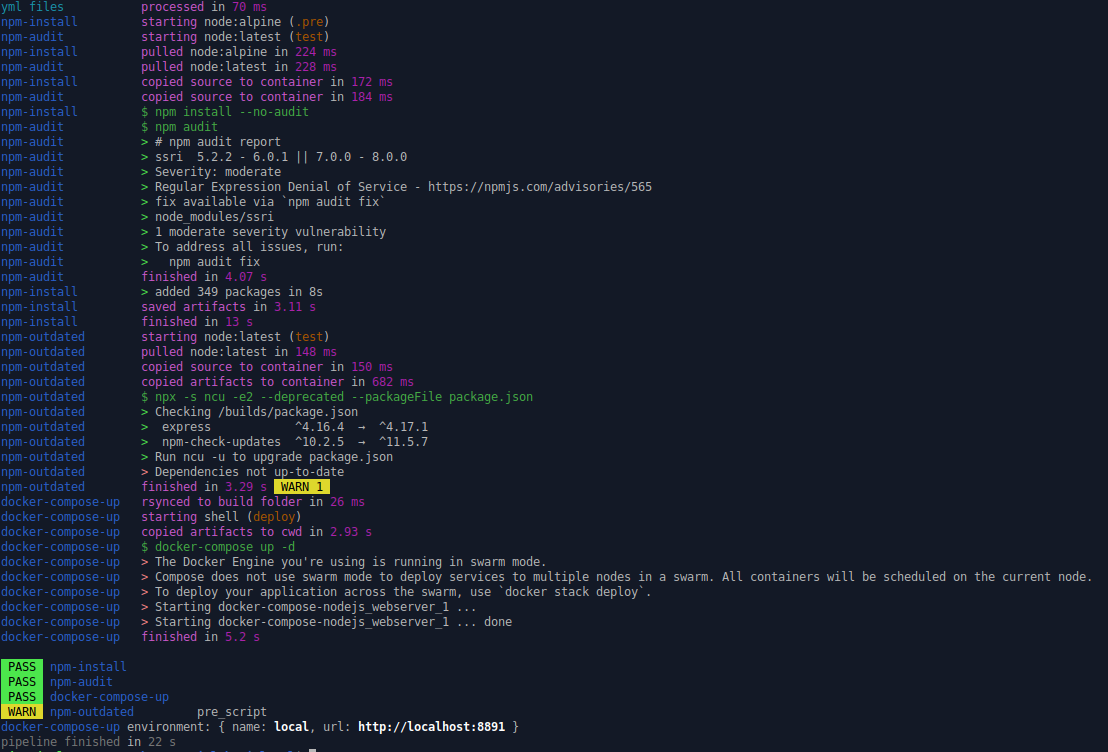
Runs a GitLab build-and-test pipeline on the machine in front of you.
▶Repo detailsthe review · specs · pros & cons · install
What it is
The program reads a project's .gitlab-ci.yml file and carries out the jobs in it, either directly in a shell or inside containers, the way GitLab's own runners would.
What it is good for. Anyone who has pushed the same commit eleven times to fix a typo in a build file. It removes the wait entirely, and it keeps the failed attempts out of the project's shared history.
- MIT licence, read from the file at
master/LICENSE, plain and unmodified, with the holder named: "Copyright (c) 2025 Mads Jon Nielsen". - Packaged for many systems — a package repository for Debian and Ubuntu, Homebrew for macOS, Arch, npm and Bun — so there is a route that fits most machines.
- Busy and current: 4,105 stars, release 4.76.0 of 30 September 2026, code pushed on 5 October 2026.
- It is only useful where a
.gitlab-ci.ymlfile already exists, and the output is raw build logs in a terminal. There is nothing to click. - Running jobs in containers pulls real build images, which are commonly several gigabytes. No memory, disk or processor requirement is published anywhere, so there is no figure to plan against. The readme file does state that the
bashshell "must be above or equal 4.x.x", and the version macOS ships is older than that, so macOS users need a newerbashfirst. - It reads real build secrets from a plain, unencrypted file in your home folder, and the shell mode runs the job scripts directly on the machine with your own permissions. Running a pipeline from a repository you do not trust runs its commands with your access.
 nektos/act
The same idea of running a build pipeline locally in containers, covered in Edition 41, but for GitHub Actions rather than GitLab.
Track this in Scout- cirruslabs/cirrus-cli
Also runs build tasks locally in containers, but uses the Cirrus task format rather than an existing GitLab file.
Track this in Scout - earthly/earthly
Also runs reproducible build steps locally, but in its own build language, and its own page says it is no longer actively maintained.
Track this in Scout
# Debian or Ubuntu, the route the project prefers:
sudo wget -O /etc/apt/sources.list.d/gitlab-ci-local.sources \
  https://gitlab-ci-local-ppa.firecow.dk/gitlab-ci-local.sources
sudo apt-get update
sudo apt-get install gitlab-ci-local
# Or, if Node.js and npm are already installed:
npm install -g gitlab-ci-local
# macOS, which also needs a newer bash:
brew install bash gitlab-ci-local

889 stars · Apache-2.0 · v3.12.1 (2026-06-02) · Track this in Scout
Turns font source files into finished, installable font files.
▶Repo detailsthe review · specs · pros & cons · install
What it is
Fontmake is a Python command-line program that compiles .glyphs or UFO source files into TrueType and OpenType fonts, and into the single-file variable fonts that cover a whole family. It is the tool Google Fonts uses to build its own library.
What it is good for. Anyone with a typeface in a design tool who needs installable files, and anyone maintaining a font project who wants its builds to run the same way every time instead of being exported by hand.
- It is the tool the Google Fonts library itself is built with, which is a strong statement about whether it works on real font projects.
- Apache licence 2.0, read from the file at
main/LICENSE, plain and unmodified, with no conditions beyond attribution — a genuinely safe licence here. - Small, old and current: 889 stars, created in December 2015, release 3.12.1 of 2 June 2026 and code pushed on 14 September 2026.
- The licence file's copyright holder was never filled in. The line reads exactly
Copyright [yyyy] [name of copyright owner], so Google is not named in it anywhere. The terms are standard; nobody is named as owning the work. - It is one link in a chain, not a solution. It expects valid source files, and when something fails the message comes from
fontTools,glyphsLiborufo2ftrather than from fontmake, so understanding it needs real font-engineering knowledge. - 263 open issues against 7 open change requests, and Google is openly building a replacement in another language —
googlefonts/fontc, whose stated aim is "Wherein we pursue oxidizing fontmake". Command line only; no window, no buttons, and you need the flag vocabulary before anything comes out.
- googlefonts/fontc
Compiles the same font sources to the same files as a rewrite in another language aiming to be faster, but far less mature.
Track this in Scout - fonttools/fonttools
Builds and manipulates font files from Python and is the layer fontmake sits on, but is a library and low-level tools rather than a build driver.
Track this in Scout - googlefonts/glyphsLib
Converts .glyphs files to UFO only; it is a translator fontmake calls and it compiles nothing.
Track this in Scout
# Needs: Python 3.10 or later. The project recommends a separate environment.
python3 -m venv ~/venvs/fontmake
source ~/venvs/fontmake/bin/activate
pip3 install fontmake
# Build TrueType and OpenType files from a Glyphs source:
fontmake -g MyFont.glyphs -o ttf otf

842 stars · MIT · 2.3.2 (2026-09-07) · Track this in Scout
Reads the hidden information inside audio files from Python, with no other software needed.
▶Repo detailsthe review · specs · pros & cons · install
What it is
Tinytag is a pure-Python library — no compiled parts, no other packages — that reads tags and technical details from MP3, FLAC, MP4, Ogg, Wave and other formats through one small interface.
What it is good for. Anyone with a large folder of audio who needs to make a list of it, find duplicates, check which files are missing their album name, or sort a backlog of recordings. The attraction is that it installs anywhere Python runs and brings nothing with it.
- No other software required at all. The readme file states it is "Pure Python, no dependencies." — so it installs on a server, inside a container, or on a locked-down machine with nothing extra.
- One interface covers every common audio format, so code written for MP3 works unchanged on FLAC.
- MIT licence, read from the file at
master/LICENSE, plain and unmodified, with the holders properly named: "Copyright (c) 2014-2026 Tom Wallroth, Mat (mathiascode), et al." — and an unusually tidy project, 3 open issues against 2 open change requests, twelve years old.
- It is a library, not a program. Using it means writing Python;
from tinytag import TinyTagis the starting point and there is nothing to click. - It reads and does not write. To correct or add tags you need a different library,
mutagenoreyeD3. - A small project with essentially one active maintainer and no organisation behind it. It has already changed owner once, from
devsndtotinytag, and the only support channel is its issue list. Low activity is normal for a stable library, but there is nobody to call.
 quodlibet/mutagen
Reads the same information from the same formats and also writes and edits it, so it is bigger and harder to use.
Track this in Scout- nicfit/eyeD3
Reads the same tags and ships a command-line tagging program, but handles MP3 and ID3 only.
Track this in Scout  taglib/taglib
Reads and edits the same information for many formats, covered in Edition 40, but as a C++ library needing a compiler or a Python binding.
Track this in Scout
# Needs: Python 3.7 or later, and pip.
python3 -m pip install tinytag
Checked, and left out
Nothing to show for this edition. Recording the repositories that were checked and rejected began with Edition No. 4, and every edition from there on has the list.
Coming tomorrow