
Edition No. 23 · 17 Sep 2026
Twelve repositories for the tools you open every day
A shell history you can actually search, a PostgreSQL index you can test before building it, and a 151,000-star project whose licence is not open source.
Thursday, 17 September 2026 · Open WebUI has 151,000 stars and a licence that is not open source
The web version carries the English / Русский switch. The Russian text is in the file radar-2026-09-17-ru.md, delivered into the chat on the day. This archive stays English only.
Open WebUI is the screen most people use when they want to talk to an AI model on their own machine. It has about 151,000 stars, which puts it among the most starred projects on GitHub. Today we opened its licence file and read it properly. It is not MIT, and it is not any licence you have heard of. It is the project's own licence, and it forbids you from removing the words "Open WebUI" from the screen unless fewer than fifty people use your copy. That is a real limit on a real product, and almost nobody who installs it knows it is there. It is today's title, and the whole clause is quoted in entry #10.
There is no theme. Twelve repositories, picked on how good they are, across ten of the sixteen areas. Three of the twelve have fewer than three thousand stars, and one of those three has 635.
Two things worth knowing
What Open WebUI's licence actually says. Edition 21 mentioned it in a single line, inside a comparison list, and said only that it "requires you to keep its branding". Today the LICENSE file itself was opened and read. Clause 4 says you are "strictly prohibited from altering, removing, obscuring, or replacing any 'Open WebUI' branding". There are three ways out. Your deployment has fifty or fewer end users in any thirty-day period. Or you have written permission from the copyright holder. Or you have bought an enterprise licence. The base text is BSD-style, but the added clause makes the result something you cannot call open source. The practical meaning is simple. Running it for yourself is completely free and always will be. Putting it inside a product you sell, with your own name on it, is not allowed above fifty users unless you pay. Nothing about this makes it a worse program, and it is still one of today's four actions. It only means you should know before you build on it, not after.
A very large repository returned nothing today. While checking the comparison list for entry #10, we opened lobehub/lobe-chat, which is one of the best-known self-hosted AI chat projects. GitHub answered 404. That is worth noticing, because GitHub keeps an old address working after a rename, which is how this radar has caught eight renames so far. A 404 means something else: moved somewhere that does not redirect, made private, or taken down. We could not find out which from this sandbox, so nothing more is claimed about it, and it was not listed as a comparison. In the same pass an ordinary rename did turn up and is recorded: JhumanJ/OpnForm now redirects to OpnForm/OpnForm.
If you only do three things
- atuinsh/atuin (#1) — tonight, five minutes, one command. It replaces the list of commands your terminal remembers with a proper searchable one. You press one key and search everything you have ever typed, on every machine you own. It records how long each command took and whether it worked. This is the cheapest thing on the page and it changes every session after it.
- HypoPG/hypopg (#4) — half an hour, and it finishes something two earlier editions started. It lets you ask PostgreSQL whether an index would help, without building the index. Edition 18 gave you pgBadger, which names your slow queries. Edition 20 gave you pev2, which explains why one is slow. This answers the next question, which is what to do about it.
- mrjackwills/oxker (#2) — two minutes, one command, nothing left running. Every container on your machine in one list, with its live output, its memory use and a key to restart it. Also one of today's three gems.
Every link in one place
| # | Repository | Official site or docs | Stars | Licence | Latest |
|---|---|---|---|---|---|
| 1 | atuinsh/atuin | atuin.sh | 31.3k | MIT | v18.22.0 (9 Sep 2026) |
| 2 | mrjackwills/oxker 💎 | README | 1.8k | MIT | v0.13.4 (22 Aug 2026) |
| 3 | muety/wakapi | wakapi.dev | 4.4k | MIT | 2.18.0 (14 Sep 2026) |
| 4 | HypoPG/hypopg 💎 | hypopg.readthedocs.io | 1.7k | PostgreSQL licence | 1.4.3 (19 Jun 2026) |
| 5 | dalibo/pg_activity | README | 3.0k | PostgreSQL licence | v3.6.2 (5 Jun 2026) |
| 6 | usememos/memos | usememos.com | 62.5k | MIT | v0.30.0 (26 Jul 2026) |
| 7 | ghostfolio/ghostfolio | ghostfol.io | 9.3k | AGPL-3.0 | 3.70.1 (14 Sep 2026) |
| 8 | GetPublii/Publii | getpublii.com | 7.3k | GPL-3.0 | v.0.47.9 (23 Jul 2026) |
| 9 | navidrome/navidrome | navidrome.org | 23.2k | GPL-3.0 | v0.64.0 (12 Sep 2026) |
| 10 | open-webui/open-webui | openwebui.com | 151k | Open WebUI License — not open source | v0.11.3 (31 Aug 2026) |
| 11 | arikchakma/maily.to | maily.to | 4.0k | MIT | no GitHub releases; @maily-to/core 0.3.7 on npm (3 Feb 2026) |
| 12 | medama-io/medama 💎 | oss.medama.io | 635 | Apache-2.0 (core) and MIT (tracker) | v0.6.2 (18 Jan 2026) |
Open WebUI has 151,000 stars and a licence that is not open source
Twelve repositories, checked and reviewed. Every version verified against the GitHub API and dated.

31.3k stars · MIT · v18.22.0 (2026-09-09), read from /releases/latest; the date showed no year and falls in the past, so 2026 · Track this in Scout
Replaces your shell history with a searchable database, with optional end-to-end encrypted sync between machines.
▶Repo detailsthe review · specs · pros & cons · install
What it is
A replacement for the history your shell keeps, written in Rust. It stores each command in a SQLite file, which is a database held in a single file on your own machine, together with the directory you were in, the exit code, the duration and the time. Pressing the up arrow or Ctrl-R opens a full search screen instead of stepping backwards one line at a time. Sync is optional, end-to-end encrypted, and you can run your own sync server.What it is good for. Anyone who works at a command line and retypes the same long command every few weeks. The problem it removes is the lost command: the one you got right in July and cannot find in September. Filters let you ask for commands run in this directory, or only the ones that succeeded. For anyone who builds with a coding assistant it has a second use. The assistant suggests a command, you run it, and six weeks later you can find exactly what you ran and what it returned, instead of guessing.
- Search is instant and covers everything, including commands from other machines if you turn on sync.
- It records the exit code and the duration, so you can search only for the commands that worked.
- MIT licence, and sync is optional; it works perfectly with no account at all.
- It changes what the up arrow does, and that takes a few days to stop feeling wrong.
- Sync means your command history leaves the machine. It is encrypted before it goes, but the safest answer is to run your own server or leave sync off.
- Commands can contain passwords. It tries to filter those out, and you should still check the settings before turning sync on.
- cantino/mcfly
Also replaces Ctrl-R with a smarter search and orders results by what you are likely to want, and it has no sync between machines.
Track this in Scout - dvorka/hstr
A small window over your existing history file for bash and zsh, which means nothing to migrate and nothing new stored.
Track this in Scout
# One command, on macOS or Linux:
curl --proto '=https' --tlsv1.2 -LsSf https://setup.atuin.sh | sh
# Bring in the history you already have, then restart your shell:
atuin import auto
# Optional, only if you want history shared between machines:
atuin register -u <USERNAME> -e <EMAIL>
atuin sync





1.8k stars · MIT · v0.13.4 (2026-08-22), read from /releases/latest; the repository sidebar was one release behind at v0.13.2 · Track this in Scout
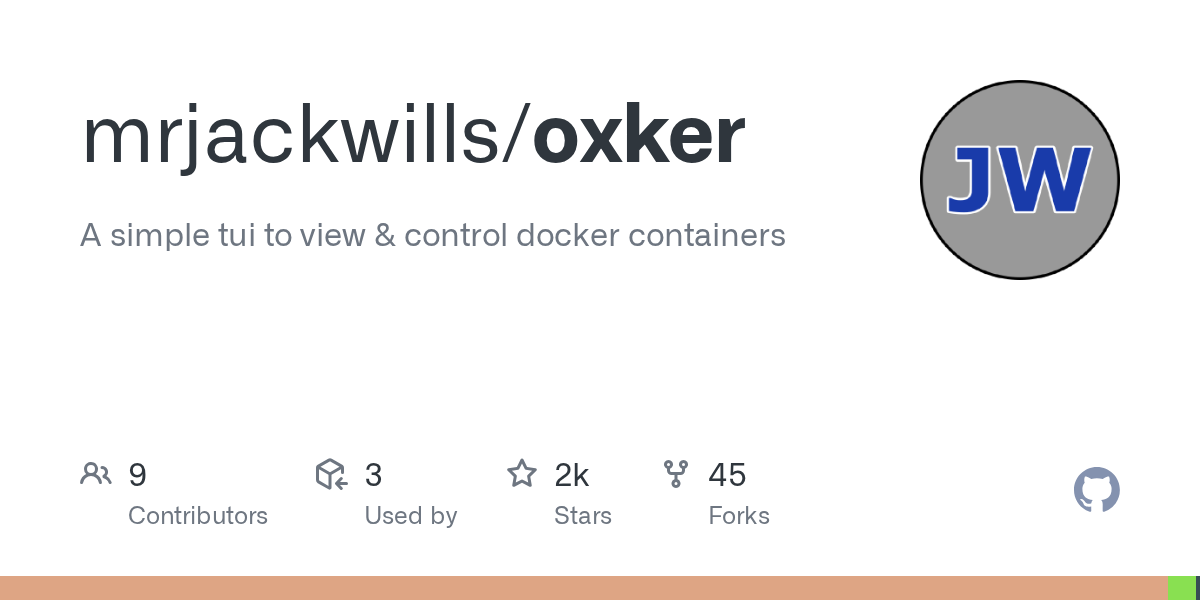
A small terminal screen that lists every Docker container on the machine and controls it with single keys.
▶Repo detailsthe review · specs · pros & cons · install
What it is
A terminal user interface for Docker, written in Rust. Docker is a way to run a program inside its own sealed box, so it cannot break anything else on the server, and each of those boxes is called a container. Oxker lists them with their status, memory, processor use and network traffic, shows the live output of whichever one you select, and binds start, stop, restart, pause and delete to single keys. It can run as a normal program or inside a container of its own.What it is good for. Anyone with a server that has quietly grown to eight containers. The problem it removes is the three commands you type before you learn anything: list, then logs, then stats. Here it is one screen. Edition 18 gave you Dozzle, which is a web page for live output, and Edition 22 gave you Dockge, which is a web page with buttons. This is the version that needs no web page, no port open and no login, because it runs in the connection you already have.
- Almost nothing to set up. One command, and it reads the Docker socket you already have.
- It shows memory and processor use beside the output, so you can see which container is the heavy one.
- MIT licence, a single small binary, and nothing left running after you quit.
- It needs access to the Docker socket, and that is the same as full control of the machine. Run it as yourself over a secure connection, and never expose it.
- It is a terminal program, so there is nothing to open on a phone and nothing to share.
- It manages containers that already exist. It will not build or deploy anything for you.
- jesseduffield/lazydocker
The same idea with more on screen, including images, volumes and Compose projects, which makes it more capable and slower to learn.
Track this in Scout  louislam/dockge
A web page instead of a terminal, so you can use it from a phone, at the cost of running a service and protecting it.
Track this in Scout amir20/dozzle
A web page for live container output only, with search, and no control over the containers themselves.
Track this in Scout
# The simplest way, on Linux or macOS:
curl https://raw.githubusercontent.com/mrjackwills/oxker/main/install.sh | bash
# Or with Rust installed:
cargo install oxker
# Or run it from a container, with nothing installed at all:
docker run --rm -it -v /var/run/docker.sock:/var/run/docker.sock:ro \
  --pull=always ghcr.io/mrjackwills/oxker
# Then just:
oxker

4.4k stars · MIT · 2.18.0 (2026-09-14), read from /releases/latest · Track this in Scout
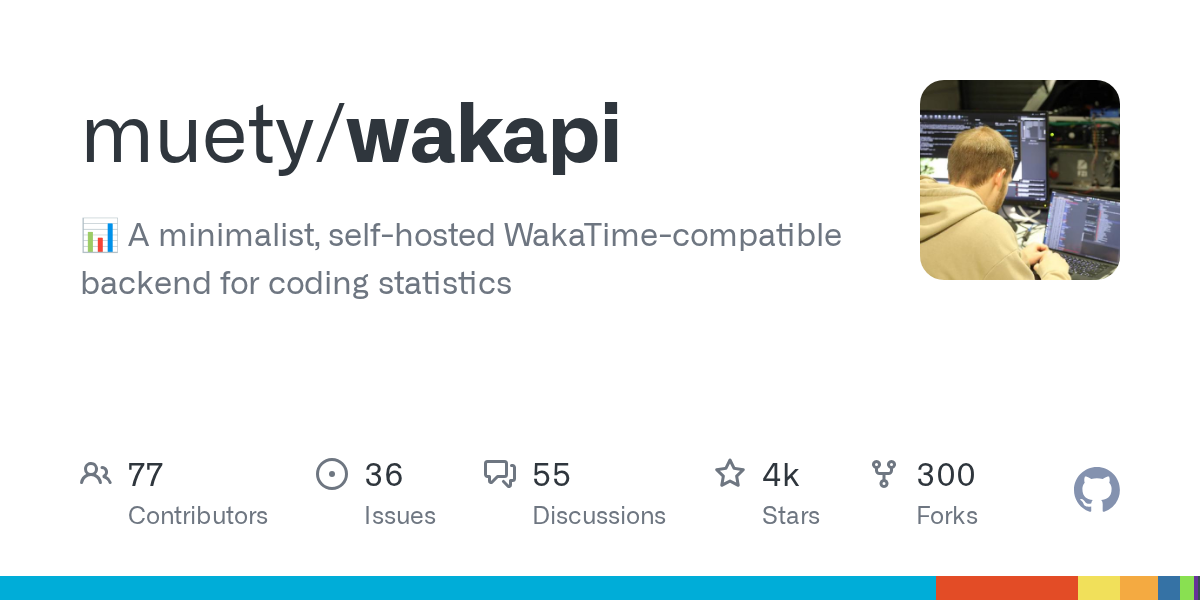
Your own server for coding-time statistics, compatible with the WakaTime editor plugins.
▶Repo detailsthe review · specs · pros & cons · install
What it is
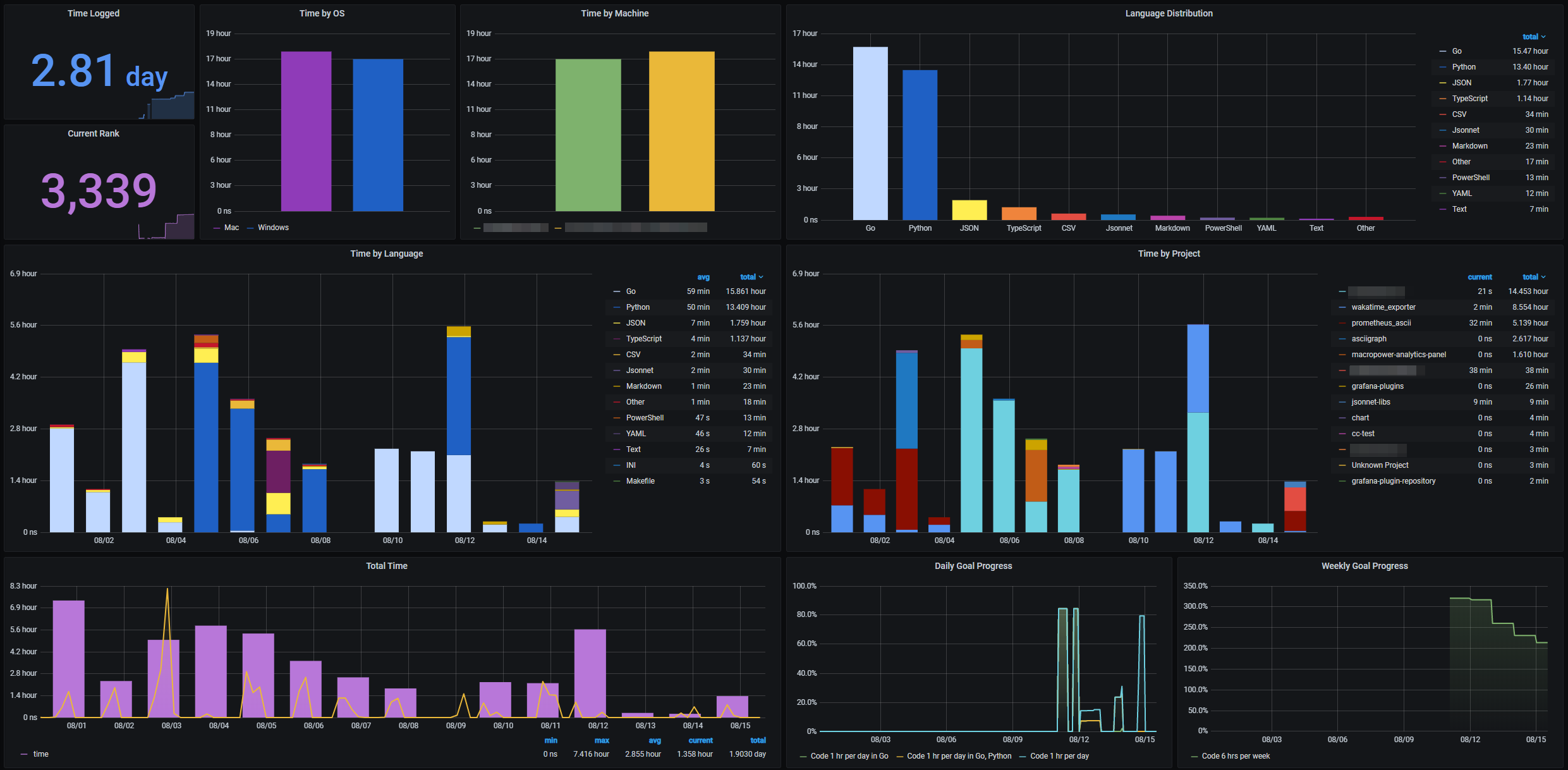
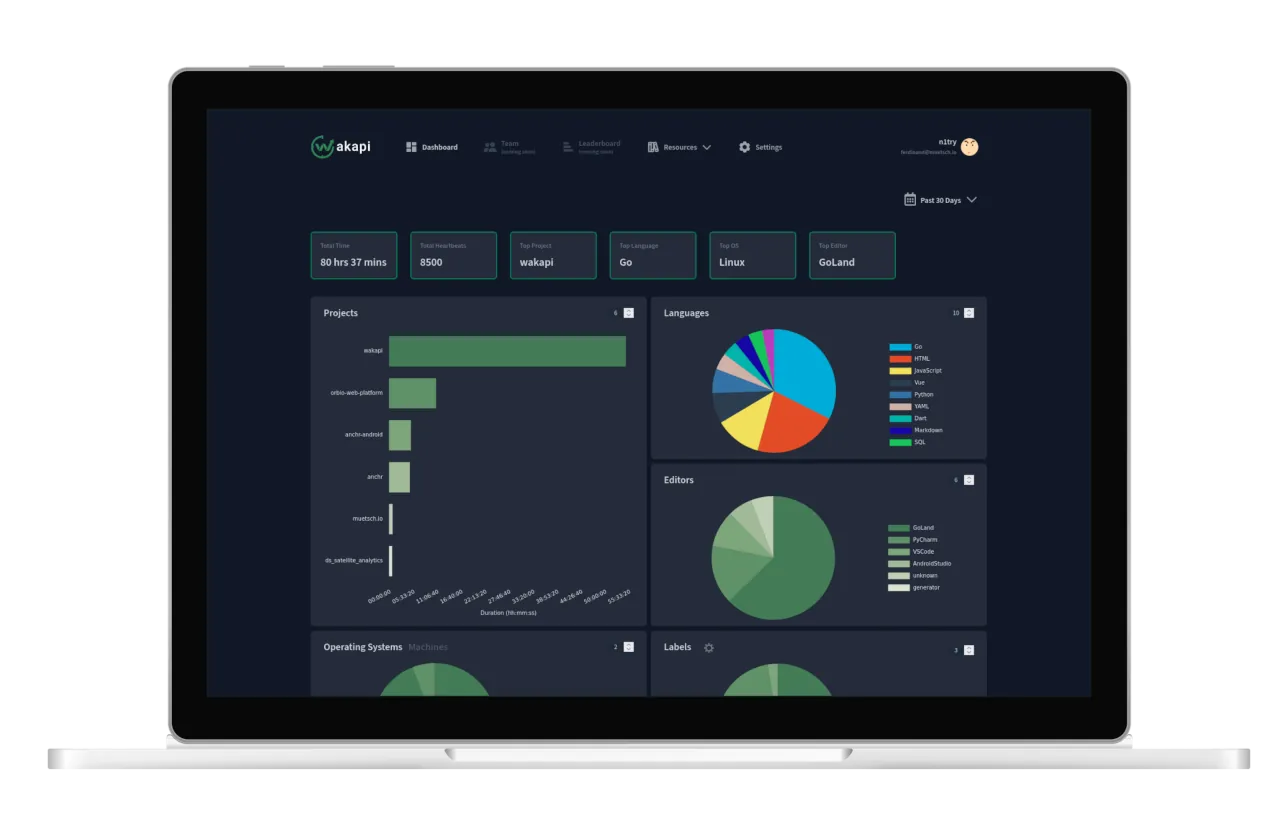
A small service written in Go that speaks the same protocol as WakaTime, the commercial coding-time service. That means the existing WakaTime plugins for VS Code, JetBrains, Vim and the rest send their data to your copy with one changed setting. It stores file names, project names, editor names, your computer's host name and timestamps, and it draws the totals by project, language, editor and operating system.What it is good for. Anyone who wants an honest answer to "where did this month go". The problem it removes is guessing. It is also useful when you bill by the hour, because the record is made while you work rather than remembered afterwards. One honest caution that belongs in plain sight: it records file names and project names, so it is a detailed picture of your work, and that is exactly why keeping it on your own server is better than sending it to a company.
- Nothing new in the editor. The WakaTime plugins already exist for almost every editor and they work unchanged.
- One small program with SQLite built in, so there is no database to install beside it.
- MIT licence, and it can optionally forward the same data to WakaTime if you want both.
- It measures activity in an editor. Time spent reading, thinking or in a terminal does not appear.
- The numbers are only as good as the plugin, and a plugin that is switched off records nothing.
- It is another service to run, back up and keep behind a login page.
- wakatime/wakatime-cli
The command-line program that every WakaTime editor plugin uses underneath; it is what sends the data that Wakapi receives.
Track this in Scout - ActivityWatch/activitywatch
Measures everything you do on the computer rather than only the editor, which is a wider picture and a much larger thing to run.
Track this in Scout
# With Docker, on your server:
docker run -d --init -p 3000:3000 \
  -e "WAKAPI_PASSWORD_SALT=change-this-to-a-long-random-string" \
  -v wakapi-data:/data ghcr.io/muety/wakapi:latest
# Or a plain binary, with no Docker:
curl -L https://wakapi.dev/get | bash
# Then open http://<your-server-address>:3000, create an account,
# and put your API key and your server address into the WakaTime
# plugin settings in your editor.

1.7k stars · PostgreSQL licence (read from the LICENSE file: the permissive BSD-style text PostgreSQL itself uses) · 1.4.3 (2026-06-19), read from /releases/latest; the date showed no year and falls in the past, so 2026 · Track this in Scout
Creates an index that does not really exist, so PostgreSQL can tell you whether a real one would be used.
▶Repo detailsthe review · specs · pros & cons · install
What it is
A PostgreSQL extension. An extension is an add-on installed into the database server itself, and this one is small and adds no background work. You call one function with the text of the index you are thinking about. Nothing is written to disk. From then on, in your session only, the query planner behaves as though the index exists, so EXPLAIN shows you whether it would be chosen and what it would cost.What it is good for. Anyone with a table that has grown past the point where experiments are cheap. The problem it removes is the guess. Instead of building three candidate indexes overnight and measuring, you try twenty in ten minutes and build the one that wins. It completes a chain this radar has been building for a month: pgBadger from Edition 18 finds which queries are slow, pev2 from Edition 20 explains why one of them is slow, and this tells you whether the obvious fix would actually work. Grasppy's data is in PostgreSQL, so this is the one entry today that could make a page faster this week.
- The pretend index costs nothing. Nothing is written, nothing is locked, and other people using the database are not affected.
- It only exists inside your own session, so you can experiment on the real database without changing it for anybody else.
- The PostgreSQL licence is as permissive as MIT, and the code is small enough to read in an afternoon.
- It tells you whether the planner would choose the index, not how fast the query would actually run. Those are close, and they are not the same.
- Installing it means compiling a small extension on the database server, which needs the PostgreSQL development headers. On a managed database you may not be allowed to.
- It supports plain B-tree indexes best. More unusual index types are partly supported or not at all.
- ankane/dexter
Reads your slow queries and suggests indexes on its own, and it uses HypoPG underneath to test them, so the two are a pair rather than a choice.
Track this in Scout - powa-team/powa
Collects query statistics over time and draws them in a web page, and it can call HypoPG to test a suggestion from inside that page.
Track this in Scout  dalibo/pev2
Draws a query plan as a picture and marks where the database guessed the number of rows badly, which is usually how you find out an index is missing.
Track this in Scout
# On Debian or Ubuntu, with the PostgreSQL apt repository enabled:
sudo apt install postgresql-17-hypopg      # match the number to your version
# Or from source; you need the PostgreSQL header files first:
sudo apt install postgresql-server-dev-17
git clone https://github.com/HypoPG/hypopg.git
cd hypopg
make && sudo make install


3.0k stars · PostgreSQL licence · v3.6.2 (2026-06-05), read from /releases/latest; the date showed no year and falls in the past, so 2026 · Track this in Scout
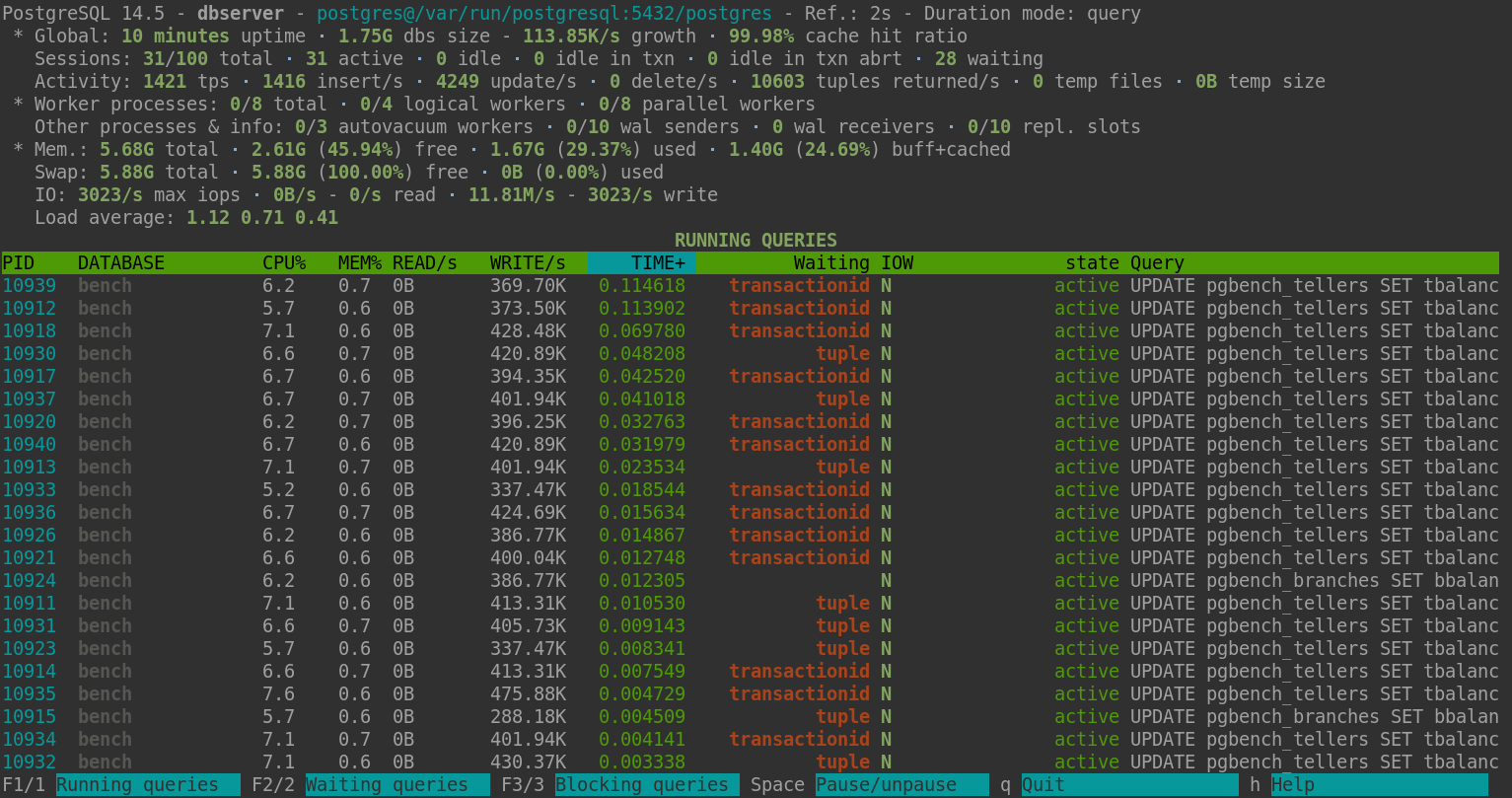
A top-like terminal screen showing every query a PostgreSQL server is running right now, with the ability to cancel one.
▶Repo detailsthe review · specs · pros & cons · install
What it is
A terminal program in the style of top, the standard tool for watching what a computer is doing. It connects to PostgreSQL and refreshes a list of active queries, showing the user, the database, the duration, the state, whether a query is blocked by another one, and read and write activity. It can cancel or terminate a query from the same screen, and it can record what it saw to a CSV file for later.What it is good for. Anyone who runs their own database and has had a slow afternoon with no explanation. The problem it removes is the delay between something going wrong and knowing what is wrong. pgBadger from Edition 18 reads yesterday's log and tells you which queries are usually slow. This is the other half: it tells you what is happening this minute, including the query that is holding a lock and stopping everything else. Being able to end that one query from the same screen is often the whole fix.
- It shows waiting and blocking clearly, which is the single most useful thing when a site has stopped rather than slowed.
- You can cancel or kill a query without opening a second connection and looking up its number.
- The PostgreSQL licence is as permissive as MIT, and it is packaged for Debian and Ubuntu already.
- It shows you now and nothing else. There is no history unless you record it to a file yourself.
- Without a superuser account it runs in a reduced mode and hides some of the most useful columns.
- It is a terminal program, so it is a tool for you and not a dashboard for anybody else.
- lesovsky/pgcenter
Covers the same live view and adds configuration editing and log reading, with a wider set of statistics screens.
Track this in Scout - powa-team/powa
Records statistics over time in the database itself and draws them, so it answers 'last Tuesday' where this answers 'right now'.
Track this in Scout  okbob/pspg
Not a monitor at all: it makes the tables your normal PostgreSQL client prints readable, with frozen headings and search.
Track this in Scout
# Debian or Ubuntu:
sudo apt install pg-activity
# Or with pipx, which keeps it out of your system Python:
pipx install "pg_activity[psycopg]"
# Or in a virtual environment:
python3 -m venv venv
source venv/bin/activate
pip install "pg_activity[psycopg]"
# Watch a local database:
sudo -u postgres pg_activity -U postgres
# Watch a remote one:
pg_activity -h your-server -p 5432 -U postgres -d grasppy

62.5k stars · MIT · v0.30.0 (2026-07-26) · Track this in Scout
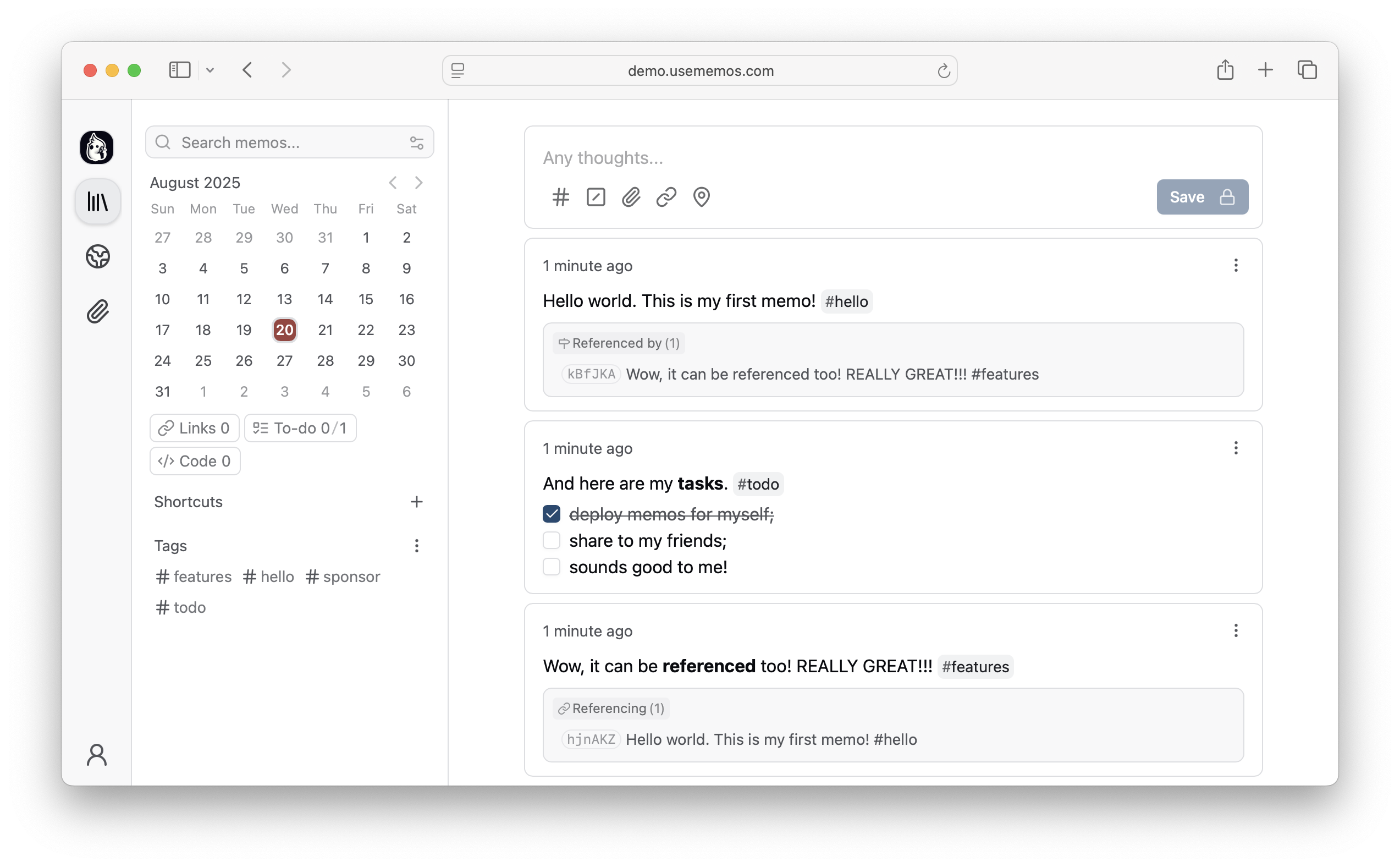
A very light self-hosted notes app built around quick capture: short Markdown notes on a chronological timeline, stored in your own database.
▶Repo detailsthe review · specs · pros & cons · install
What it is
A self-hosted note-taking service written in Go, built around quick capture rather than organisation. Self-hosted means you run it on your own machine instead of using somebody's service. Notes are written in Markdown, which is plain text with a few simple marks for headings and lists, and they are stored in SQLite by default, so the whole thing is one program and one file. It has accounts, public and private notes, and an interface that works on a phone.What it is good for. Anyone whose ideas currently live in a chat message to themselves. The problem it removes is the friction before writing: no notebook to pick, no place to file it. It is deliberately not a wiki and not a second brain. Version 0.30, from July, added a browser extension that saves a page and its selected text straight into your own copy, which makes it a reasonable place to keep the things you find during research.
- One program, one file, and it starts in a few seconds with nothing else installed.
- The whole point is speed of capture, and it is genuinely faster than any wiki.
- MIT licence, and the notes are plain Markdown that you can export and read anywhere.
- It is still before version 1.0, and it has changed things between minor versions in ways that broke people's setups. Pin the version you run and read the release notes before upgrading.
- There is no folder structure at all. If you want a hierarchy, this is the wrong tool.
- Version 0.30 made instances without a configured address run in private mode, which surprises people who upgrade without reading.
- siyuan-note/siyuan
A full personal knowledge system with blocks, links and a graph, which is far more powerful and much slower to write one line into.
Track this in Scout - outline/outline
A team knowledge base with real documents, sharing and permissions; its licence is the Business Source License, not a plain open-source one.
Track this in Scout
# One container, storing its data in a folder in your home directory:
docker run -d --name memos \
  -p 5230:5230 \
  -v ~/.memos/:/var/opt/memos \
  --restart unless-stopped \
  neosmemo/memos:stable
# Then open http://<your-server-address>:5230 and create the first account.
# Pin the version rather than following 'stable' if you dislike surprises:
#   neosmemo/memos:0.30.0

9.3k stars · AGPL-3.0 · 3.70.1 (2026-09-14), read from /releases/latest · Track this in Scout
Self-hosted wealth management that tracks holdings, allocation and performance across accounts.
▶Repo detailsthe review · specs · pros & cons · install
What it is
A self-hosted wealth management application built with Angular and NestJS, using PostgreSQL for storage and Redis for caching. It handles shares, funds, cryptocurrency, commodities and cash across several accounts and currencies, fetches market prices from public data sources, and reports performance, allocation and dividends. There is a hosted subscription from the same people, and the self-hosted version has everything.What it is good for. Any solo founder whose money is in more places than they can picture. The problem it removes is the spreadsheet you update twice a year and then stop trusting. It also draws a clear line this radar has been circling: Edition 20 gave you Actual for deciding where money will go, Edition 22 gave you Fava for recording where it went, and this one answers what you currently hold. The three do not overlap, and this is the only one of them that fetches a price on its own.
- It understands several accounts and several currencies at once, which is where a spreadsheet usually gives up.
- Market prices are fetched for you, so the total is current without any typing.
- Nothing is connected to a bank, so there is no account access to hand over and nothing to revoke.
- AGPL-3.0. Running it for yourself is completely free. Building a service on top of it means publishing your changes.
- It needs PostgreSQL and Redis beside it, so this is a few containers rather than one, and it wants a couple of gigabytes of memory.
- Every transaction is typed in by hand, or imported from a file you prepare. There is no bank connection.
- firefly-iii/firefly-iii
A full personal finance manager built around your bank accounts and budgets rather than your investments, and much larger.
Track this in Scout  beancount/fava
A screen over a plain text accounting file, which records what happened rather than tracking what you hold.
Track this in Scout actualbudget/actual
Decides where money will go before you spend it, which is the question neither of the other two answers.
Track this in Scout
# Take the project's own compose file and environment example:
git clone https://github.com/ghostfolio/ghostfolio.git
cd ghostfolio
cp .env.example .env
# Edit .env and set your own values for the database password,
# ACCESS_TOKEN_SALT and JWT_SECRET_KEY. Then:
docker compose -f docker/docker-compose.yml up -d
# Open http://<your-server-address>:3333 and press "Get Started".
# The first account you create becomes the administrator.



7.3k stars · GPL-3.0 · v.0.47.9-build-17481 (2026-07-23), read from /releases/latest; the date showed no year and falls in the past, so 2026 · Track this in Scout
A desktop program that writes, builds and uploads a static website, with no server to run at all.
▶Repo detailsthe review · specs · pros & cons · install
What it is
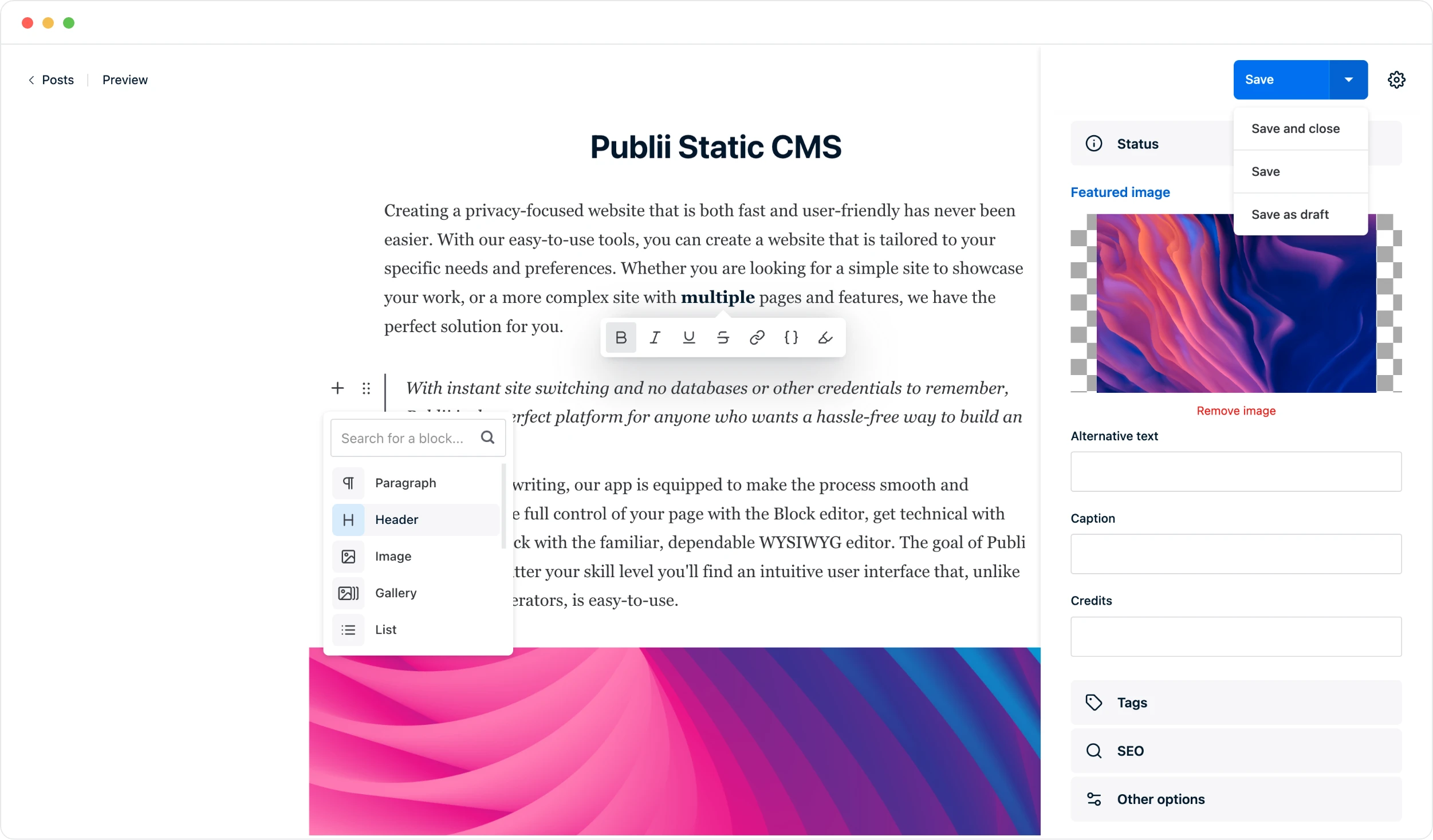
A desktop content management system. A content management system is the screen you use to write and organise the pages of a website. Publii keeps everything on your own machine, builds a static website from it, and uploads the result over FTP, SFTP, Amazon S3, GitHub Pages, Netlify or Google Cloud. Static means the pages are ordinary files with no program running behind them. It ships themes, a menu editor, image handling, and built-in settings for search engines and for privacy notices.What it is good for. Anyone who wants a proper website but does not want to administer one. The problem it removes is the whole maintenance category: no updates to apply, no plugin to break, nothing to patch on a Tuesday. It is the right answer for a personal site, a documentation site or a small business site that changes a few times a month. Edition 14 gave you Sveltia CMS, which is a login page bolted onto a site kept in git, and Edition 3 gave you Astro, which is a framework you build with. This is the version with no git, no framework and no server at all.
- Nothing to attack and nothing to maintain. The published site is plain files.
- The editor runs on your machine, so you can write with no internet and publish later.
- It has real settings for search engines, image sizes and privacy notices built in, rather than as add-ons.
- GPL-3.0. Using it is completely free; building a product from its code means publishing your changes.
- Your site lives on one computer. Moving to a second machine, or working with another person, means copying a folder around.
- Anything that needs a server is out: no comments, no forms and no logins without a separate service.
 sveltia/sveltia-cms
Adds a writing screen to a site whose files live in git, so it works from a phone and needs a git host rather than a desktop.
Track this in Scout- decaporg/decap-cms
The older and larger project that Sveltia was written to replace, with the same git-based idea and many more guides available.
Track this in Scout
# There is no command. Download the installer for your system from:
#   https://getpublii.com
# or take it from the releases page:
#   https://github.com/GetPublii/Publii/releases/latest
# On a Mac you can also use Homebrew:
brew install --cask publii
# Then: create a site, choose a theme, write, and set up
# "Server" in the site settings with your FTP or S3 details.


23.2k stars · GPL-3.0 · v0.64.0 (2026-09-12), read from /releases/latest; the date showed no year and falls in the past, so 2026 · Track this in Scout
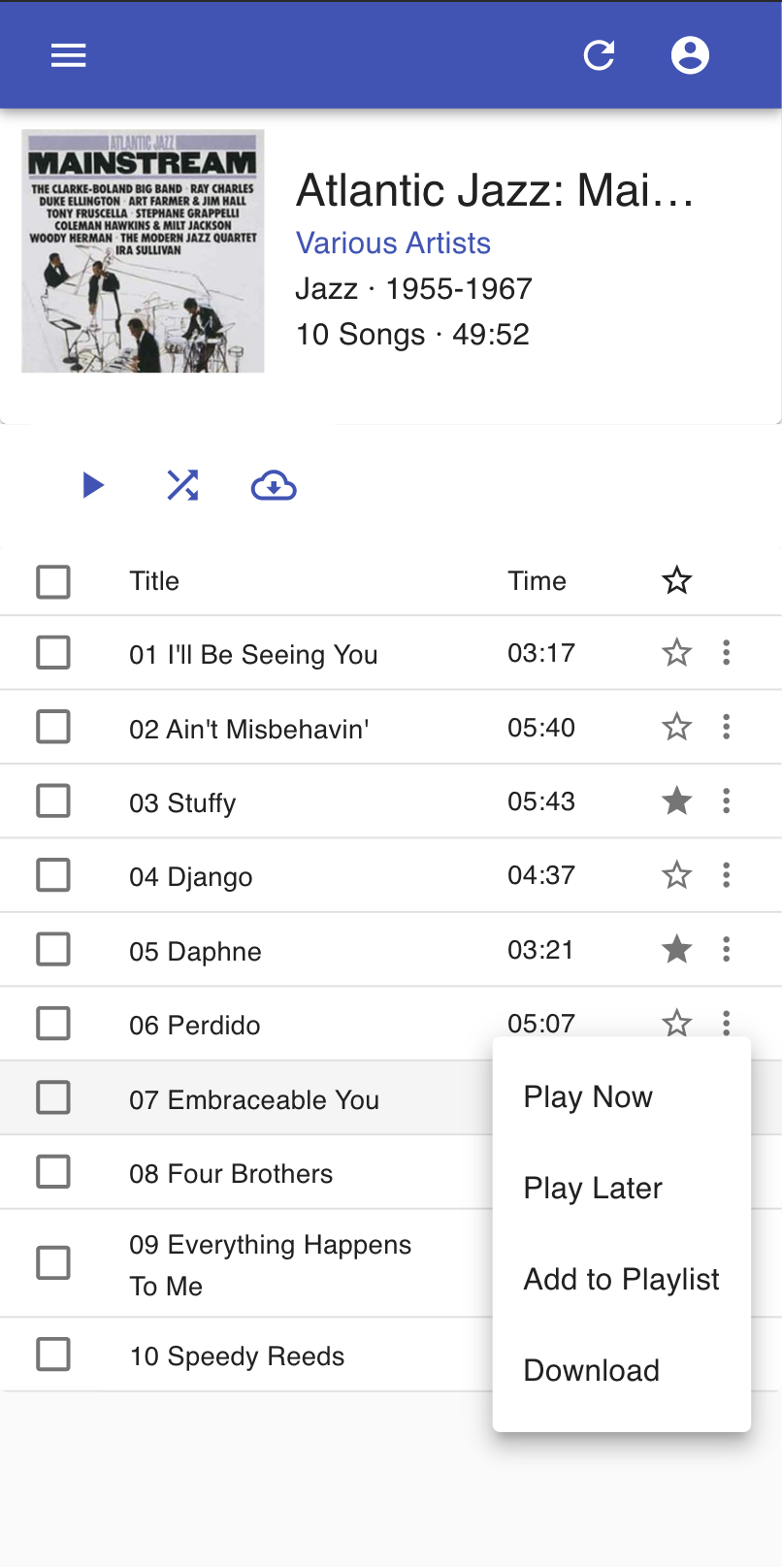
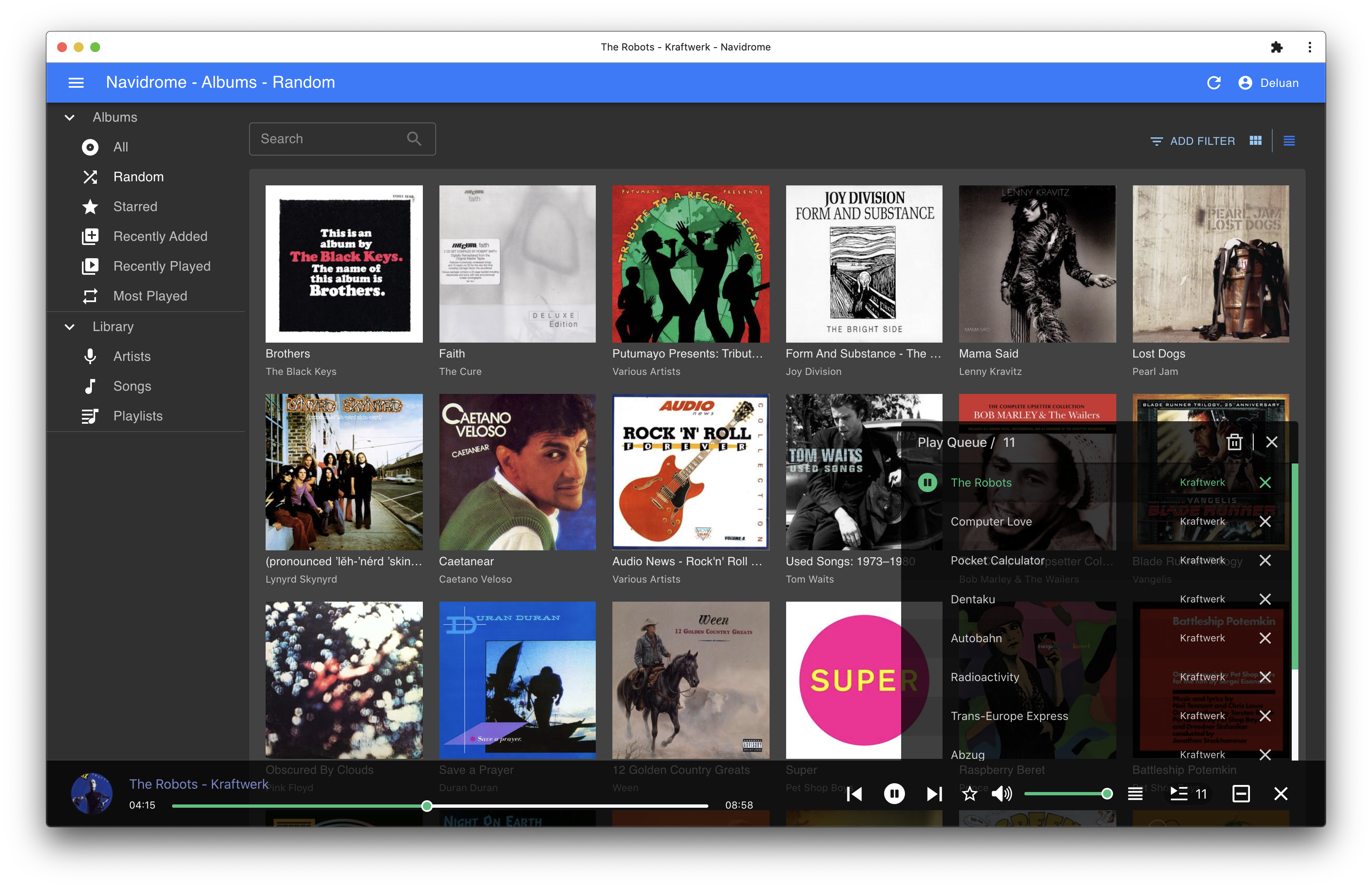
Turns a folder of music files into your own streaming service, playable from dozens of existing phone apps.
▶Repo detailsthe review · specs · pros & cons · install
What it is
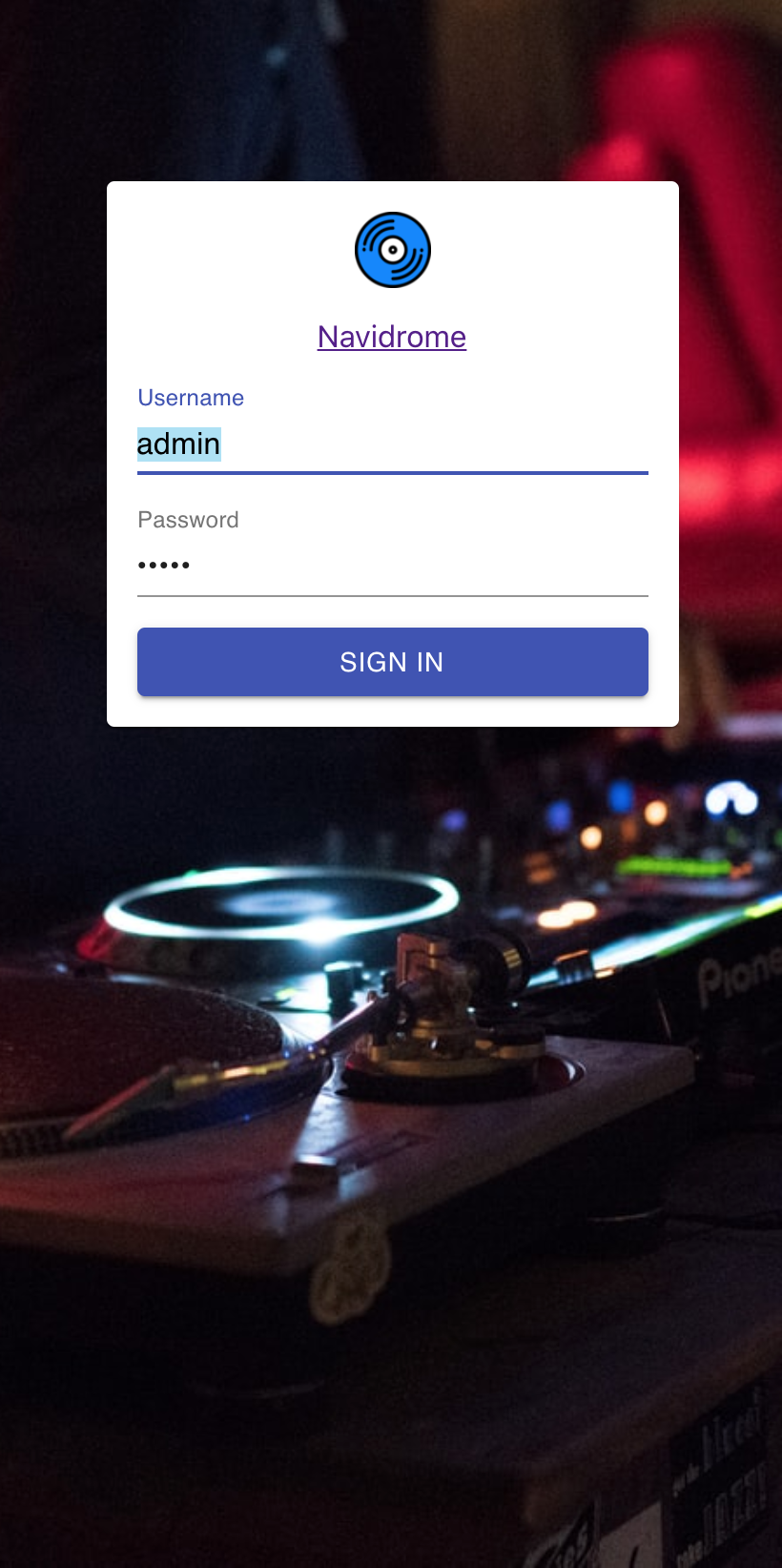
A music server written in Go that indexes a music folder and serves it over the web and over the Subsonic protocol. Subsonic is an old and widely supported way for music apps to talk to a music server, which is why so many phone apps work with this one. It handles almost all audio formats, converts on the fly when a device cannot play a file, keeps play counts and ratings per user, and notices changes in the folder without being told.What it is good for. Anyone with a music collection and no wish to rent it. The problem it removes is the licence that expires: files you own, played from a machine you own, on the app you prefer. Version 0.64, from September, added an experimental Jellyfin music interface as well, so clients built for Jellyfin can now connect. It also has a practical use for anyone who records audio, because a folder of your own recordings becomes something you can listen to on a phone without copying files around.
- Very light. It runs comfortably on a small server or a Raspberry Pi alongside everything else.
- Dozens of existing phone and desktop apps work with it, so you are not tied to its own screen.
- Multiple users with their own playlists, play counts and favourites.
- GPL-3.0. Running it is free; building a product from its code means publishing your changes.
- It plays music you already have. It will not find music for you and it is not a shop.
- Version 0.64 rewrote how every item is identified, and that touches every table. Back up the database before upgrading, and expect phone apps to re-sync.
- jellyfin/jellyfin
A full media server for video as well as music, which is far more capable and far heavier if all you have is music.
Track this in Scout - ampache/ampache
An older web-based audio and video server written in PHP, with a longer feature list and a heavier setup.
Track this in Scout
# With Docker, pointing at your music folder and a data folder:
docker run -d \
  --name navidrome \
  --restart=unless-stopped \
  --user $(id -u):$(id -g) \
  -v /path/to/music:/music \
  -v /path/to/data:/data \
  -p 4533:4533 \
  -e ND_LOGLEVEL=info \
  deluan/navidrome:latest
# Then open http://<your-server-address>:4533 and create the first account.
# Binaries for Linux, macOS, Windows and Raspberry Pi are at:
#   https://www.navidrome.org/docs/installation/


151k stars · Open WebUI License - NOT open source. A BSD-style base with clause 4 added, which strictly prohibits altering, removing, obscuring or replacing any 'Open WebUI' branding. Waived below fifty end users in any rolling thirty-day period, with written permission from the copyright holder, or under a paid enterprise licence. Older code remains under its original licences, listed in LICENSE_HISTORY. Read directly from the LICENSE file on 17 September 2026 · v0.11.3 (2026-08-31), read from /releases/latest; the date showed no year and falls in the past, so 2026 · Track this in Scout
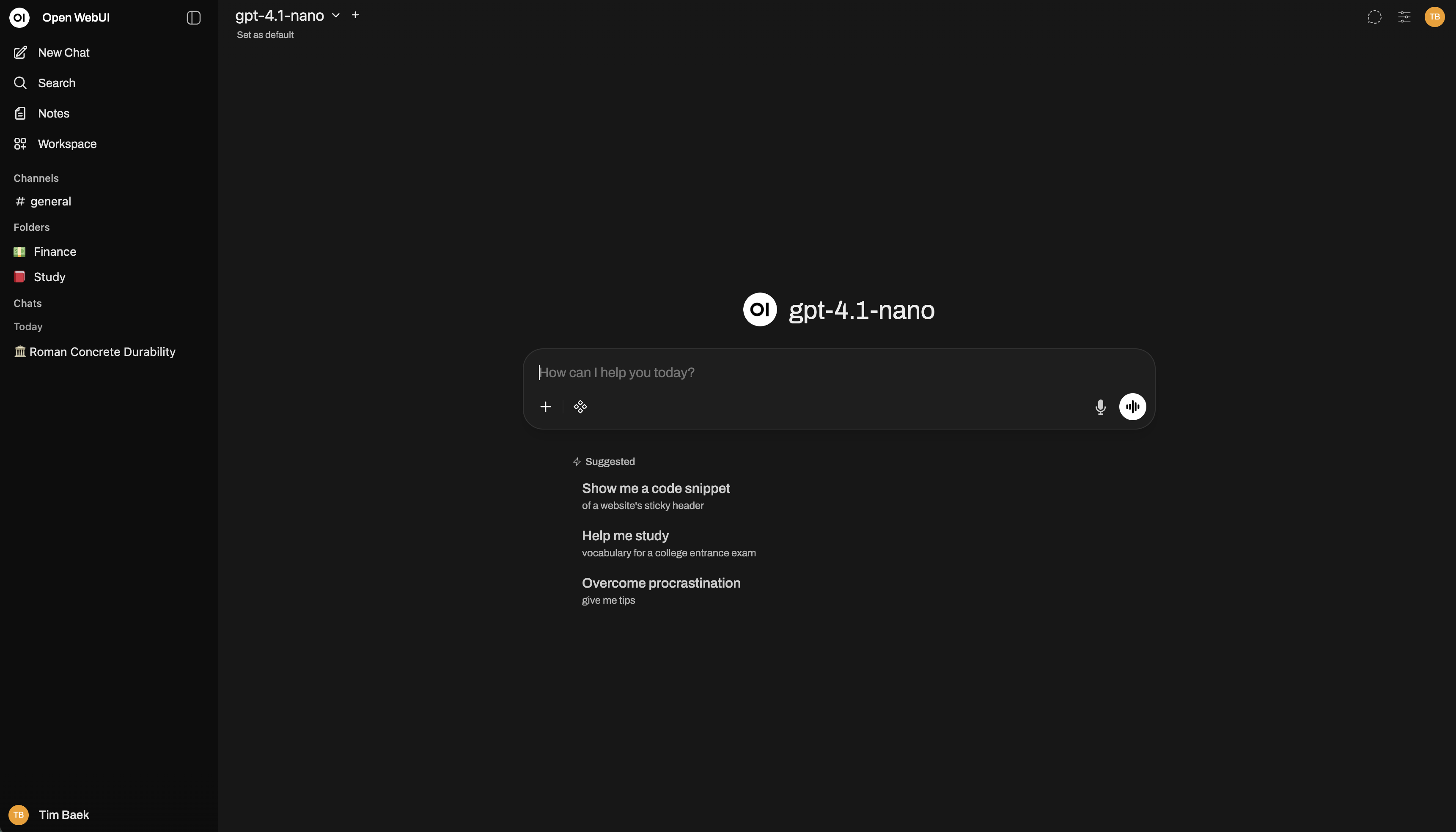
A self-hosted web interface for talking to AI models, with accounts, conversation history and document retrieval.
▶Repo detailsthe review · specs · pros & cons · install
What it is
A self-hosted interface for large language models, written in Python and JavaScript. It talks to Ollama, which runs open-weight models on your own hardware, and to anything that speaks the OpenAI API, which covers most paid services. It has user accounts and permissions, conversation history, retrieval over documents you upload, web search, image generation, and a pipeline system for extending it. It is one of the most starred projects on GitHub, at about 151,000 stars.What it is good for. Anyone who wants the convenience of a commercial chat screen without sending everything to a company. The problem it removes is the gap between a model running on your machine and something you would actually use every day. It is also the easy way to give two or three people access to one paid API key with a proper log of what was asked. For Grasppy it is a reasonable place to try prompts against your own documents before any of it is written into the product.
- It works with local models and with paid services in the same screen, so you can switch by picking from a list.
- Document upload with retrieval is built in, so asking questions about your own files needs no extra software.
- It is very widely used, so almost every problem you hit has already been answered somewhere.
- The licence is not open source. It is the project's own licence, based on BSD, with clause 4 added: you are "strictly prohibited from altering, removing, obscuring, or replacing any 'Open WebUI' branding". It is waived below fifty end users in any thirty-day period, or with written permission, or with a paid enterprise licence. Parts of the older code are still under their original licences, listed in
LICENSE_HISTORY. - It is a large application. Expect a gigabyte or two of memory before any model is loaded, and models need much more.
- It ships no model. You still need Ollama on your machine or a paid key, and the real cost is whichever of those you choose.
- danny-avila/LibreChat
The same job under a plain MIT licence, with agents, many providers and no branding condition, and a smaller community.
Track this in Scout - oobabooga/text-generation-webui
Aimed at running and tuning the models themselves rather than at daily chatting, so it is the better workshop and the worse chat screen.
Track this in Scout  ggozad/oterm
The same idea in a terminal instead of a browser, with no accounts and nothing to host.
Track this in Scout
# With Docker, which is the supported way:
docker run -d -p 3000:8080 \
  --add-host=host.docker.internal:host-gateway \
  -v open-webui:/app/backend/data \
  --name open-webui --restart always \
  ghcr.io/open-webui/open-webui:main
# Or with Python, in a virtual environment:
python3 -m venv venv
source venv/bin/activate
pip install open-webui
open-webui serve
# Then open http://<your-server-address>:3000 .
# The first account you create becomes the administrator.
# Read the licence before putting this inside anything you sell:
#   https://github.com/open-webui/open-webui/blob/main/LICENSE

4k stars · MIT · no releases; 7 tags; tag dates unreachable (robots) · Track this in Scout
Drag-and-drop editor for mobile-ready HTML emails — the thing Listmonk conspicuously lacks.
▶Repo detailsthe review · specs · pros & cons · install
What it is
An email editor built as a React component, so it is a piece you add to your own screen rather than a program you run. React is the common way to build a web interface in JavaScript. It produces the HTML that mail programs need, and it supports variables that are filled in per reader, blocks that appear only when a condition is met, buttons, images and dividers. There is a hosted version at maily.to, and the editor itself is MIT licensed.What it is good for. Anyone building a product that sends email their customers can design themselves. The problem it removes is writing an email editor, which is a month of work nobody wants. Edition 21 gave you email-builder-js, which does very nearly the same thing, and the honest comparison is this. email-builder-js comes from Waypoint, is a little more of a complete kit including a viewer, and looks plainer. maily.to has the better writing experience and its variables and conditional blocks are stronger, which matters if your emails are personalised. Both are React only and both are MIT. Pick on which editor you would rather use, because that is the real difference.
- Variables and conditional blocks are built in, which is the part most editors leave to you.
- It is a component, so it sits inside your own application with your own styling around it.
- MIT licence, and it works with the common sending services rather than assuming one.
- React only. If your interface is built another way, this is not usable.
- The repository publishes no GitHub releases at all, so you track it on npm. That is a publishing habit and not a health signal, and the latest package was published on 3 February 2026.
- It is the editor and nothing more. Sending, lists, and tracking are somebody else's job — see Listmonk from Edition 2 and useSend from Edition 18 #5.
 usewaypoint/email-builder-js
Very nearly the same tool and the same licence, with a plainer editor and a more complete kit including a reader component.
Track this in Scout maizzle/framework
Not an editor at all: you write the email in HTML with Tailwind and it prepares it for mail programs, which suits a developer and not a customer.
Track this in Scout
# Inside your own React project:
npm install @maily-to/core
# It is a component you render, and it gives you back the HTML.
# The starting example is in the repository:
#   https://github.com/arikchakma/maily.to#readme
# To try the editor before you build anything:
#   https://maily.to



635 stars · Apache-2.0 for /core and /dashboard, MIT for /tracker · v0.6.2 (2026-01-18), read from /releases/latest; the release page states fifteen commits have landed since · Track this in Scout
Counts website visitors with no cookies and no personal identifiers, in one small binary with storage built in.
▶Repo detailsthe review · specs · pros & cons · install
What it is
A self-hosted web analytics service. The part that runs on your server is written in Go and stores its data in one file, so there is no separate database. The part that runs on your page is a script under 1 KB that records the page, the referrer and a few coarse facts about the device, and stores no cookie and no identifier. It reports pages, referrers, countries, browsers, screen sizes and how long people stayed, and it also measures the page speed your real visitors experienced.What it is good for. Anyone with a website in Europe who would rather not have a consent banner. The problem it removes is the permission question, because there is nothing stored that needs permission. This ledger now holds six ways to count visitors, so here is the honest placement. Umami from Edition 1 and Plausible from Edition 18 are the mature choices with the most features. PostHog from Edition 11 is the large one that also records sessions. Counterscale from Edition 9 runs on Cloudflare. This one is the smallest, the newest and the lightest, and it is the only one that fits comfortably on a very small machine. It would suit grasppy.com, where the pages are long articles and the tracking file's size is a real part of the load.
- No cookies and no personal identifiers, which removes the consent banner question in most of Europe.
- Under 1 KB on the page and 256 MB of memory on the server, so it costs almost nothing to run.
- One binary with storage built in, and the core is Apache-2.0 while the tracking script is MIT.
- 635 stars and version 0.6. This is a young project with a small number of users, and that is a real risk you are taking on.
- The newest release is 18 January 2026, with fifteen commits since. That is eight months, which is well inside our line, but it is the quietest project in today's twelve.
- Features are thinner than the mature tools. There are no goals, funnels or experiments here.
 umami-software/umami
The mature version of the same idea, with far more reporting and a PostgreSQL or MySQL database beside it.
Track this in Scout plausible/community-edition
Also cookie-free and well established, and it needs about 2 GB of memory because it runs ClickHouse underneath.
Track this in Scout benvinegar/counterscale
Runs on Cloudflare's network rather than on your own server, so there is nothing to host at all.
Track this in Scout
# One container with a named volume for its data:
docker volume create medama-data
docker run -d -p 8080:8080 -v medama-data:/app/data \
  ghcr.io/medama-io/medama:latest
# Or take the single binary from:
#   https://github.com/medama-io/medama/releases/latest
# Then open http://<your-server-address>:8080 and sign in with
#   admin / CHANGE_ME_ON_FIRST_LOGIN
# Change that password immediately, then add the tracking snippet
# the dashboard gives you to your pages.
Checked, and left out
These were opened for this edition and did not make it, with the reason.
OpnForm/OpnForm - ALIVE. 3.7k stars, a self-hosted form builder. AGPL-3.0 for the main part with separate paid enterprise features, printed as a note for the reader and not used as a disqualifier. Left out because the twelve were full. RENAME CAUGHT: JhumanJ/OpnForm now redirects to OpnForm/OpnForm, recorded as renamed_from. New to the ledger, queued.
OpnForm/OpnForm - ALIVE. 3.7k stars, a self-hosted form builder. AGPL-3.0 for the main part with separate paid enterprise features, printed as a note for the reader and not used as a disqualifier. Left out because the twelve were full. RENAME CAUGHT: JhumanJ/OpnForm now redirects to OpnForm/OpnForm, recorded as renamed_from. New to the ledger, queued.
noborus/trdsql - ALIVE: v1.2.3, 29 May 2026. 2.2k stars, MIT. Runs SQL queries directly against CSV, JSON, YAML and LTSV files with no database involved. It would have been a fourth hidden gem, and HypoPG and pg_activity had already taken the two data-and-databases places. New to the ledger, queued.
noborus/trdsql - ALIVE: v1.2.3, 29 May 2026. 2.2k stars, MIT. Runs SQL queries directly against CSV, JSON, YAML and LTSV files with no database involved. It would have been a fourth hidden gem, and HypoPG and pg_activity had already taken the two data-and-databases places. New to the ledger, queued.
sitespeedio/sitespeed.io - ALIVE. 5.0k stars, MIT. Measures real page load speed with real browsers and can run on a schedule. Left out because Medama took the single getting-found place. New to the ledger, queued.
sitespeedio/sitespeed.io - ALIVE. 5.0k stars, MIT. Measures real page load speed with real browsers and can run on a schedule. Left out because Medama took the single getting-found place. New to the ledger, queued.
lobehub/lobe-chat - UNVERIFIED, and explicitly NOT called dormant or dead. The address returned HTTP 404 when opened while checking the Similar repositories list for entry #10. GitHub normally keeps an old address working after a rename, so a 404 points at a move without a redirect, a repository made private, or a removal. Nothing could be settled from this sandbox. New to the ledger, recorded as unverified. Needs a sweep from the Mac.
lobehub/lobe-chat - UNVERIFIED, and explicitly NOT called dormant or dead. The address returned HTTP 404 when opened while checking the Similar repositories list for entry #10. GitHub normally keeps an old address working after a rename, so a 404 points at a move without a redirect, a repository made private, or a removal. Nothing could be settled from this sandbox. New to the ledger, recorded as unverified. Needs a sweep from the Mac.
Coming tomorrow