1.5k stars · MIT · v1.42.0 (2026-09-02) · Track this in Rising ↗
Normalises every video to the EBU R128 loudness YouTube expects — ten minutes, and viewers stop reaching for the volume.
Radar check
What we found when we opened it. Every bar is one fact, with its date.
Last code pushed 14 Oct 2026, 13 days before this check.
Latest release v1.43.0 on 14 Oct 2026.
Public since July 2014, a little over 12 years.
1,539 stars and 131 forks.
12 commits and 0 new issues in the last 90 days.
30 contributors. 2 pull requests merged in 90 days.
No security policy file says how to report a problem. No published security advisories.
How the bars are scored
- Alive. Days since the last code push: a week or less 100, a month 90, three months 70, six months 50, a year 30, eighteen months 15, older 0.
- Releases. Age of the latest GitHub release, on a similar scale; no bar when the project publishes no releases.
- Maturity. Age of the project: eight years 100, five 90, three 70, two 55, one 40, six months 25, younger 10.
- Adoption. Stars on a log scale: 100,000 stars is 100, 10,000 is 80, 1,000 is 60, 100 is 40.
- Activity. Commits in the last 90 days: 300 or more 100, 100 85, 30 65, 10 45, any 25.
- Community. People who have contributed: 100 or more 100, 30 80, 10 60, 5 40, 2 25, one 10.
- Security. A published security policy 80, none 40; published advisories are listed, not scored.
Checked by Repo Radar on 27 Oct 2026 from the repository on GitHub. Covered in Edition 13.
▶Repo detailsthe review · specs · pros & cons · install
What it does
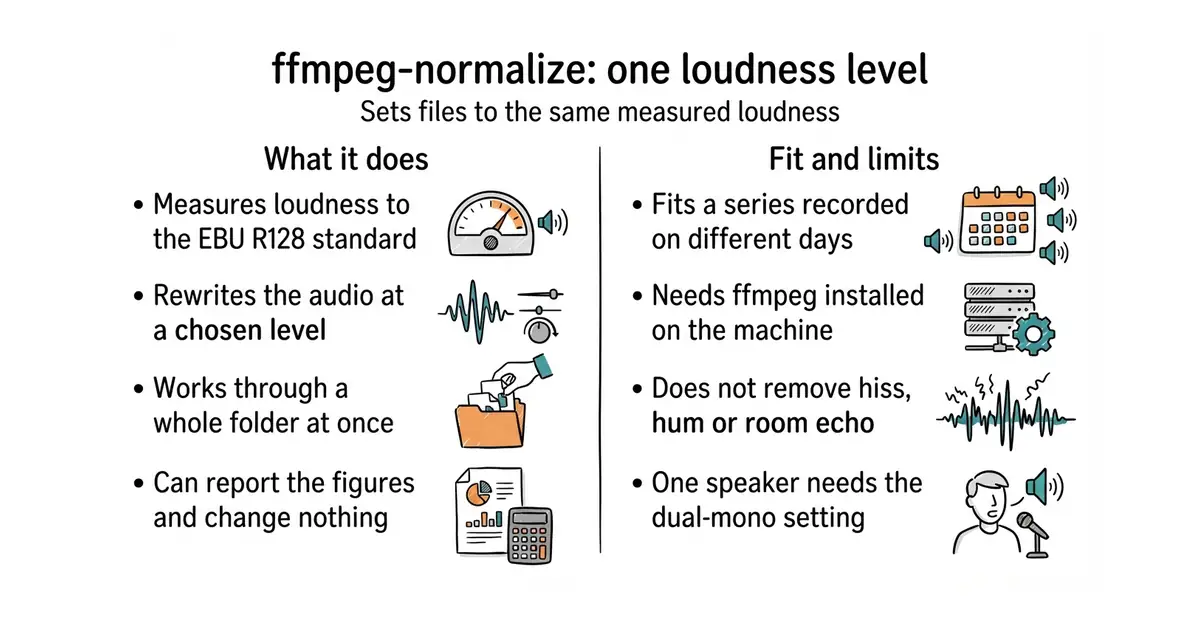
It measures how loud a file is using EBU R128, the broadcast loudness standard, then rewrites the audio at a level you choose. That is the same measurement the large video platforms use when they quietly raise or lower an upload. It can also do simple peak or RMS adjustment when the standard method is not wanted. It works on a whole folder in one run, and it can write a report of the measurements instead of changing anything. It chooses sensible output settings and lets every part of them be overridden. Version 1.43.0 was released on 14 October 2026. It fixes level only: it does not remove hiss, hum or room echo, and raising a quiet passage raises the noise under it too.
Why it matters
Who it suits. It suits anyone publishing a series, where a viewer moves from one file to the next and hears the difference. It suits a back catalogue recorded at various times, because a whole folder can be fixed in one pass. It also suits any pipeline that mixes sources, such as a recorded voice next to generated speech from #1 or #2, which will arrive at different levels. Skip it for a single file that already sounds right, and skip it if the real problem is noise rather than level.
Verdict. The clearest ten minutes in this edition. The one detail everyone gets wrong first time is the --dual-mono flag, which is needed for a recording where one person speaks on both channels; without it the measurement comes out 3 dB off. Listen to one result before running a batch, since loudness work makes existing noise more audible. Keep it next to #3 and run it second.
Summary (Key Points)from the README
Key features
- EBU R128 loudness: Two-pass by default, with an option for one-pass dynamic normalization.
- RMS and peak normalization: Adjusts audio to a set RMS level or peak level.
- Selective streams: `-as 1,2` normalizes only streams 1 and 2, `--audio-default-only` targets default tracks, and `--keep-other-audio` copies the rest unchanged.
- Skip files at target: `--threshold 0.5` copies files already within that range unchanged instead of re-encoding them (disabled by default).
- Batch/album mode: `--batch` shifts all files by the same amount, preserving relative loudness. The README example shifts an album so its average RMS is -20 dB.
- Presets: Built-in `podcast` (EBU R128, -16 LUFS), `music` and `streaming-video` presets, plus custom presets.
- Reporting: `--print-summary` prints input and output levels and applied gain, and `--print-stats` gives a per-file status.
- Format handling: Video streams are preserved, and bit depth is kept by default for formats like FLAC.
Ways to install
| Platform or method | What it needs | Effort |
|---|---|---|
| pip (`pip3 install ffmpeg-normalize`) | A recent ffmpeg and Python 3.10 or higher | One command |
| uv (`uvx ffmpeg-normalize`) | A recent ffmpeg and uv installed | One command |
| Docker | A Docker container; the README gives no setup details | Not specified in the README |
Important
- ffmpeg dependency: A recent ffmpeg must be installed separately.
- Python version: Python 3.10 or higher is required for the pip route.
- Skipped files: With `--threshold`, files within range are copied through unchanged, not re-encoded.
- Exit codes: A non-zero exit code means at least one file failed, so scripts should check it.
- Encoder settings tag: `--write-encoder-settings` writes an ENCODER_SETTINGS tag only for Matroska/WebM outputs, and it has no effect with `--metadata-disable`.
- Output location: The quick start writes output to a `normalized/` folder, for example `normalized/file.mkv`.
Written by an AI model from the project’s README; not part of the review, and it can be wrong.
- Works across a whole folder, so an entire back catalogue is one command.
- Short to learn and nothing to remember afterwards.
- MIT licence, and it can be run without a permanent install through
uvx.
- It needs ffmpeg installed, and it needs the
--dual-monoflag for single-speaker recordings. - It changes level only. Noise, hum and echo are untouched.
- Raising a quiet passage raises the hiss with it, so the number alone is not proof of a good result.
This is the step that makes them one video instead of three different sources.
brew install ffmpeg        # or: sudo apt install ffmpeg
pip install ffmpeg-normalize
ffmpeg-normalize lesson-tight.mp4 -c:a aac -b:a 192k -t -14 --dual-mono -o lesson-ready.mp4