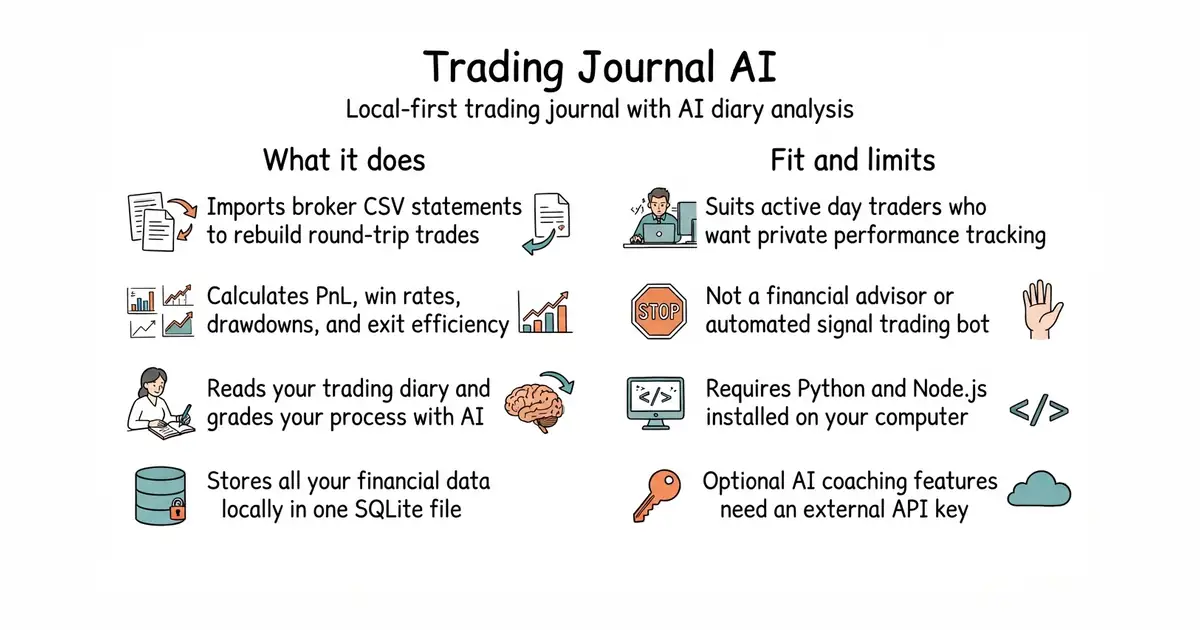
In simple English
This tool helps you keep track of your stock, option, and future trades in one place. You download it to your own computer and run it locally. It reads your broker files and calculates your wins, losses, and fees automatically. You can also connect an optional AI assistant to read your handwritten notes and grade your trading habits. It costs nothing to run, but you need your own AI key if you want the coaching features.
What it is
A self-hosted trading journal and analytics dashboard built with a Python backend and a React (a library for building user interfaces) frontend. It stores your data in a local SQLite (a self-contained, serverless database engine) file and connects optionally to external market data and AI APIs.
What it is good for
Day traders and active investors who want to analyze their performance without paying monthly fees for cloud-based journals or sharing their financial data with third-party servers.
- Runs entirely on your machine with no account or telemetry required.
- Calculates deterministic trade statistics, win rates, and drawdowns with local code.
- Includes built-in importers for Thinkorswim and Interactive Brokers, plus a generic CSV template.
- Requires Python and Node.js installed on your system to run manually.
- AI features and intraday charts require external API keys and internet access.
- Setting up the local environment requires some familiarity with the command line.
Paid cloud-based trading journals and manual spreadsheets
Python
- simonro/edge-scanner156 stars
A real-time intraday stock scanner with a customizable browser dashboard by the same author.

- jesse-ai/jesse8.7k stars
A Python framework for writing crypto trading strategies, testing them against past prices, and running them live.
- hummingbot/hummingbot20k stars
A free framework for writing and running automated trading programs on cryptocurrency exchanges.
- lballabio/QuantLib7.7k stars
The long-established free library for pricing and risk-managing financial instruments.
python -m venv .venv
source .venv/bin/activate
pip install -r backend/requirements.txt
cd frontend && npm ci && cd ..
launch.bat