Radar check
What we found when we opened it. Every bar is one fact, with its date.
Last code pushed 28 Oct 2026, the same day before this check.
Latest release v1.14.0 on 24 Oct 2026.
Public since December 2023, a little over 2 years.
16,862 stars and 2,980 forks.
3,515 commits and 193 new issues in the last 90 days.
381 contributors. 685 pull requests merged in 90 days.
A security policy says how to report a problem. 4 published security advisories.
How the bars are scored
- Alive. Days since the last code push: a week or less 100, a month 90, three months 70, six months 50, a year 30, eighteen months 15, older 0.
- Releases. Age of the latest GitHub release, on a similar scale; no bar when the project publishes no releases.
- Maturity. Age of the project: eight years 100, five 90, three 70, two 55, one 40, six months 25, younger 10.
- Adoption. Stars on a log scale: 100,000 stars is 100, 10,000 is 80, 1,000 is 60, 100 is 40.
- Activity. Commits in the last 90 days: 300 or more 100, 100 85, 30 65, 10 45, any 25.
- Community. People who have contributed: 100 or more 100, 30 80, 10 60, 5 40, 2 25, one 10.
- Security. A published security policy 80, none 40; published advisories are listed, not scored.
Checked by Repo Radar on 28 Oct 2026 from the repository on GitHub.
In simple English
This tool helps you build voice assistants and chatbots that talk in real time. It connects speech recognition, language models, and text-to-speech services into one smooth pipeline. You can use it to create phone bots, voice companions, or interactive video agents. It is free to use under an open-source licence, but you will pay for the third-party AI services you connect to it. Setting it up requires Python knowledge and API keys from providers like OpenAI or Deepgram.
What it is
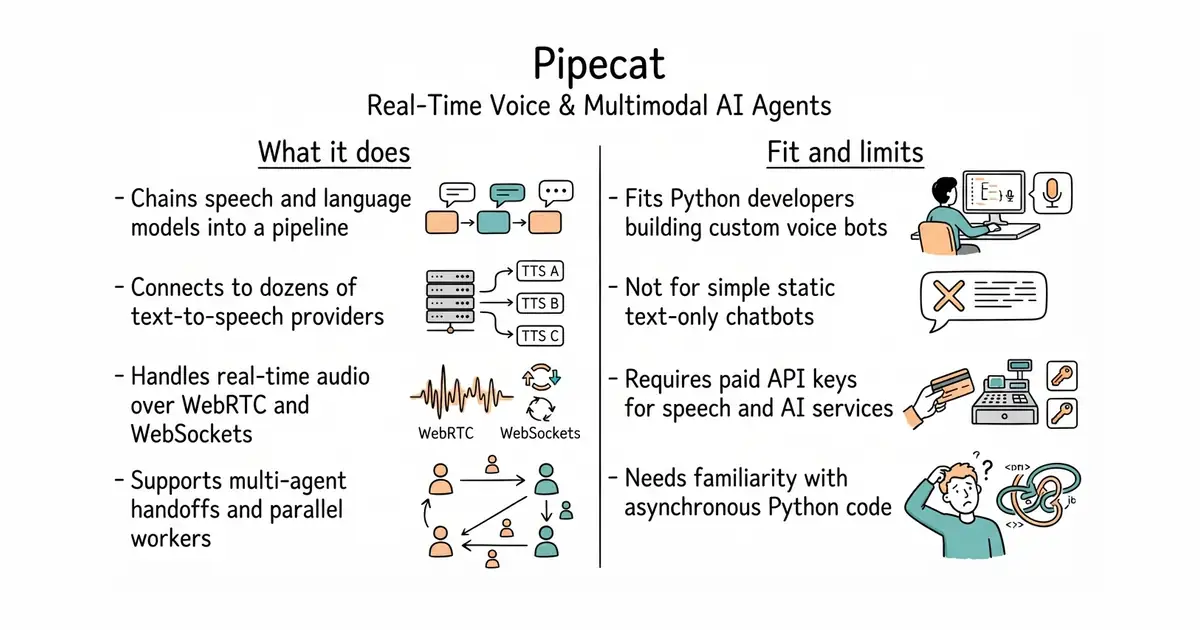
Pipecat is an open-source Python framework designed for orchestrating real-time voice and multimodal AI agents. It provides pluggable components to handle audio streams, video, speech-to-text, and text-to-speech services.
What it is good for
Solo builders who want to create custom voice bots, phone agents, or multimodal AI applications without writing low-level audio streaming code from scratch.
Summary (Key Points)from the README
Key features
- Multi-agent orchestration: Agents can hand off to specialists, fan out in parallel, run as sidecar workers over a shared bus, or be distributed across processes and machines.
- Composable pipelines: Each pipeline is built from modular components covering audio, AI services, transports, and conversation flow.
- Broad service coverage: The README lists speech-to-text, LLM, text-to-speech, speech-to-speech, video, memory, vision, and analytics providers, with a link to the full list.
- Real-time transports: Supported transports include WebRTC (Daily, LiveKit, Vonage, SmallWebRTC), FastAPI and WebSocket servers, WhatsApp, and local audio.
- Telephony serializers: Exotel, Genesys, Plivo, Twilio, Telnyx, and Vonage serializers are listed for phone-based bots.
- Audio processing: Silero VAD, Krisp Viva, Koala, ai-coustics, and RNNoise filters are available for voice input.
- Structured conversations: Pipecat Flows provides predefined or dynamic conversation paths with state management.
- Project scaffolding: `pipecat init` can scaffold a runnable bot in under a minute and set up an AI coding assistant (Claude Code or Codex) to build on it.
- Client SDKs and debugging tools: Official SDKs cover JavaScript, React, React Native, Swift, Kotlin, C++, and ESP32, and the ecosystem includes the Whisker debugger and the Tail terminal dashboard.
Ways to install
| Platform or method | What it needs | Effort |
|---|---|---|
| Pipecat CLI (`uv tool install "pipecat-ai[cli]"` then `pipecat init`) | uv, then the CLI installed; runs an interactive setup | Low: one install command plus guided prompts |
| Manual install with uv (`uv add pipecat-ai`) | uv, a new or existing project, and a `.env` copied from `env.example` | Moderate: several steps and manual wiring |
| Manual install with pip (`pip install pipecat-ai`) | pip; optional extras installed the same way | Moderate: same wiring as uv, using pip |
Important
- Core only by default: Only the core framework is installed out of the box, so third-party service dependencies must be added with `uv add "pipecat-ai[option,...]"`.
- Environment setup: The manual path requires copying `env.example` to `.env` before the code runs.
- uv is expected: The README recommends uv and tells you to install it first, even though pip is also supported.
- Third-party dependencies: Most listed services are external providers, so their accounts and availability sit outside the project.
- Community integrations are unvetted: Community-built integrations are maintained outside the core project and are linked rather than included.
- AI-assisted setup needs its own tools: The Claude Code skills and CLI assistant features require Claude Code or Codex to be installed separately.
Written by an AI model from the project’s README; not part of the review, and it can be wrong.
- Connects easily to dozens of different speech and language providers.
- Supports real-time streaming with low latency using WebSockets or WebRTC.
- Includes helper tools like command-line utilities and debugging dashboards.
- Requires a strong working knowledge of Python and asynchronous programming.
- Running multiple speech and language services can become expensive quickly.
- Debugging audio pipeline timing issues can take significant time.
Writing custom WebRTC and audio streaming pipelines from scratch.
FastAPI (a modern Python web framework for building APIs quickly).
- livekit/agents15k stars
LiveKit Agents is another popular open-source framework for building real-time multimodal voice and video agents.
- langchain-ai/langchain149k stars
LangChain helps build general language model applications, but focuses less on real-time voice streaming than Pipecat.


- vllm-project/vllm96k stars
A serving engine that makes one graphics card answer many requests at once.
- infiniflow/ragflow93k stars
A question-answering system built on a document collection, with the sources shown beside every answer.
- basicmachines-co/basic-memory4.3k stars
Gives an AI assistant a memory that is stored as plain text files you can read.
uv init my-pipecat-app
cd my-pipecat-app
uv add pipecat-ai