43.5k stars · GPL-2.0 · v3.69.0 (2026-06-04) · Track this in Rising ↗
Trim and cut video without re-encoding — an ffmpeg GUI that is genuinely pleasant for a non-programmer.
Radar check
What we found when we opened it. Every bar is one fact, with its date.
Last code pushed 25 Oct 2026, 2 days before this check.
Latest release v3.70.1 on 19 Oct 2026.
Public since October 2016, a little over 9 years.
45,263 stars and 2,279 forks.
371 commits and 57 new issues in the last 90 days.
184 contributors. 99 pull requests merged in 90 days.
No security policy file says how to report a problem. No published security advisories.
How the bars are scored
- Alive. Days since the last code push: a week or less 100, a month 90, three months 70, six months 50, a year 30, eighteen months 15, older 0.
- Releases. Age of the latest GitHub release, on a similar scale; no bar when the project publishes no releases.
- Maturity. Age of the project: eight years 100, five 90, three 70, two 55, one 40, six months 25, younger 10.
- Adoption. Stars on a log scale: 100,000 stars is 100, 10,000 is 80, 1,000 is 60, 100 is 40.
- Activity. Commits in the last 90 days: 300 or more 100, 100 85, 30 65, 10 45, any 25.
- Community. People who have contributed: 100 or more 100, 30 80, 10 60, 5 40, 2 25, one 10.
- Security. A published security policy 80, none 40; published advisories are listed, not scored.
Checked by Repo Radar on 26 Oct 2026 from the repository on GitHub. Covered in Edition 16.
▶Repo detailsthe review · specs · pros & cons · install
What it does
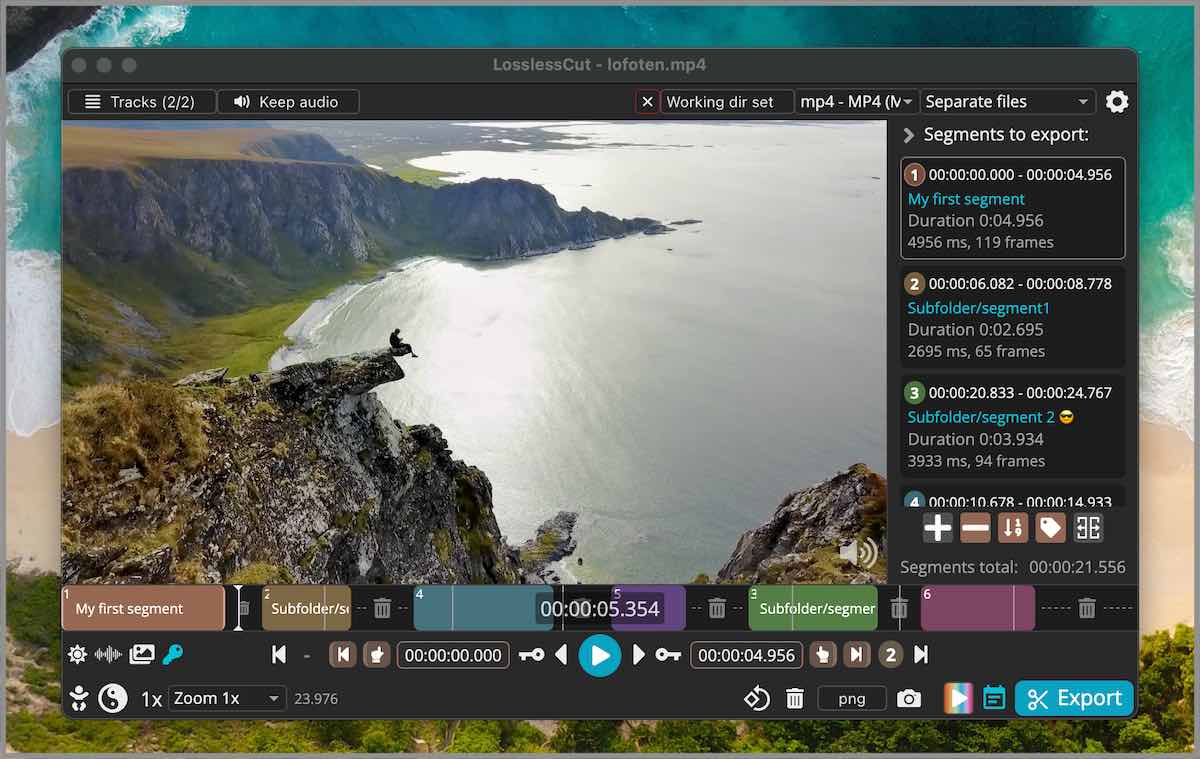
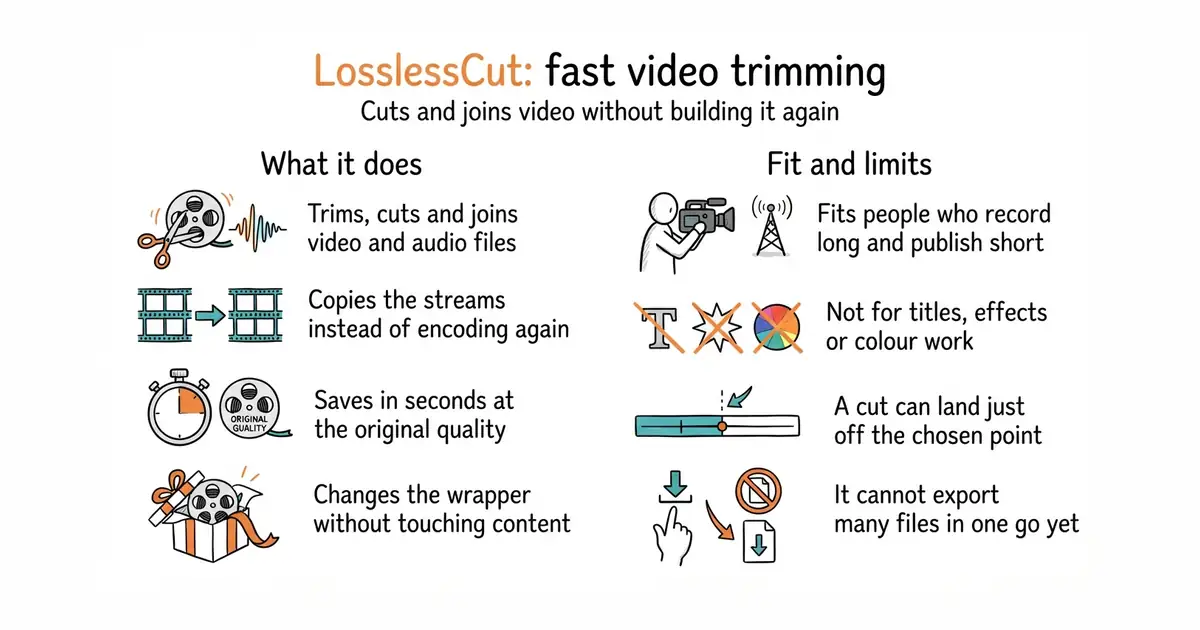
LosslessCut trims, cuts, joins and rearranges video and audio files. It puts a window with buttons in front of FFmpeg, the command-line program most video tools use underneath, and FFmpeg does the work. It copies the picture and sound already in the file instead of encoding them again, so a save takes seconds. It can change the container, which is the wrapper around the picture and sound, without touching the content inside. It opens files with several video, audio and subtitle tracks and can save one track on its own. It can edit titles and rotation, take still pictures, export single frames, and import or export lists of segments. It does not re-encode video to shrink or improve it, it has no batch export yet, and some formats will not play natively, so a low-quality preview copy is made while the cut still runs on the original.
Why it matters
Who it suits. It fits people who record long and publish short: cutting dead time off the front, splitting a two-hour recording into parts, joining takes, or lifting the sound out of a video. It also fits anyone working through very large camera files on a modest computer, because nothing is encoded a second time. Skip it when the job needs titles, transitions, colour work or several layers on top of each other. That is a full editor's work, and this program does not claim to do it.
Verdict. Worth an hour, and worth keeping after that. There is nothing to compile, and the first useful cut takes about ten minutes to learn. The thing to watch is where a cut lands. Cuts happen at the join points already inside the file, so the result can sit a fraction of a second away from the mark. For edits led by speech that is sometimes too rough, and a tool that removes silence by itself is a better first pass. Keep a full editor alongside for titles and effects, and use this one for the rough cut that comes first.
Summary (Key Points)from the README
Key features
- Lossless cutting: Trims and cuts video and audio losslessly, using an almost direct data copy through FFmpeg, so no re-encode is needed.
- Space saving: Rough-cuts large camera, GoPro or drone files by discarding unwanted gigabytes without quality loss.
- Merging: Joins cut segments, or whole files with identical codecs, losslessly.
- Track handling: Adds, removes, replaces or extracts audio, subtitle and other tracks.
- Remuxing: Changes container format, for example MKV to MP4, without re-encoding.
- Markers and chapters: Manages segments, markers and tags, with import and export of chapters, CSV, EDL and more.
- Detection and splitting: Detects scenes, black frames and silence, and splits files by them.
- Metadata and export: Edits metadata and rotation, exports snapshots and frames, and offers keyboard shortcuts, a CLI and an HTTP API.
Ways to install
| Platform or method | What it needs | Effort |
|---|---|---|
| Snap Store (Linux) | Snap support; gives automatic, stable updates | Low |
| Other app stores | Purchase from a favorite store; gives automatic, stable updates | Low |
| macOS DMG | Intel or Apple Silicon Mac; PKG does not work | Low |
| Windows 7zip | Windows 10 or later; Windows 7, 8 and 8.1 are unsupported after v3.50.0 | Low to medium (manual extraction) |
| Linux tar.bz2 or AppImage | x64 or arm64 system; AppImage is x64 only | Low to medium |
| Raspberry Pi tar.bz2 | armv7l device; this build does not include FFmpeg | Medium (FFmpeg must be installed separately) |
| Flathub | Flatpak; unofficial and not maintained by the author | Low |
| Nightly builds | Willingness to run pre-release software | Low |
Important
- Playback limits: Playback uses the Chromium HTML5 player, so not all codecs play natively; other files play through FFmpeg-assisted playback or can be converted via File → Convert to supported format.
- Lossless export: Even converted files are exported from the original, so output stays lossless.
- Platform gaps: APPX (Windows) and PKG (macOS) do not work, and Windows 7, 8 and 8.1 are no longer supported after v3.50.0.
- Raspberry Pi caveat: The armv7l build does not include FFmpeg.
- Unofficial builds: Flathub and other unofficial releases are not maintained by the author; the listed official downloads are the only ones the author provides.
- Single maintainer: The project is maintained by one person alone, so support and updates depend on that individual.
Written by an AI model from the project’s README; not part of the review, and it can be wrong.
- A save takes seconds instead of hours, and the picture is exactly what came out of the camera.
- It is a window with buttons. Nothing here needs the command line.
- Ready-made downloads for macOS on both chip types, Windows, Linux, and Raspberry Pi.
- A cut lands on a join point already inside the file, so it can sit a fraction of a second from the mark. That is the price of not building the file again.
- The licence is GPL-2.0. Using the program is free. Putting its code inside a product that is sold is not practical.
- Playback uses the browser engine inside the program, so some formats only preview at low quality. The Windows APPX and macOS PKG packages do not work at all.
https://github.com/mifi/lossless-cut/releases/latest