5.2k stars · Unlicense · 31.6.0 (2026-09-06) · Track this in Rising ↗
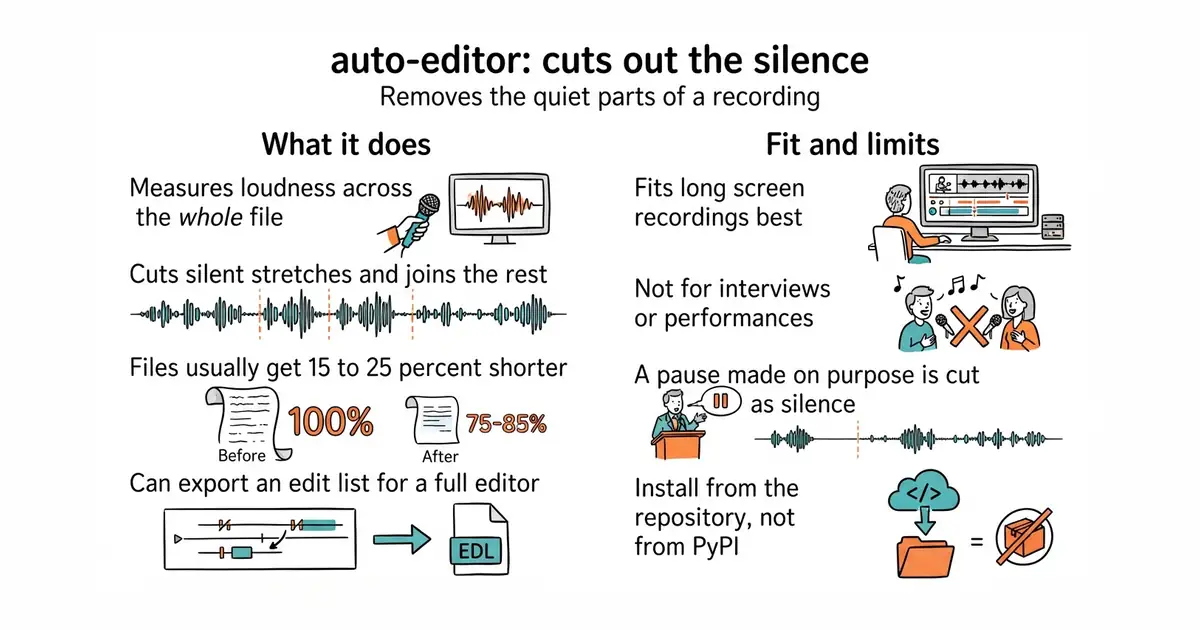
One command strips silence and dead air from a screencast — typically 15-25% shorter, better retention.
Radar check
What we found when we opened it. Every bar is one fact, with its date.
Last code pushed 25 Oct 2026, 2 days before this check.
Latest release 31.7.2 on 3 Oct 2026.
Public since April 2020, a little over 6 years.
5,619 stars and 700 forks.
137 commits and 4 new issues in the last 90 days.
17 contributors. 2 pull requests merged in 90 days.
No security policy file says how to report a problem. No published security advisories.
How the bars are scored
- Alive. Days since the last code push: a week or less 100, a month 90, three months 70, six months 50, a year 30, eighteen months 15, older 0.
- Releases. Age of the latest GitHub release, on a similar scale; no bar when the project publishes no releases.
- Maturity. Age of the project: eight years 100, five 90, three 70, two 55, one 40, six months 25, younger 10.
- Adoption. Stars on a log scale: 100,000 stars is 100, 10,000 is 80, 1,000 is 60, 100 is 40.
- Activity. Commits in the last 90 days: 300 or more 100, 100 85, 30 65, 10 45, any 25.
- Community. People who have contributed: 100 or more 100, 30 80, 10 60, 5 40, 2 25, one 10.
- Security. A published security policy 80, none 40; published advisories are listed, not scored.
Checked by Repo Radar on 25 Oct 2026 from the repository on GitHub. Covered in Edition 13.
▶Repo detailsthe review · specs · pros & cons · install
What it does
It measures the loudness across a file, decides which stretches count as silence, and joins what is left into a new file. There is no timeline, no settings window and no project file. The rules can be changed, so cuts can be made on loudness, on motion, or on a mix of both. It reads and writes the common video and audio formats, and it can also export an edit list for a full editor instead of a finished file. It can copy the video stream through untouched when the cuts allow it, which avoids losing quality. Version 31.7.2 was released on 3 October 2026 and code was pushed on 12 October 2026. It does not judge content: a deliberate pause is silence to it, and it will cut that too.
Why it matters
Who it suits. It suits anyone who records themselves working, teaching or demonstrating, where most of the waste is waiting rather than mistakes. It suits long recordings best, because the saving grows with length. Skip it for scripted, already tight footage, and skip it for anything where pauses carry meaning, such as an interview or a performance.
Verdict. The best value in this edition, and the one to run first. Budget ten minutes to install and one viewing pass to check the result, every time, because a cut in the wrong place is worse than a long file. Pair it with #4 immediately afterwards. If a graphical editor is wanted instead, mifi/lossless-cut does cuts by hand without re-encoding.
Summary (Key Points)from the README
Key features
- Loudness-based cutting: The `--edit` option makes automatic cuts, with audio loudness as the most notable method.
- Motion-based cutting: Setting `--edit motion` removes motionless sections of a video.
- dB thresholds: You can specify volume in dB, a unit familiar to video editors.
- Pacing control: `--margin` adds silent sections so the edited result feels less abrupt.
- Multiple classes: Labels run from 0 to 255 (N up to 255), set with `--edit:N` and `--when:N`. Where classes overlap, the higher label wins.
- Inverse export: `--when-active cut` with `--when-inactive nil` exports the material that auto-editor would normally remove.
- Editor export: It exports XML for Adobe Premiere Pro, and also supports DaVinci Resolve, Final Cut Pro, ShotCut, Kdenlive, and individual media clips.
Ways to install
| Platform or method | What it needs | Effort |
|---|---|---|
| Run online | Not stated in the README | Not stated in the README |
| Download the application | Not stated in the README | Not stated in the README |
Important
- Default cuts: Label 0 (silent) is cut by default, and label 1 (active) is kept. `--edit 0` cuts everything and `--edit 1` keeps everything.
- Case-sensitive units: The dB unit is case-sensitive.
- Mixed asset licensing: The online and application versions use Unlicense assets from the repository, but their own unique assets fall under a separate proprietary license.
- Release binaries: Binary artifacts in the "Releases" section may fall under various open source licenses.
Written by an AI model from the project’s README; not part of the review, and it can be wrong.
- One command, and public-domain terms, so nothing about it restricts commercial use.
- Reads the formats an ordinary recording comes in, so it fits before or after any editor.
- Can hand its decisions to a full editor rather than producing a final file.
- It cuts by sound alone. A pause made on purpose is just silence to it, so the result has to be watched.
- Some settings re-encode the video, which costs a little quality and some time.
- PyPI is nearly a year behind the repository, so the install line is unusual. See the note above.
# ffmpeg is needed for some formats: brew install ffmpeg  (or: sudo apt install ffmpeg)
python3 -m venv venv
source venv/bin/activate
pip install --upgrade "auto-editor @ git+https://github.com/WyattBlue/auto-editor"
auto-editor lesson.mp4 --output lesson-tight.mp4