Radar check
What we found when we opened it. Every bar is one fact, with its date.
Last code pushed 2 Jul 2026, 3 months before this check.
Latest release 1.5.1 on 6 May 2026.
Public since January 2023, a little over 3 years.
12,300 stars and 970 forks.
0 commits and 5 new issues in the last 90 days.
43 contributors. No pull requests merged in 90 days; changes go in directly.
No security policy file says how to report a problem. No published security advisories.
How the bars are scored
- Alive. Days since the last code push: a week or less 100, a month 90, three months 70, six months 50, a year 30, eighteen months 15, older 0.
- Releases. Age of the latest GitHub release, on a similar scale; no bar when the project publishes no releases.
- Maturity. Age of the project: eight years 100, five 90, three 70, two 55, one 40, six months 25, younger 10.
- Adoption. Stars on a log scale: 100,000 stars is 100, 10,000 is 80, 1,000 is 60, 100 is 40.
- Activity. Commits in the last 90 days: 300 or more 100, 100 85, 30 65, 10 45, any 25.
- Community. People who have contributed: 100 or more 100, 30 80, 10 60, 5 40, 2 25, one 10.
- Security. A published security policy 80, none 40; published advisories are listed, not scored.
Checked by Repo Radar on 26 Oct 2026 from the repository on GitHub.
In simple English
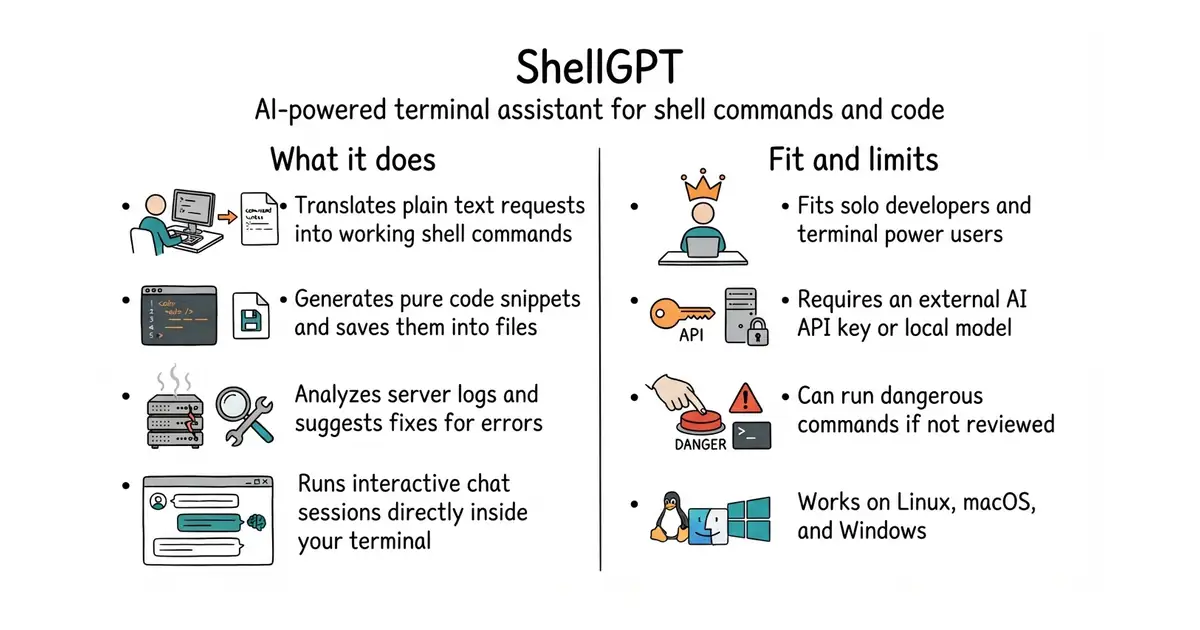
You can ask your computer to do things in plain English directly inside your terminal. It will write the command for you, check it, and run it if you say yes. You save time because you no longer need to search online for complicated commands. It costs money for the artificial intelligence tokens you use, unless you connect it to a free local model. You need an internet connection and an API key from an artificial intelligence provider to get started.
What it is
A command-line interface utility that connects your terminal to large language models. It handles code generation, shell command creation, chat history, and system function calling.
What it is good for
Solo builders who spend time looking up terminal syntax, writing repetitive shell scripts, or translating log files into plain explanations.
- Generates correct operating system-specific shell commands tailored to whether you use macOS, Linux, or Windows.
- Includes chat and interactive loop modes to refine multi-step instructions without leaving the terminal.
- Saves previous requests in a local cache so identical queries do not cost extra API calls.
- Requires an active API key and paid account balance with an artificial intelligence provider unless configured with a local model.
- Can generate dangerous or destructive shell commands if you do not read the suggestion carefully before executing it.
- Setup requires familiarity with terminal commands and python package installation.
manual web searches for command syntax and copy-pasting code snippets
Ollama
- Aider-AI/aider50k stars
An AI assistant that edits files directly in your git repository instead of only generating single commands.

- Kong/insomnia40k stars
A desktop application for sending requests to an interface and reading what comes back.
- microsoft/playwright-mcp39k stars
A server that lets an AI assistant drive a real browser, using the page's own structure rather than screenshots.
- Kilo-Org/kilocode28k stars
An open-source coding assistant for VS Code, JetBrains editors and the terminal, which can edit several files at once.
pip install shell-gpt