38.5k stars · Apache-2.0 · v0.0.83 (2026-09-28) · Track this in Scout
A server that lets an AI assistant drive a real browser, using the page's own structure rather than screenshots.
▶Repo detailsthe review · specs · pros & cons · install
What it does
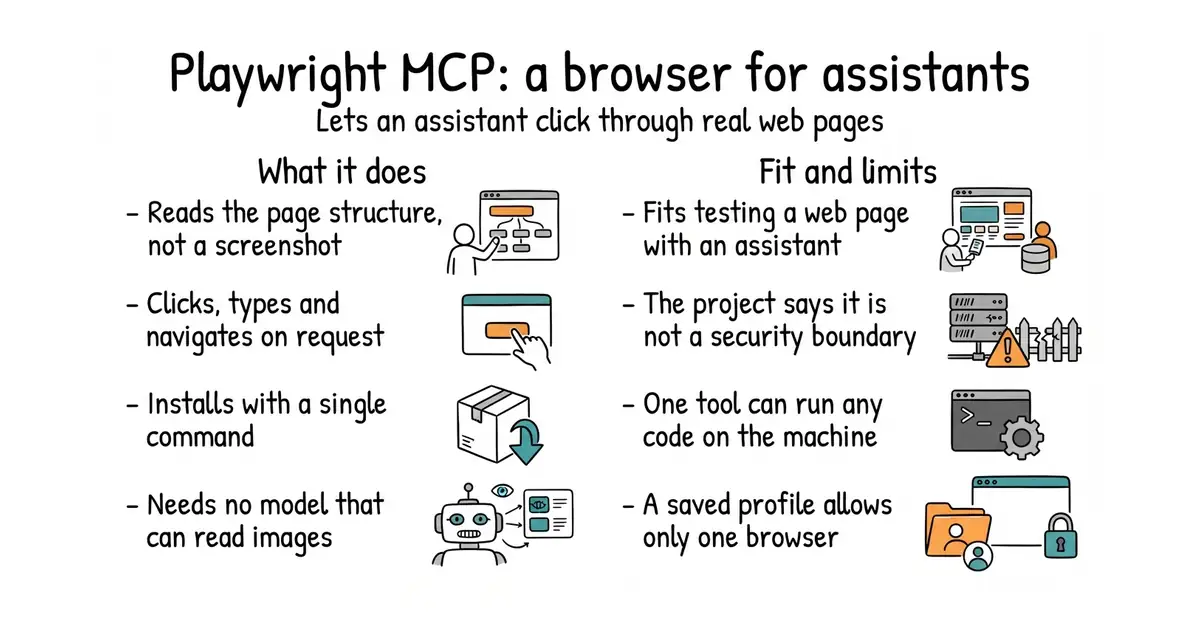
It speaks the Model Context Protocol, which is a common way for AI assistants to call outside tools, and the tools it offers are browser actions. It drives the browser through Playwright, Microsoft's browser automation library. Instead of sending pictures of the page, it sends the page's accessibility tree, which is the structured description browsers already build for screen readers. That means no vision model is needed by default, and far fewer words are spent per step. It needs Node.js 18 or newer and an assistant that speaks the protocol. Default timings are an action timeout of five seconds, a navigation timeout of sixty seconds and a settling pause of half a second. Now the limits, and the project states all of them itself. It says plainly that this is not a security boundary. A tool named browser_run_code_unsafe runs whatever code it is given inside the server process, which the project describes as equivalent to letting someone run programs on that machine. The --allowed-origins option is not a security boundary either and does not apply to redirects, and the feature for handling passwords is described as a convenience rather than a protection. A saved browser profile can only be used by one browser at a time, so two assistants in the same folder will collide unless each is given --isolated or its own profile folder. The container image runs headless Chromium only.
Why it matters
Who it suits. Anyone using an AI assistant for work that involves a web page: checking that a form still submits, reading a page that needs a login, filling in a slow administrative screen, or walking through a sign-up to see where it breaks. It suits testing especially well, because the assistant describes what it saw in words you can read back. It also suits anyone who has tried the screenshot-based approach and found it slow and expensive. Skip it if the pages you care about hold money, credentials or anything irreversible, because the project's own warning tells you that is the wrong place for it.
Verdict. This is the gold entry today and it is also the one with the clearest warning attached, which is exactly why it earns the slot. The install is one command and the payoff is immediate: an assistant that can see a page properly instead of guessing. Version 0.0.83 was published on 28 September 2026 and the version number is honest about how young this is. Two rules to follow. Never switch on browser_run_code_unsafe on a machine that holds anything you care about, and treat --allowed-origins as a convenience rather than a fence. Also worth knowing, because the project says it: for a coding assistant that mainly needs to run browser tests, the plain Playwright command-line tool may spend fewer words than this does. The library underneath is microsoft/playwright, and browserbase/stagehand is the nearest alternative.
- One command to install, with nothing to configure for a first run.
- It reads the page's own structure, so no image-reading model is needed and each step is cheap.
- Apache-2.0, and the project lists its own weaknesses in plain language rather than burying them.
- It is not a security boundary, and one of its tools is equivalent to letting someone run programs on the machine.
- A saved browser profile allows only one browser at a time, so parallel use needs extra flags.
- Version 0.0.83, with no stated promise that the tool names will stay as they are.
 microsoft/playwright
Apache-2.0, the browser automation library this is built on; the right choice when a person is writing the test rather than an assistant.
Track this in Scout browserbase/stagehand
MIT, a software kit for the same idea in the other direction: you write code that gives instructions in plain language and gets structured data back.
Track this in Scout
# any assistant that speaks the protocol
npx @playwright/mcp@latest        # needs Node.js 18 or newer
# Claude Code
claude mcp add playwright npx @playwright/mcp@latest
# as a server on a port
npx @playwright/mcp@latest --port 8931
# in a container, headless Chromium only
docker run -i --rm --init --pull=always mcr.microsoft.com/playwright/mcp