14.1k stars · MIT · v5.1.0 (2026-07-29) · Track this in Rising ↗
The mature desktop subtitle editor — waveform retiming, line-by-line translation, and every format converted.
Radar check
What we found when we opened it. Every bar is one fact, with its date.
Last code pushed 25 Oct 2026, 2 days before this check.
Latest release v5.3.0 on 14 Oct 2026.
Public since February 2014, a little over 12 years.
14,710 stars and 1,343 forks.
5,607 commits and 943 new issues in the last 90 days.
238 contributors. 2378 pull requests merged in 90 days.
No security policy file says how to report a problem. No published security advisories.
How the bars are scored
- Alive. Days since the last code push: a week or less 100, a month 90, three months 70, six months 50, a year 30, eighteen months 15, older 0.
- Releases. Age of the latest GitHub release, on a similar scale; no bar when the project publishes no releases.
- Maturity. Age of the project: eight years 100, five 90, three 70, two 55, one 40, six months 25, younger 10.
- Adoption. Stars on a log scale: 100,000 stars is 100, 10,000 is 80, 1,000 is 60, 100 is 40.
- Activity. Commits in the last 90 days: 300 or more 100, 100 85, 30 65, 10 45, any 25.
- Community. People who have contributed: 100 or more 100, 30 80, 10 60, 5 40, 2 25, one 10.
- Security. A published security policy 80, none 40; published advisories are listed, not scored.
Checked by Repo Radar on 25 Oct 2026 from the repository on GitHub. Covered in Edition 13.
▶Repo detailsthe review · specs · pros & cons · install
What it does
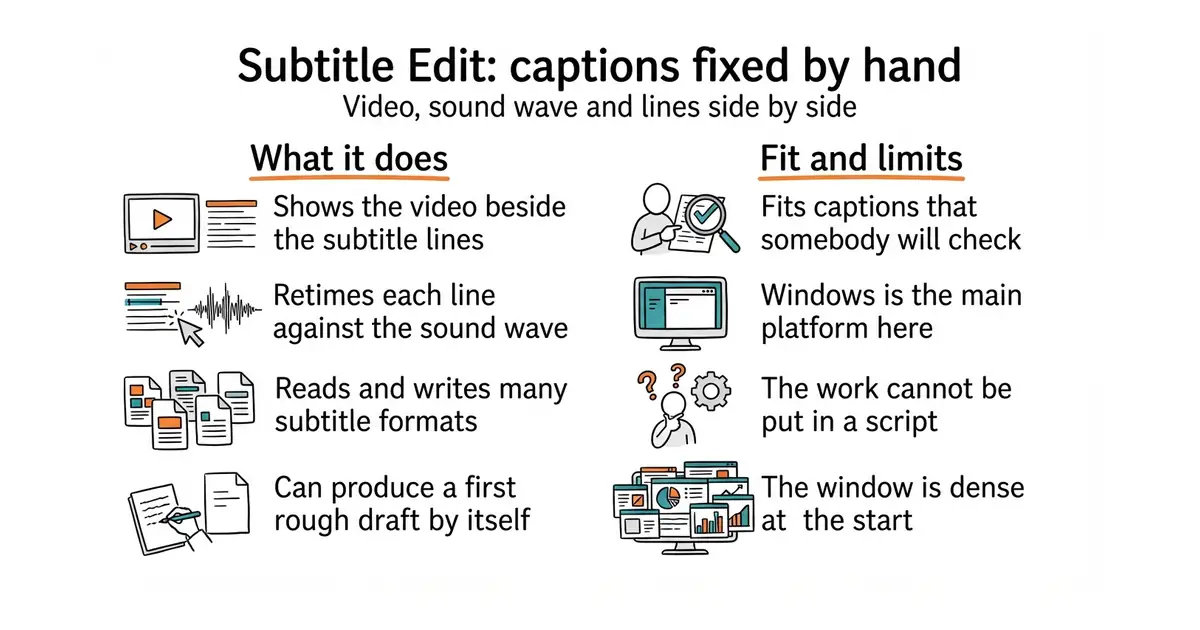
It is a desktop subtitle editor that has been maintained for over ten years. It shows the video, the sound wave and the subtitle lines together, so timings can be dragged into place. It reads and writes more than two hundred subtitle formats and converts between them. It can split and merge lines, fix common errors in bulk, check reading speed, and translate line by line. It can also call a speech-recognition engine itself to produce a first draft. Version 5.3.0 was released on 14 October 2026 and code was pushed on 17 October 2026, so the release-candidate stage noted in earlier editions is over. It is a program a person operates: nothing about it can be put in a script.
Why it matters
Who it suits. It suits anyone publishing captions they are prepared to stand behind, and anyone publishing in a second language, where machine output is a draft rather than an answer. It also suits awkward format work, which it handles better than anything else available. Skip it if captions are automatic and nobody checks them, and skip it if everything has to run unattended.
Verdict. Worth installing and worth learning two keyboard shortcuts. It is the only step in this part that cannot be automated, and the time it takes is the time the quality costs. Windows is the first-class platform, so check the build for other systems before planning around it. Aegisub/Aegisub is the alternative for styled captions; smacke/ffsubsync solves the narrower problem of subtitles that are simply offset.
Summary (Key Points)from the README
Key features
- Offline core: Editing, converting, video playback and local auto-backup run entirely on your device.
- Optional online services: Translation, speech-to-text, text-to-speech, OCR and dictionary lookups can be used, and only the data each request needs is sent to the chosen provider.
- Self-contained builds: Windows, macOS and Flatpak builds include their dependencies and need no separate .NET install.
- Bundled video stack on macOS: libmpv and ffmpeg are included inside Subtitle Edit.app, so MacPorts or Homebrew is not required.
- Signed macOS app: As of v5.2.0, the .dmg is signed with an Apple Developer ID and notarized by Apple, so it opens without a Terminal quarantine-removal step.
- Flatpak for any distribution: The Flatpak bundles mpv and ffmpeg for Linux users on any distribution.
- Open source: The project is published as open source under the SubtitleEdit GitHub organization.
Ways to install
| Platform or method | What it needs | Effort |
|---|---|---|
| Windows (build from Releases page) | Windows 10 version 22H2 (build 19045) or newer, fully updated | Low |
| macOS .dmg | macOS 12 minimum, macOS 14 or newer recommended | Low: mount the .dmg and drag the app to Applications |
| Linux Flatpak | A Flatpak-capable system; mpv and ffmpeg are bundled | Low |
| Linux native (.tar.gz) | mpv and ffmpeg installed for video features, plus distro packages | Medium |
Important
- Old Windows 10 builds: Builds 2004, 20H2, 21H1 and 21H2 are end-of-life and may fail to start with a .NET runtime error (0x80131506).
- macOS 12 and 13: The app still starts on these versions, but the .NET runtime is not tested on that combination.
- Native Linux video: The .tar.gz build needs mpv and ffmpeg for video functionality, so install them before relying on playback.
- Online services: Using translation, speech-to-text, OCR or lookups sends the minimal request data to that provider, which applies its own privacy policy.
- Offline claim scope: "Offline" describes the core application; features that call third-party services are not offline.
Written by an AI model from the project’s README; not part of the review, and it can be wrong.
- Reads and writes almost every subtitle format, which removes a whole class of dead end.
- The sound-wave view makes retiming fast enough to be done rather than skipped.
- MIT licence, works offline, and has a long and steady history.
- Windows is the main platform; builds for other systems are less polished.
- The window is dense, and finding the right feature takes some patience at first.
- It is operated by hand, so unlike everything else in this part it cannot be scripted.
Download a build from the releases page: https://github.com/SubtitleEdit/subtitleedit/releases It takes the subtitle file written by #5 and gives each site the format it asks for.