25.3k stars · MIT · v1.2.1 (2025-10-31) · Track this in Rising ↗
Whisper transcription up to 4x faster with less memory, and it runs on plain CPU.
Radar check
What we found when we opened it. Every bar is one fact, with its date.
Last code pushed 25 Oct 2026, 2 days before this check.
Latest release v1.2.1 on 31 Oct 2025.
Public since February 2023, a little over 3 years.
26,118 stars and 2,165 forks.
11 commits and 9 new issues in the last 90 days.
52 contributors. 11 pull requests merged in 90 days.
No security policy file says how to report a problem. No published security advisories.
How the bars are scored
- Alive. Days since the last code push: a week or less 100, a month 90, three months 70, six months 50, a year 30, eighteen months 15, older 0.
- Releases. Age of the latest GitHub release, on a similar scale; no bar when the project publishes no releases.
- Maturity. Age of the project: eight years 100, five 90, three 70, two 55, one 40, six months 25, younger 10.
- Adoption. Stars on a log scale: 100,000 stars is 100, 10,000 is 80, 1,000 is 60, 100 is 40.
- Activity. Commits in the last 90 days: 300 or more 100, 100 85, 30 65, 10 45, any 25.
- Community. People who have contributed: 100 or more 100, 30 80, 10 60, 5 40, 2 25, one 10.
- Security. A published security policy 80, none 40; published advisories are listed, not scored.
Checked by Repo Radar on 25 Oct 2026 from the repository on GitHub. Covered in Edition 18.
▶Repo detailsthe review · specs · pros & cons · install
What it does
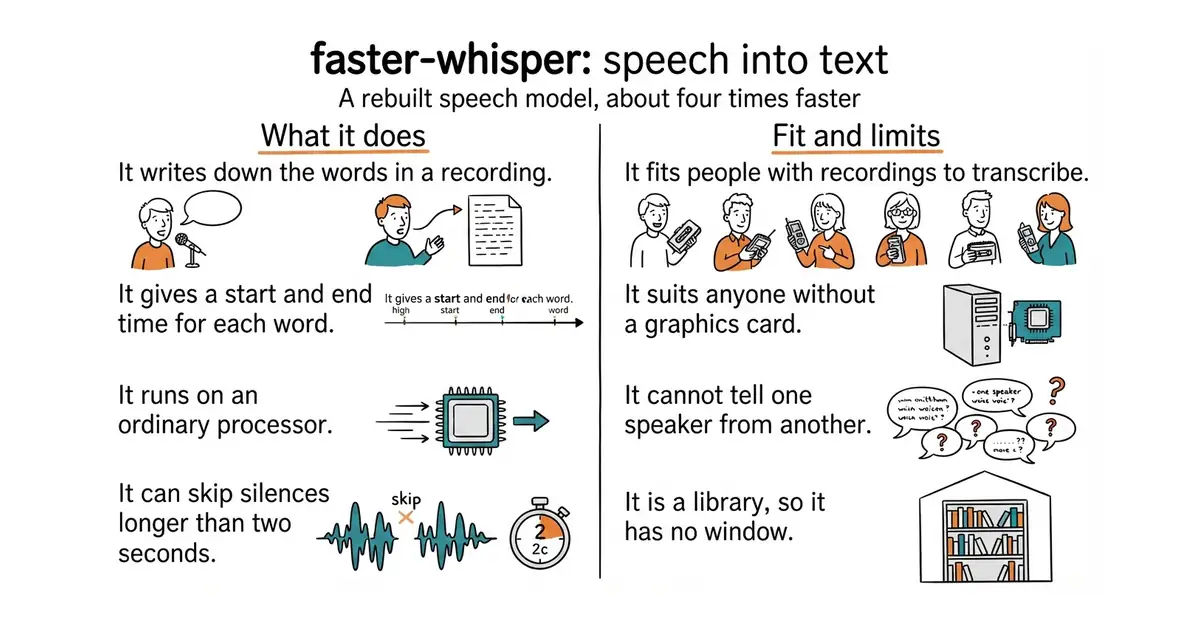
It reads an audio or video file and returns the text in short pieces, each with a start time and an end time. Ask for word timings and it gives a time for every single word, which is what a subtitle file needs. It is built on CTranslate2, an engine for running this kind of model quickly. A batched mode sends several pieces of audio through at once, and it is a direct swap for the normal call. It can skip silence automatically, and by default it only removes gaps longer than two seconds. It reads the audio itself, so no separate media tool has to be installed. It needs Python 3.9 or newer, and a graphics card is optional. It does not tell you who is speaking, and it has no window or web page of its own: it is a library, meaning code called from a program somebody writes.
Why it matters
Who it suits. It suits people with recordings piling up and no time to type them out: interviews, meetings, lectures, podcasts, video captions. It suits someone who writes a little Python, because the result is handed to code rather than shown on a screen. It also suits anyone working without a graphics card, since it is the quickest of the Whisper rebuilds on an ordinary processor. Skip it if what is wanted is a page where a file is dropped and a transcript comes back, or if each line has to be labelled with the name of the person who said it.
Verdict. Worth about an hour, and most of that hour is the first model download. The accuracy is the same as the original Whisper and the speed is the reason to choose this one. Watch the version numbers rather than trusting them: release 1.2.1 is from 31 October 2025, yet code landed on 16 October 2026, so the project is being worked on and simply tags rarely. Two near relatives are worth knowing. Edition 2 covered m-bain/whisperX, which runs on top of this project and adds speaker labels. Edition 13 covered ggml-org/whisper.cpp, which is easier to install on a Mac and needs no Python at all. Use this one when the transcript has to come out inside a Python script.
Summary (Key Points)from the README
Key features
- Speed and memory: The README says it is up to 4 times faster than openai/whisper for the same accuracy, while using less memory.
- 8-bit quantization: Int8 precision is supported on both CPU and GPU. On a GPU, large-v2 int8 transcribed 13 minutes of audio in 59s using 2926MB VRAM.
- Batched transcription: `BatchedInferencePipeline.transcribe` is a drop-in replacement for `WhisperModel.transcribe`. With batch_size=8 on GPU, large-v2 fp16 finished in 17s.
- Distil-Whisper support: The distil-large-v3 checkpoint works with the package. The README reports 25m50s with batch_size=16 fp16 versus 46m12s for transformers (SDPA).
- No FFmpeg install: Audio is decoded by PyAV, which bundles the FFmpeg libraries.
- Built-in VAD: Silero VAD filters out non-speech audio. By default it removes only silence longer than 2 seconds, and its parameters can be customized.
- Word-level timestamps: The README includes a section on word-level timestamps.
- Model conversion: A script converts Transformers-compatible Whisper models (original or fine-tuned) to CTranslate2 format, and models can also be converted from code.
- Automatic model download: Loading a size name such as `WhisperModel("large-v3")` fetches the converted model from the Hugging Face Hub.
Ways to install
| Platform or method | What it needs | Effort |
|---|---|---|
| PyPI (`pip`) | Python 3.9 or greater | Low, one package install |
| Master branch or specific commit | Git and pip | Medium, installs from source |
| GPU libraries via official NVIDIA docs | NVIDIA GPU, cuBLAS and cuDNN 9 for CUDA 12 | Medium, follows NVIDIA's guide |
| GPU libraries via Docker | Docker and the official `nvidia/cuda` runtime image | Medium, container setup |
| GPU libraries via pip (Linux only) | Linux, and `LD_LIBRARY_PATH` set before launching Python | Medium, manual environment setup |
| GPU libraries via Purfview archive (Windows and Linux) | Downloaded archive placed on the PATH | Medium, manual file placement |
Important
- CUDA and cuDNN versions: GPU use needs cuBLAS for CUDA 12 and cuDNN 9 for CUDA 12. Newer ctranslate2 releases support only these versions.
- Older CUDA setups: For CUDA 11 with cuDNN 8, the README says to downgrade to ctranslate2 3.24.0. For CUDA 12 with cuDNN 8, it says to downgrade to 4.4.0.
- Lazy transcription: `segments` is a generator, so nothing runs until you iterate over it.
- Benchmark conditions: GPU results come from an NVIDIA RTX 3070 Ti 8GB with CUDA 12.4. CPU results come from an Intel Core i7-12700K with 8 threads.
- Default beam size: This library defaults to beam size 5, while openai/whisper's `transcribe` defaults to 1. Comparisons need matched settings, WER and thread counts.
- Third-party binaries: The Purfview archive is a separate project, not part of the official package.
Written by an AI model from the project’s README; not part of the review, and it can be wrong.
- About four times faster than the original Whisper, with lower memory use.
- It runs on an ordinary processor, so no graphics card is needed.
- Word-level timings come out of the same call, so subtitles need no second tool.
- The first run downloads a model file of several hundred megabytes. Do that once, on a good connection.
- It cannot tell one speaker from another. That job needs a second tool on top.
- Running it on an NVIDIA graphics card means installing CUDA 12 and cuDNN 9 first, and older versions of those are no longer supported.
# Python 3.9 or newer is required. No separate media tool is needed.
mkdir -p ~/transcripts && cd ~/transcripts
python3 -m venv venv
source venv/bin/activate
pip install faster-whisper