Edition No. 18 · 12 Sep 2026
Open Props has not cut a release in three years, and it is not dead

This edition is about the unglamorous half of running software.
Refreshed on 17 October 2026. The repositories are the ones first published; any that are no longer maintained are left out.
Saturday, 12 September 2026 · Open Props has not cut a release in three years, and it is not dead
This edition is about the unglamorous half of running software. Backups that work. Logs a person can read. A login page. Email that arrives. An invoice. A test that runs against a real database. None of it is exciting. All of it is the difference between a project and a product.
One of the twelve taught a lesson worth the whole edition. Open Props last tagged a release in September 2023, three years ago. Everything about that looks like a dead project. Its code was pushed on 11 August 2026, and its package registry entry is twenty-three versions into the 1.7 line, well past the last tag. The project simply stopped tagging releases. This radar has been wrong about that exact thing before, and the rule is written down now: a release date is not a code date.
Two things worth knowing, separate from the recommendations
A project with no release since 2023 is still shipping code. Open Props (#9) last tagged a release on 29 September 2023. Its package registry entry is on 1.7.23, twenty-three versions into a line the tags never reached, and its newest code change landed on 11 August 2026. Reading the release page alone would have put it on the do-not-recommend list, and that would have been wrong. This radar made that exact mistake on 8 September 2026 with four projects in one run, and the rule written that day is the reason Open Props was checked properly: a release date says when somebody last tagged a version, and nothing else.
useSend started tagging releases. When it was checked on 9 September 2026 it had 508 commits and no releases at all, and that was why it kept losing its slot. It now has v1.9.8, published on 30 August 2026. Nothing about the project changed except a habit, and a habit was all that stood between it and an edition. That is worth remembering the next time something is held back for the same reason.
Every link in one place
| # | Repository | What it does | Stars | Licence | Website |
|---|---|---|---|---|---|
| 1 | pgbackrest/pgbackrest | PostgreSQL backup and point-in-time restore | 4.4k | MIT | pgbackrest.org |
| 2 | amir20/dozzle | Live container logs in a browser | 14.0k | MIT | dozzle.dev |
| 3 | NginxProxyManager/nginx-proxy-manager | HTTPS and routing from a web screen | 34.4k | MIT | nginxproxymanager.com |
| 4 | pocket-id/pocket-id | Sign-in with passkeys only | 9.0k | BSD-2-Clause | pocket-id.org |
| 5 | usesend/useSend | A self-hosted email sending service | 4.7k | AGPL-3.0 | usesend.com |
| 6 | darold/pgbadger | Names the slowest database queries | 4.1k | PostgreSQL License | pgbadger.darold.net |
| 7 | testcontainers/testcontainers-python | Tests against a real database 💎 | 2.3k | Apache-2.0 | testcontainers-python.readthedocs.io |
| 8 | InvoiceShelf/InvoiceShelf | Self-hosted invoicing 💎 | 1.9k | AGPL-3.0 | invoiceshelf.com |
| 9 | argyleink/open-props | Ready-made design values for CSS | 5.5k | MIT | open-props.style |
| 10 | SYSTRAN/faster-whisper | Speech to text, about four times faster | 25.9k | MIT | — |
| 11 | dcajasn/Riskfolio-Lib | Splits money between strategies | 4.5k | BSD-3-Clause | portfoliooptimization.org |
| 12 | plausible/community-edition | Self-hosted visitor counting 💎 | 2.5k | MIT | plausible.io/blog/community-edition |
Open Props has not cut a release in three years, and it is not dead
Twelve repositories, checked and reviewed. Every version verified against the GitHub API and dated.

4.4k stars · MIT | [pgbackrest.org](https://pgbackrest.org) · release/2.60.0 (2026-10-18) · Track this in Scout · Share this tool
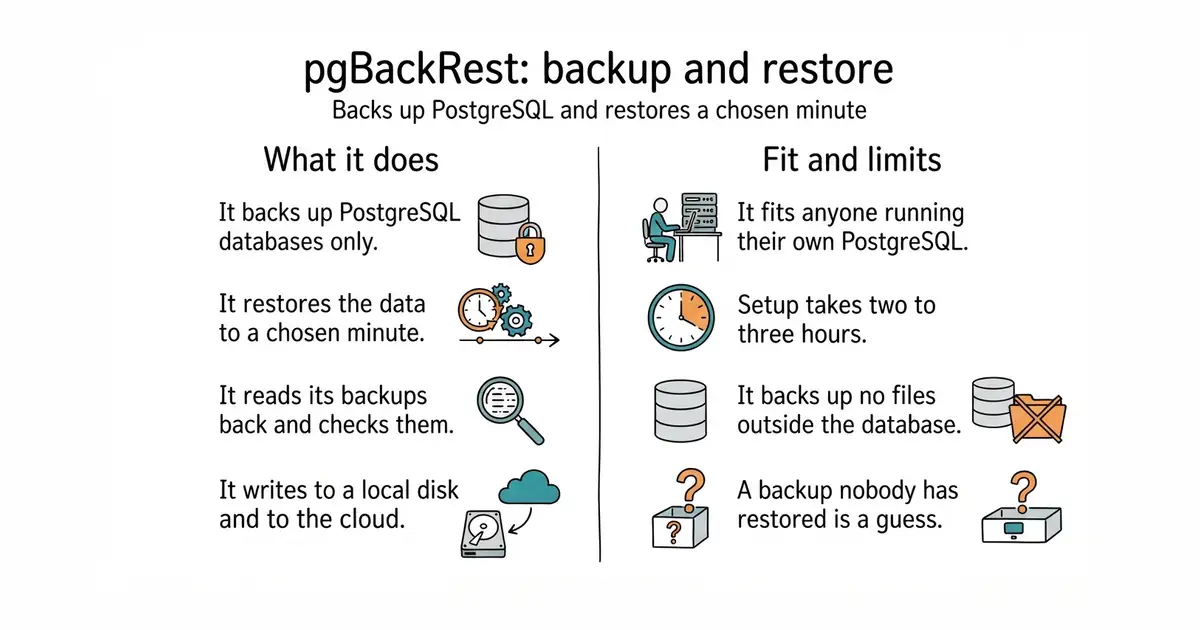
Backup and restore for PostgreSQL, including a restore to a chosen minute in the past.
▶Repo detailsthe review · specs · pros & cons · install
What it does
pgBackRest backs up PostgreSQL databases and nothing else. It takes full backups, and it also takes partial ones, so a nightly run copies only what changed. It keeps a copy of every change the database writes down, which is what makes a restore to an exact minute possible. It reads its own backups back and checks them, so a damaged backup is found before anyone needs it. It can write the same backup to a local disk and to S3-style cloud storage at the same time. Compression and encryption are built in, so no second tool is needed. Version 2.59.3 arrived on 4 October 2026, and the newest code change landed on 17 October 2026. It does not back up files, images or anything outside PostgreSQL, and it has no screen of its own: it is a command-line tool, meaning it is run by typing commands.
Why it matters
Who it suits. It suits people who run PostgreSQL on a machine they look after themselves, where the data is the one part that cannot be rebuilt from scratch. It suits a small team with nobody whose job is databases, because the whole configuration is one short file and one scheduled job. Skip it if the database is rented from a hosting provider that already takes point-in-time backups, and skip it if the important data lives somewhere other than PostgreSQL.
Verdict. Worth two to three hours, once, and it is the best-spent time on this page. The thing to watch is that a backup nobody has restored is only a guess, so rehearse one restore on a spare machine before calling the job done. Edition 8 covered restic/restic, which is excellent for files and is not a replacement here, because a file-level copy of a running PostgreSQL folder can be internally inconsistent. The sensible pairing is restic for everything else on the machine and pgBackRest for the database.
- A restore to any minute chosen, not only to the moment of the last backup.
- Backups can go to a local disk and to cloud storage at once, so one dead machine does not take the backups with it.
- It verifies its own backups by reading them back.
- Setup is a configuration file and a scheduled job, not one command. Expect two to three hours the first time.
- PostgreSQL only. Files and images need a second tool.
- The documentation is thorough and dry, and reading it is part of the work.
# On the database machine, as root. Debian or Ubuntu:
sudo apt update
sudo apt install pgbackrest
# Tell it where to keep backups and which database to protect.
sudo mkdir -p /var/lib/pgbackrest
sudo chown postgres:postgres /var/lib/pgbackrest
sudo tee /etc/pgbackrest/pgbackrest.conf > /dev/null <<'EOF'
[global]
repo1-path=/var/lib/pgbackrest
repo1-retention-full=2
start-fast=y
[main]
pg1-path=/var/lib/postgresql/16/main
EOF
# Then, in postgresql.conf, switch on change logging and point it at pgBackRest:
#   archive_mode = on
#   archive_command = 'pgbackrest --stanza=main archive-push %p'
# Restart PostgreSQL, then:
sudo -u postgres pgbackrest --stanza=main stanza-create
sudo -u postgres pgbackrest --stanza=main check
sudo -u postgres pgbackrest --stanza=main --type=full backup

14.7k stars · MIT | [dozzle.dev](https://dozzle.dev) · v11.3.2 (2026-10-13) · Track this in Scout · Share this tool
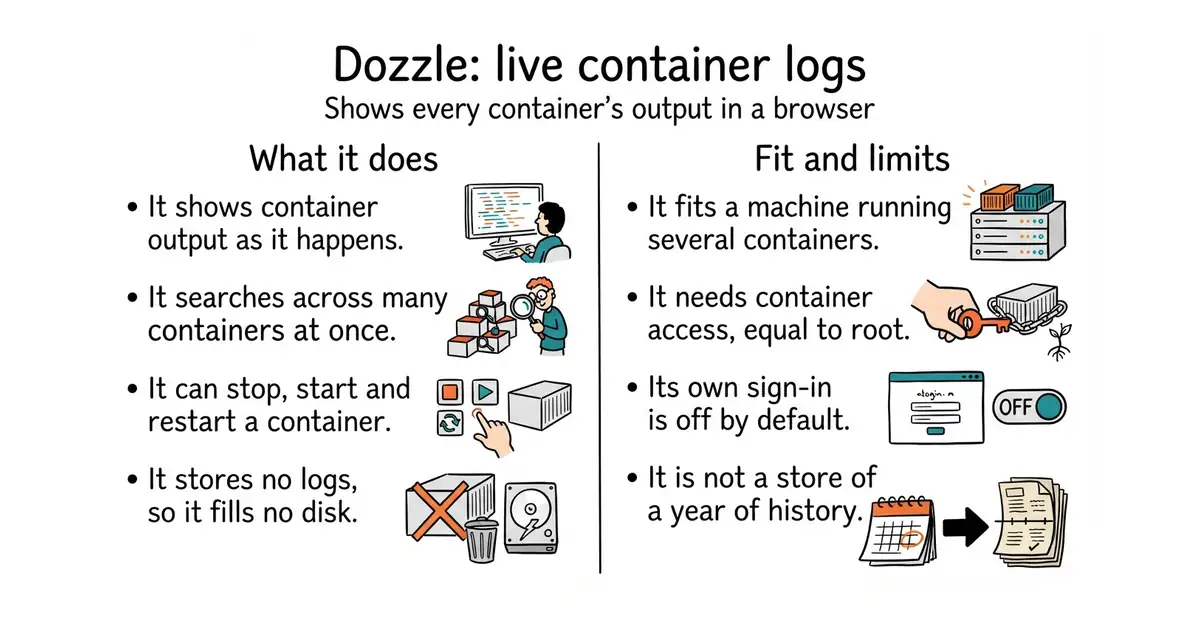
A web page showing the live output of every container on a machine, with search.
▶Repo detailsthe review · specs · pros & cons · install
What it does
Dozzle reads the output of containers and shows it in a browser, whether they run under Docker, Docker Swarm or Kubernetes. A container is a sealed box holding one program and everything that program needs. It shows several containers at once in one stream, with live search across all of them. Since version 11.3.2 it can also start, stop and restart a container, so it is no longer only a viewer. It keeps no copy of the logs itself, so it cannot fill a disk. It has a sign-in of its own, switched off by default, and it can use an outside identity service instead. Version 11.3.2 arrived on 13 October 2026. It is not a store of a year of history, it draws no graphs, and it raises no alerts.
Why it matters
Who it suits. It suits a machine with more than one container on it, where answering "what happened at 11pm" currently means a remote text-only connection and a command nobody remembers. It suits a small team, because several people can read the same output at the same time. It suits a first step, since nothing has to be collected or stored before it is useful. Skip it where logs are already gathered centrally and searched there, and skip it where the need is long retention, alerting or dashboards rather than watching.
Verdict. Ten minutes, and the payoff arrives the first time something breaks at night. One caution matters more than the rest. Dozzle needs the Docker socket, which is the control channel for Docker on that machine, and handing that to a program is the same as handing over root access. Version 11.3.2 widens that: the log views can now restart, stop and start containers, so a copy left open on the internet is no longer merely a leak of log lines. Put a password in front of it, or keep it bound to the machine itself. For keeping and searching a year of logs, grafana/loki is the heavier answer and a different job. Dozzle is for watching; Loki is for keeping.
- One command and it is running. Removing it is just as quick.
- It stores nothing by default, so it cannot fill a disk.
- Containers from several machines can be merged into one stream and searched together.
- It needs the Docker socket, which is equal to root access on that machine.
- Its own sign-in is off by default, and since 11.3.2 it can stop and start containers, so an unguarded copy does real damage.
- It shows what is happening now. It is not a store of a year of history.
# On the machine running the containers. Docker is the only prerequisite.
docker run -d --name dozzle \
  -v /var/run/docker.sock:/var/run/docker.sock \
  -v dozzle_data:/data \
  -p 127.0.0.1:8080:8080 \
  amir20/dozzle:latest

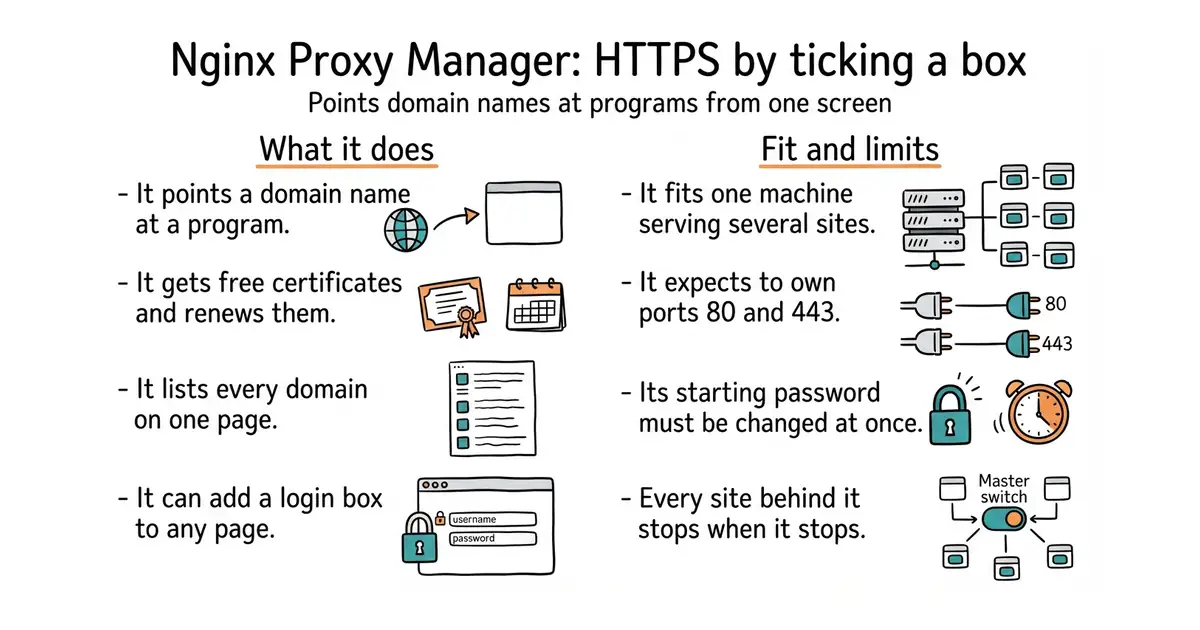
34.4k stars · MIT | [nginxproxymanager.com](https://nginxproxymanager.com) · v2.16.0 (2026-09-24) · Track this in Scout · Share this tool
A web screen that points domain names at programs and gets free HTTPS certificates that renew on their own.
▶Repo detailsthe review · specs · pros & cons · install
What it does
Nginx Proxy Manager runs the nginx web server together with a management screen. HTTPS is the encrypted connection behind the padlock, and the certificate that proves the site is genuine comes free from Let's Encrypt; this program asks for it, installs it and renews it before it expires. Every domain on the machine is listed on one page, so what points where can be read at a glance. It can put a username and password in front of any page that has none. It handles redirects, raw network streams, and a block of extra nginx settings for each host. Wildcard certificates work through more than a hundred DNS providers, which means one certificate covers every name under a domain. Version 2.16.0 arrived on 24 September 2026 and added a log viewer inside the screen, access rules for single paths, and a fix for a flaw that could have let an outsider run commands on the machine; the newest code change landed on 13 October 2026. It does not host websites itself, and it manages one machine rather than spreading traffic across several.
Why it matters
Who it suits. It suits people who run several programs on one machine and do not want to write nginx configuration by hand. It removes the step that most often stops a self-hosted tool from being reached properly, which is the certificate. It is also how entry 4 gets the HTTPS it needs in order to run at all. Skip it if the machine serves exactly one site, where a single certificate command is simpler. Skip it too if the setup already runs Traefik or Caddy.
Verdict. Worth an hour, and most of the hour is waiting for a change to a domain name to spread across the internet. Three cautions. It expects to own ports 80 and 443, the two ports web traffic arrives on, so moving a machine that is already serving onto it is a planned change rather than a quick try. The management screen starts with a password that is printed in the documentation, so change it in the first minute. And version 2.16.0 also updated the certificate tool underneath, which broke some DNS plugins, so read the release notes before upgrading an older installation. traefik/traefik and caddyserver/caddy do the same job from a configuration file and are the better choice where the whole setup is already written in files.
- Free certificates that renew on their own, set up by ticking a box.
- One screen listing every domain on the machine, so nothing is hidden in a file.
- It can put a login box in front of any page that has none.
- It expects ports 80 and 443, so a machine that is already serving has to be moved over deliberately.
- Everything behind it depends on it. When it stops, every site on that machine stops.
- The management screen starts with a password that is printed in the documentation, and it must never face the open internet.
mkdir -p ~/npm && cd ~/npm
cat > docker-compose.yml <<'EOF'
services:
  app:
    image: jc21/nginx-proxy-manager:latest
    restart: unless-stopped
    ports:
      - '80:80'
      - '443:443'
      - '127.0.0.1:81:81'
    volumes:
      - ./data:/data
      - ./letsencrypt:/etc/letsencrypt
EOF
docker compose up -d

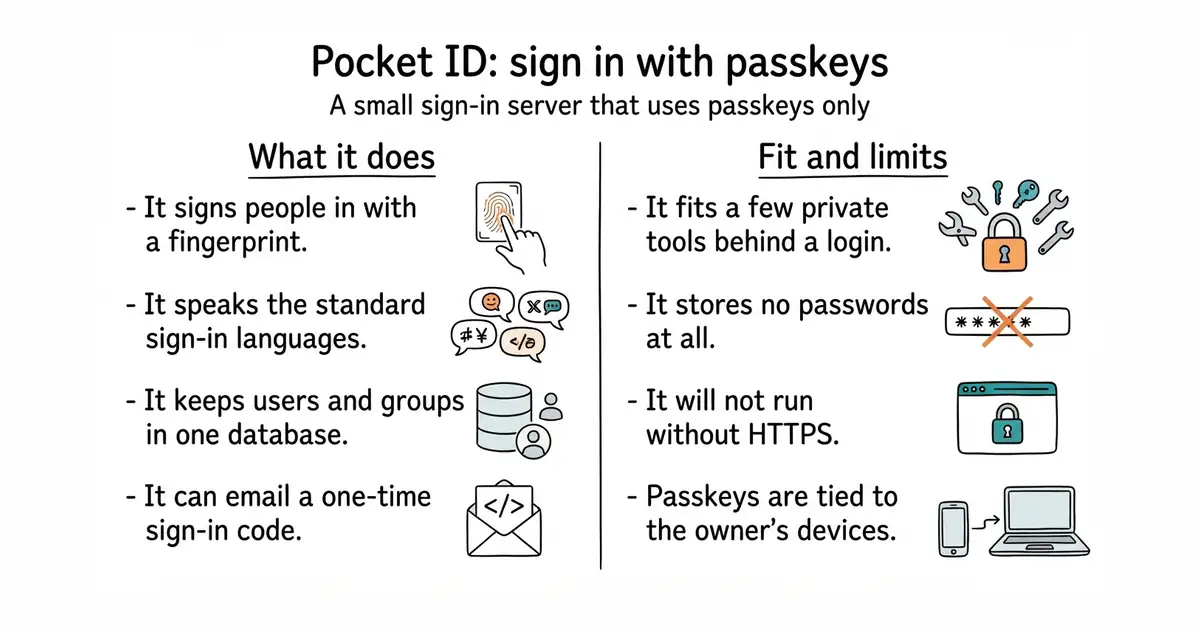
9.6k stars · BSD-2-Clause | [pocket-id.org](https://pocket-id.org) · v2.18.0 (2026-10-04) · Track this in Scout · Share this tool
A small sign-in server that lets people log in with a fingerprint or a face instead of a password.
▶Repo detailsthe review · specs · pros & cons · install
What it does
Pocket ID is an identity provider, which means other programs hand the sign-in step to it and it reports back who the person is. It speaks OpenID Connect and OAuth 2.0, the two standard languages for that exchange, and it is formally certified for the first. It supports passkeys only: the keys a phone or computer stores and unlocks with a fingerprint, a face or a PIN. It keeps users and groups, and it can pass those groups to the applications behind it. It stores its data in SQLite by default, a database that is a single file, and it can use PostgreSQL instead. It can send one-time sign-in codes by email for people whose device is lost. Version 2.18.0 arrived on 4 October 2026. It does not support passwords at all, and it will not run without HTTPS.
Why it matters
Who it suits. It suits someone with one or two private tools on a machine who wants a proper login in front of them, and it suits a product whose own sign-in page is still on the list. It suits a team small enough that every member owns a modern phone or laptop. Skip it if some visitors use shared or older computers, because passkey-only will block them, and skip it if passwords, social logins or organisations are needed.
Verdict. Worth an evening, and the setup is mostly getting HTTPS in place first, which entry 3 handles. Two things to plan for. Passkeys are tied to devices, so losing every device is a real support problem: register more than one and set up a recovery route on day one. And passkey-only is a product decision, not a bug, so it is worth deciding before building it in. Edition 11 covered logto-io/logto, which does far more — passwords, social logins, organisations — and is the right choice when those are needed. authelia/authelia is the right choice for putting one sign-in in front of several existing self-hosted pages.
- No passwords to store, reset, or have stolen.
- One small program with a single-file database, so it is cheap to run and easy to understand.
- It speaks the standard sign-in language, so most self-hosted tools accept it with no changes.
- It only works over HTTPS, because passkeys refuse to run otherwise.
- Passkeys are tied to devices, so account recovery has to be planned before anyone needs it.
- Passkey-only will turn away visitors on older or shared computers.
mkdir -p ~/pocket-id && cd ~/pocket-id
cat > docker-compose.yml <<'EOF'
services:
  pocket-id:
    image: ghcr.io/pocket-id/pocket-id:v2
    restart: unless-stopped
    env_file: .env
    ports:
      - '127.0.0.1:1411:1411'
    volumes:
      - ./data:/app/data
EOF
echo "APP_URL=https://id.example.com" > .env
echo "TRUST_PROXY=true" >> .env
docker compose up -d



4.7k stars · AGPL-3.0 · v1.9.8 (2026-08-30) · Track this in Scout · Share this tool
Self-hosted alternative to Resend, SendGrid and Postmark — the sending layer Listmonk and Mautic both assume.
▶Repo detailsthe review · specs · pros & cons · install
What it does
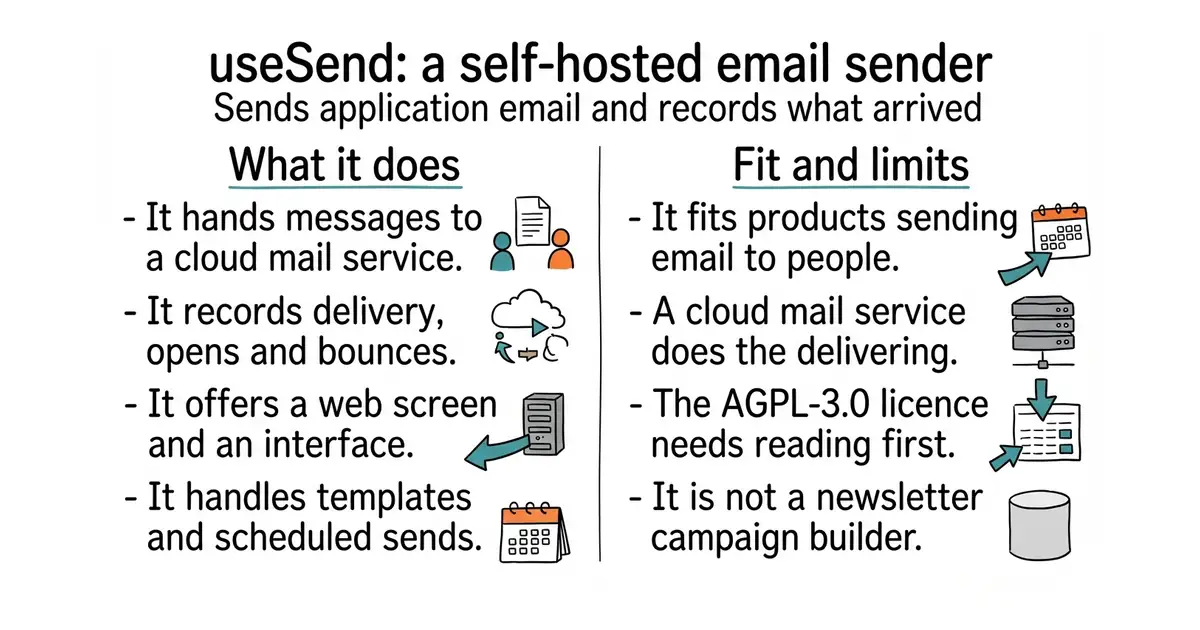
useSend is a self-hosted alternative to paid email services such as Resend, SendGrid and Postmark. It gives an application a simple way to ask for an email to be sent, and it hands the message to Amazon SES for delivery. A programming interface and ready-made code libraries cover the asking; a web screen covers the looking. It records what happened to each message: delivered, opened, clicked, bounced, or marked as spam. It handles templates, contact lists and scheduled sends, and it can be used as the delivery route for other software through plain SMTP, the standard language for passing email between machines. Version 1.9.8 arrived on 30 August 2026. It does not deliver the mail itself, so Amazon SES does the sending, and it is not a marketing campaign builder.
Why it matters
Who it suits. It suits a product that sends email to individual people, one message at a time, rather than one newsletter to a list. It suits anyone whose paid email bill has grown faster than the product, because Amazon SES costs roughly ten cents per thousand messages. Skip it if the need is a newsletter with subscriber management, and skip it if nobody wants to own the delivery setup at all.
Verdict. Worth half a day, and most of that is Amazon rather than this software: a new SES account starts restricted and getting out of that state takes a short application. Two cautions. The licence is AGPL-3.0, which is fine for running it in a business and needs reading carefully before building it into something sold on. And email delivery still depends on getting the boring domain records right, which Edition 8's checkdmarc checks. Edition 2 covered knadh/listmonk and Edition 10 covered Mautic, which both write campaigns and assume something else delivers them. Edition 15 covered postalserver/postal, the heavier answer that is a full mail server of its own.
- Sending through Amazon SES costs about ten cents per thousand emails, far below the usual monthly plans.
- The record of every message stays in the database it was sent from, including bounces.
- A web screen and a programming interface, so nothing has to be read out of a database by hand.
- Licensed AGPL-3.0. Read it before building it into a product that is sold.
- It depends on Amazon SES, and a new SES account needs a short application to leave its restricted mode.
- Delivery still needs the domain records done correctly, which is separate work.
mkdir -p ~/usesend && cd ~/usesend
curl -fsSL https://raw.githubusercontent.com/usesend/useSend/main/docker-compose.yml -o docker-compose.yml
# Read the file, then set the values in an .env beside it:
#   DATABASE_URL, NEXTAUTH_SECRET, AWS_ACCESS_KEY, AWS_SECRET_KEY, AWS_DEFAULT_REGION
docker compose up -d





4.1k stars · PostgreSQL License | [pgbadger.darold.net](http://pgbadger.darold.net/) · v13.2 (2025-12-29) · Track this in Scout · Share this tool
It reads PostgreSQL's own log file and writes one page naming the slowest queries.
▶Repo detailsthe review · specs · pros & cons · install
What it does
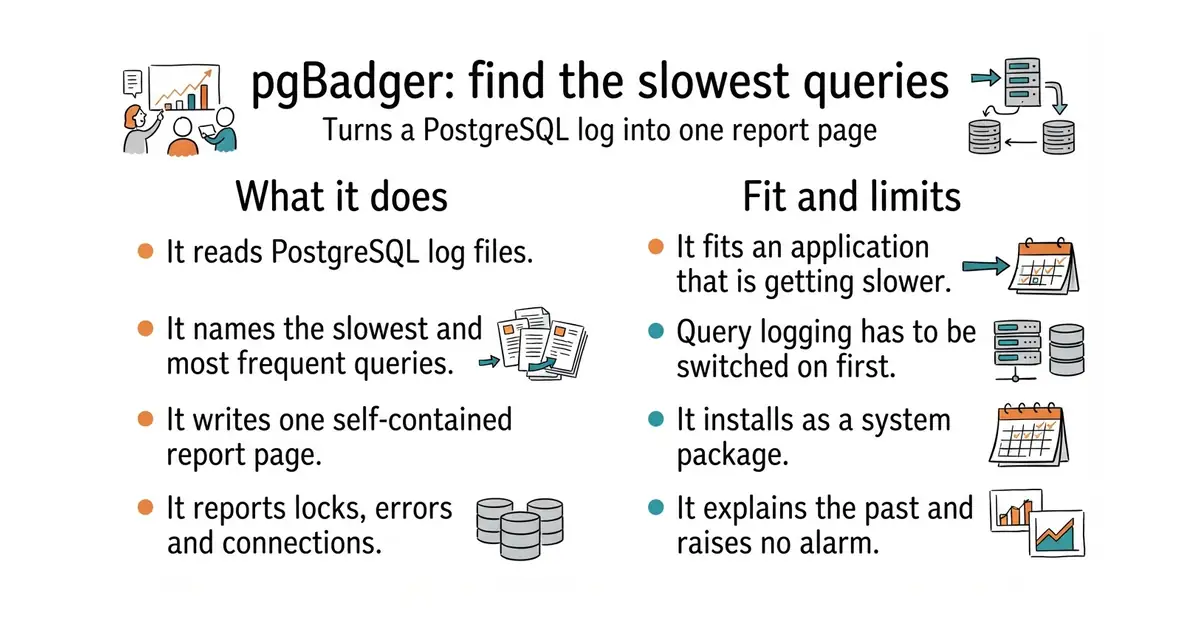
pgBadger is a single program that reads PostgreSQL log files and produces one self-contained HTML report. The report names the slowest queries, the most frequent ones, and the ones that cost the most time in total, with charts over the day. It also reports connections, locks, temporary files, checkpoints and errors. It can read compressed logs, several files at once, and logs from a remote machine. It can run over a long period in pieces and combine the results. Version 13.2 arrived on 29 December 2025, and the newest code change landed on 15 September 2026. It does not watch a database continuously, and it offers no alerts and no live dashboard.
Why it matters
Who it suits. It suits anyone whose own application is getting slower with no obvious cause, because it answers the question directly instead of asking for monitoring to be installed and a week to pass. It suits a one-off investigation, since nothing is left running afterwards. It is also the quickest way to find work that walks through a long list of records and quietly runs one small query per record. Skip it if what is wanted is a live dashboard and alerts, and skip it if query logging cannot be switched on even for a day.
Verdict. Worth half an hour, and the report usually pays for itself the first time. Two cautions. A useful report needs query logging switched on in PostgreSQL first, which writes more to disk, so free space is worth watching for that day. And it is written in Perl, an older programming language, so installing it is a package rather than a one-line Python install. dalibo/pev2 is the natural next step once the slow query is known, and cybertec-postgresql/pgwatch is the choice if continuous monitoring is what is actually wanted.
- It works on log files that already exist, so it can explain last week.
- Nothing is left running on the machine. Run it, read the page, done.
- The report is one HTML file, with no database and no dashboard to maintain.
- Query logging has to be switched on first, which writes more to disk.
- It is written in Perl, so it is a system package rather than a quick language-specific install.
- It explains the past. It raises no alarm while something is going wrong.
# Debian and Ubuntu package it directly:
sudo apt update
sudo apt install pgbadger
# Switch on query logging in postgresql.conf:
#   log_min_duration_statement = 0
#   log_line_prefix = '%t [%p]: user=%u,db=%d,app=%a,client=%h '
#   log_checkpoints = on
#   log_lock_waits = on
#   log_temp_files = 0
# Reload PostgreSQL, let it run for a day, then:
pgbadger /var/log/postgresql/postgresql-16-main.log -o ~/report.html

2.3k stars · Apache-2.0 | [testcontainers-python.readthedocs.io](https://testcontainers-python.readthedocs.io/en/latest/) · testcontainers-v4.15.0 (2026-07-24) · Track this in Scout · Share this tool
Tests get a real, empty PostgreSQL, started and destroyed automatically.
▶Repo detailsthe review · specs · pros & cons · install
What it does
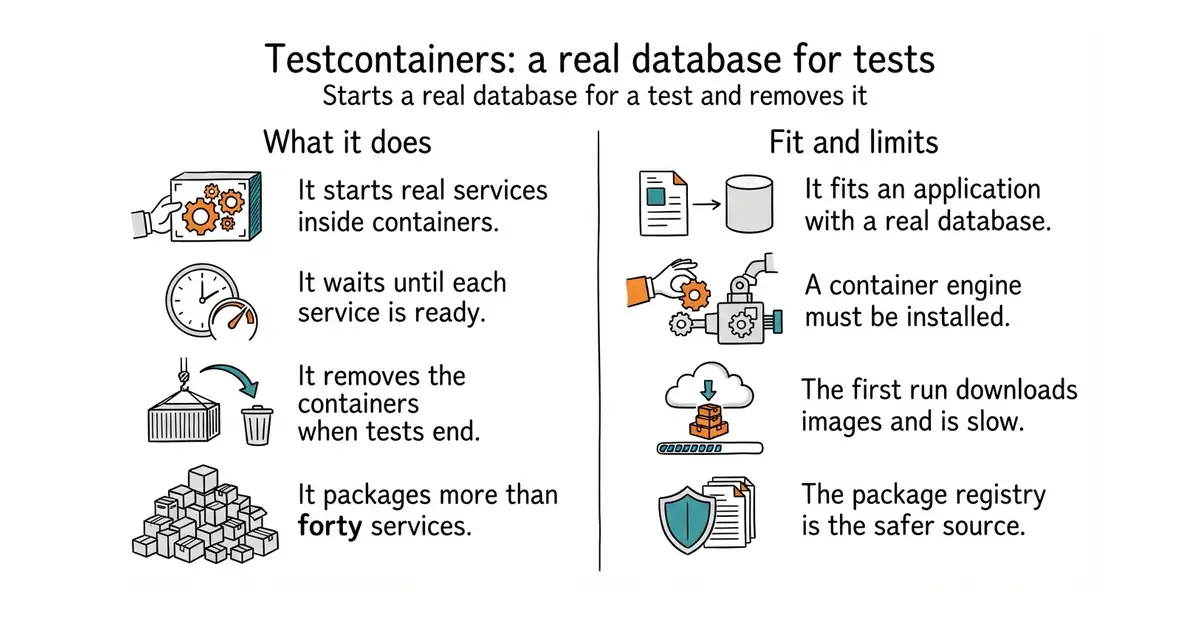
Testcontainers for Python is a library added to test code. It starts real services inside Docker containers for the length of a test run, waits until each one is ready, hands the test the address to connect to, and removes them when the run ends. It covers far more than databases: more than forty services are packaged, including PostgreSQL, MySQL, Redis, Kafka, RabbitMQ, Elasticsearch and S3-compatible storage. Each container can be reused across a whole test session or started fresh per test. It works with pytest and with the standard library's own test runner. A clean-up helper removes containers even when a test run is killed halfway. Version 4.15.0 arrived on 24 July 2026. It does not provide the tests themselves, and it will not run where Docker is unavailable.
Why it matters
Who it suits. It suits anyone with a real database behind an application who has been putting tests off, because this removes the usual excuse. The common alternative is testing against SQLite, a small file-based database, and hoping it behaves like the real engine; it does not, and the differences appear in production. It also suits a team using a coding assistant to write tests, since tests against the real engine actually prove something. Skip it if Docker cannot be installed where the tests run, and skip it if a few seconds of extra time per test run matters more than accuracy.
Verdict. Worth an hour to adopt and almost nothing to maintain. Two things to expect. The first run downloads container images and is slow, and every run after that adds a few seconds. And Docker has to exist wherever the tests run, including on any build machine used later. The newest thing published on the GitHub releases page can be a release candidate, which is a version offered for testing, so install from PyPI where 4.15.0 is the finished release. Edition 17 covered electric-sql/pglite, which gives a browser a Postgres engine with no server at all, and the two sit neatly beside each other.
- Tests run against the same database engine as production, so a passing test means more.
- Every run starts empty, so tests cannot pollute each other.
- More than forty services are packaged, not only databases.
- The first run pulls container images and is slow, and later runs still add seconds.
- Docker has to be available wherever the tests run, including on build machines.
- The GitHub releases page can show a release candidate, so PyPI is the safer source.
cd ~/myapp
source venv/bin/activate
pip install "testcontainers[postgres]" pytest

1.9k stars · AGPL-3.0 | [invoiceshelf.com](https://invoiceshelf.com) · 2.4.6 (2026-09-25) · Track this in Scout · Share this tool
Invoicing and expense tracking you host yourself, with several currencies and customers.
▶Repo detailsthe review · specs · pros & cons · install
What it does
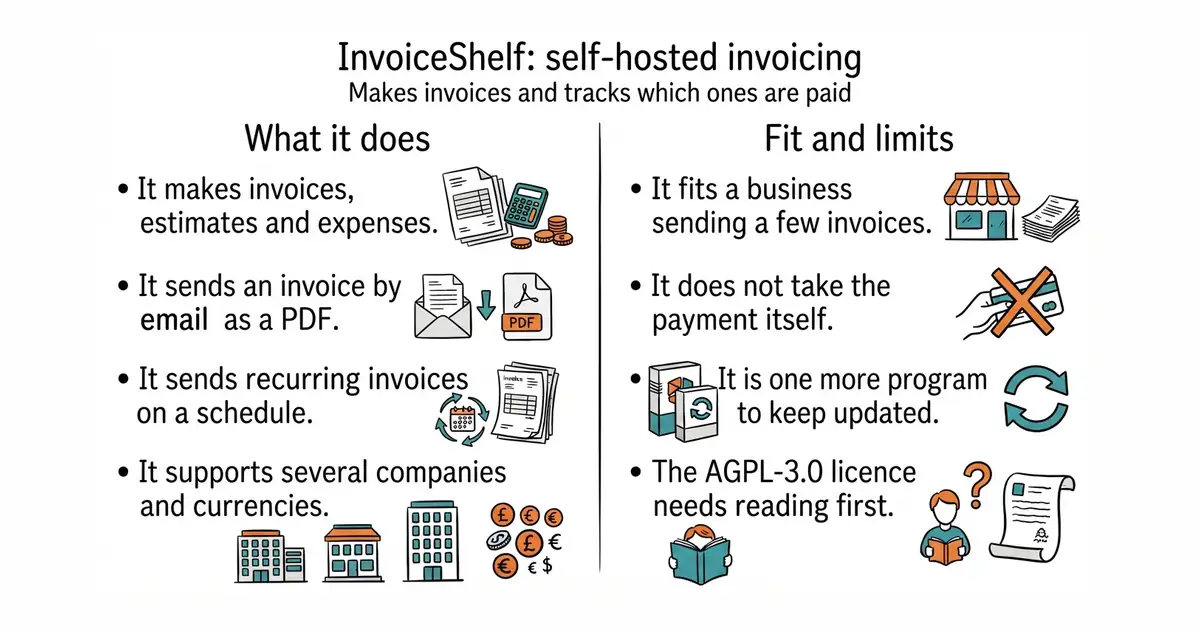
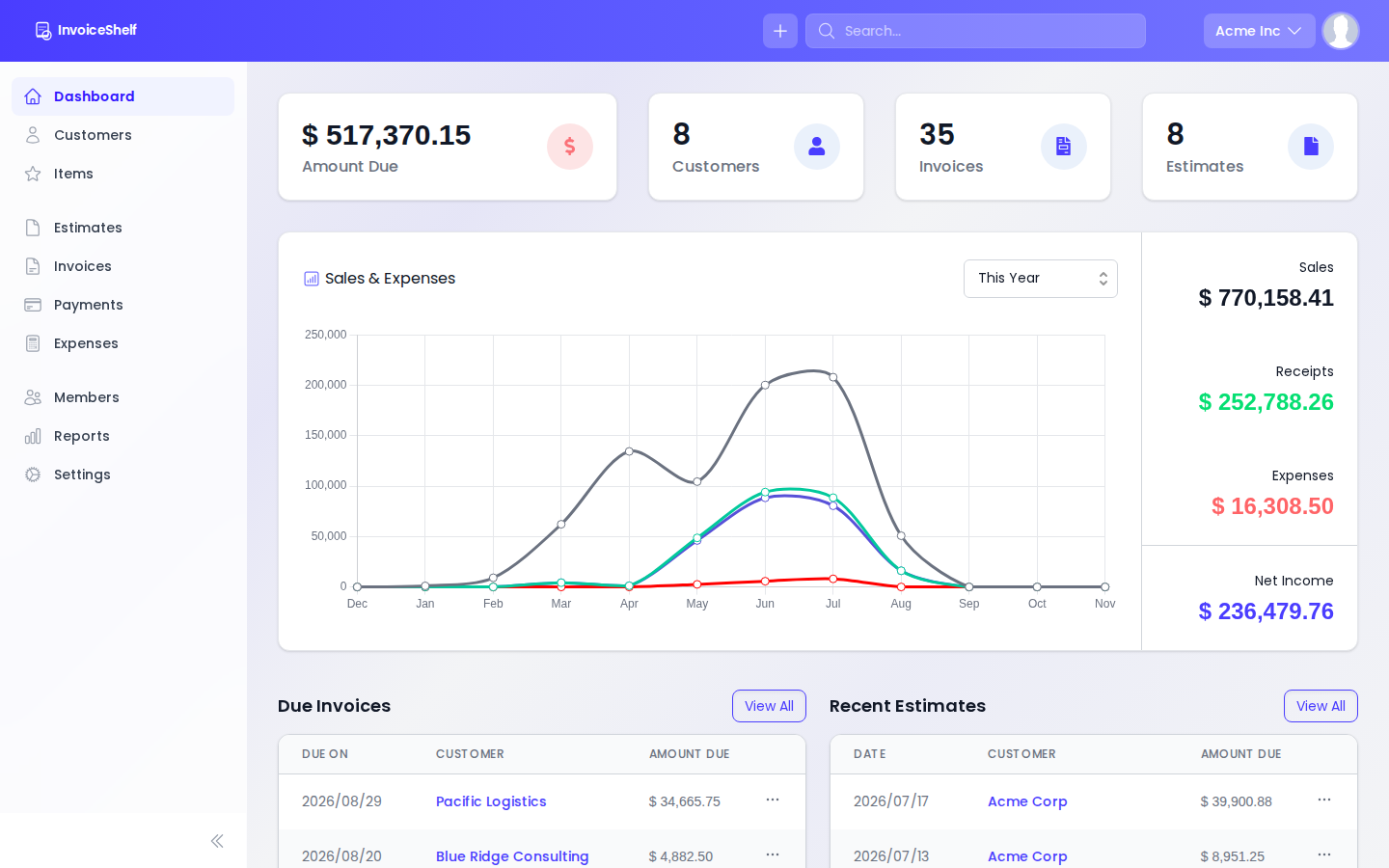
InvoiceShelf is a self-hosted invoicing application, and the maintained continuation of an older project called Crater. It keeps customers, estimates, invoices, recurring invoices, payments and expenses. It sends an invoice by email as a PDF and can take a customer to a page where they see it. Recurring invoices go out on a schedule without anyone remembering. It supports several companies in one installation, several currencies, and tax rules set by hand. It runs on SQLite, MariaDB or PostgreSQL, with official container images for each. Version 2.4.6 arrived on 25 September 2026, and the newest code change landed on 16 October 2026. It does not take payments, so a payment provider is still needed, and it is not an accounting system.
Why it matters
Who it suits. It suits a solo founder or a small business sending a handful of invoices to named people, in whatever currency those people asked for, and not wanting a monthly subscription for the privilege. It suits anyone who would rather keep customer records on a machine they control. Skip it if invoices should be generated automatically for hundreds of self-service customers, and skip it if full double-entry accounting is the real need.
Verdict. Worth an afternoon, and the recurring invoices are the part that earns it back. Two cautions. The licence is AGPL-3.0, which is fine for running a business on and needs reading before building it into something sold on. And it is a PHP application, so it is another kind of program to keep updated. At 1.9k stars it is the smallest project in this edition, which is the point of the gem badge, and taking over a stopped project is the good kind of continuation. invoiceninja/invoiceninja is the larger alternative, and akaunting/akaunting is the one to look at if accounting rather than invoicing is the problem.
- Several currencies, several companies, and tax rules that can be set by hand.
- Recurring invoices go out on their own, which is the part everybody forgets.
- Official container images, with a choice of SQLite, MariaDB or PostgreSQL behind it.
- Licensed AGPL-3.0. Read it before building it into a product that is sold.
- It is a PHP application, so it is one more kind of program to keep updated.
- It makes and tracks invoices. Something else still has to take the money.
mkdir -p ~/invoiceshelf && cd ~/invoiceshelf
git clone https://github.com/InvoiceShelf/docker.git .
# Pick one of the provided compose files: SQLite, MariaDB or PostgreSQL.
cp .env.example .env
# Edit .env — set APP_URL and the database password — then:
docker compose up -d


5.5k stars · MIT · v1.6.0 (2023-09-29) · Track this in Scout · Share this tool
CSS custom properties for spacing, colour, shadows and easing — design tokens without a framework.
▶Repo detailsthe review · specs · pros & cons · install
What it does
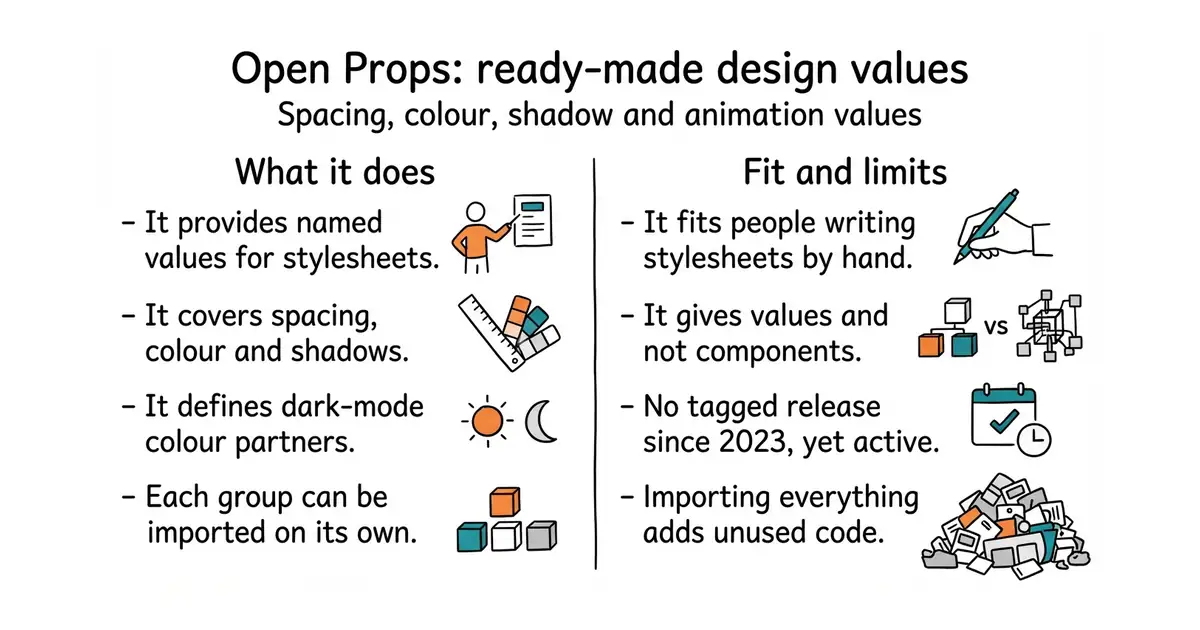
Open Props is a collection of CSS custom properties, which are named values that can be reused anywhere in a stylesheet. It covers sizes, spacing, colours, shadows, borders, gradients, easing curves and whole animations, with dark-mode partners already defined for the colours. It is plain CSS, so there is no build step and no framework. The parts can be imported separately, so a page can take the spacing scale and nothing else. It also ships as individual files per group for anyone who wants to pick by hand. The newest tagged release is v1.6.0 from 29 September 2023, while the package registry is on 1.7.23 and the newest code change landed on 11 August 2026. It gives values and not components, so there is no button, card or menu in it.
Why it matters
Who it suits. It suits people writing CSS by hand who want a site to look consistent without designing a system first, and it is the quickest route to a considered-looking page in plain CSS. It suits a small project where adding a whole framework would be too much. Skip it if the project already uses Tailwind or another system that owns these decisions, and skip it if what is needed is ready-made components rather than values.
Verdict. Worth twenty minutes, and the shadows and easing curves alone are worth it, because those are the values people usually get wrong. The thing to know before reading the repository is the release gap: three years with no tag looks like a dead project and is not one, and the code date is the number that settles it. Importing the whole set adds CSS that a page may never use, so import only the needed parts. Edition 16 covered radix-ui/colors, which does the colour half of this problem very well, and the two combine without fuss.
- Plain CSS. No build step, no framework, and only the needed parts have to be imported.
- It covers the values people usually get wrong, especially shadows and easing.
- Dark-mode partners are already defined for the colours.
- No tagged release since 2023, which reads as abandoned until the code date is checked.
- It gives values, not components. Nothing in it looks like a button until one is built.
- Importing the whole set adds CSS that may go unused.
cd ~/your-site
npm install open-props

25.3k stars · MIT · v1.2.1 (2025-10-31) · Track this in Scout · Share this tool
Whisper transcription up to 4x faster with less memory, and it runs on plain CPU.
▶Repo detailsthe review · specs · pros & cons · install
What it does
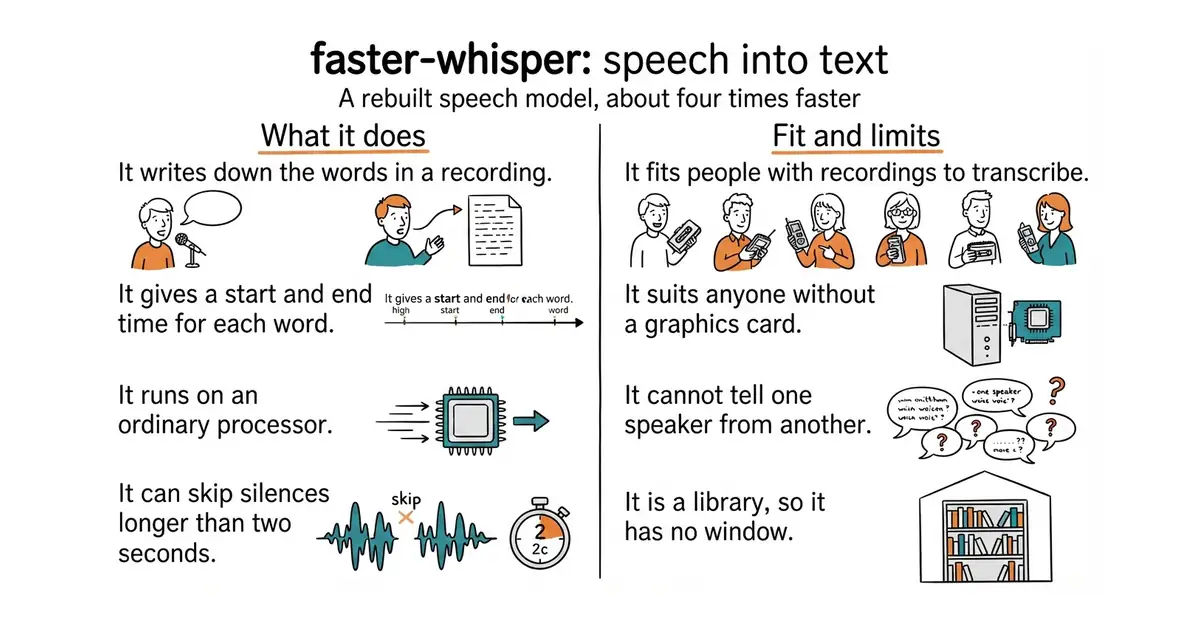
It reads an audio or video file and returns the text in short pieces, each with a start time and an end time. Ask for word timings and it gives a time for every single word, which is what a subtitle file needs. It is built on CTranslate2, an engine for running this kind of model quickly. A batched mode sends several pieces of audio through at once, and it is a direct swap for the normal call. It can skip silence automatically, and by default it only removes gaps longer than two seconds. It reads the audio itself, so no separate media tool has to be installed. It needs Python 3.9 or newer, and a graphics card is optional. It does not tell you who is speaking, and it has no window or web page of its own: it is a library, meaning code called from a program somebody writes.
Why it matters
Who it suits. It suits people with recordings piling up and no time to type them out: interviews, meetings, lectures, podcasts, video captions. It suits someone who writes a little Python, because the result is handed to code rather than shown on a screen. It also suits anyone working without a graphics card, since it is the quickest of the Whisper rebuilds on an ordinary processor. Skip it if what is wanted is a page where a file is dropped and a transcript comes back, or if each line has to be labelled with the name of the person who said it.
Verdict. Worth about an hour, and most of that hour is the first model download. The accuracy is the same as the original Whisper and the speed is the reason to choose this one. Watch the version numbers rather than trusting them: release 1.2.1 is from 31 October 2025, yet code landed on 16 October 2026, so the project is being worked on and simply tags rarely. Two near relatives are worth knowing. Edition 2 covered m-bain/whisperX, which runs on top of this project and adds speaker labels. Edition 13 covered ggml-org/whisper.cpp, which is easier to install on a Mac and needs no Python at all. Use this one when the transcript has to come out inside a Python script.
- About four times faster than the original Whisper, with lower memory use.
- It runs on an ordinary processor, so no graphics card is needed.
- Word-level timings come out of the same call, so subtitles need no second tool.
- The first run downloads a model file of several hundred megabytes. Do that once, on a good connection.
- It cannot tell one speaker from another. That job needs a second tool on top.
- Running it on an NVIDIA graphics card means installing CUDA 12 and cuDNN 9 first, and older versions of those are no longer supported.
# Python 3.9 or newer is required. No separate media tool is needed.
mkdir -p ~/transcripts && cd ~/transcripts
python3 -m venv venv
source venv/bin/activate
pip install faster-whisper

4.5k stars · BSD-3-Clause · 7.3.0 on PyPI (2026-05-31) · Track this in Scout · Share this tool
Portfolio optimisation with a large library of risk measures — how capital should be split across strategies.
▶Repo detailsthe review · specs · pros & cons · install
What it does
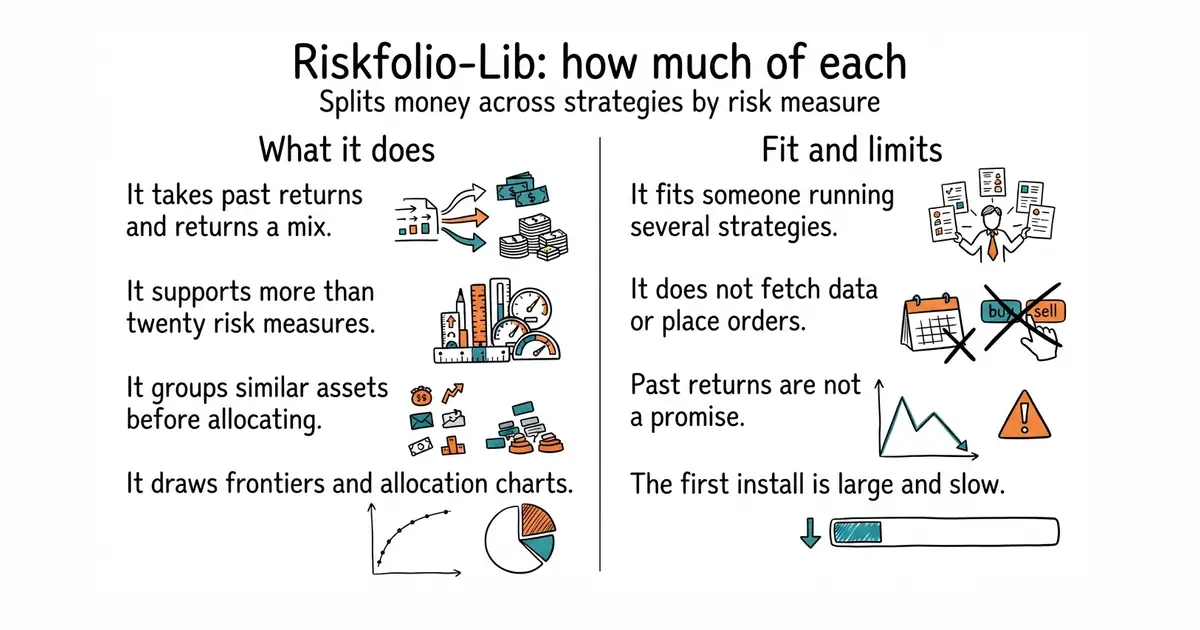
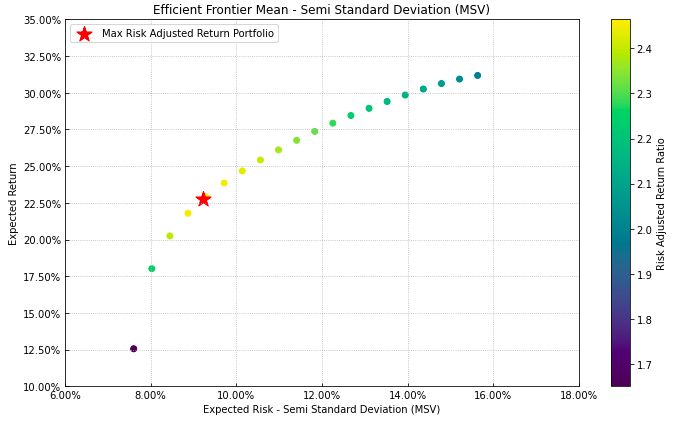
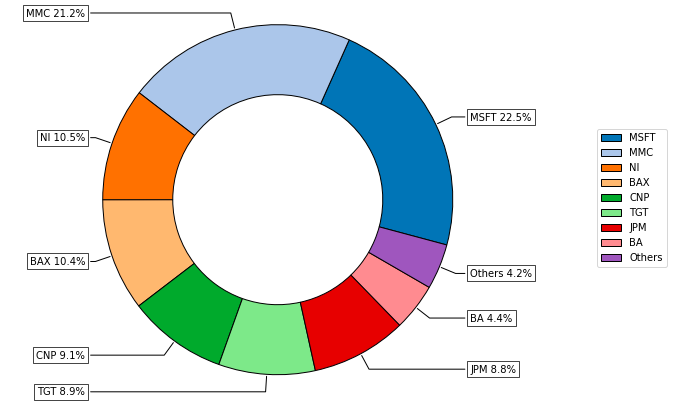
Riskfolio-Lib takes the past returns of several assets or strategies and produces the mix that best balances return against a chosen measure of risk. It supports more than twenty risk measures, including variance, mean absolute deviation, conditional value at risk and maximum drawdown. It can also build portfolios by hierarchical clustering, which groups similar assets before allocating between the groups. It draws the results: efficient frontiers, allocation pies, risk contributions and dendrograms. It works directly with pandas, the standard Python table library, so existing data fits with no conversion. Version 7.4.0 arrived on 4 October 2026, and it needs Python 3.10 or newer. It does not fetch market data, it places no orders, and it publishes no tagged releases on GitHub, only on PyPI.
Why it matters
Who it suits. It suits anyone with several things to allocate between: strategies, instruments, or the same strategy in different time windows. It suits a researcher who already has a table of returns and wants a defensible split rather than a round number. Skip it while there is only one strategy, because the honest answer then is to put everything in it. Skip it too if the real problem is choosing which strategy to run, rather than how much of each.
Verdict. Worth a weekend, and the weekend is mostly reading rather than coding. The caution is bigger than the software: this is finance mathematics, and it gives confident answers to questions that may be asked wrongly. It optimises on past returns, and past returns are not a promise. Installing it pulls in a solver library, so the first install is larger and slower than most. Edition 13 covered pmorissette/ffn, which answers the earlier question of which candidate performed best, and robertmartin8/PyPortfolioOpt is the smaller, gentler library to start with.
- More than twenty risk measures, not only the textbook one.
- It draws the results, so the output is a chart rather than a wall of numbers.
- It works directly with pandas, so existing tables of returns fit as they are.
- It optimises on past returns, which are not a promise about the future.
- The mathematics is the hard part, and a wrong question still gets a confident answer.
- The first install is large and slow, because it pulls in a solver library.
cd ~/myapp
source venv/bin/activate
pip install Riskfolio-Lib

2.8k stars · MIT · no releases; rolling docker-compose.yml · Track this in Scout · Share this tool
The self-host distribution for Plausible Analytics (the analytics engine itself lives in plausible/analytics).
▶Repo detailsthe review · specs · pros & cons · install
What it does
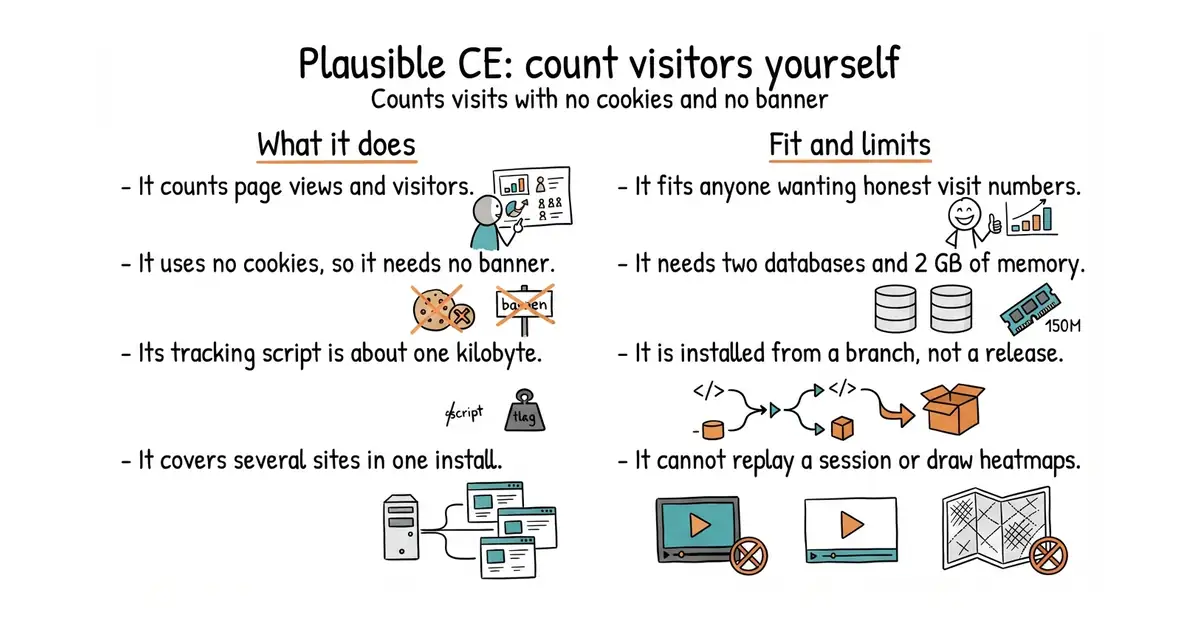
This repository is the self-hosted distribution of Plausible Analytics: a Docker Compose setup plus the settings needed to run it. Plausible counts page views, visitors, referrers, countries and devices without storing anything that identifies a person, which is why it needs no consent banner in Europe. The tracking script is about one kilobyte, so it barely affects page speed. It supports custom events and goals, campaign tags, and several sites in one installation. It runs a PostgreSQL database for its own records and a ClickHouse database for the counting, so expect about 2 GB of memory or more. The installation is a named branch rather than a release: the quickstart currently gives v3.2.1, and the newest code change here landed on 15 May 2026. It does not replay sessions, it draws no heatmaps, and it will not say why somebody left.
Why it matters
Who it suits. It suits anyone who wants honest visitor numbers with a much shorter privacy policy, and who would rather hold the numbers themselves than rent them. It suits a small set of sites on one machine, since one installation covers several. Skip it if session replay, funnels or product analytics are the real need. Skip it too if nobody wants to run two databases, in which case the company's own hosted plan is the sensible answer and paying for it supports the project.
Verdict. Worth an afternoon, and worth being straight about the crowd it joins. Editions 1 and 5 covered umami-software/umami, which does nearly the same job and is also MIT-licensed, and is lighter because it needs only one database. Edition 11 covered PostHog/posthog, which does far more and is easiest on its hosted free tier. Edition 9 covered Counterscale, for Cloudflare. Edition 8 covered allinurl/goaccess, which reads server log files and needs no script on the page at all. That makes five ways to count visitors on this radar. The useful advice is to pick one and install it, and for most people on one machine, Umami is the lighter start and Plausible the better-looking report.
- No cookies, so no consent banner and a much shorter privacy policy.
- The tracking script is about one kilobyte, so pages stay fast.
- MIT-licensed and self-hosted, so the numbers stay where they are collected.
- It is a real service to keep running: one container plus PostgreSQL and ClickHouse. Expect 2 GB of memory or more.
- This repository publishes no releases, so the installation is a named branch and there is no release page to read.
- It counts pages and visits. It will not replay a session or explain why somebody left.
git clone -b v3.2.1 --single-branch https://github.com/plausible/community-edition plausible-ce
cd plausible-ce
touch .env
echo "BASE_URL=https://plausible.example.com" >> .env
echo "SECRET_KEY_BASE=$(openssl rand -base64 48)" >> .env
docker compose up -d
Checked, and left out
These were opened for this edition and did not make it, with the reason.
azimuttapp/azimutt
azimuttapp/azimutt — UNVERIFIED. A database schema explorer, 2.1k stars, MIT, and it would have been a fourth hidden gem. It publishes no GitHub releases, its npm package carries no readable publish date, and this sandbox cannot read commit dates, so recent code could not be proven either way. Recorded as unverified with the reason stated; explicitly NOT called dormant. Re-check from the Mac, where the API is readable.
hunvreus/basecoat
hunvreus/basecoat — VERIFIED ALIVE, last code 21 July 2026 (Mac sweep, 9 September). shadcn/ui's look in plain HTML with no React. Left out only because open-props took the single design slot and the twelve were full. Stays queued and is near the front.
Know a repository we should check?