Radar check
What we found when we opened it. Every bar is one fact, with its date.
Last code pushed 27 Oct 2026, the same day before this check.
Latest release v0.2.13 on 27 Oct 2026.
Public since September 2026, 1 months.
2,603 stars and 97 forks.
323 commits and 216 new issues in the last 90 days.
12 contributors. 230 pull requests merged in 90 days.
A security policy says how to report a problem. No published security advisories.
How the bars are scored
- Alive. Days since the last code push: a week or less 100, a month 90, three months 70, six months 50, a year 30, eighteen months 15, older 0.
- Releases. Age of the latest GitHub release, on a similar scale; no bar when the project publishes no releases.
- Maturity. Age of the project: eight years 100, five 90, three 70, two 55, one 40, six months 25, younger 10.
- Adoption. Stars on a log scale: 100,000 stars is 100, 10,000 is 80, 1,000 is 60, 100 is 40.
- Activity. Commits in the last 90 days: 300 or more 100, 100 85, 30 65, 10 45, any 25.
- Community. People who have contributed: 100 or more 100, 30 80, 10 60, 5 40, 2 25, one 10.
- Security. A published security policy 80, none 40; published advisories are listed, not scored.
Checked by Repo Radar on 28 Oct 2026 from the repository on GitHub.
In simple English
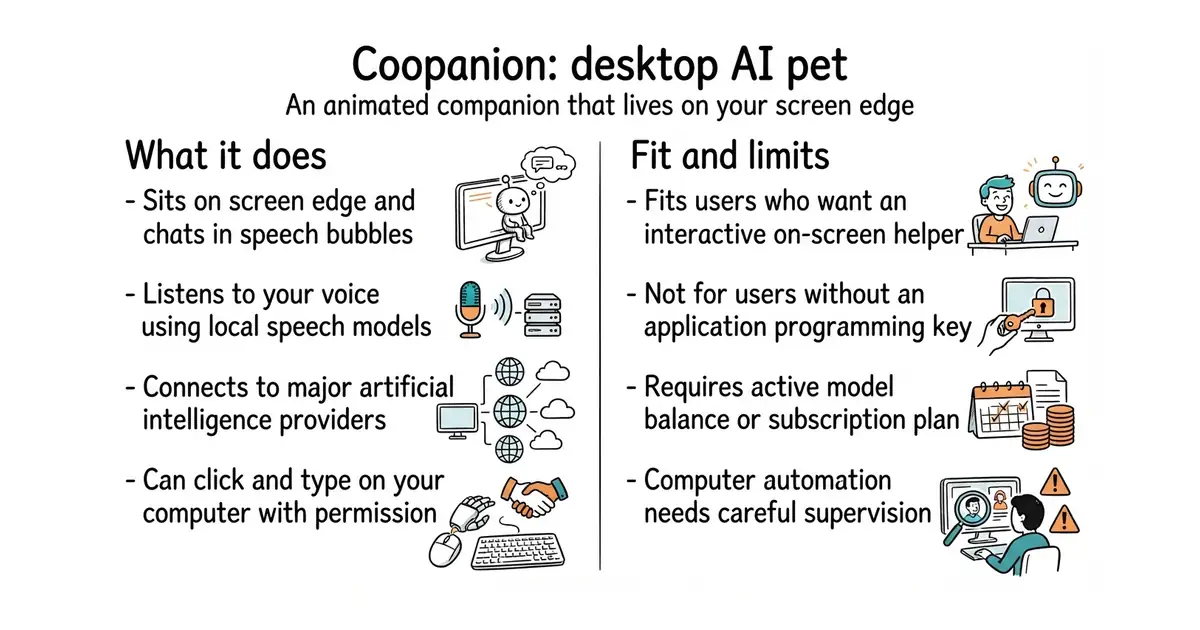
This program puts a small animated character on your desktop. It walks along the edge of your screen and talks to you through speech bubbles. You can speak to it with your microphone or type messages to ask questions. It connects to artificial intelligence services using your own account keys. With your permission, it can also click buttons and type on your computer to help you finish tasks.
What it is
Coopanion is a desktop pet application built with Electron and TypeScript that integrates various language models. It runs on Windows, macOS, and Linux.
What it is good for
Solo builders who want a friendly on-screen companion that answers questions, sets alarms, and automates simple computer tasks without opening a separate browser window.
Summary (Key Points)from the README
Key features
- Many model services: Thirteen providers work with an API key, including OpenAI, Anthropic, Gemini, DeepSeek and Qwen, or with a ChatGPT account on its plan.
- Local speech recognition: Hold the talk key and speak, or type. Speech is recognized on your machine with FunASR or Whisper, and you can choose an OpenAI-compatible transcription service instead.
- Memory you can inspect: What Coo knows about you is stored in `PARTNER.md`, and each workspace change is saved as a version.
- Computer use: Coo can click, type and switch windows. It is off by default, and four levels set how often it asks, with `ask-once` as the default.
- Activity bubbles: An animated icon shows when Coo is thinking, reading, searching, writing or using the computer.
- Figures and dress-up: Coo or the animated DeepSeek Chan, with eight vendor color schemes and three outfits. You can also change colors, hats, glasses, size and how often it walks.
- Alarms: Ask Coo to set one at a local time or after a number of minutes. Daily alarms keep their clock time across daylight-saving changes.
- Extensions and OBS overlay: Install Worlds such as a QQ bot or small games from the Extensions page, or show Coo as an OBS Browser source on a transparent background.
Ways to install
| Platform or method | What it needs | Effort |
|---|---|---|
| Windows installer (`Coopanion-Setup-<version>.exe`) | Windows 10 or 11, 64-bit; no administrator rights | Run the file; click More info, then Run anyway, because it is not code-signed |
| Windows one-line PowerShell command | Windows 10 or 11, 64-bit; PowerShell | Paste one command; if antivirus interrupts, retry with `/S` or allow-list the app |
| Windows portable zip | Windows 10 or 11, 64-bit | Unpack to any folder and run `Coopanion.exe`; updates are manual |
| macOS DMG | macOS 13 or later, Apple silicon or Intel | Drag to Applications, then approve the first open in Privacy & Security |
| Linux deb | 64-bit Linux desktop with X11 or XWayland; Debian or Ubuntu | Run `sudo apt install` on the file |
| Linux AppImage | 64-bit Linux desktop; Ubuntu 22.04 and later need `libfuse2t64` | Make it executable with `chmod +x` and run it |
Important
- Billing: Coopanion is free, but the model service you choose bills you for usage. ChatGPT requests count toward your plan's usage limits instead.
- Tested providers: Only DeepSeek, Anthropic and StepFun Step Plan have been tested with real keys, according to the README.
- Regional accounts: Kimi, Qwen, MiniMax and Zhipu GLM have separate mainland China and international accounts and keys. Doubao, Baidu Qianfan, StepFun and StepFun Step Plan accept mainland China accounts only.
- Speech model downloads: FunASR is about 230 MB and Whisper about 360 MB, downloaded from ModelScope or Hugging Face.
- macOS permissions: macOS does not keep permission grants after an update, so you may need to remove and re-add Coopanion in the permission list.
- Linux display needs: The pet needs desktop compositing, and the tray icon needs status icon support. Computer use needs `xdotool` and `zenity`.
- Intel Linux artifacts: With Intel graphics, old frames can remain on the transparent window unless you start it with `INTEL_DEBUG=nofc`.
- Anonymous statistics: Usage counts are sent to `survey.palailab.org`. You can turn this off in Habits.
- Portable copies: Up to 5 portable copies can run at once, and they do not update themselves.
Written by an AI model from the project’s README; not part of the review, and it can be wrong.
- Runs locally on Windows, macOS, and Linux with low idle resource use.
- Supports a wide range of model providers including OpenAI, Anthropic, DeepSeek, and local keys.
- Includes optional computer use capabilities to click and type on your behalf.
- Requires your own API keys or paid accounts for model access, which cost money per request.
- Computer use features carry inherent security risks if left unchecked.
- Custom license terms may restrict certain commercial use cases beyond standard AGPL.
browser-based chat windows
DeepSeek API
- microsoft/PowerToys140k stars
Microsoft PowerToys offers system utilities, but does not include an AI assistant desktop pet.

- vllm-project/vllm96k stars
A serving engine that makes one graphics card answer many requests at once.
- infiniflow/ragflow93k stars
A question-answering system built on a document collection, with the sources shown beside every answer.
- basicmachines-co/basic-memory4.3k stars
Gives an AI assistant a memory that is stored as plain text files you can read.
Download the installer or package for your operating system from the GitHub releases page and run it.