166.2k stars · MIT | v5.3.2, 16 Oct 2026 | [ponytail.dev](https://ponytail.dev) · v5.3.2 (2026-10-16) · Track this in Rising ↗
A plugin that makes a coding assistant look for the existing answer before writing a new one.
Radar check
What we found when we opened it. Every bar is one fact, with its date.
Last code pushed 18 Oct 2026, 9 days before this check.
Latest release v5.3.2 on 16 Oct 2026.
Public since June 2026, 4 months.
178,226 stars and 9,757 forks.
157 commits and 201 new issues in the last 90 days.
130 contributors. 149 pull requests merged in 90 days.
No security policy file says how to report a problem. No published security advisories.
How the bars are scored
- Alive. Days since the last code push: a week or less 100, a month 90, three months 70, six months 50, a year 30, eighteen months 15, older 0.
- Releases. Age of the latest GitHub release, on a similar scale; no bar when the project publishes no releases.
- Maturity. Age of the project: eight years 100, five 90, three 70, two 55, one 40, six months 25, younger 10.
- Adoption. Stars on a log scale: 100,000 stars is 100, 10,000 is 80, 1,000 is 60, 100 is 40.
- Activity. Commits in the last 90 days: 300 or more 100, 100 85, 30 65, 10 45, any 25.
- Community. People who have contributed: 100 or more 100, 30 80, 10 60, 5 40, 2 25, one 10.
- Security. A published security policy 80, none 40; published advisories are listed, not scored.
Checked by Repo Radar on 28 Oct 2026 from the repository on GitHub. Covered in Edition 16.
▶Repo detailsthe review · specs · pros & cons · install
What it does
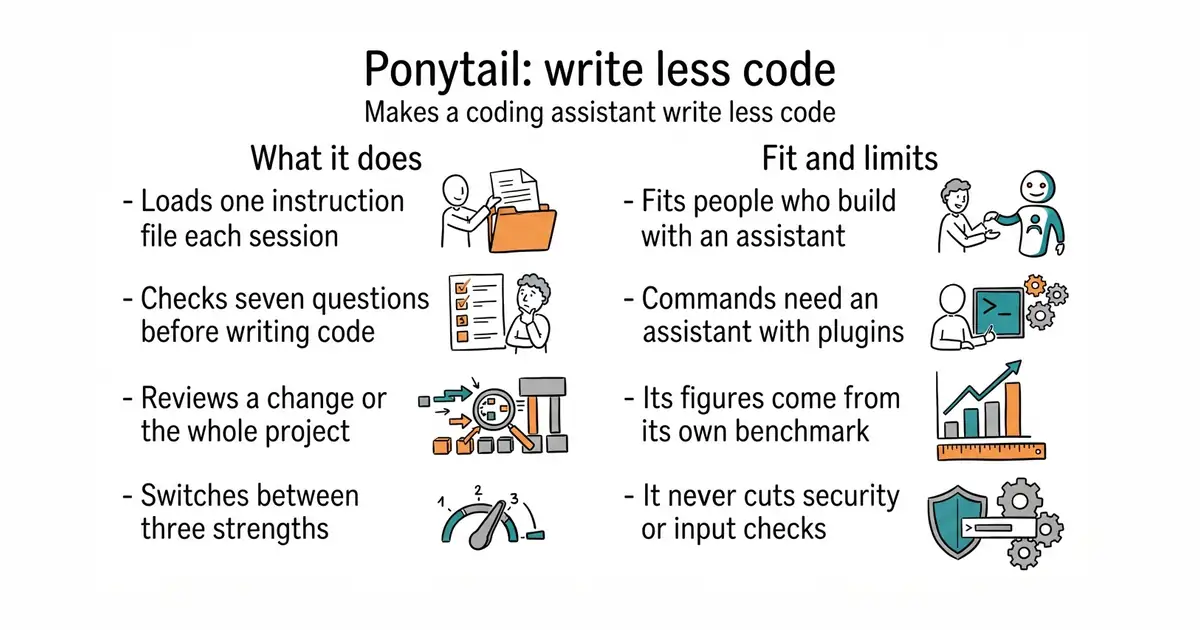
Ponytail is one written instruction file that a coding assistant loads every session. Before the assistant writes anything, it works down a list of seven questions and stops at the first one that answers the task: does this need to exist, is it already in the project, does the standard library do it, is there a native browser or platform feature, is there an installed library, can it be one line, and only then, the smallest thing that works. It reads the code a change touches before deciding. It adds four commands: a review of the current change, a review of the whole project ranked by priority, a list of shortcuts that were deliberately left behind, and a switch between three strengths called lite, full and ultra. Inside Claude Code it can also draw a small band above the prompt showing the cost, the time and whether the tests passed after the last change. The project states plainly what it never cuts: checks on untrusted input, handling that prevents data loss, security and accessibility. It does not aim at the fewest words or the fewest tokens, and it ships no program file of its own — it is text that the assistant reads.
Why it matters
Who it suits. It fits anyone who builds software by asking an assistant to do it, and who then has to own every line it produced. The usual complaint is not that an assistant writes bad code. It is that it writes far too much of it. The project's own benchmark, run on 39 tasks with five runs each, reports 53% less code, 41% less time, 26% lower cost and 45% fewer output tokens, and its own example is a date picker that came out at 335 lines without the plugin and 10 lines with it. Those are the project's figures, measured by the project, and not a promise. Skip it if the work is a one-off script nobody will maintain, or if the assistant in use has no way to load a rules file.
Verdict. Worth the five minutes, and the cheapest thing in this edition to try. There is no account, no service and no cost, and uninstalling it changes nothing in the project. Two things to watch. First, "write less" is a preference, not a law — sometimes the longer answer is the right one, and the output still has to be read. Second, the commands and the band only work on assistants that support plugins; on the rest it is a text file copied into the project and nothing more. Install it before the next big feature rather than after.
Summary (Key Points)from the README
Key features
- Smaller code: Benchmarked against the same agent without the skill, Ponytail 5 cut code by 53%, time by 41%, cost by 26% and tokens by 45%.
- Tested risky logic: 98% of risky logic ships with a test, compared with 68% without Ponytail.
- Blind preference: In a blind comparison, Ponytail 5's replies beat the previous Ponytail's 110 to 67.
- Security tasks: On six security tasks (SQL injection, path traversal, forged tokens, rate limiting, malformed CSV rows, caching), it passed all 30 runs with less code.
- Reuse first: Before writing code, it checks what the repo and the platform already provide. In the date picker example, it combined an existing Input component with the browser's built-in date picker, producing 10 lines instead of 335.
- Review command: `/ponytail-review` reads the code the change touches, not just the diff, and reports bugs, security, load, missing tests, speed and cuts, with a fix and the consequence of ignoring each finding.
- Audit command: `/ponytail-audit` maps the whole repo's entry points, data flow and expected load, then ranks what to fix first.
- Local dashboard: Band Board opens a local page with cost, agent time, tokens and tests per task and session. Data stays in `~/.config/ponytail/band/` by default.
Ways to install
| Platform or method | What it needs | Effort |
|---|---|---|
| Claude Code | Two separate prompts pasted into Claude Code; the band needs version 2.1.290 or later | Paste two prompts |
| Codex | Paste the prompt, then trust its two lifecycle hooks in `/hooks` | Trust hooks, start a new thread |
| Any other agent | Copy `AGENTS.md` into the project, or install `skills/ponytail/SKILL.md` as a skill | Copy a file; per-agent steps in INSTALL.md |
| npm | Package `@dietrichgebert/ponytail` | Install from npm |
Important
- Claude Code version: The band needs Claude Code 2.1.290 or later and does not show in the VS Code chat panel, cloud sessions or `claude -p`.
- Command support varies: Cursor with hooks gets only `/ponytail` level switching. Instruction-only adapters such as Windsurf, Cline and Copilot load the ruleset without any commands.
- Shortcut comments: Ponytail writes `shortcut:` comments to mark deliberate cuts. You can change the wording in CLAUDE.md or AGENTS.md.
- Trusted sources only: Install only from the official GitHub repository or the npm package named above. The README says it never ships `.exe` or `.dll` files, and a copy that does is not theirs.
- Benchmark scope: The figures come from 39 tasks in Claude Code using Opus 5.5, five runs each. The README links per-task tables and limits in `benchmarks/results/2026-10-07-agentic.md`.
- Unchecked areas: Each reply ends with what was skipped or not checked, so review that note before relying on the output.
Written by an AI model from the project’s README; not part of the review, and it can be wrong.
- Two commands to install, and removing it is just as quick. Nothing about the project itself changes.
- It is a text instruction, not a service. There is no account, no server and no subscription.
- The safety parts are protected by name. Input checking, security, data-loss handling and accessibility are never treated as code to cut.
- The slash commands need an assistant that supports plugins or skills. On the others it is only a rules file, with no commands and no review.
- The band above the prompt works in Claude Code and nowhere else, and the project names a minimum version for it.
- The headline figures come from the project's own benchmark. They were not measured independently, and a different codebase will give different numbers.
/plugin marketplace add DietrichGebert/ponytail
/plugin install ponytail@ponytail