9.2k stars · MIT · @astrojs/starlight@0.39.3 (2026-06-02) · Track this in Rising ↗
Astro's own documentation theme — the content that ranks for months and gets quoted by AI assistants.
Radar check
What we found when we opened it. Every bar is one fact, with its date.
Last code pushed 27 Oct 2026, the same day before this check.
Latest release @astrojs/starlight@0.42.7 on 23 Oct 2026.
Public since March 2023, a little over 3 years.
9,478 stars and 1,078 forks.
156 commits and 11 new issues in the last 90 days.
359 contributors. 146 pull requests merged in 90 days.
A security policy says how to report a problem. No published security advisories.
How the bars are scored
- Alive. Days since the last code push: a week or less 100, a month 90, three months 70, six months 50, a year 30, eighteen months 15, older 0.
- Releases. Age of the latest GitHub release, on a similar scale; no bar when the project publishes no releases.
- Maturity. Age of the project: eight years 100, five 90, three 70, two 55, one 40, six months 25, younger 10.
- Adoption. Stars on a log scale: 100,000 stars is 100, 10,000 is 80, 1,000 is 60, 100 is 40.
- Activity. Commits in the last 90 days: 300 or more 100, 100 85, 30 65, 10 45, any 25.
- Community. People who have contributed: 100 or more 100, 30 80, 10 60, 5 40, 2 25, one 10.
- Security. A published security policy 80, none 40; published advisories are listed, not scored.
Checked by Repo Radar on 27 Oct 2026 from the repository on GitHub. Covered in Edition 4.
▶Repo detailsthe review · specs · pros & cons · install
What it does
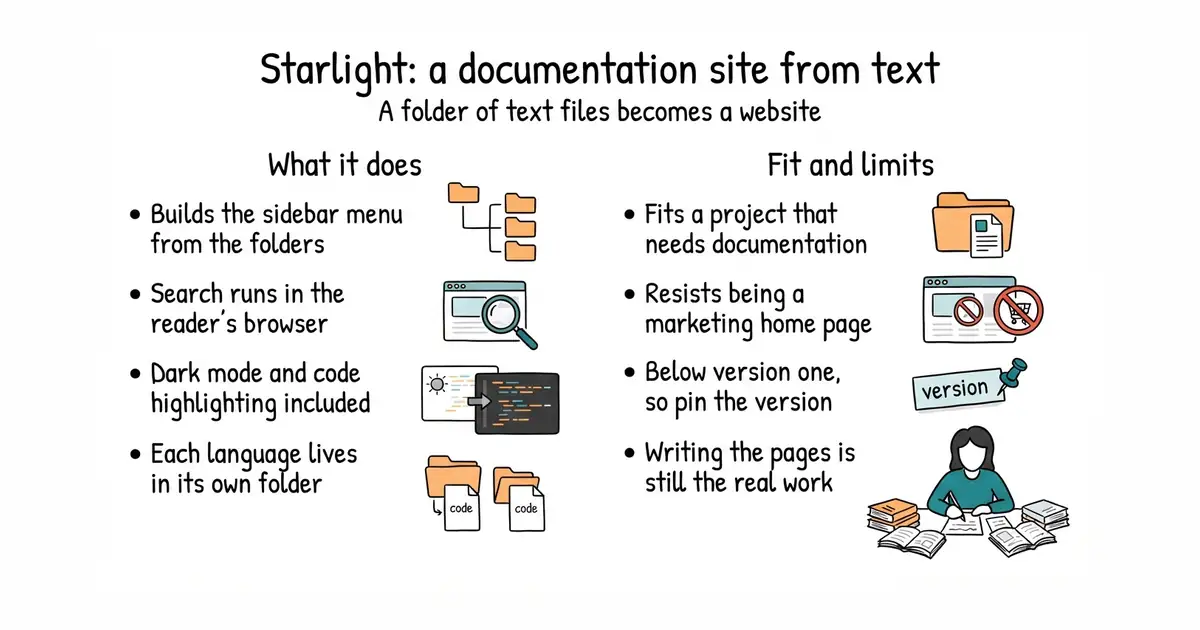
It turns a folder of Markdown files into a documentation website. The sidebar menu is built from the folder structure, or from a list written by hand. Full-text search is included and runs in the reader's browser, so no search server is needed. Code samples are highlighted and dark mode works out of the box. More than one language is supported, with each language living in its own folder and its own web address. The output is plain HTML, which any static host will serve for free. It is a documentation theme and only that. It will not run comments, a shop or a login, and bending it into a marketing home page is more work than starting from a blank Astro page.
Why it matters
Who it suits. Anyone whose project needs written documentation and who would rather spend the time writing than building a site. It is the Astro team's own theme, so a project already using Astro adds it with one command and takes on no integration risk. Skip it if the site is mostly marketing pages, because a documentation theme fights that shape at every turn.
Verdict. Worth an hour, and the single highest-return thing to put on a new documentation site. The reason is that documentation earns twice. It ranks in a search engine for one specific question, and it is the text an assistant quotes when somebody asks that question. A post about industry trends decays in three months; a page called How this feature works keeps answering for a year and needs editing once. Two cautions. The version number is still below 1.0 and releases are frequent, so pin the version and upgrade on purpose. And writing documentation people can follow is the real cost, which no theme removes. VitePress is the Vue equivalent, Docusaurus the much larger React one, and Material for MkDocs the Python one.
Summary (Key Points)from the README
Key features
- Astro-based docs framework: Starlight is a documentation website framework built for Astro.
- Dogfooded docs: The official Starlight documentation is itself built with Starlight.
- Contributor resources: A Contributor Manual, Code of Conduct and Community Guide are provided for people who want to help.
- Community support: Help is available in the Astro Discord, including a #support forum where questions can be tagged "starlight" and a dedicated #starlight channel.
- Issue tracking: Bug reports and feature requests are handled through GitHub issues.
- Open license: Starlight is released under the MIT license.
Important
- No usage details here: The README does not explain installation, setup or configuration; it points to external documentation for those.
- Depends on Astro: Starlight is described as a framework for Astro, so you need to be working within Astro to use it.
- Support lives off-GitHub: Questions go to the Astro Discord rather than the repository, so troubleshooting help is found there.
Written by an AI model from the project’s README; not part of the review, and it can be wrong.
- MIT, and it is Astro's own theme, so there is no integration risk on an Astro site
- Second-language support built in, so another language is a folder and not a second project
- Search, sidebar, dark mode and code highlighting are included; you write text and nothing else
- It wants a documentation shape, and resists being a marketing home page
- Still numbered below 1.0 with frequent releases, so pin the version
- Writing genuinely useful documentation is the real work and no tool removes it
npm create astro@latest -- --template starlight
cd my-docs
npm run dev      # preview at localhost:4321
npm run build    # static HTML into ./dist