4.1k stars · Apache-2.0 core + Tolgee Enterprise Licence over parts · v3.221.0 (2026-09-07) · Track this in Rising ↗
Self-hosted localisation platform with in-context editing — the way the Russian version of Grasppy stops being a forked codebase.
Radar check
What we found when we opened it. Every bar is one fact, with its date.
Last code pushed 27 Oct 2026, the same day before this check.
Latest release v3.241.1 on 27 Oct 2026.
Public since October 2020, about 6 years.
4,141 stars and 376 forks.
179 commits and 34 new issues in the last 90 days.
99 contributors. 111 pull requests merged in 90 days.
A security policy says how to report a problem. 8 published security advisories.
How the bars are scored
- Alive. Days since the last code push: a week or less 100, a month 90, three months 70, six months 50, a year 30, eighteen months 15, older 0.
- Releases. Age of the latest GitHub release, on a similar scale; no bar when the project publishes no releases.
- Maturity. Age of the project: eight years 100, five 90, three 70, two 55, one 40, six months 25, younger 10.
- Adoption. Stars on a log scale: 100,000 stars is 100, 10,000 is 80, 1,000 is 60, 100 is 40.
- Activity. Commits in the last 90 days: 300 or more 100, 100 85, 30 65, 10 45, any 25.
- Community. People who have contributed: 100 or more 100, 30 80, 10 60, 5 40, 2 25, one 10.
- Security. A published security policy 80, none 40; published advisories are listed, not scored.
Checked by Repo Radar on 27 Oct 2026 from the repository on GitHub. Covered in Edition 4.
▶Repo detailsthe review · specs · pros & cons · install
What it does
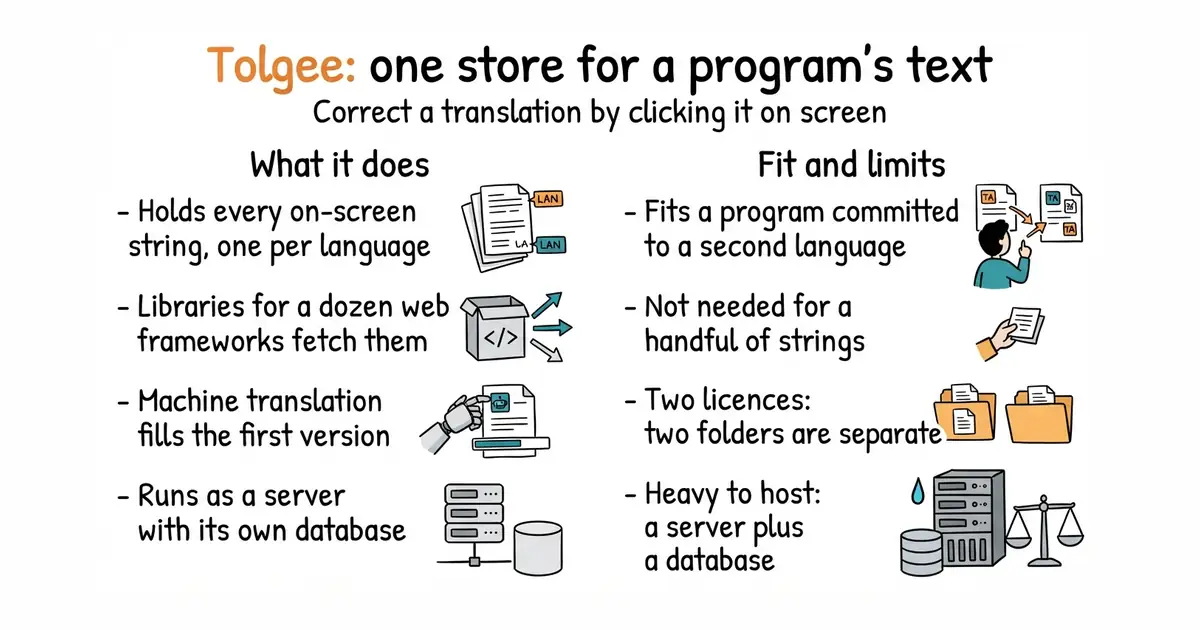
It holds every piece of text a program displays, with one entry per language. Small code libraries for React, Vue, Angular, Svelte and about a dozen other frameworks fetch those entries as the program runs or when it is built. A translator can hold down a key, click a piece of text inside the running program, and correct it in place. Machine-translation services can be connected, so a rough first version of each language arrives automatically. A command-line tool, meaning a program you type commands into, moves text in and out during a build. It runs as a server written in Kotlin with its own database, and the same company sells a hosted version. It does not translate anything itself. The machine translation comes from an outside service, and the final wording still comes from a person.
Why it matters
Who it suits. A team, or one developer, who has decided to ship a program in more than one language and now has to keep the versions in step. That is the job that quietly gets abandoned in week three, and a half-translated screen reads worse than one language done properly. Skip it if the program has only a handful of strings, or if English will always be the only language. A spreadsheet and a build script cover that without a server.
Verdict. Worth an afternoon when the second language is a commitment rather than an experiment. The in-place editing is the part that earns its keep, because the person fixing an awkward phrase is looking at the real screen while they do it. Two things to watch. The licence is split: most of the code is Apache-2.0, and two directories under ee/ carry a separate licence, so read which features depend on them. And it is a Java-based server plus a database, which is not a light thing to host. Weblate is the heavier, longer-established alternative. inlang is the lighter one, with no server at all.
Summary (Key Points)from the README
Key features
- In-context editing: Hold ALT/Option and click an element to open a dialog and edit its strings directly in the app, without touching .json, .po or similar files.
- One-click screenshots: Hold ALT and click a string, then press the camera button to generate a screenshot with the highlighted phrase.
- Production translation: The Tolgee Tools Chrome plugin lets non-developers translate a deployed app by entering an API key.
- SDK integration: Tolgee embeds into the app through SDKs rather than only syncing local files with a backend.
- Machine translation: Choose DeepL, Google Translate, AWS Translate or Azure Translator in the settings.
- AI translator: Uses screenshots, key and project descriptions, language notes, translation memory matches and Tolgee Context, and reports which meaning it chose for ambiguous strings.
- Translation memory: Suggests earlier translations with a similarity percentage, the key and the original text.
- Auto translation: When enabled, new keys are translated immediately using translation memory or a chosen machine translation service.
- Activity log, comments and history: Track who changed, reviewed or commented on phrases, and see the change history of a specific translation.
- MCP server: Lets AI coding assistants search keys, create and update translations, manage languages and trigger machine translation.
Ways to install
| Platform or method | What it needs | Effort |
|---|---|---|
| Tolgee Cloud (app.tolgee.io) | Sign up for an account, then create a project | Low: sign up and follow an integration guide |
| Self-hosted instance | Not specified in the README | Not specified in the README |
Important
- Chrome-only plugin: The production in-context translation feature uses the Tolgee Tools Chrome plugin, and the README mentions no other browser.
- MCP setup elsewhere: Setup instructions for the MCP server are in DEVELOPMENT.md, not in the README itself.
- AI output needs review: The README says the AI translator shows which reading it chose so a reviewer can disagree, which implies its output should still be checked.
- Machine translation configuration: The README says to choose services in the settings but does not describe credentials or costs for DeepL, Google, AWS or Azure.
- No pricing or requirements listed: The README gives no pricing, system requirements or hosting specifications for self-hosting.
Written by an AI model from the project’s README; not part of the review, and it can be wrong.
- Click a piece of text in the running program and correct the translation there
- Libraries for the common frameworks, plus a command-line tool for builds
- Machine translation plugs in, so the first version of each language is automatic
- Two licences in one repository, and the split matters for some features
- A Kotlin server plus a database is a heavy thing to run and keep patched
- Abandoned halfway, it leaves a program that is translated in some places and not others
docker run -v tolgee_data:/data/ -p 8085:8080 tolgee/tolgee