Radar check
What we found when we opened it. Every bar is one fact, with its date.
Last code pushed 2 Jun 2026, 4 months before this check.
Latest release v1.24.0 on 21 Apr 2026.
Public since January 2026, 9 months.
1,564 stars and 154 forks.
0 commits and 13 new issues in the last 90 days.
3 contributors. No pull requests merged in 90 days; changes go in directly. A small team carries it.
No security policy file says how to report a problem. No published security advisories.
How the bars are scored
- Alive. Days since the last code push: a week or less 100, a month 90, three months 70, six months 50, a year 30, eighteen months 15, older 0.
- Releases. Age of the latest GitHub release, on a similar scale; no bar when the project publishes no releases.
- Maturity. Age of the project: eight years 100, five 90, three 70, two 55, one 40, six months 25, younger 10.
- Adoption. Stars on a log scale: 100,000 stars is 100, 10,000 is 80, 1,000 is 60, 100 is 40.
- Activity. Commits in the last 90 days: 300 or more 100, 100 85, 30 65, 10 45, any 25.
- Community. People who have contributed: 100 or more 100, 30 80, 10 60, 5 40, 2 25, one 10.
- Security. A published security policy 80, none 40; published advisories are listed, not scored.
Checked by Repo Radar on 28 Oct 2026 from the repository on GitHub.
In simple English
Every AI coding assistant uses a different folder structure and file format for custom instructions. You end up rewriting the same rules for Claude, Cursor, and Copilot. This tool acts as a package manager for those helper files. It downloads them from public repositories and converts them to match whichever assistant you happen to use. It costs nothing to run, though you need Node.js installed on your computer.
What it is
A command-line package manager for AI agent skills that translates instruction files between different agent formats. It supports over forty-six targets and includes optional servers, terminal interfaces, and recommendation engines.
What it is good for
Solo builders who test different AI coding assistants and want to share the same custom instructions across all of them without rewriting files by hand.
Summary (Key Points)from the README
Key features
- Agent coverage: One skill can be installed across 46 agents, including Claude Code, Cursor, Codex, Gemini CLI, GitHub Copilot and Windsurf.
- Marketplace access: Install from 400K+ skills across 31 sources, from GitHub, GitLab, local paths or gists.
- Format translation: `skillkit translate` converts a skill to another agent's format, for one agent or all, with a `--dry-run` option.
- Stack-aware recommendations: `skillkit recommend` reads the repo and ranks skills by match, for example 92% for a React best-practices skill.
- Security scanning: Installs run a security scan; the README's example shows "42/42 skills pass".
- Instruction generation: `skillkit primer --all-agents` writes agent instruction files such as CLAUDE.md, .cursorrules and AGENTS.md from codebase analysis.
- Session memory: `skillkit memory` commands compress, search and export what agents learned during a session.
- Team manifests: A committable `.skills` manifest lets teammates run `skillkit manifest install` to match skill state.
- REST, MCP and Python access: `skillkit serve` exposes a search endpoint on port 3737, with an MCP config and a Python client also shown.
- Test coverage: The badges cite 757 tests.
Ways to install
| Platform or method | What it needs | Effort |
|---|---|---|
| npm, global (`npm install -g skillkit`) | npm | One command; 418 packages and about 18s on a cold cache, or 118 packages and about 9s with `--omit=optional` |
| pnpm, global (`pnpm add -g skillkit`) | pnpm | One command |
| bun, global (`bun add -g skillkit`) | bun | One command |
| npx, no install (`npx skillkit add <owner/repo>`) | npm (npx) | No install; first call caches the package, and the README suggests switching to a global install if used often |
Important
- Optional packages: Terminal UI, REST server, peer mesh and messaging ship as separate optional packages, so `skillkit ui`, `serve`, `mesh` and `message` need them installed. The CLI prints a one-line hint when one is missing.
- Mesh networking: The mesh feature distributes agents across machines over encrypted P2P; the README gives no details on setup or security beyond that description.
- Third-party content: Skills come from many community repositories. The README says creators are credited and licenses preserved, but it does not describe a review process beyond the scan.
- Translation fidelity: The README does not say how completely a skill keeps its behavior when translated to another agent's format.
- Model requirements: AI skill generation works with Claude, GPT-4, Gemini, Ollama or OpenRouter models, but the README does not state what accounts or keys each option needs.
- License: Apache 2.0.
Written by an AI model from the project’s README; not part of the review, and it can be wrong.
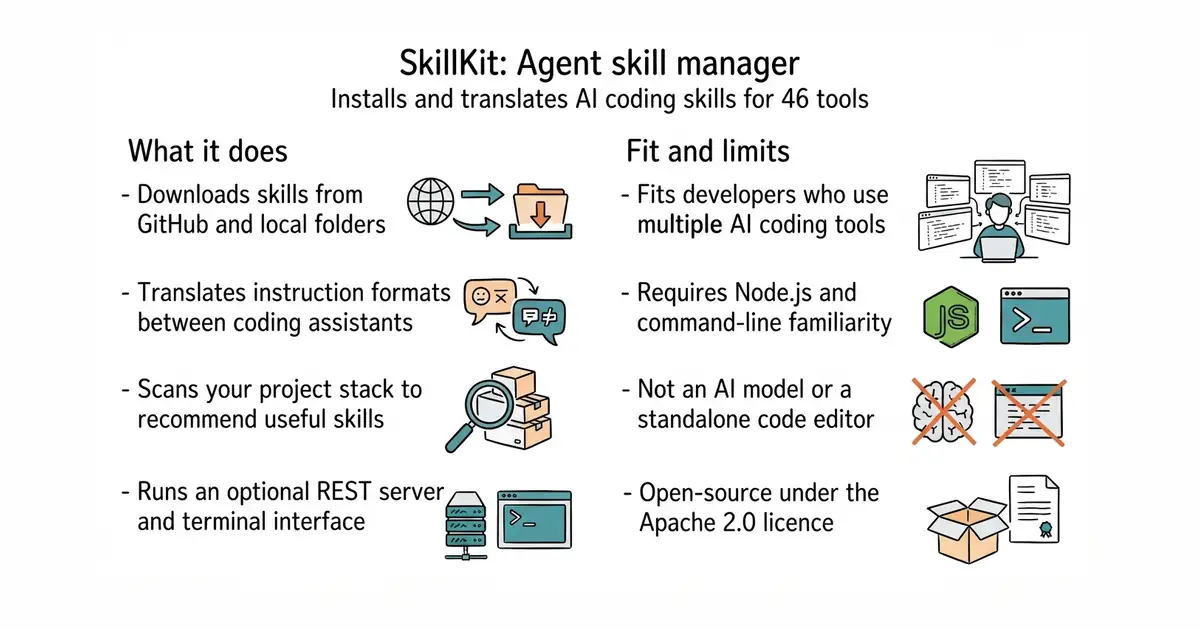
- Installs skills from GitHub, GitLab, and local folders with a single command.
- Automatically translates instruction files between different assistant formats.
- Suggests relevant skills by scanning your project files and technology stack.
- Requires Node.js and familiarity with the command line.
- Full installation pulls over four hundred packages, which takes disk space.
- Relying on third-party skill repositories means you must trust external instruction files.
manually copying and converting prompt files for different AI coding assistants
Cursor or Claude Code
- anthropics/skills184k stars
Provides official skill files for Claude, which SkillKit can download and translate.
- vercel-labs/agent-skills33k stars
Offers a collection of agent skills focused on web development frameworks.


- musistudio/claude-code-router38k stars
One local address that many coding assistants can talk to, pointed at whichever model the operator chooses.
- Kong/insomnia40k stars
A desktop application for sending requests to an interface and reading what comes back.
- microsoft/playwright-mcp39k stars
A server that lets an AI assistant drive a real browser, using the page's own structure rather than screenshots.
npm install -g skillkit
skillkit init