11.9k stars · GPL-3.0 · 7.2.8 (2026-03-22) · Track this in Rising ↗
Free Microsoft neural TTS with strong Russian voices and word-boundary timings — no key, no GPU, no cost.
Radar check
What we found when we opened it. Every bar is one fact, with its date.
Last code pushed 14 Oct 2026, 13 days before this check.
Latest release 7.3.1 on 13 Oct 2026.
Public since May 2021, a little over 5 years.
12,393 stars and 1,162 forks.
8 commits and 12 new issues in the last 90 days.
22 contributors. 5 pull requests merged in 90 days.
No security policy file says how to report a problem. No published security advisories.
How the bars are scored
- Alive. Days since the last code push: a week or less 100, a month 90, three months 70, six months 50, a year 30, eighteen months 15, older 0.
- Releases. Age of the latest GitHub release, on a similar scale; no bar when the project publishes no releases.
- Maturity. Age of the project: eight years 100, five 90, three 70, two 55, one 40, six months 25, younger 10.
- Adoption. Stars on a log scale: 100,000 stars is 100, 10,000 is 80, 1,000 is 60, 100 is 40.
- Activity. Commits in the last 90 days: 300 or more 100, 100 85, 30 65, 10 45, any 25.
- Community. People who have contributed: 100 or more 100, 30 80, 10 60, 5 40, 2 25, one 10.
- Security. A published security policy 80, none 40; published advisories are listed, not scored.
Checked by Repo Radar on 27 Oct 2026 from the repository on GitHub. Covered in Edition 3.
▶Repo detailsthe review · specs · pros & cons · install
What it does
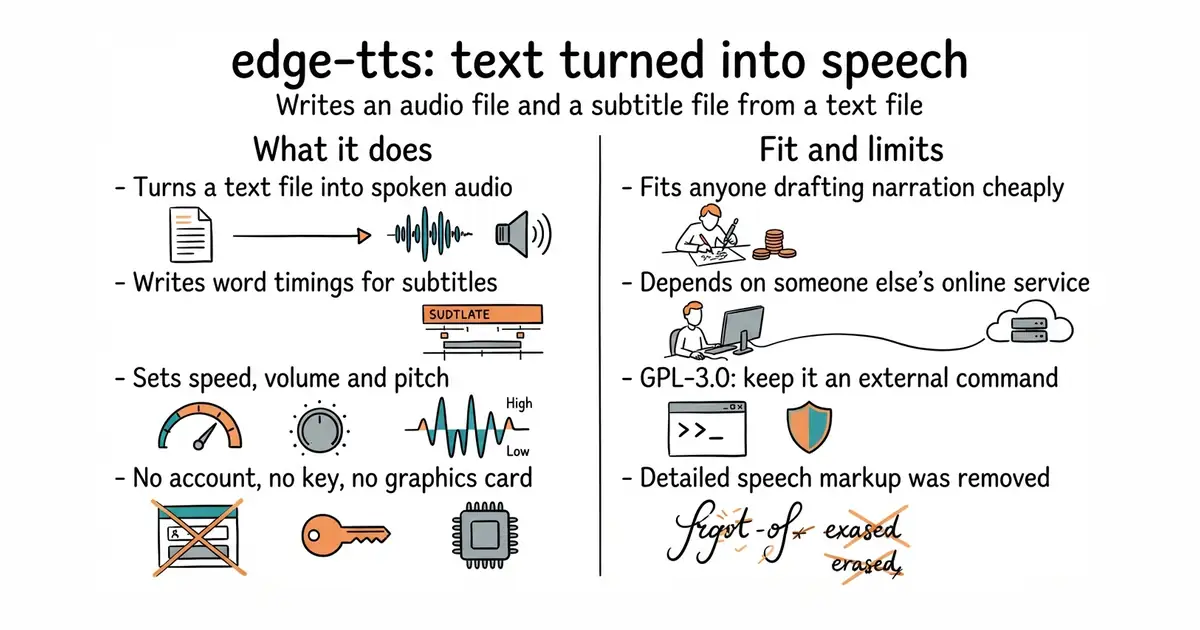
You install it and run edge-tts with some text. It sends the text to Microsoft Edge's online speech service and writes back an audio file, with --write-media, and a subtitle file with word timings, with --write-subtitles. The README states plainly that it needs neither the Edge browser, nor Windows, nor an interface key. --list-voices prints the voices on offer and --voice picks one. Speed, volume and pitch are adjustable with --rate, --volume and --pitch. A second command, edge-playback, speaks text straight out of the speakers and needs the mpv player everywhere except Windows. It is importable as a Python module, so a script can do the same work in a loop. What it does not do is accept detailed speech markup any more: the README says that support was removed because the service only accepts the markup Edge itself produces, which is one voice tag with one prosody tag inside it. edge-playback also refuses the file-writing and voice-listing options.
Why it matters
Who it suits. Anyone who narrates anything and is currently paying per word for it, and anyone who needs a spoken version of a page or a document in a language they do not speak. Paying per attempt is what stops people trying a second phrasing, and this makes the attempt free. It also suits anyone who needs subtitles, because the word timings arrive with the audio rather than from a second pass. Skip it if the recording has to be legally licensed for commercial use, which brings us to the warning below.
Verdict. The two-minute item in this edition, and the best value in it. One command and you have audio. Three things to be clear about. It talks to an undocumented endpoint belonging to a large company, so commercial use is a grey area and the whole thing can stop working without notice. The licence is GPL-3.0, so keep it as a separate command you call and do not import it into closed-source software. And it is less expressive than the paid services, which makes it right for drafts, tutorials and accessibility and thinner for a polished advertisement. Release 7.2.8 and the newest code are both from 22 March 2026, which is nearly seven months of quiet with five open issues, so this reads as a small finished tool rather than a busy one. For speech generated entirely on your own machine instead, OHF-Voice/piper1-gpl is the live successor to a popular local engine.
Summary (Key Points)from the README
Key features
- Python module: Use the edge-tts module directly from Python code, with examples in the project's `/examples/` folder.
- Command-line tools: The `edge-tts` command generates speech, and `edge-playback` plays it back immediately with subtitles.
- Voice selection: The `--voice` option picks the voice, and `--list-voices` lists all available voices.
- Rate, volume and pitch: The `--rate`, `--volume` and `--pitch` options adjust the generated speech.
- Progress bar: When stderr is a terminal, a progress bar shows audio generation progress as a percentage of the estimated total length.
- Progress control: The bar is hidden when stderr is redirected, when subtitles go to stderr with `--write-subtitles -`, or when `--no-progress` is passed.
- Ecosystem use: The README lists other projects built on the module, including hass-edge-tts and Podcastfy.
Ways to install
| Platform or method | What it needs | Effort |
|---|---|---|
| pip install (Python module and commands) | A Python environment; the README does not show the exact command | Not stated in README |
| pipx (commands only) | pipx; for `edge-playback`, the mpv player unless on Windows | Not stated in README |
Important
- Custom SSML unsupported: Support was removed because Microsoft blocks any SSML that Microsoft Edge itself could not generate, so custom SSML cannot be used.
- mpv dependency: `edge-playback` requires the mpv command line player, except on Windows.
- Limited edge-playback options: `--write-media`, `--write-subtitles` and `--list-voices` do not work with `edge-playback`.
- Negative values syntax: Negative rate, volume or pitch values must be written as `--[option]=-50%`, not `--[option] -50%`, or the value is read as a command line option.
- Progress is an estimate: The percentage is based on the service's boundary metadata, so it shows how much audio is left to generate, not how much text has been read.
Written by an AI model from the project’s README; not part of the review, and it can be wrong.
- Free with no account, no key and no graphics card, so it runs on anything.
- Word-level subtitle timings come out alongside the audio, so captions need no second pass.
- Both a command you type and a Python module you import, and 12,091 stars with only five open issues.
- It depends on an undocumented service belonging to someone else, which can change or close at any time.
- GPL-3.0, so it should stay an external command rather than a library inside a closed product.
- Detailed speech markup was removed, and the newest code is from March 2026.
pipx install edge-tts          # the commands only, in their own environment
# or, to use it from your own code:
python3 -m venv venv
source venv/bin/activate
pip install edge-tts
edge-tts --list-voices
edge-tts --voice en-GB-SoniaNeural --file script.txt \
         --write-media draft.mp3 --write-subtitles draft.vtt