16.9k stars · MIT | v3.3.7, 3 Jun 2026 | [postalserver.io](https://postalserver.io) · 3.3.7 (2026-06-03) · Track this in Rising ↗
A self-run mail server for outgoing mail, with delivery records and bounce handling.
Radar check
What we found when we opened it. Every bar is one fact, with its date.
Last code pushed 20 Oct 2026, 7 days before this check.
Latest release 3.3.7 on 3 Jun 2026.
Public since April 2017, a little over 9 years.
16,896 stars and 1,314 forks.
3 commits and 6 new issues in the last 90 days.
53 contributors. 3 pull requests merged in 90 days.
A security policy says how to report a problem. 2 published security advisories.
How the bars are scored
- Alive. Days since the last code push: a week or less 100, a month 90, three months 70, six months 50, a year 30, eighteen months 15, older 0.
- Releases. Age of the latest GitHub release, on a similar scale; no bar when the project publishes no releases.
- Maturity. Age of the project: eight years 100, five 90, three 70, two 55, one 40, six months 25, younger 10.
- Adoption. Stars on a log scale: 100,000 stars is 100, 10,000 is 80, 1,000 is 60, 100 is 40.
- Activity. Commits in the last 90 days: 300 or more 100, 100 85, 30 65, 10 45, any 25.
- Community. People who have contributed: 100 or more 100, 30 80, 10 60, 5 40, 2 25, one 10.
- Security. A published security policy 80, none 40; published advisories are listed, not scored.
Checked by Repo Radar on 27 Oct 2026 from the repository on GitHub. Covered in Edition 15.
▶Repo detailsthe review · specs · pros & cons · install
What it does
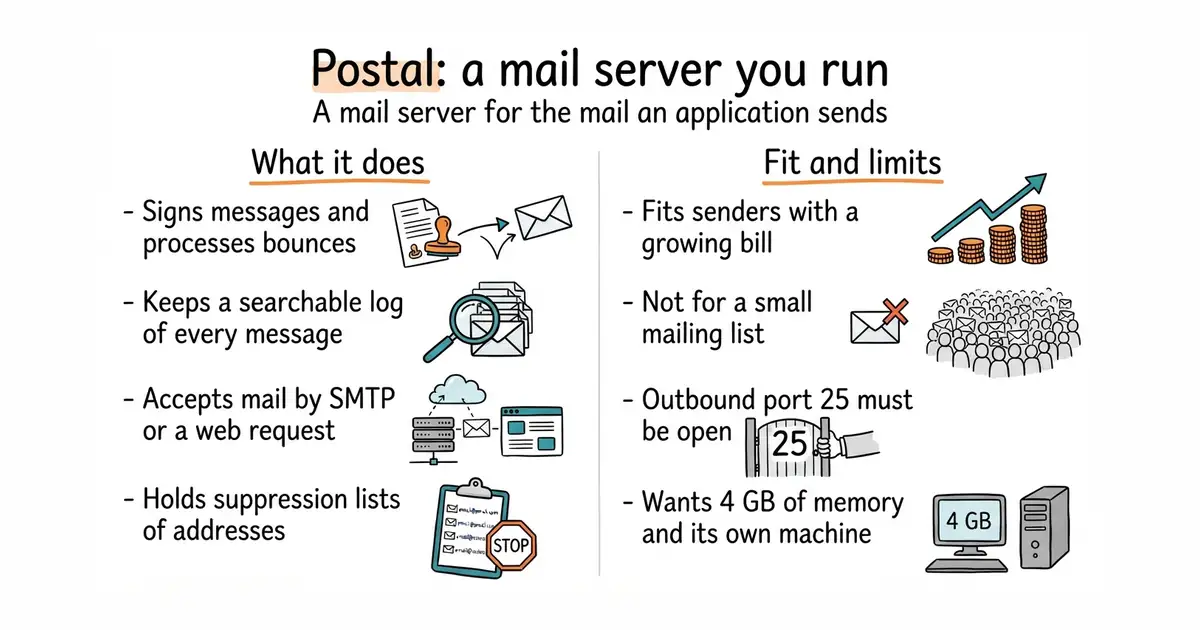
Postal is a full mail server for the mail an application sends, and it also accepts incoming mail. The project positions it as a replacement for paid sending services. It has a web interface, a web-request interface and an SMTP interface, so almost anything can hand it a message. It signs messages, processes bounces, keeps suppression lists and stores a searchable record of every message. Its own prerequisites are specific: a dedicated machine with 4 GB of memory, 2 processor cores and 25 GB of disk, Docker and the Docker Compose plugin, and MariaDB 10.6 or newer — MySQL is not supported. Outbound port 25, the port used to pass mail to other mail servers, must be open, and many hosting companies block it. It is not a mailbox service: there is no webmail for reading personal mail here.
Why it matters
Who it suits. Anyone sending enough mail that a per-message bill has become noticeable, who also wants the delivery log in their own hands. It suits the gap under a mailing-list tool: Listmonk (Edition 2 #1), Mautic (Edition 10 #6) and Dittofeed (Edition 14 #8) all write the email and none of them deliver it. Skip it on a small list, because a paid sending service costs very little at that size and carries the hard part.
Verdict. The install is the easy half and getting mail accepted is the hard half. A brand new sending address has no reputation, so volumes have to start small and build. Confirm port 25 before spending the afternoon, because the hosting company can simply say no. Worth it at scale and a poor trade below it. mailcow/mailcow-dockerized is the choice if human mailboxes are also wanted.
- MIT, and the whole product is in the repository. Nothing is held back for a paid edition.
- It does the real delivery work: message signing, bounce processing, suppression lists and a searchable log.
- It accepts mail over both SMTP and a web-request interface, so any sending tool can pass messages to it.
- Outbound port 25 is often blocked on new hosting accounts, and the provider is allowed to refuse to open it.
- The documentation asks for a dedicated machine, 4 GB of memory, 2 cores, 25 GB of disk and MariaDB 10.6 or newer. MySQL will not do.
- When mail stops flowing at two in the morning, it is nobody else's problem.
sudo apt install -y docker.io docker-compose-plugin git curl jq
sudo git clone https://github.com/postalserver/install /opt/postal/install
sudo ln -s /opt/postal/install/bin/postal /usr/bin/postal
sudo postal bootstrap postal.example.com
sudo postal initialize
sudo postal make-user
sudo postal start