133.9k stars · MIT · v1.0.4 (2026-09-02) · Track this in Rising ↗
GitHub's spec-driven development toolkit — intent, then specification, then plan, then the agent implements.
Radar check
What we found when we opened it. Every bar is one fact, with its date.
Last code pushed 23 Oct 2026, 4 days before this check.
Latest release v1.2.3 on 22 Oct 2026.
Public since August 2025, a little over 1 year.
142,910 stars and 12,804 forks.
665 commits and 397 new issues in the last 90 days.
325 contributors. 632 pull requests merged in 90 days.
A security policy says how to report a problem. No published security advisories.
How the bars are scored
- Alive. Days since the last code push: a week or less 100, a month 90, three months 70, six months 50, a year 30, eighteen months 15, older 0.
- Releases. Age of the latest GitHub release, on a similar scale; no bar when the project publishes no releases.
- Maturity. Age of the project: eight years 100, five 90, three 70, two 55, one 40, six months 25, younger 10.
- Adoption. Stars on a log scale: 100,000 stars is 100, 10,000 is 80, 1,000 is 60, 100 is 40.
- Activity. Commits in the last 90 days: 300 or more 100, 100 85, 30 65, 10 45, any 25.
- Community. People who have contributed: 100 or more 100, 30 80, 10 60, 5 40, 2 25, one 10.
- Security. A published security policy 80, none 40; published advisories are listed, not scored.
Checked by Repo Radar on 26 Oct 2026 from the repository on GitHub. Covered in Edition 8.
▶Repo detailsthe review · specs · pros & cons · install
What it does
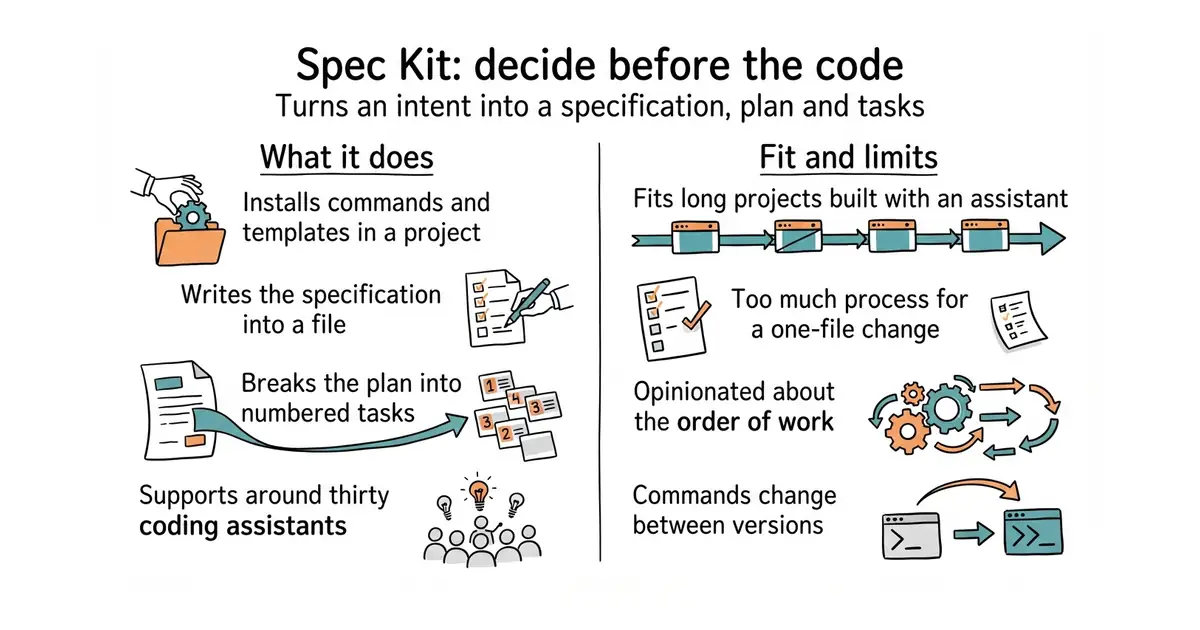
You run one command to set up a project, and it installs a set of slash commands and templates for the assistant you use. The commands walk through fixed stages: establish the project's standing rules, write a specification of what is wanted, clarify what is unclear, produce a technical plan, break the plan into tasks, and then implement them. Each stage writes a file into the repository, so the specification and the plan are reviewed like any other change. It supports around thirty assistants and is not tied to one vendor. The Python package specify-cli reached 1.1.2 on 7 October 2026, and code is pushed almost daily. It writes no application code itself: the assistant does that, and the quality of the result still depends on the assistant.
Why it matters
Who it suits. Someone building a sizeable product mostly through an assistant, who keeps re-deciding the same questions at the start of every session. It also suits a small team wanting the specification reviewed before the code appears. Skip it for a one-file change, where the process costs more than it saves.
Verdict. Worth adopting on a project that will run for months, and a waste on anything smaller. It is opinionated about the order of work, so if it does not match how you think, take the templates and drop the rest rather than fighting it. Expect the commands to change between versions, because the project is moving fast at 139k stars and near-daily commits. BMAD-METHOD is the main alternative, heavier and organised around named agent roles rather than a short command sequence.
Summary (Key Points)from the README
Key features
- Four entry points: Spec-Driven Development ships in core, while bug fixing and idea assessment are bundled extensions you install when needed.
- Structured outcomes: Bug fixing ends with a verdict of verified, partial, or failed, and only verified confirms a successful fix.
- Evidence-backed decisions: Idea assessment ends with a go, needs-clarification, or kill decision, and a documented stop is treated as a useful outcome.
- Composable extensions: Extensions add commands, quality gates, complete processes, external tool connections, and lifecycle event reactions.
- Presets and overrides: Presets adapt templates, commands, terminology, or methodology, and project-local overrides change one template for a single project.
- Workflows: Workflows automate prompts, commands, gates, and shell tasks, and overlays modify an installed workflow without forking it.
- Bundles and catalogs: Bundles package a curated setup for a role or team, and catalogs let you discover community components or host a private, approved set.
- Offline use: Local sources and self-hosted catalogs support work offline or behind a firewall.
Important
- Requirements: You need Python 3.11+, uv, and a supported AI coding agent on Linux, macOS, or Windows.
- Community components are unvetted: Catalog listings are not audits or endorsements, so review community source code before installing or running it.
- Skills run in the agent chat: The SDD, bug-fixing, and assessment steps are run as skills in your agent's chat, not in the terminal, one at a time, reviewing each result.
- Constitution first: SDD requires creating a constitution once per project, and you repeat the feature steps for each feature.
- Repeat until converged: In SDD, repeat implement and converge until convergence reports Converged.
- Edit, don't rerun: In idea assessment, resolve unknowns by editing the existing Markdown artifacts rather than rerunning whole stages.
- Agent syntax varies: The examples use GitHub Copilot's default skills syntax, so other agents need their equivalent invocation syntax.
Written by an AI model from the project’s README; not part of the review, and it can be wrong.
- Works with around thirty assistants and is MIT licensed, so nothing locks you in.
- The specification and the plan are separate files in the repository, reviewed like code.
- Very actively developed, with
specify-cli1.1.2 published on 7 October 2026.
- It is process, and process only pays back on work large enough to need it.
- Opinionated about workflow. If the order does not suit you, the fix is to keep only the templates.
- Commands change between versions, so written notes about it go stale quickly.
Written down once, those stop being re-litigated every time you open a session.
Installed alongside Claude Code with uv , writing spec and plan files into your own repositories.
# needs uv
uv tool install specify-cli --from git+https://github.com/github/spec-kit.git
specify init my-feature