1.3k stars · MIT · 0.1.83 (2026-07-30) · Track this in Rising ↗
Every comment under any YouTube video as JSON — no key, no quota. The complaints under competitors' tutorials are your next ten video titles.
Radar check
What we found when we opened it. Every bar is one fact, with its date.
Last code pushed 15 Oct 2026, 12 days before this check.
Latest release 0.1.84 on 15 Oct 2026.
Public since August 2015, a little over 11 years.
1,269 stars and 262 forks.
6 commits and 3 new issues in the last 90 days.
10 contributors. 1 pull requests merged in 90 days.
No security policy file says how to report a problem. No published security advisories.
How the bars are scored
- Alive. Days since the last code push: a week or less 100, a month 90, three months 70, six months 50, a year 30, eighteen months 15, older 0.
- Releases. Age of the latest GitHub release, on a similar scale; no bar when the project publishes no releases.
- Maturity. Age of the project: eight years 100, five 90, three 70, two 55, one 40, six months 25, younger 10.
- Adoption. Stars on a log scale: 100,000 stars is 100, 10,000 is 80, 1,000 is 60, 100 is 40.
- Activity. Commits in the last 90 days: 300 or more 100, 100 85, 30 65, 10 45, any 25.
- Community. People who have contributed: 100 or more 100, 30 80, 10 60, 5 40, 2 25, one 10.
- Security. A published security policy 80, none 40; published advisories are listed, not scored.
Checked by Repo Radar on 26 Oct 2026 from the repository on GitHub. Covered in Edition 7.
▶Repo detailsthe review · specs · pros & cons · install
What it does
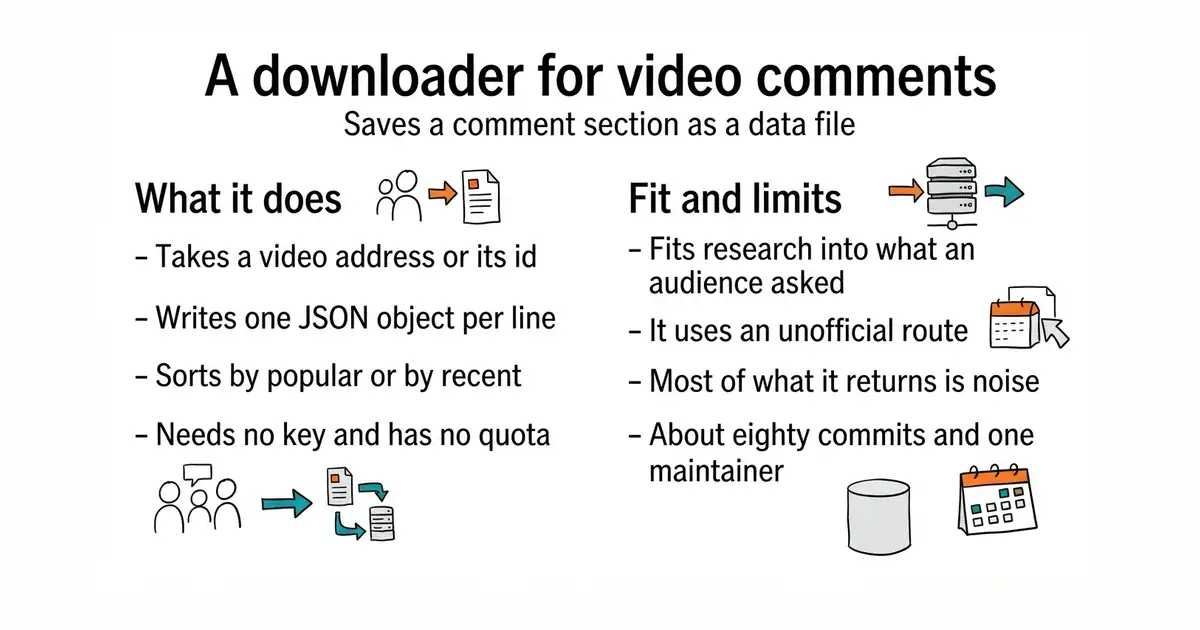
You give it a video address or a video id and it writes the comments to a file, one JSON object per line, with the text, the author, the timestamp, the number of likes and the replies. Output can also be ordinary JSON, comma-separated or semicolon-separated values. You can cap the number of comments, choose between the most popular and the most recent, and set the language used for automatically generated text. It works as a command and as a library you call from Python. It does not use the official YouTube interface, so there is no key to obtain, no consent screen and no daily quota to spend. What it does not do is anything else: no video details, no channel statistics, no transcripts, and no promise that the route it uses will keep working.
Why it matters
Who it suits. Anyone who wants evidence about an audience rather than an opinion about one — somebody planning what to write or film next, somebody checking which part of a subject confuses people, somebody studying a public conversation. Reading the comments under the twenty most-watched videos in a subject takes an evening and the same six complaints appear in different words every time. Skip it if the work needs the official interface's guarantees, because this one has none.
Verdict. Still the sharpest cheap research tool in this archive, and still the same version it was when first published: 0.1.83 on PyPI, dated 30 July 2026, with no code since. For something this small that is closer to finished than to neglected, but it is worth knowing before depending on it. Two warnings. It uses an endpoint that was never meant for this, so run it from an ordinary machine rather than a data-centre address, where the blocks land first. And comment sections are mostly noise, so expect to discard most of what comes back, which is the job entry 7 exists for. One thing this project illustrates nicely: its GitHub releases page stopped in August 2025 and looks abandoned, while PyPI shows a release from July 2026. For a Python package, believe the package registry. Edition 5 covered jdepoix/youtube-transcript-api, which is the same shape of tool for what was said in the video rather than under it.
Summary (Key Points)from the README
Key features
- No API key needed: Downloads YouTube comments without using the official YouTube API.
- Line-delimited JSON output: Comments are written as JSON lines, one comment per line.
- Command-line interface: Run the script directly and save output automatically to a file named after the video ID (for example, ScMzIvxBSi4.jsonl).
- Custom filename and format: Choose your own output filename and format, such as CSV.
- Library usage: Import the downloader in Python code and work with comments programmatically, for example to print the 10 most popular comments for a video.
- Dash-prefixed IDs: Video IDs that begin with a dash are supported through the -y= or --youtubeid= option form.
Important
- Installation method: The README recommends installing inside a Python virtual environment, and it also offers installing directly from the GitHub repository as an alternative.
- Dependency on YouTube's page structure: The README does not describe how the script obtains comments, so it may break if YouTube changes its website, and the README does not say how to handle this.
Written by an AI model from the project’s README; not part of the review, and it can be wrong.
- No key, no consent screen, no quota, and nothing to register.
- MIT licensed, pure Python, and it writes line-delimited JSON that goes straight into a file or a database.
- Comments are the one research source written by the audience rather than by the publisher.
- An unofficial route that can stop working at any time, and data-centre addresses get blocked first.
- About eighty commits and one maintainer, so it is replaceable rather than dependable.
- Most of what it returns is spam, jokes and noise that has to be filtered out afterwards.
Install into a virtual environment on the Mac beside your Edition 6 research tools.
python3 -m venv venv
source venv/bin/activate
pip install youtube-comment-downloader