10.3k stars · MIT · v1.31.1 (2026-09-05) · Track this in Rising ↗
Fake SMTP server with a web inbox, spam score and HTML-compatibility report — read the campaign before subscribers do.
Radar check
What we found when we opened it. Every bar is one fact, with its date.
Last code pushed 22 Oct 2026, 5 days before this check.
Latest release v1.32.0 on 22 Oct 2026.
Public since July 2022, a little over 4 years.
10,749 stars and 367 forks.
122 commits and 15 new issues in the last 90 days.
53 contributors. 8 pull requests merged in 90 days.
A security policy says how to report a problem. 17 published security advisories.
How the bars are scored
- Alive. Days since the last code push: a week or less 100, a month 90, three months 70, six months 50, a year 30, eighteen months 15, older 0.
- Releases. Age of the latest GitHub release, on a similar scale; no bar when the project publishes no releases.
- Maturity. Age of the project: eight years 100, five 90, three 70, two 55, one 40, six months 25, younger 10.
- Adoption. Stars on a log scale: 100,000 stars is 100, 10,000 is 80, 1,000 is 60, 100 is 40.
- Activity. Commits in the last 90 days: 300 or more 100, 100 85, 30 65, 10 45, any 25.
- Community. People who have contributed: 100 or more 100, 30 80, 10 60, 5 40, 2 25, one 10.
- Security. A published security policy 80, none 40; published advisories are listed, not scored.
Checked by Repo Radar on 25 Oct 2026 from the repository on GitHub. Covered in Edition 6.
▶Repo detailsthe review · specs · pros & cons · install
What it does
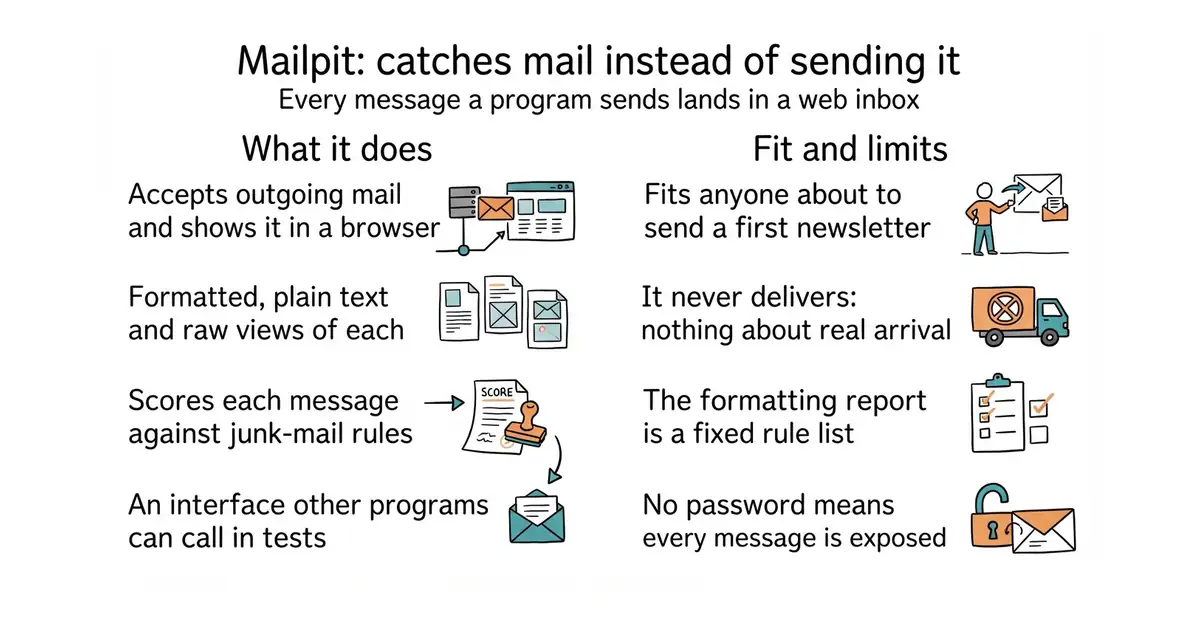
It runs one program that listens for outgoing mail. Any application pointed at it sends mail there instead of to the internet. Each message appears in a browser inbox, where the formatted version, the plain-text version and the raw message are all readable. It scores each message against junk-mail rules, and checks the formatting against a table of what real mail programs support. It also has an interface other programs can call, which makes it usable in automated tests. The licence is MIT and the latest release is v1.31.5, from 11 October 2026. What it does not do is deliver anything. It says nothing about whether real mail would arrive, so the records that prove a sender is genuine are still a separate job.
Why it matters
Who it suits. Anyone about to send a first newsletter to a real list. It also suits any team whose sign-up confirmations and password resets have never been read by a human, which is most teams, because that is the mail path that breaks quietly and costs sign-ups with no error anywhere. Skip it if nothing in the project sends mail at all.
Verdict. Worth half an hour, today, and it is the lowest-effort entry on this page. One container, no configuration, and the two things that cannot be eyeballed, the junk score and the formatting report, are built in. Two cautions. The formatting report is a fixed rule list, not a real copy of any mail program, so treat it as a strong hint. And left on a public machine with no password it would show every message it has caught, so keep it on a local machine or behind a login. rnwood/smtp4dev is the closest alternative.
Summary (Key Points)from the README
Key features
- Single binary or Docker: Runs from one static binary or multi-architecture Docker images.
- Web UI with search: Shows formatted HTML, highlighted source, text, headers, raw source and MIME attachments, including image thumbnails. HTTPS and authentication are optional.
- SMTP server: Supports optional STARTTLS or SSL/TLS and authentication, including an "accept any" mode.
- Ingest speed: Ingests 200-300 emails per second over SMTP, depending on CPU, network speed and email size.
- Automatic pruning: Prunes by volume or message age, keeping the most recent 500 emails by default.
- HTML and link checks: The HTML check scores mail client compatibility. The link check tests message links and linked images.
- Spam check: Tests message "spamminess" using a running SpamAssassin server.
- Relay and forwarding: Relays messages through another SMTP server with an optional recipient allowlist, or forwards them automatically to predefined addresses.
- Chaos and webhooks: Chaos mode injects configurable SMTP errors to test resilience. An optional webhook fires on received messages.
Ways to install
| Platform or method | What it needs | Effort |
|---|---|---|
| Mac via Homebrew (`brew install mailpit`) | Homebrew | Low |
| Arch Linux (AUR package) | An AUR helper or manual AUR build | Low |
| FreeBSD (`pkg install mailpit`) | FreeBSD pkg | Low |
| Install script (Linux and Mac) | Shell access, writes to /usr/local/bin by default | Low |
| Static binary (Windows, Linux, Mac) | Download from releases and add to PATH | Low |
| Docker (386, amd64, arm64 images) | Docker | Low |
| Compile from source | Build steps in the "Building from source" docs | High |
Important
- Testing tool, not a mail server: Mailpit is built to capture mail during development and testing.
- MailHog is unmaintained: Mailpit was inspired by MailHog, which the README says has had no active development or security updates for a few years.
- Default SMTP port: The SMTP server listens on port 1025, so sending applications must be pointed at that port.
- Pruning can delete mail: Old messages are removed automatically once the limit is reached, so keep the defaults in mind if you need long-term history.
- Spam check dependency: It needs a separately running SpamAssassin server.
- Relay and forwarding depend on another server: Both need a reachable external SMTP server.
- Incomplete default address: The README leaves the web UI's default listen address blank, so check the docs or `mailpit -h` for it.
- Vendor promotion: The README points to Mailtrap, a hosted product, for team features and multiple inboxes.
Written by an AI model from the project’s README; not part of the review, and it can be wrong.
- One program or one container, no configuration, MIT licence.
- The junk score and the formatting report cover the two things nobody can check by eye.
- It catches an application's own sign-up and reset mail, which is the path that fails silently.
- It never delivers anything, so it says nothing about whether real mail would arrive.
- The formatting report is a fixed rule list, not a real mail program.
- Left on a public machine without a password it exposes every caught message.
docker run -d --name mailpit -p 8025:8025 -p 1025:1025 axllent/mailpit