14.7k stars · MIT | [dozzle.dev](https://dozzle.dev) · v11.3.2 (2026-10-13) · Track this in Rising ↗
A web page showing the live output of every container on a machine, with search.
Radar check
What we found when we opened it. Every bar is one fact, with its date.
Last code pushed 24 Oct 2026, 3 days before this check.
Latest release v11.3.5 on 24 Oct 2026.
Public since October 2018, a little over 7 years.
14,730 stars and 645 forks.
533 commits and 82 new issues in the last 90 days.
139 contributors. 490 pull requests merged in 90 days.
A security policy says how to report a problem. 11 published security advisories.
How the bars are scored
- Alive. Days since the last code push: a week or less 100, a month 90, three months 70, six months 50, a year 30, eighteen months 15, older 0.
- Releases. Age of the latest GitHub release, on a similar scale; no bar when the project publishes no releases.
- Maturity. Age of the project: eight years 100, five 90, three 70, two 55, one 40, six months 25, younger 10.
- Adoption. Stars on a log scale: 100,000 stars is 100, 10,000 is 80, 1,000 is 60, 100 is 40.
- Activity. Commits in the last 90 days: 300 or more 100, 100 85, 30 65, 10 45, any 25.
- Community. People who have contributed: 100 or more 100, 30 80, 10 60, 5 40, 2 25, one 10.
- Security. A published security policy 80, none 40; published advisories are listed, not scored.
Checked by Repo Radar on 25 Oct 2026 from the repository on GitHub. Covered in Edition 18.
▶Repo detailsthe review · specs · pros & cons · install
What it does
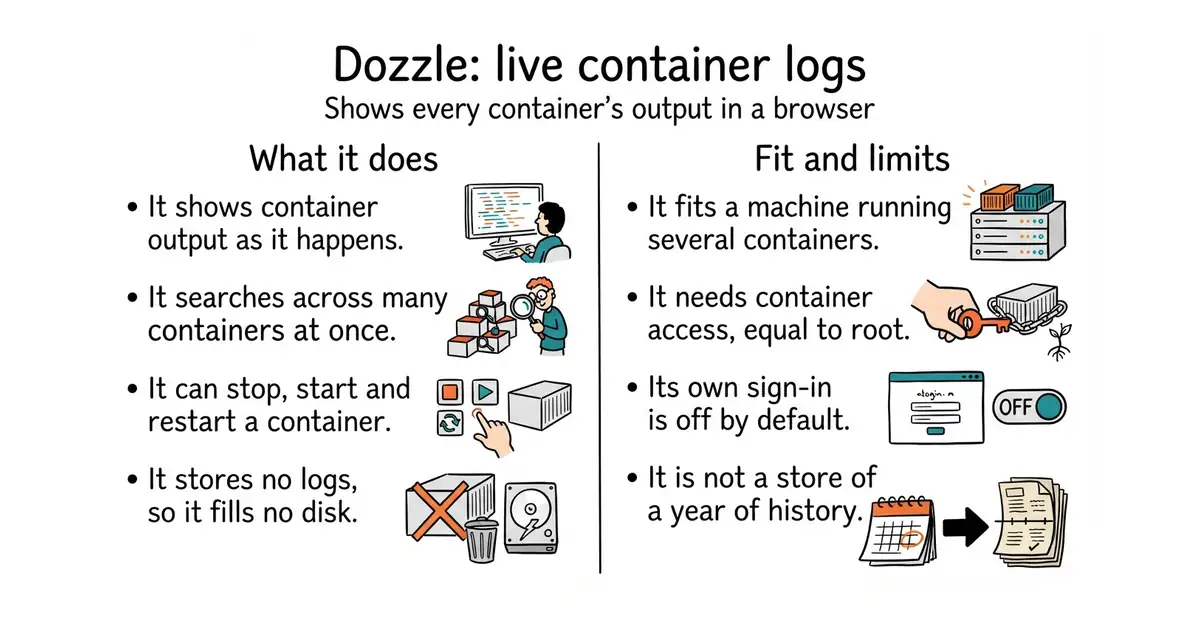
Dozzle reads the output of containers and shows it in a browser, whether they run under Docker, Docker Swarm or Kubernetes. A container is a sealed box holding one program and everything that program needs. It shows several containers at once in one stream, with live search across all of them. Since version 11.3.2 it can also start, stop and restart a container, so it is no longer only a viewer. It keeps no copy of the logs itself, so it cannot fill a disk. It has a sign-in of its own, switched off by default, and it can use an outside identity service instead. Version 11.3.2 arrived on 13 October 2026. It is not a store of a year of history, it draws no graphs, and it raises no alerts.
Why it matters
Who it suits. It suits a machine with more than one container on it, where answering "what happened at 11pm" currently means a remote text-only connection and a command nobody remembers. It suits a small team, because several people can read the same output at the same time. It suits a first step, since nothing has to be collected or stored before it is useful. Skip it where logs are already gathered centrally and searched there, and skip it where the need is long retention, alerting or dashboards rather than watching.
Verdict. Ten minutes, and the payoff arrives the first time something breaks at night. One caution matters more than the rest. Dozzle needs the Docker socket, which is the control channel for Docker on that machine, and handing that to a program is the same as handing over root access. Version 11.3.2 widens that: the log views can now restart, stop and start containers, so a copy left open on the internet is no longer merely a leak of log lines. Put a password in front of it, or keep it bound to the machine itself. For keeping and searching a year of logs, grafana/loki is the heavier answer and a different job. Dozzle is for watching; Loki is for keeping.
Summary (Key Points)from the README
Key features
- Tiny image: The default image is built FROM scratch and is about 7 MB compressed.
- Fuzzy container search: Intelligent fuzzy search finds containers by name.
- Regex and SQL log search: Logs can be searched with regex or SQL queries.
- Live stats: Memory and CPU usage are shown live for containers.
- Split screen: Multiple container logs can be viewed side by side.
- Multi-user auth: File-based authentication and forward proxy authorization are supported, for example with Authelia.
- Swarm and agent support: Dozzle runs as a Swarm global service and can monitor multiple Docker hosts in agent mode.
- Broad runtime support: Automatic API negotiation works with most Docker setups, and Colima and Podman are supported too.
Ways to install
| Platform or method | What it needs | Effort |
|---|---|---|
| Docker run | Docker with the Unix socket mounted at /var/run/docker.sock | Low: one command |
| Docker Compose | A Compose file, with an example in the README | Low: copy the example |
| Docker Swarm | A Swarm cluster, run as a global service | Medium: cluster setup and the Swarm docs |
| Agent mode | Dozzle running in agent mode on each Docker host | Medium: follow the Agent Mode docs |
| Podman | The Podman remote socket enabled before running Dozzle | Medium: enable the socket first |
Important
- No offline search: Dozzle does not store log files and does not support offline searching. Tools like Loggly, Papertrail, or Kibana are better for full search.
- Engine version: Docker Engine 19.03 or newer (API 1.40+) is required. Older daemons are not supported.
- Analytics on by default: Anonymous configuration data is sent to Google Analytics. Use the --no-analytics flag to turn this off.
- Image tags: Avoid latest and main in production. latest changes on every release, and main is unreleased code. Pin an exact version such as v10.6.15 for reproducible deployments.
- No shell in default images: The default images contain only the binary. Use the alpine variants only if your setup needs a shell, such as platforms that wrap the entrypoint with a #!/bin/sh script.
- Podman setup: Podman needs its remote socket enabled, and the README says nothing else is required beyond that.
Written by an AI model from the project’s README; not part of the review, and it can be wrong.
- One command and it is running. Removing it is just as quick.
- It stores nothing by default, so it cannot fill a disk.
- Containers from several machines can be merged into one stream and searched together.
- It needs the Docker socket, which is equal to root access on that machine.
- Its own sign-in is off by default, and since 11.3.2 it can stop and start containers, so an unguarded copy does real damage.
- It shows what is happening now. It is not a store of a year of history.
# On the machine running the containers. Docker is the only prerequisite.
docker run -d --name dozzle \
  -v /var/run/docker.sock:/var/run/docker.sock \
  -v dozzle_data:/data \
  -p 127.0.0.1:8080:8080 \
  amir20/dozzle:latest