In simple English
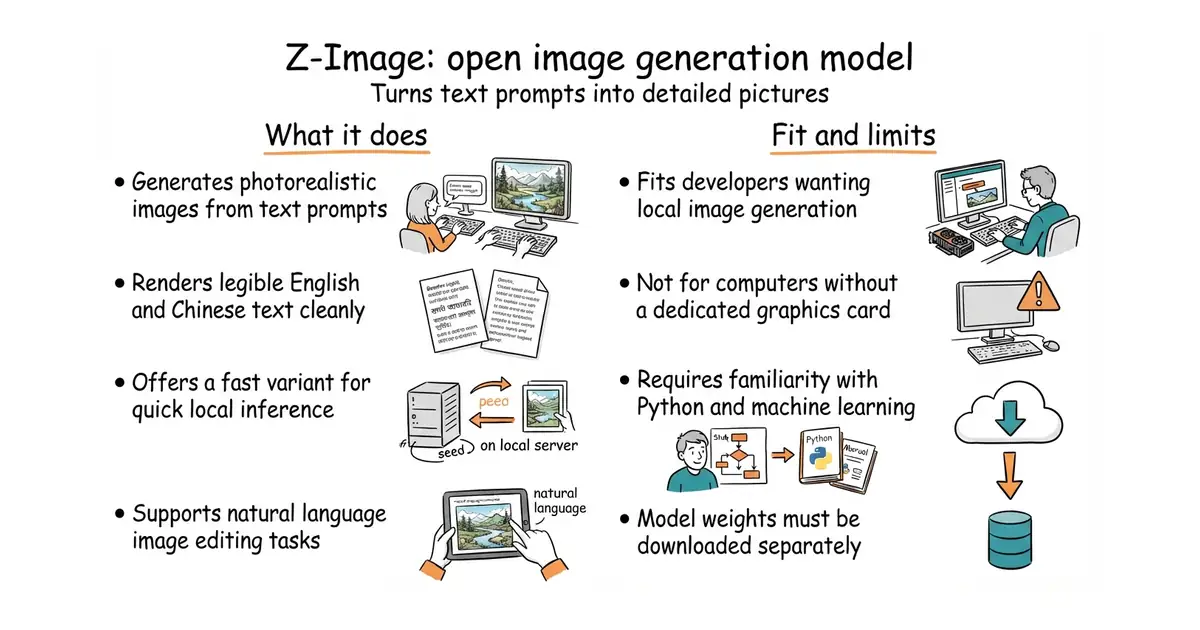
This tool creates digital pictures from written descriptions. It turns your words into photorealistic images and renders English and Chinese text cleanly. You can run the fast version on a standard computer graphics card with enough memory. The project is free to download and use for your own projects. You need technical knowledge with Python code to set it up and run it.
What it is
Z-Image is a family of open-source image generation models with six billion parameters built on a single-stream diffusion transformer architecture. It includes variants for fast generation, base creative work, and natural language image editing.
What it is good for
Solo builders and developers who want to generate custom artwork, marketing graphics, or product images locally without paying for closed cloud services.
- Generates high-quality images and renders legible text in both English and Chinese.
- Includes a fast variant that produces results in under a second on high-end hardware.
- Provides multiple model checkpoints and community integrations for different workflows.
- Requires a powerful GPU with substantial VRAM to run locally without cloud assistance.
- Setup involves installing specific package versions and python environments.
- Generation speed and memory consumption vary significantly depending on the chosen model variant.
Paid cloud image generation APIs and manual graphic design work
Diffusers library and PyTorch
- Comfy-Org/ComfyUI141k stars
A node-based graphical interface for running diffusion models like Z-Image.
- leejet/stable-diffusion.cpp7.7k stars
A pure C++ engine that lets you run diffusion models efficiently on lower-memory GPUs.


- ggml-org/llama.cpp132k stars
A C and C++ library and command-line tool for running language models locally.
- EleutherAI/lm-evaluation-harness14k stars
Runs standard question sets against a language model and reports the scores.
- mudler/LocalAI50k stars
Serves text, vision, speech, image and video models from one self-hosted service that imitates the paid interfaces.
pip install git+https://github.com/huggingface/diffusers
pip install -e .