34.4k stars · MIT | [nginxproxymanager.com](https://nginxproxymanager.com) · v2.16.0 (2026-09-24) · Track this in Rising ↗
A web screen that points domain names at programs and gets free HTTPS certificates that renew on their own.
Radar check
What we found when we opened it. Every bar is one fact, with its date.
Last code pushed 20 Oct 2026, 7 days before this check.
Latest release v2.16.0 on 24 Sep 2026.
Public since December 2017, a little over 8 years.
34,526 stars and 3,942 forks.
146 commits and 59 new issues in the last 90 days.
323 contributors. 62 pull requests merged in 90 days.
A security policy says how to report a problem. No published security advisories.
How the bars are scored
- Alive. Days since the last code push: a week or less 100, a month 90, three months 70, six months 50, a year 30, eighteen months 15, older 0.
- Releases. Age of the latest GitHub release, on a similar scale; no bar when the project publishes no releases.
- Maturity. Age of the project: eight years 100, five 90, three 70, two 55, one 40, six months 25, younger 10.
- Adoption. Stars on a log scale: 100,000 stars is 100, 10,000 is 80, 1,000 is 60, 100 is 40.
- Activity. Commits in the last 90 days: 300 or more 100, 100 85, 30 65, 10 45, any 25.
- Community. People who have contributed: 100 or more 100, 30 80, 10 60, 5 40, 2 25, one 10.
- Security. A published security policy 80, none 40; published advisories are listed, not scored.
Checked by Repo Radar on 25 Oct 2026 from the repository on GitHub. Covered in Edition 18.
▶Repo detailsthe review · specs · pros & cons · install
What it does
Nginx Proxy Manager runs the nginx web server together with a management screen. HTTPS is the encrypted connection behind the padlock, and the certificate that proves the site is genuine comes free from Let's Encrypt; this program asks for it, installs it and renews it before it expires. Every domain on the machine is listed on one page, so what points where can be read at a glance. It can put a username and password in front of any page that has none. It handles redirects, raw network streams, and a block of extra nginx settings for each host. Wildcard certificates work through more than a hundred DNS providers, which means one certificate covers every name under a domain. Version 2.16.0 arrived on 24 September 2026 and added a log viewer inside the screen, access rules for single paths, and a fix for a flaw that could have let an outsider run commands on the machine; the newest code change landed on 13 October 2026. It does not host websites itself, and it manages one machine rather than spreading traffic across several.
Why it matters
Who it suits. It suits people who run several programs on one machine and do not want to write nginx configuration by hand. It removes the step that most often stops a self-hosted tool from being reached properly, which is the certificate. It is also how entry 4 gets the HTTPS it needs in order to run at all. Skip it if the machine serves exactly one site, where a single certificate command is simpler. Skip it too if the setup already runs Traefik or Caddy.
Verdict. Worth an hour, and most of the hour is waiting for a change to a domain name to spread across the internet. Three cautions. It expects to own ports 80 and 443, the two ports web traffic arrives on, so moving a machine that is already serving onto it is a planned change rather than a quick try. The management screen starts with a password that is printed in the documentation, so change it in the first minute. And version 2.16.0 also updated the certificate tool underneath, which broke some DNS plugins, so read the release notes before upgrading an older installation. traefik/traefik and caddyserver/caddy do the same job from a configuration file and are the better choice where the whole setup is already written in files.
Summary (Key Points)from the README
Key features
- Pre-built Docker image: Runs as a ready-made container, so you don't build anything yourself.
- Admin interface: A Tabler-based web UI for managing your hosts.
- No-Nginx setup: Create forwarding domains, redirections, streams, and 404 hosts without writing Nginx configuration.
- Free SSL: Uses Let's Encrypt for certificates, or you can supply your own.
- Access control: Access Lists and basic HTTP authentication protect individual hosts.
- Advanced config: Lets super users add custom Nginx configuration when the defaults aren't enough.
- User management: Includes user accounts, permissions, and an audit log.
- Home-network guidance: Explains port forwarding on your router (ports 80 and 443) and dynamic DNS options such as DuckDNS, Amazon Route53, and Cloudflare.
Important
- armv7 support ended: Version 2.14 and later no longer support armv7, because Node.js dropped armhf. If you're on armv7, use the 2.13.7 image tag instead.
- Port forwarding required: For public access from home, ports 80 and 443 must be forwarded from your router to the server running the project.
- DNS setup needed: Your domain must point to your home network, either through a static IP or a dynamic DNS service.
- Admin UI on port 81: The admin interface is reached on port 81 once the container is running.
- Slow first start: The container can take a while to come up the first time because of key generation (entropy).
Written by an AI model from the project’s README; not part of the review, and it can be wrong.
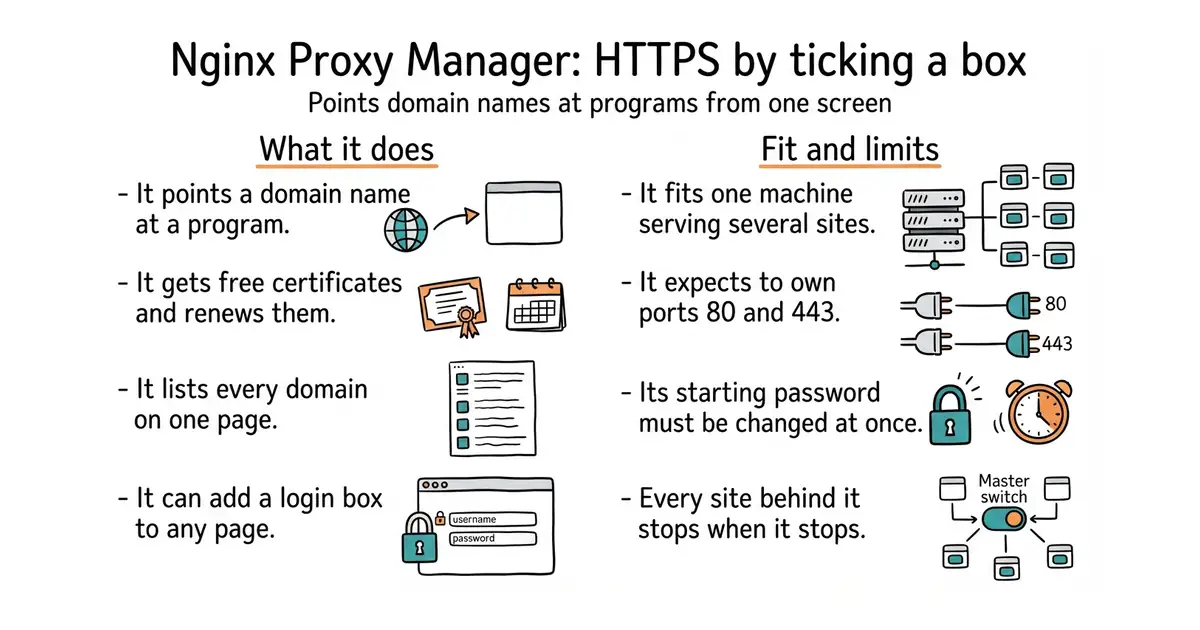
- Free certificates that renew on their own, set up by ticking a box.
- One screen listing every domain on the machine, so nothing is hidden in a file.
- It can put a login box in front of any page that has none.
- It expects ports 80 and 443, so a machine that is already serving has to be moved over deliberately.
- Everything behind it depends on it. When it stops, every site on that machine stops.
- The management screen starts with a password that is printed in the documentation, and it must never face the open internet.
mkdir -p ~/npm && cd ~/npm
cat > docker-compose.yml <<'EOF'
services:
  app:
    image: jc21/nginx-proxy-manager:latest
    restart: unless-stopped
    ports:
      - '80:80'
      - '443:443'
      - '127.0.0.1:81:81'
    volumes:
      - ./data:/data
      - ./letsencrypt:/etc/letsencrypt
EOF
docker compose up -d