18.4k stars · Apache-2.0 · v3.0.1 (2026-02-28) · Track this in Rising ↗
One-click transcribe, translate and dub pipeline; doubles every video into a Russian edition.
Radar check
What we found when we opened it. Every bar is one fact, with its date.
Last code pushed 30 Sep 2026, 27 days before this check.
Latest release v3.1.1 on 27 Sep 2026.
Public since August 2024, a little over 2 years.
18,925 stars and 2,089 forks.
115 commits and 9 new issues in the last 90 days.
24 contributors. 26 pull requests merged in 90 days.
No security policy file says how to report a problem. No published security advisories.
How the bars are scored
- Alive. Days since the last code push: a week or less 100, a month 90, three months 70, six months 50, a year 30, eighteen months 15, older 0.
- Releases. Age of the latest GitHub release, on a similar scale; no bar when the project publishes no releases.
- Maturity. Age of the project: eight years 100, five 90, three 70, two 55, one 40, six months 25, younger 10.
- Adoption. Stars on a log scale: 100,000 stars is 100, 10,000 is 80, 1,000 is 60, 100 is 40.
- Activity. Commits in the last 90 days: 300 or more 100, 100 85, 30 65, 10 45, any 25.
- Community. People who have contributed: 100 or more 100, 30 80, 10 60, 5 40, 2 25, one 10.
- Security. A published security policy 80, none 40; published advisories are listed, not scored.
Checked by Repo Radar on 25 Oct 2026 from the repository on GitHub. Covered in Edition 1.
▶Repo detailsthe review · specs · pros & cons · install
What it does
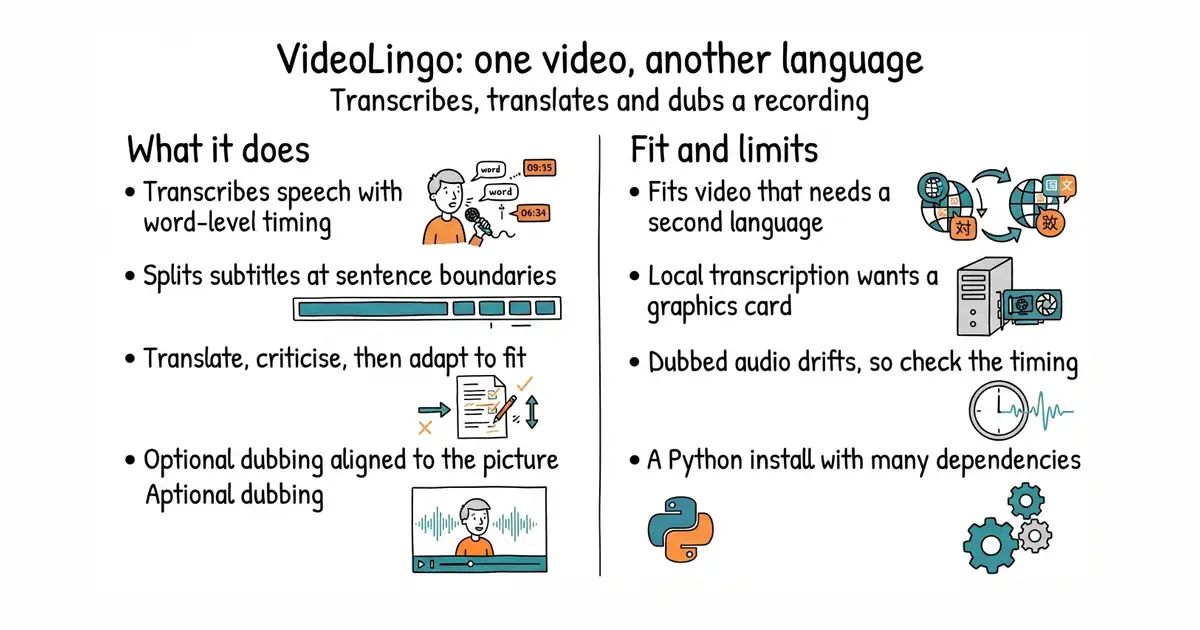
You give it a video file or a link. It transcribes the speech using Whisper, which is a speech recognition model, with word-level timing. It then splits the subtitles at natural sentence breaks rather than at fixed character counts. Translation runs in three passes: translate, criticise the translation, then adapt it to fit the time available on screen. It keeps a list of terms so names and product words stay the same throughout. Finally it can generate dubbed audio, using a cloud voice service or a voice cloned from a sample, and align that audio to the original timing. It writes subtitle files you can use anywhere. What it does not do is produce broadcast-ready dubbing: the generated speech varies slightly in length, so a recording with tight on-screen timing still needs a person to check it.
Why it matters
Who it suits. Anyone publishing video who wants a second language edition without filming twice. Subtitle files are useful on their own as well: they become chapter markers and written text for a web page. It suits someone comfortable installing Python programs. Skip it if you have neither a graphics card nor a budget for cloud transcription, because the slow path is very slow. Skip it too if the material is legally sensitive, because a machine translation of a contract is not a translation of a contract.
Verdict. Worth an afternoon, and it is the most capable thing of its kind that is free. The criticise-and-adapt pass is what separates it from a plain machine translation, and the difference is visible in the first minute of output. The install is much better than it was: the project now recommends a tool called uv that downloads Python 3.10 and builds the environment on its own, and it says the older conda route will not be maintained. Version 3.1.1 landed on 27 September 2026 and code on 30 September 2026, so it is actively worked on. Two honest warnings. Running Whisper locally wants a graphics card, and the Docker image requires CUDA 12.4 and a recent NVIDIA driver, so on a plain processor you are pushed towards paid cloud transcription. And the dubbing step costs money at a voice service unless you use the free local option, which sounds noticeably worse.
Summary (Key Points)from the README
Key features
- Local speech recognition: Word-level recognition and alignment with Qwen3-ASR + Qwen3-ForcedAligner, with MLX on Apple Silicon.
- YouTube download: Fetches videos via yt-dlp.
- Segmentation: Uses NLP and AI-powered subtitle segmentation, with configurable length limits.
- Terminology: Combines custom and AI-generated terminology for consistent translation.
- Translation options: Direct translation with optional reflection and natural rewriting.
- Dubbing: Supports GPT-SoVITS, OpenAI, Edge TTS, and other TTS methods.
- Model search: Searches and filters the provider's full model list fetched through the API.
- Task control and resumption: Pause, resume, or stop at any step, with detailed logging and progress resumption.
Ways to install
| Platform or method | What it needs | Effort |
|---|---|---|
| Windows one-click | Source zip from the latest Release, an internet connection; the first run installs uv, Python 3.12, dependencies and FFmpeg | Low: extract and double-click OneKeyStart.bat |
| Install from source (Windows, macOS, Linux) | uv and the project folder; later launches use uv run start.py | Moderate: command-line setup |
| Docker | Linux with an NVIDIA GPU, a compatible driver and the NVIDIA Container Toolkit; CUDA 12.8.1/cu128 by default | Higher: GPU and container setup |
| HTTP API | config.yaml configured, started from the project root; installs missing dependencies on first use | Moderate: configuration and scripting |
Important
- Translation quality: Depends on source audio, language and chosen models.
- LLM output: Must match the workflow's required JSON structure; check output/gpt_log/error.json when it fails.
- Retries: Cached successful responses and completed outputs are reused, and changing the model alone does not regenerate every stage. Don't delete all output as the first fix.
- Paid providers: With MAI-Transcribe-2, audio goes to the selected provider and may incur charges.
- WhisperX: Not installed by the installer; it requires a manual setup.
- Recognition accuracy: Background noise and language-specific alignment models affect results. Numbers and symbols may lack reliable word timings.
- Mixed-language audio: Each audio segment has one primary recognition language, so accuracy is not guaranteed across languages.
- Dubbing: Quality and timing depend on translation, the TTS service and speech rate. No separate voice is assigned per speaker.
- Intel Macs: Use CPU recognition, and dubbing uses the new voice without the original background sound by default.
Written by an AI model from the project’s README; not part of the review, and it can be wrong.
- It covers the whole chain in one program, rather than one step of it.
- The criticise-and-adapt translation pass produces noticeably better subtitles than raw machine translation.
- It speaks to several voice services, so it fits an account that already exists, and Apache-2.0 is a plain licence.
- Local speech recognition really wants a graphics card; the Docker route demands CUDA 12.4 and a driver above 550.
- Dubbed audio drifts in length, so a recording with precise on-screen timing needs a manual pass.
- A Python install with many dependencies and a web interface, which is more to go wrong than a single command.
# FFmpeg first
sudo apt install ffmpeg        # or: brew install ffmpeg
# The recommended route
git clone https://github.com/Huanshere/VideoLingo.git
cd VideoLingo
python setup_env.py
.venv/bin/streamlit run st.py